
SpringBoot-(3)-RestController接口参数
一,无参接口:
    //无参接口

    @RequestMapping("/appSecret")

    public String secret() {

        return "EK125EKLNGKNELKGKGNKLEGNK87";

    }
访问接口

二,带参接口:
 @RequestMapping("/serviceTime")

    public String time(@RequestParam(value = "local", required = true) String local) {

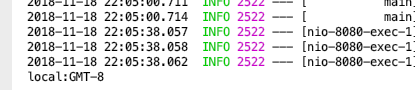
        System.out.println("local:"+local);

        return "2018-8-8 18:36:00";

    }
访问接口

三,多参接口
//多参接口,表单

    @RequestMapping("/register")

    public Account register(String username, String password) {

        Account user = new Account();

        user.setUsername(username);

        user.setPassword(password);

        return user;

    }
访问接口

四,json实例对象
//json实体对象

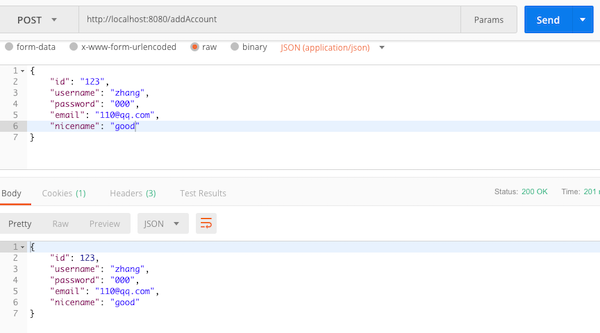
    @RequestMapping(value = "/addAccount", method = RequestMethod.POST)

    public Account addAccount(@RequestBody Account account) {

        System.out.print(account.getUsername());

        return account;

    }
访问接口:
五,路径参数:
//路径参数

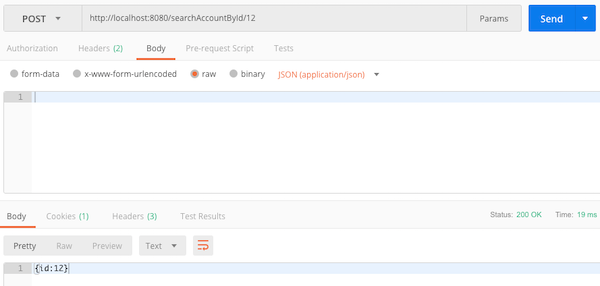
    @RequestMapping(value="/searchAccountById/{id}",method = RequestMethod.POST)

    public String searchAccountById(@PathVariable("id") int id) {

        return "{id:"+id+"}";

    }

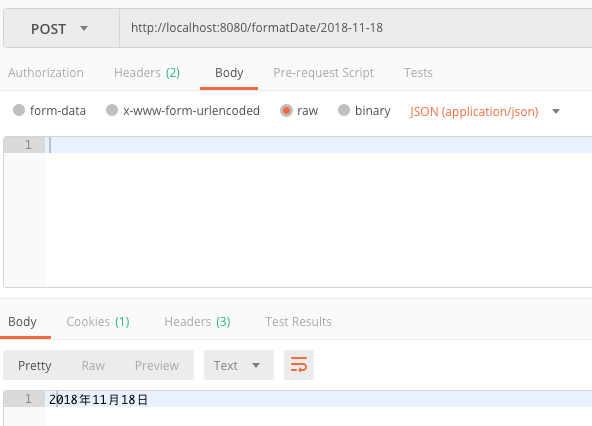
    @RequestMapping(value="/formatDate/{year}-{month}-{day}",method = RequestMethod.POST)

    public String formatDate(@PathVariable("year") int year, @PathVariable("month") int month, @PathVariable("day") int day) {

        return year + "年" + month + "月" + day + "日";

    }
访问接口
Controller代码:
package com.example.demo.controllers;

import com.example.demo.domain.Account;

import org.springframework.web.bind.annotation.*;

/**

 * Created by zhang_guang_yang on 2018/11/18.

 */

@RestController

public class UserBusinessController {

    //无参接口

    @RequestMapping("/appSecret")

    public String secret() {

        return "EK125EKLNGKNELKGKGNKLEGNK87";

    }

    //带参接口

    @RequestMapping("/serviceTime")

    public String time(@RequestParam(value = "local", required = true) String local) {

        System.out.println("local:"+local);

        return "2018-8-8 18:36:00";

    }

    //多参接口,表单

    @RequestMapping("/register")

    public Account register(String username, String password) {

        Account user = new Account();

        user.setUsername(username);

        user.setPassword(password);

        return user;

    }

    //json实体对象

    @RequestMapping(value = "/addAccount", method = RequestMethod.POST)

    public Account addAccount(@RequestBody Account account) {

        System.out.print(account.getUsername());

        return account;

    }

    //路径参数

    @RequestMapping(value="/searchAccountById/{id}",method = RequestMethod.POST)

    public String searchAccountById(@PathVariable("id") int id) {

        return "{id:"+id+"}";

    }

    @RequestMapping(value="/formatDate/{year}-{month}-{day}",method = RequestMethod.POST)

    public String formatDate(@PathVariable("year") int year, @PathVariable("month") int month, @PathVariable("day") int day) {

        return year + "年" + month + "月" + day + "日";

    }

}
补充: Map类型多参数转换,POST,GET接口的实现:
package com.ams.accountmanagementsystem.controllers;

import com.ams.accountmanagementsystem.models.TestUser;

import org.springframework.web.bind.annotation.*;

import java.util.Map;

@RestController

public class ApiTest {

    // 不带参数

    @RequestMapping("/test_no_param")

    public String testNoParam() {

        return "success";

    }

    // 带有一个参数

    @RequestMapping("/test_param")

    public String testParam(@RequestParam String param) {

        return "success, the param is: " + param;

    }

    // 带多个参数

    @RequestMapping("/test_multiple_param")

    public String testMultipleParam(@RequestParam String name, @RequestParam String password) {

        return "success, the name is: " + name + " password is: " + password;

    }

    // map接受参数

    @RequestMapping("/test_param_map")

    public String testParamMap(@RequestParam Map map) {

        return "success, map: " + map;

    }

    // path参数

    @RequestMapping("/test/{path}")

    public String testPath(@PathVariable String path) {

        return "success, path: " + path;

    }

    // post带一个参数

    @PostMapping("/test_post_param")

    public String postParam(@RequestBody String time) {

        return "success, time: " + time;

    }

    // post带Map参数

    @PostMapping("/test_post_map_param")

    public String postMapParam(@RequestBody Map map) {

        return "success, map: " + map;

    }

    // post转实体对象

    @PostMapping("/test_post_entity")

    public String postEntity(@RequestBody TestUser user) {

        return "success, entity " + user;

    }

    // POST GET

    @RequestMapping(value = "/test_get", method = RequestMethod.GET)

    public String testGetMethod() {

        return "get method";

    }

    @RequestMapping(value = "/test_post", method = RequestMethod.POST)

    public String testPostMethod() {

        return "post method";

    }

    @GetMapping("/test_get_method")

    public String testGet() {

        return "get method";

    }

    @PostMapping("/test_post_method")

    public String testPost() {

        return "post method";

    }

}
SpringBoot-(3)-RestController接口参数的更多相关文章
- 【快学springboot】4.接口参数校验
前言 在开发接口的时候,参数校验是必不可少的.参数的类型,长度等规则,在开发初期都应该由产品经理或者技术负责人等来约定.如果不对入参做校验,很有可能会因为一些不合法的参数而导致系统出现异常. 上一篇文 ...
- SpringBoot实现通用的接口参数校验
本文介绍基于Spring Boot和JDK8编写一个AOP,结合自定义注解实现通用的接口参数校验. 缘由 目前参数校验常用的方法是在实体类上添加注解,但对于不同的方法,所应用的校验规则也是不一样的,例 ...
- java springboot调用第三方接口 借助hutoool工具类 爬坑
楼主是个后端小白一枚,之前没接触过后端,只学了java基本语法,还是在学校老师教的,学的很浅,什么ssh.ssm框架都没有学,最近在自学spring boot,看书学也看不是很懂,就在b站上看教学视频 ...
- 【快学springboot】2.Restful简介,SpringBoot构建Restful接口
Restful简介 Restful一种软件架构风格.设计风格,而不是标准,只是提供了一组设计原则和约束条件.它主要用于客户端和服务器交互类的软件.基于这个风格设计的软件可以更简洁,更有层次,更易于实现 ...
- SpringBoot写后端接口,看这一篇就够了!
摘要:本文演示如何构建起一个优秀的后端接口体系,体系构建好了自然就有了规范,同时再构建新的后端接口也会十分轻松. 一个后端接口大致分为四个部分组成:接口地址(url).接口请求方式(get.post等 ...
- SpringBoot 如何生成接口文档,老鸟们都这么玩的!
大家好,我是飘渺. SpringBoot老鸟系列的文章已经写了两篇,每篇的阅读反响都还不错,果然大家还是对SpringBoot比较感兴趣.那今天我们就带来老鸟系列的第三篇:集成Swagger接口文档以 ...
- SpringBoot下支付宝接口的使用
SpringBoot下支付宝接口的使用 前期准备: 参考之前写过的 支付宝接口引入servlet版本 Jar包引入: <!-- 支付宝 --> <dependency> < ...
- springboot返回统一接口与统一异常处理
springboot返回统一接口与统一异常处理 编写人员:yls 编写时间:2019-9-19 0001-springboot返回统一接口与统一异常处理 简介 创建统一的返回格式 Result 封装统 ...
- Spring Boot 之:接口参数校验
Spring Boot 之:接口参数校验,学习资料 网址 SpringBoot(八) JSR-303 数据验证(写的比较好) https://qq343509740.gitee.io/2018/07/ ...
随机推荐
- Nginx没有启动文件、nginx服务不支持chkconfig、nginx无法自启
Nginx没有启动文件.nginx服务不支持chkconfig.nginx无法自启 问题描述: Nginx安装后,当想要设置Ngixn为开机启动时, 就需要把nginx的启动命令路径放到/etc/rc ...
- 洛谷—— P2251 质量检测
https://www.luogu.org/problemnew/show/P2251 题目背景 无 题目描述 为了检测生产流水线上总共N件产品的质量,我们首先给每一件产品打一个分数A表示其品质,然后 ...
- 济南day3
连续几天都有点炸 预计的分拿不到,调整好心态,考试的时候多想一下,think twice,code once 唉,什么情况啊 题解链接 0+0+0 T1读错题输出反了 n*m%2判断是否==1 T2 ...
- mac升级系统自带numpy失败解决方案
sudo pip install -U numpy 后抛出 OSError: [Errno 1] Operation not permitted: '/tmp/pip-o2xinZ-uninstall ...
- IOS 教你玩转UITableViewController和TableView
iphone和Ipad开发中UITableViewController和TableView应该是用得比較多得控件. 可是你是会由于写这些控件写得多了而厌烦. 全部怎么让这个控件一直能用.怎么让这个控件 ...
- Git学习0基础篇(下)
server上的 Git - 协议 Git能够使用四种基本的协议传输资料:本地协议(Local).HTTP 协议.SSH(Secure Shell) 协议以及 Git 协议.眼下使用最普及的是 SSH ...
- Java中字符串转为16进制表示
Java中字符串转为16进制表示 String str = "鲸"; char[] chars = "0123456789ABCDEF".toCharArray ...
- Raid分类说明 (from mongodb权威指南)
RAID(Redundant Array of Independent Disk,独立磁盘冗余阵列,旧称Redundant Array of InexpensiveDisk,廉价磁盘冗余阵列) 是一种 ...
- django 设置局域网内访问项目
1. 关闭主机电脑上的防火墙(或者不用关闭,加一个端口号就行) 2.在你的settings.py文件中,找到ALLOWED_HOSTS=[ ],在中括号中加入你在局域网中的IP.例:我在局域网中的IP ...
- 无向图的点双连通分量(tarjan模板)
#include<iostream> #include<cstdio> #include<algorithm> #include<cstring> #i ...