
pytest分布式执行(pytest-xdist)
前言
平常我们手工测试用例非常多时,比如有1千条用例,假设每个用例执行需要1分钟。如果一个测试人员执行需要1000分钟才能执行完,当项目非常紧急的时候,
我们会用测试人力成本换取时间成本,这个时候多找个小伙伴把任务分成2部分,于是时间缩减一半。如果是十个人一起执行,1000个用例理论上只需100分钟就能完成,时间缩短到了1/10。大大节省的测试时间,为项目节省了时间成本。
同样道理,当我们测试用例非常多的时候,一条条执行,很显然会比较慢,那么如何让测试用例并行执行呢,这就是我们接下来要讲的pytest分布式执行插件pytest-xdist
pytest-xdist
cmd里面使用pip安装,目前版本号Version: 1.23.2
pip install pytest-xdist
>pip show pytest-xdist
Name: pytest-xdist
Version: 1.23.2
Summary: pytest xdist plugin for distributed testing and loop-on-failing modes
Home-page: https://github.com/pytest-dev/pytest-xdist
Author: holger krekel and contributors
Author-email: pytest-dev@python.org,holger@merlinux.eu
License: MIT
Location: e:\python36\lib\site-packages
Requires: execnet, pytest-forked, six, pytestpytest-xdist官网地址:【Home-page: https://github.com/pytest-dev/pytest-xdist】
该pytest-xdist插件扩展了一些独特的测试执行模式pytest:
测试运行并行化:如果有多个CPU或主机,则可以将它们用于组合测试运行。会加快运行速度
- --looponfail:在子进程中重复运行测试。每次运行之后,pytest会等待,直到项目中的文件发生更改,然后重新运行以前失败的测试。
重复此过程直到所有测试通过,之后再次执行完整运行。 多平台覆盖:您可以指定不同的Python解释器或不同的平台,并在所有平台上并行运行测试。
在远程运行测试之前,pytest有效地将您的程序源代码“rsyncs”到远程位置。报告所有测试结果并显示给您的本地终端。您可以指定不同的Python版本和解释器。
如果您想知道pytest-xdist如何在幕后工作,可以看这里【OVERVIEW】
并行测试
多cpu并行执行用例,直接加个-n参数即可,后面num参数就是并行数量,比如num设置为3
pytest -n 3
运行以下代码,项目结构如下
web_conf_py是项目工程名称
│  conftest.py
│  __init__.py
│
├─baidu
│  │  conftest.py
│  │  test_1_baidu.py
│  │  test_2.py
│  │  __init__.py
│
├─blog
│  │  conftest.py
│  │  test_2_blog.py
│  │  __init__.py
代码参考:
# web_conf_py/conftest.py
import pytest

@pytest.fixture(scope="session")
def start():
    print("\n打开首页")
    return "yoyo"

# web_conf_py/baidu/conftest.py
import pytest

@pytest.fixture(scope="session")
def open_baidu():
    print("打开百度页面_session")

# web_conf_py/baidu/test_1_baidu.py
import pytest
import time

def test_01(start, open_baidu):
    print("测试用例test_01")
    time.sleep(1)
    assert start == "yoyo"

def test_02(start, open_baidu):
    print("测试用例test_02")
    time.sleep(1)
    assert start == "yoyo"

if __name__ == "__main__":
    pytest.main(["-s", "test_1_baidu.py"])

# web_conf_py/baidu/test_2.py
import pytest
import time

def test_06(start, open_baidu):
    print("测试用例test_01")
    time.sleep(1)
    assert start == "yoyo"
def test_07(start, open_baidu):
    print("测试用例test_02")
    time.sleep(1)
    assert start == "yoyo"

if __name__ == "__main__":
    pytest.main(["-s", "test_2.py"])

# web_conf_py/blog/conftest.py
import pytest

@pytest.fixture(scope="function")
def open_blog():
    print("打开blog页面_function")

# web_conf_py/blog/test_2_blog.py

import pytest
import time
def test_03(start, open_blog):
    print("测试用例test_03")
    time.sleep(1)
    assert start == "yoyo"

def test_04(start, open_blog):
    print("测试用例test_04")
    time.sleep(1)
    assert start == "yoyo"

def test_05(start, open_blog):
    '''跨模块调用baidu模块下的conftest'''
    print("测试用例test_05,跨模块调用baidu")
    time.sleep(1)
    assert start == "yoyo"

if __name__ == "__main__":
    pytest.main(["-s", "test_2_blog.py"])
正常运行需要消耗时间:7.12 seconds
E:\YOYO\web_conf_py>pytest
============================= test session starts =============================
platform win32 -- Python 3.6.0, pytest-3.6.3, py-1.5.4, pluggy-0.6.0
rootdir: E:\YOYO\web_conf_py, inifile:
plugins: xdist-1.23.2, metadata-1.7.0, html-1.19.0, forked-0.2
collected 7 items

baidu\test_1_baidu.py ..                                                 [ 28%]
baidu\test_2.py ..                                                       [ 57%]
blog\test_2_blog.py ...                                                  [100%]

========================== 7 passed in 7.12 seconds ===========================
设置并行运行数量为3,消耗时间:3.64 seconds,大大的缩短了用例时间
E:\YOYO\web_conf_py>pytest -n 3
============================= test session starts =============================
platform win32 -- Python 3.6.0, pytest-3.6.3, py-1.5.4, pluggy-0.6.0
rootdir: E:\YOYO\web_conf_py, inifile:
plugins: xdist-1.23.2, metadata-1.7.0, html-1.19.0, forked-0.2
gw0 [7] / gw1 [7] / gw2 [7]
scheduling tests via LoadScheduling
.......                                                                  [100%]
========================== 7 passed in 3.64 seconds ===========================
测试报告
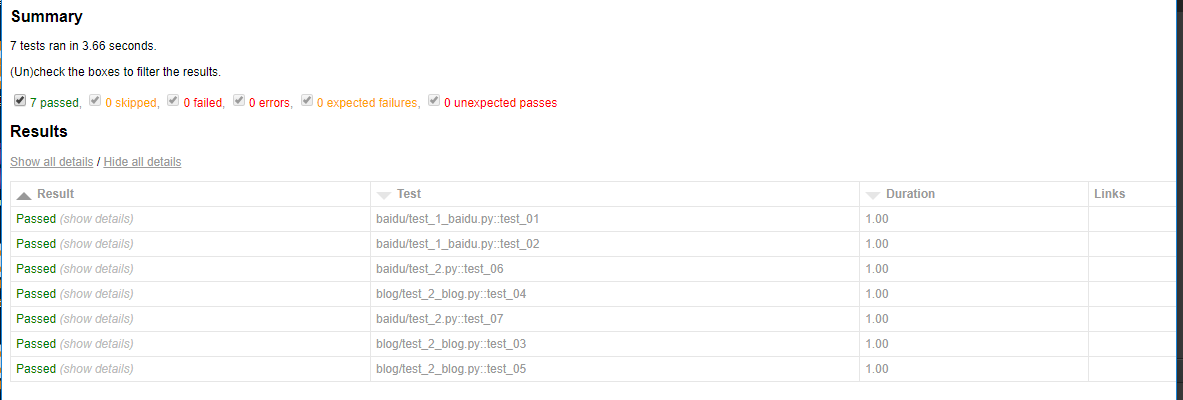
使用pytest-xdist插件也能生成html报告,完美支持pytest-html插件
pytest -n 3 --html=report.html --self-contained-html
pytest分布式执行(pytest-xdist)的更多相关文章
- Pytest(15)pytest分布式执行用例
前言 平常我们功能测试用例非常多时,比如有1千条用例,假设每个用例执行需要1分钟,如果单个测试人员执行需要1000分钟才能跑完 当项目非常紧急时,会需要协调多个测试资源来把任务分成两部分,于是执行时间 ...
- pytest文档27-pytest分布式执行(pytest-xdist)
前言 平常我们手工测试用例非常多时,比如有1千条用例,假设每个用例执行需要1分钟.如果一个测试人员执行需要1000分钟才能执行完,当项目非常紧急的时候, 我们会用测试人力成本换取时间成本,这个时候多找 ...
- pytest-xdist分布式执行测试用例
前言 平常我们手工测试用例非常多时,比如有1千条用例,假设每个用例执行需要1分钟.如果一个测试人员执行需要1000分钟才能执行完,当项目非常紧急的时候,我们会用测试人力成本换取时间成本,这个时候多找个 ...
- pytest的执行方式及搜索原则
pytest的执行方式 Pytest/py.test(终端,命令行,pycharm可配置pytest方式执行) 1. Pytest –v (最高级别信息—verbose) 2. pytest -v - ...
- pytest框架执行自动化测试时使用pycharm正常运行,使用cmd或Terminal报错:Hint: make sure your test modules/packages have valid Python names.
问题描述: 使用pytest框架做接口自动化测试时,在测试用例所在的.py文件下使用pycharm的run功能可以正常跑用例,使用cmd运行窗口或Terminal则报下图中的错误: Hint: mak ...
- App自动化《元素定位方式、元素操作、混合应用、分层设计、代码方式执行Pytest 命令》
坚持原创输出,点击蓝字关注我吧 作者:清菡 博客:oschina.云+社区.知乎等各大平台都有. 目录 一.App 元素定位方式 二.元素操作 三.测试混合应用 四.以代码的方式执行 Pytest 命 ...
- pytest系列(四)- pytest+allure+jenkins - 持续集成平台生成allure报告
pytest是什么 pytest是python的一款测试框架,拥有unittest的功能并比它更丰富. allure是什么 有非常多的优秀的测试框架,但却是有非常少优秀的报告工具可以展示非常清楚的用例 ...
- Pytest单元测试框架-Pytest环境安装
unittest是python自带的单元测试框架,它封装好了一些校验返回的结果方法和一些用例执行前的初始化操作,使得单元测试易于开展,因为它的易用性,很多同学也拿它来做功能测试和接口测试,只需简单开发 ...
- pytest(3):pytest运行参数介绍
前言 pytest 带有很多参数,可以使用 pytest --help 来查看帮助文档,下面介绍几种常用的参数: 无参数 读取路径下所有符合规则的文件,类,方法,函数全部执行.使用方法如下: py ...
随机推荐
- php pack、unpack、ord 函数使用方法(二进制流接口应用实例)
在工作中,我也逐渐了解到pack,unpack,ord对于二进制字节处理的强大. 下面我逐一介绍它们.在我们工作中,用到它们的估计不多. 我在最近一个工作中,因为通讯需要用到二进制流,然后接口用php ...
- java数据结构和算法06(红黑树)
这一篇我们来看看红黑树,首先说一下我啃红黑树的一点想法,刚开始的时候比较蒙,what?这到底是什么鬼啊?还有这种操作?有好久的时间我都缓不过来,直到我玩了两把王者之后回头一看,好像有点儿意思,所以有的 ...
- Django模板导入及母版继承和自定义返回Html片段
1.ROOT_URLCONF = '总路由所在路径(比如untitled.urls)'<===默认情况是这样 根路由的路径是可以修改的:ROOT_URLCONF = app01.urls< ...
- js如何调用电脑的摄像头
闲来无事,用js写了一个调用摄像头的demo,并用canvas显示保存.这个功能很实用,比如上传用户的头像,即时拍照及时上传. Html: <video width="200px&qu ...
- DVWA之Brute Force教程
---恢复内容开始--- Brute Force暴力破解模块,是指黑客密码字典,使用穷举的方法猜出用户的口令,是一种广泛的攻击手法. LOW low级别的漏洞利用过程 1.使用burp suite工具 ...
- Azure School女神相邀,把每分钟都过的更充实
也许你不姓「牛」,但是你技术牛啊 所以,请容我叫你一声「牛郎」 (讲真,只是因为你技术牛,不是其他啥原因哈) 平时忙到昏天黑地,一心一意为技术的你 注意看一下日历,因为: !!!七夕节(8月28日)到 ...
- Azure 8 月新公布
Azure 8 月新发布:Cosmos DB 每分钟请求单位,存储的托管磁盘及促销,高级和标准磁盘存储大尺寸磁盘,高级磁盘存储小尺寸磁盘. Azure Cosmos DB:每分钟请求单位为您降低成本, ...
- (四)mybatis之mybatis初了解
前言:终于到mybatis啦! Mybatis 前文有提到,Hibernate采用的是全表映射的方式,而这方式恰恰使得性能变得较差(https://www.cnblogs.com/NYfor201 ...
- iterator与iterable
用Iterator模式实现遍历集合Iterator模式是用于遍历集合类的标准访问方法.它可以把访问逻辑从不同类型的集合类中抽象出来,从而避免向客户端暴露集合的内部结构.例如,如果没有使用Iterato ...
- this+call、apply、bind的区别与使用
http://www.ruanyifeng.com/blog/2018/06/javascript-this.html https://segmentfault.com/a/1190000018017 ...