
AspNetPager样式以及属性帮助文档
帮助文档地址:http://www.webdiyer.com/AspNetPagerDocs/index.html
应用样式:http://www.webdiyer.com/AspNetPagerDemo/ApplyStyles/default.aspx
样式,原文地址:http://www.cnblogs.com/zengxiangzhan/archive/2010/03/03/1677460.html
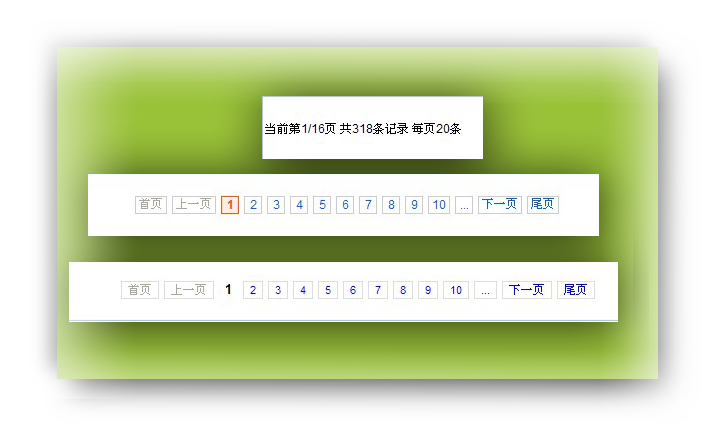
分页是Web应用程序中最常用到的功能之一,AspNetPager 简单实用,应用到项目后台中,棒极了!
自定义样式:
<style type="text/css"> /*拍拍网风格*/ .paginator { font: 11px Arial, Helvetica, sans-serif;padding:10px 20px 10px 0; margin: 0px;} .paginator a {padding: 1px 6px; border: solid 1px #ddd; background: #fff; text-decoration: none;margin-right:2px} .paginator a:visited {padding: 1px 6px; border: solid 1px #ddd; background: #fff; text-decoration: none;} .paginator .cpb {padding: 1px 6px;font-weight: bold; font-size: 13px;border:none} .paginator a:hover {color: #fff; background: #ffa501;border-color:#ffa501;text-decoration: none;} /*淘宝风格*/ .paginator { font: 12px Arial, Helvetica, sans-serif;padding:10px 20px 10px 0; margin: 0px;} .paginator a {border:solid 1px #ccc;color:#0063dc;cursor:pointer;text-decoration:none;} .paginator a:visited {padding: 1px 6px; border: solid 1px #ddd; background: #fff; text-decoration: none;} .paginator .cpb {border:1px solid #F50;font-weight:700;color:#F50;background-color:#ffeee5;} .paginator a:hover {border:solid 1px #F50;color:#f60;text-decoration:none;} .paginator a,.paginator a:visited,.paginator .cpb,.paginator a:hover {float:left;height:16px;line-height:16px;min-width:10px;_width:10px;margin-right:5px;text-align:center; white-space:nowrap;font-size:12px;font-family:Arial,SimSun;padding:0 3px;} </style>
前台:
<table cellpadding="0" cellspacing="0" align="center" width="99%" class="border"> <tr> <td align="left" colspan="2"> <webdiyer:AspNetPager ID="AspNetPager1" CssClass="paginator" CurrentPageButtonClass="cpb" runat="server" AlwaysShow="True" FirstPageText="首页" LastPageText="尾页" NextPageText="下一页" PageSize="20" PrevPageText="上一页" ShowCustomInfoSection="Left" ShowInputBox="Never" onpagechanged="AspNetPager1_PageChanged" CustomInfoTextAlign="Left" LayoutType="Table" > </webdiyer:AspNetPager> </td> </tr> </table>
后台:
void bindData()     {
       .......绑定语句
       this.AspNetPager1.CustomInfoHTML = string.Format("当前第{0}/{1}页 共{2}条记录 每页{3}条", new object[] { this.AspNetPager1.CurrentPageIndex, this.AspNetPager1.PageCount, this.AspNetPager1.RecordCount, this.AspNetPager1.PageSize });     }     protected void AspNetPager1_PageChanged(object src, EventArgs e)     {         bindData();     }
AspNetPager样式以及属性帮助文档的更多相关文章
- jQuery 选择器 筛选器 样式操作 文本操作 属性操作 文档处理 事件 动画效果 插件 each、data、Ajax
jQuery jQuery介绍 1.jQuery是一个轻量级的.兼容多浏览器的JavaScript库. 2.jQuery使用户能够更方便地处理HTML Document.Events.实现动画效果.方 ...
- CSS中"position:relative"属性与文档流的关系
前言 近期遇到一个问题--"position:relative"到底会不会导致元素脱离文档流?主流观点是不会,但都给不出一个有说服力的论据.最后我自己佐证了一番,总算有了个结果:& ...
- jQuery操作标签--样式、文本、属性操作, 文档处理
1.样式 2.文本 3.属性操作 全选,反选效果 4.文档处理 操作标签 一.样式操作 样式类: addClass(); // 添加指定的css类名 removeClass(); //移除指定的css ...
- Jquery框架1.选择器|效果图|属性、文档操作
1.JavaScript和jquery的对比 书写繁琐,代码量大 代码复杂 动画效果,很难实现.使用定时器 各种操作和处理 <!DOCTYPE html> <html lang=&q ...
- jQuery对标签、类样式、值、文档、DOM对象的操作
jquery的标签属性操作 使用attr()方法对html标签属性进行操作,attr如果参数是一个参数,表示获取html标签的属性值,如果是两个参数则是设置标签属性名以及对象的属性值 .prop()适 ...
- 24-[jQuery]-属性,文档,位置,筛选
1.jquery的属性操作 jquery对象有它自己的属性和方法,我们先研究一下jquery的属性操作.jquery的属性操作模块分为四个部分:html属性操作,dom属性操作,类样式操作和值操作 h ...
- C#代码将html样式文件转为Word文档
首先有个这样的需求,将以下网页内容下载为Word文件. html代码: <div class="modal-body"> <div style=" ...
- .NET开源项目 QuarkDoc 一款自带极简主义属性的文档管理系统
有些话说在前头 因为公司产品业务重构且功能拆分组件化,往后会有很多的接口文档需要留存,所以急需一款文档管理系统.当时选型要求3点: 1.不能是云平台上的Saas服务,整个系统都要在自己公司部署维护(数 ...
- jQuery-对标签元素 文本操作-属性操作-文档的操作
一.对标签元素文本操作 1.1 对标签中内容的操作 // js var div1 = document.getElementById("div1"); div1.innerText ...
随机推荐
- [学习笔记]Java异常机制
概述 异常 程序在执行时出现的不正常情况,是对问题的描写叙述.将问题进行对象的封装. Java中的异常,就是对不正常情况进行描写叙述后的对象体现. 异常体系 Throwable |--Erro ...
- Lead软件项目半年感受
Lead一个项目快半年了,整体来说是个辛苦活. 除了自己的研发进度,还要负责对上,对下,对外的交流.这里记录一些感受. 对上的交流,除了确保正确理解老大的安排.就是确保老大在和他的lead以及 ...
- Logical Volume Manager (Linux)
http://en.wikipedia.org/wiki/Logical_Volume_Manager_(Linux) Logical Volume Manager (Linux) From Wiki ...
- Django-form组件补充
首先来看一个用户登录的实例 from django.forms import Form from django.forms import fields from django.forms import ...
- 基于Django做权限控制
一.权限信息初始化 二.中间件操作 三.自定义标签 补充:数据表设计,源码下载,其它
- qemu-kvm编译错误
今天编译了下qemu-kvm,死活编不过,错误信息如下: CC block/qcow2-snapshot.oIn file included from ./qemu-common.h:6:0, ...
- SAM4E单片机之旅——9、UART与MCK之MAINCK
为得到更高的带宽,需要使用更高的波特率.UART波特率的计算已经介绍过了,现在就尝试下调整外设的时钟频率.可以有多种方法调整外设时钟(MCK)的频率,这里先介绍先主要时钟(MAINCK)的设置,其中包 ...
- vue http 请求
https://github.com/vuejs/awesome-vue#http-requests vue-resource - npm https://www.npmjs.com/package/ ...
- 看不懂JDK8的流操作?5分钟带你入门(转)
在JDK1.8里有两个非常高级的新操作,它们分别是:Lambda 表达式和 Stream 流. Lambda表达式 让我们先说说 Lambda 表达式吧,这个表达式最大的作用就是简化语法,让代码更加易 ...
- ElasticSearch(十四) _search api search timeout 机制
语法:timeout=10ms,timeout=1s,timeout=1m GET /_search?timeout=10m timeout:默认无timeout,latency平衡completen ...