
Android Looper原理分析
实际业务使用场景:
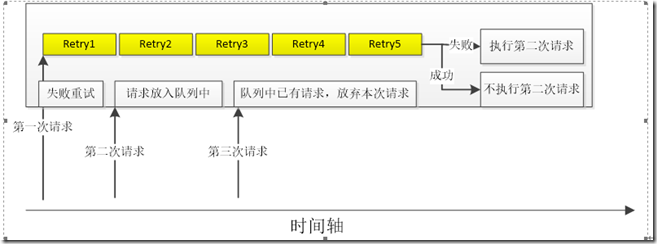
某业务场景需要将本地数据传递到服务端,服务端再返回传递成功或者失败的信息。
1、 失败时: 重传5次
2、设置客户端请求的最小时间间隔,这个间隔内最多请求1次
具体逻辑如下:(这里请求的最小时间间隔设置为:80s,防止客户端由于某种异常频繁的调用服务端,造成服务端异常)
实现:
handler 的实现:
public class BindHandler extends Handler {
    private final static String TAG = "BindHandler";
    private static final String DEFAULT_HANDLER_THREAD_NAME = "DeviceBindingHandlerThread";
    static final int MSG_DEVICE_BIND = 1;
    static final int MSG_DEVICE_BIND_RETRY = 2;
    private BindManager mManager;
    private HandlerThread mHandlerThread;

    BindHandler(BindManager manager){
        this(manager,createDefaultHandlerThread());
    }

    private BindHandler(BindManager manager,HandlerThread thread){
        super(thread.getLooper());
        mManager = manager;
        mHandlerThread = thread;
    }

    private static HandlerThread createDefaultHandlerThread() {
        HandlerThread handlerThread = new HandlerThread(DEFAULT_HANDLER_THREAD_NAME, Process.THREAD_PRIORITY_BACKGROUND);
        handlerThread.start();
        return handlerThread;
    }

    public void quitHandlerThread(){
        if(null != mHandlerThread){
            mHandlerThread.getLooper().quit();
        }
    }

    public void startHandlerThread(){
        if(null != mHandlerThread){
            mHandlerThread.getLooper().loop();
        }
    }

    public boolean isHandlerThreadAlive(){
        return mHandlerThread.isAlive();
    }
    @Override
    public void handleMessage(Message msg) {
        if(null == msg){
            return;
        }
        switch (msg.what){
            case MSG_DEVICE_BIND:
                mManager.handleBinding(true);
                break;
            case MSG_DEVICE_BIND_RETRY:
                mManager.handleBinding(false);
                break;
            default:
                break;
        }
    }
}
上述代码中 设置了一个HandlerThread 用于开启一个线程,请求的发送运行在该线程中(获取该HandlerThread的Looper,用该Looper初始化Handler,这样就可以将该Handler中handleMessage函数运行在开辟的线程中)。
通过Looper.quit函数结束该线程,否者该线程的Looper一直在循环等待消息的到来,占用资源(在HandlerThread已经失去价值的时候应该及时停掉它)。
方法1: mHandlerThread.getLooper().quit();//方法2: mHandlerThread.quit();方法3:mHandlerThread.getLooper().quitSafely();
//方法4:mHandlerThread.quitSafely();
1 和 2 结束的方法等同,不管消息队列中有没有消息都结束该线程。
3 和 4 中如果消息队列中有消息,则不会立刻结束,待处理完消息队列中的消息在结束该线程(处理过程中达到的消息不再处理)
请求管理类:
1、 请求管理类中定义自变量: mBindHandler,用于发送消息
2、设置重传策略
3、设置防止频繁调用的策略,(检查消息队列中是否有消息,如果有则丢弃该消息)
mBindHandler.hasMessages(BindHandler.MSG_DEVICE_BIND_RETRY)
具体代码不再详细分析
HandlerThread 使用详解
/**
 * Handy class for starting a new thread that has a looper. The looper can then be
 * used to create handler classes. Note that start() must still be called.
 */
public class HandlerThread extends Thread {
    int mPriority;
    int mTid = -1;
    Looper mLooper;
    private @Nullable Handler mHandler;

    public
HandlerThread(String name)
 {
        super(name);
        mPriority = Process.THREAD_PRIORITY_DEFAULT;
    }

    /**
     * Constructs a HandlerThread.
     * @param name
     * @param priority The priority to run the thread at. The value supplied must be from
     * {@link android.os.Process} and not from java.lang.Thread.
     */
    public
HandlerThread(String name, int priority)
 {
        super(name);
        mPriority = priority;
    }

    /**
     * Call back method that can be explicitly overridden if needed to execute some
     * setup before Looper loops.
     */
    protected void onLooperPrepared() {
    }

    @Override
public void run() {
mTid = Process.myTid();Looper.prepare();
        synchronized (this) {
            mLooper = Looper.myLooper();
            notifyAll(); //
唤醒等待线程
        }
        Process.setThreadPriority(mPriority);
        onLooperPrepared();
Looper.loop();
        mTid = -1;
    }

    /**
     * This method returns the Looper associated with this thread. If this thread not been started
     * or for any reason isAlive() returns false, this method will return null. If this thread
     * has been started, this method will block until the looper has been initialized.
     * @return The looper.
     */
    public Looper
getLooper()
 {   //如果该线程没有start 则处于等待状态,当调用start后,notify
        if (!isAlive()) {
            return null;
        }

        // If the thread has been started, wait until the looper has been created.
        synchronized (this) {
            while (isAlive() && mLooper == null) {
                try {
                    wait();    //线程没有开启则处于等待状态
                } catch (InterruptedException e) {
                }
            }
        }
        return mLooper;
    }

    /**
     * @return a shared {@link Handler} associated with this thread
     * @hide
     */
    @NonNull
    public
Handler getThreadHandler()
 {
        if (mHandler == null) {
            mHandler = new Handler(getLooper());
        }
        return mHandler;
    }

    /**
     * Quits the handler thread's looper.
     * <p>
     * Causes the handler thread's looper to terminate without processing any
     * more messages in the message queue.
     * </p><p>
     * Any attempt to post messages to the queue after the looper is asked to quit will fail.
     * For example, the {@link Handler#sendMessage(Message)} method will return false.
     * </p><p class="note">
     * Using this method may be unsafe because some messages may not be delivered
     * before the looper terminates.  Consider using {@link #quitSafely} instead to ensure
     * that all pending work is completed in an orderly manner.
     * </p>
     *
     * @return True if the looper looper has been asked to quit or false if the
     * thread had not yet started running.
     *
     * @see #quitSafely
     */
    public boolean
quit()
 {
        Looper looper = getLooper();
        if (looper != null) {
            looper.quit();
            return true;
        }
        return false;
    }

    /**
     * Quits the handler thread's looper safely.
     * <p>
     * Causes the handler thread's looper to terminate as soon as all remaining messages
     * in the message queue that are already due to be delivered have been handled.
     * Pending delayed messages with due times in the future will not be delivered.
     * </p><p>
     * Any attempt to post messages to the queue after the looper is asked to quit will fail.
     * For example, the {@link Handler#sendMessage(Message)} method will return false.
     * </p><p>
     * If the thread has not been started or has finished (that is if
     * {@link #getLooper} returns null), then false is returned.
     * Otherwise the looper is asked to quit and true is returned.
     * </p>
     *
     * @return True if the looper looper has been asked to quit or false if the
     * thread had not yet started running.
     */
    public boolean
quitSafely()
 {
        Looper looper = getLooper();
        if (looper != null) {
            looper.quitSafely();
            return true;
        }
        return false;
    }

    /**
     * Returns the identifier of this thread. See Process.myTid().
     */
    public int getThreadId() {
        return mTid;
    }
}
从源码可以看出HandlerThread继续自Thread,构造函数的传递参数有两个,一个是name指的是线程的名称,一个是priority指的是线程优先级,我们根据需要调用即可。其中成员变量mLooper就是HandlerThread自己持有的Looper对象。onLooperPrepared()该方法是一个空实现,是留给我们必要时可以去重写的,但是注意重写时机是在Looper循环启动前,再看看THread的run方法.
前面我们在HandlerThread的常规使用中分析过,在创建HandlerThread对象后必须调用其start()方法才能进行其他操作,而调用start()方法后相当于启动了线程,也就是run方法将会被调用,而我们从run源码中可以看出其执行了Looper.prepare()代码,这时Looper对象将被创建,当Looper对象被创建后将绑定在当前线程(也就是当前异步线程),这样我们才可以把Looper对象赋值给Handler对象,进而确保Handler对象中的handleMessage方法是在异步线程执行的。
synchronized (this) {
mLooper = Looper.myLooper();
notifyAll(); //唤醒等待线程
}
这里在Looper对象创建后将其赋值给HandlerThread的内部变量mLooper,并通过notifyAll()方法去唤醒等待线程,最后执行Looper.loop();代码,开启looper循环语句。那这里为什么要唤醒等待线程呢?我们来看看,getLooper方法
- HandlerThread本质上是一个线程类,它继承了Thread;
- HandlerThread有自己的内部Looper对象,可以进行looper循环;
- 通过获取HandlerThread的looper对象传递给Handler对象,可以在handleMessage方法中执行异步任务。
- 创建HandlerThread后必须先调用HandlerThread.start()方法,Thread会先调用run方法,创建Looper对象。
参考: http://blog.csdn.net/javazejian/article/details/52426353
Lopper.java 源码分析
Looper的核心代码:
public static void loop() {
Looper me = myLooper();
if (me == null) {
throw new RuntimeException("No Looper; Looper.prepare() wasn't called on this thread.");
}
MessageQueue queue = me.mQueue;
// Make sure the identity of this thread is that of the local process, and keep track of what that identity token actually is.
Binder.clearCallingIdentity();
final long ident = Binder.clearCallingIdentity();
while (true) {
Message msg = queue.next(); // might block
if (msg != null) {
if (msg.target == null) { // target为null,结束消息,结束循环
// No target is a magic identifier for the quit message.
return;
}
}
}
private Looper() {
mQueue = new MessageQueue();
mRun = true;
mThread = Thread.currentThread();
}
public void quit() {
Message msg = Message.obtain();
// NOTE: By enqueueing directly into the message queue, the message is left with a null target. This is how we know it is a quit message
// 发送一个target为null的消息,作为结束
mQueue.enqueueMessage(msg, 0);
}
我看到里面是一个无限循环,退出循环的条件是:msg.target == null;
也就是说,如果我们向此looper的MessageQueue发送一个target为null的message,就可以停止这个线程的远行。(查看Looper.quit代码可以验证这一点)。
使用Looper.prepare()、Looper.loop()为Thread添加消息队列后,该线程便开启了。
使用总结
1. Looper类用来为一个线程开启一个消息循环。
默认情况下android中新诞生的线程是没有开启消息循环的。(主线程除外,主线程系统会自动为其创建Looper对象,开启消息循环。)
Looper对象通过MessageQueue来存放消息和事件。一个线程只能有一个Looper,对应一个MessageQueue。(如果对一个已经quit的Looper重新start会出现异常)
2. 通常是通过Handler对象来与Looper进行交互的。Handler可看做是Looper的一个接口,用来向指定的Looper发送消息及定义处理方法。
默认情况下Handler会与其被定义时所在线程的Looper绑定,比如,Handler在主线程中定义,那么它是与主线程的Looper绑定。
mainHandler = new Handler() 等价于new Handler(Looper.myLooper()).
Looper.myLooper():获取当前进程的looper对象,类似的 Looper.getMainLooper() 用于获取主线程的Looper对象。
3. 在非主线程中直接new Handler() 会报如下的错误:
E/AndroidRuntime( 6173): Uncaught handler: thread Thread-8 exiting due to uncaught exception
E/AndroidRuntime( 6173): java.lang.RuntimeException: Can't create handler inside thread that has not called Looper.prepare()
原因是非主线程中默认没有创建Looper对象,需要先调用Looper.prepare()启用Looper。
4. Looper.loop(); 让Looper开始工作,从消息队列里取消息,处理消息。
注意:写在Looper.loop()之后的代码不会被执行,这个函数内部应该是一个循环,当调用mHandler.getLooper().quit()后,loop才会中止,其后的代码才能得以运行。
5. 基于以上知识,可实现主线程给子线程(非主线程)发送消息。
Android Looper原理分析的更多相关文章
- Android LayoutInflater原理分析,带你一步步深入了解View(一)
转载请注明出处:http://blog.csdn.net/guolin_blog/article/details/12921889 有不少朋友跟我反应,都希望我可以写一篇关于View的文章,讲一讲Vi ...
- Android动画原理分析
最近在Android上做了一些动画效果,网上查了一些资料,有各种各样的使用方式,于是乘热打铁,想具体分析一下动画是如何实现的,Animation, Animator都有哪些区别等等. 首先说Anima ...
- Android LayoutInflater原理分析
相信接触Android久一点的朋友对于LayoutInflater一定不会陌生,都会知道它主要是用于加载布局的.而刚接触Android的朋友可能对LayoutInflater不怎么熟悉,因为加载布局的 ...
- Android startActivity原理分析(基于Android 8.1 AOSP)
应用进程内 如何使用Intent做Activity的跳转 Intnet intent = new Intent(MainActivity.this,TestActivity.class); start ...
- Android ANR原理分析
一.概述 ANR(Application Not responding),是指应用程序未响应,Android系统对于一些事件需要在一定的时间范围内完成,如果超过预定时间能未能得到有效响应或者响应时间过 ...
- Android LowMemoryKiller原理分析
copy from : http://gityuan.com/2016/09/17/android-lowmemorykiller/ frameworks/base/services/core/jav ...
- 安卓主activity引用自定义的View——Android LayoutInflater原理分析
相信接触Android久一点的朋友对于LayoutInflater一定不会陌生,都会知道它主要是用于加载布局的.而刚接触Android的朋友可能对LayoutInflater不怎么熟悉,因为加载布局的 ...
- [转]Handler MessageQueue Looper消息循环原理分析
Handler MessageQueue Looper消息循环原理分析 Handler概述 Handler在Android开发中非常重要,最常见的使用场景就是在子线程需要更新UI,用Handler ...
- ZT自老罗的博客 Android系统的智能指针(轻量级指针、强指针和弱指针)的实现原理分析
Android系统的智能指针(轻量级指针.强指针和弱指针)的实现原理分析 分类: Android 2011-09-23 00:59 31568人阅读 评论(42) 收藏 举报 androidclass ...
随机推荐
- TensorFlow简易学习[3]:实现神经网络
TensorFlow本身是分布式机器学习框架,所以是基于深度学习的,前一篇TensorFlow简易学习[2]:实现线性回归对只一般算法的举例只是为说明TensorFlow的广泛性.本文将通过示例Ten ...
- 书写规范的javaScript
书写可维护的代码 代码的维护,修改以及扩展都是需要时间和人力成本的,所以为了减少浪费不必要的成本,从一开始就要书写可维护的代码,这样给自己也给项目其他人提供便利. 书写可维护的代码意味着你的代码是: ...
- Java日志框架那些事儿
文章首发于[博客园-陈树义],点击跳转到原文Java日志框架那些事儿. 在项目开发过程中,我们可以通过 debug 查找问题.而在线上环境我们查找问题只能通过打印日志的方式查找问题.因此对于一个项目而 ...
- HTML5能否会成为Web技术的核心?
谁会成为HTML5后继者? 那么会有一个HTML6吗? Jaffe表示,网上支付可能会推动进行这样的全面修订,以期能为网上支付来提供一个统一方式.如果大家将之称为HTML 6,那么HTML 6是极有可 ...
- spring boot 错误,求大神帮解决
Exception in thread "main" java.lang.IllegalStateException: Failed to read Class-Path attr ...
- C++ 将汉字转换成拼音全拼
#include <string> using std::string; //======================================================= ...
- MVC Code First(数据模型实例讲解)
首先配置好web.config <connectionStrings> <add name="BookDbContext" connectionString=&q ...
- [对smartMenu.js改进] 解决右键菜单栏在边缘弹出后,移出视图区域无法操作的问题
当用户在视图边缘(如右下角)右键召唤菜单栏的时候,菜单仍然从选中元素的右下角弹出,这时二级菜单栏一般都离开了视图区域,用户无法进一步操作. 这个问题挺常见的,原作者的留言板: 但是作者应该是已经不再维 ...
- 51nod 1058 N的阶乘的长度 位数公式
1058 N的阶乘的长度基准时间限制:1 秒 空间限制:131072 KB 分值: 0 难度:基础题 收藏 关注输入N求N的阶乘的10进制表示的长度.例如6! = 720,长度为3.Input输入N( ...
- esp8266 SDK开发之编译流程
最近刚完成自己8266的小项目,已经发布在github上,有兴趣的朋友可以看一下 github地址:esp-ujn 1. 通过MQTT协议与服务器交互 2. 内置HTTP服务器,支持通过浏览器进行参数 ...