
CSS3特效----图片动态提示效果
需掌握的知识点:
1.掌握两个HTML5新标签figure以及figcaption的用法
2.掌握transform的属性特点,并能熟练运用
3.学会通过transition及transform配合,制作动画
4.学会简单的媒体查询应用
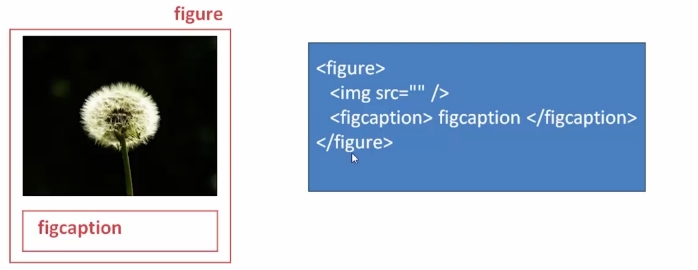
figure ,HTML5语义化标签:
用于规定独立的流内容(图像、图表、照片、代码等)
figcaption,HTML5语义化标签:
与figure配套使用,用于标签定义figure元素的标题或注解
结构和用法:
transform属性:
1、translate(平移)-- transform:translate(10px,10px);
2、rotate(旋转) -- transform:rotate(90deg);
3、scale(缩放) -- transform:scale(0.5,0.5);
4、skew(扭曲)- - transform:skew(50deg,0deg);
transition属性:
1、property:检索或设置对象中的参与过渡属性(all,transform...)
2、duration:过渡动画的持续时间
3、timing-function:检索火设置对象中过渡的动画类型
4、delay:检索或设置对象延迟过渡的时间
-- transition: property duration timing-function delay;
-- transition: all 2s ease-in 1s;
效果图:

html代码:
<!DOCTYPE html>
<html>
<head lang="en">
    <meta charset="UTF-8">
    <title></title>
    <link href="demoCSS.css" type="text/css" rel="stylesheet" />
</head>
<body>
<figure class="test1">
    <img src="img/1.jpg" />
    <figcaption>
        <h2>平移动画-多条文字</h2>
        <p>多条图片简介文字</p>
        <p>逐一飞入动画</p>
        <p>利用动画延时达到效果</p>
    </figcaption>
</figure>
<figure class="test2">
    <img src="img/2.jpg" />
    <figcaption>
        <h2>旋转动画</h2>
        <p>飞来飞去,飞来飞舞</p>
        <div></div>
    </figcaption>
</figure>
<figure class="test3">
    <img src="img/3.jpg" />
    <figcaption>
        <h2>图片标题</h2>
        <p>图片注解</p>
    </figcaption>
</figure>
<figure class="test4">
    <img src="img/4.jpg" />
    <figcaption>
        <h2>缩放动画</h2>
        <p>图片注解</p>
        <div></div>
    </figcaption>
</figure>
</body>
</html>
css代码:
*{
    margin:;
    padding:;
}
figure{
    position: relative;
    width: 33%;
    height: 350px;
    float: left;
    overflow: hidden;
}
figcaption{
    position: absolute;
    top: 0px;
    left: 0px;
    color: #fff;
    font-family: "微软雅黑";
}
@media screen and (max-width: 600px){
    figure{width: 100%}
}
@media screen and (min-width: 601px) and (max-width: 1000px){
    figure{width: 50%}
}
@media screen and (min-width: 1001px){
    figure{width: 33%}
}
figure figcaption p,h2,span,div{transition: all 0.35s;}
figure img{opacity: 0.8;transition: all 0.35s;}
.test1{background: #2F0000;}
.test1 figcaption p{
    background: #fff;
    color: #333;
    margin: 5px;
    text-align: center;
    transform: translate(-240px,0px);
}
.test1 figcaption{padding: 20px;}
.test1:hover figcaption p{transform: translate(0px,0px);}
.test1 figcaption p:nth-of-type(1){transition-delay: 0.05s;}
.test1 figcaption p:nth-of-type(2){transition-delay: 0.1s;}
.test1 figcaption p:nth-of-type(3){transition-delay: 0.15s;}
.test1:hover img{opacity: 0.5;transform: translate(-50px,0px);}
.test2{background: #030;}
.test2 figcaption{width: 100%;height: 100%;}
.test2 figcaption div{
    border: 2px solid #fff;
    width: 80%;
    height: 80%;
    position: absolute;
    top: 10%;
    left: 10%;
    transform: translate(0px,-350px) rotate(0deg);
}
.test2 figcaption h2{
    margin-top: 15%;
    margin-left: 15%;
}
.test2 figcaption p{
    margin-left: 15%;
    transform: translate(0px,50px);
    opacity:;
}
.test2:hover figcaption div{
    transform: translate(0px,0px) rotate(360deg);
}
.test2:hover img{opacity: 0.5;}
.test2:hover figcaption p{
    transform: translate(0px,0px);
    opacity:;
}
.test3{
    background: #000;
}
.test3 figcaption{
    top: 30%;
    left: 15%;
}
.test3 figcaption h2{
    -webkit-transform: skew(90deg);/*导致chrome卡死的原因是90deg无限大*/
}
.test3 figcaption p{
    -webkit-transform: skew(90deg);
    transition-delay: 0.1s;
}
.test3:hover figcaption h2{
    -webkit-transform: skew(0deg);
}
.test3:hover figcaption p{
    -webkit-transform: skew(0deg);
}
.test3:hover img{
    opacity: 0.5;
}
.test4{
    background: #000;
}
.test4 figcaption{width: 100%;height: 100%;}
.test4 figcaption h2{
    margin-top: 15%;
    margin-left: 15%;
    transform: scale(1.2,1.2);
    opacity:;
}
.test4 figcaption p{
    margin-top: 5px;
    margin-left: 15%;
    transform: scale(1.2,1.2);
    opacity:;
}
.test4 figcaption div{
    border: 2px solid #fff;
    width: 80%;
    height: 80%;
    position: absolute;
    top: 10%;
    left: 10%;
    transform: scale(1.2,1.2);
    opacity:;
}
.test4:hover figcaption div{
    transform: scale(1,1);
    opacity:;
}
.test4:hover img{
    opacity: 0.5;
    transform: scale(1.2,1.2);
}
.test4:hover figcaption h2{
    transform: scale(1,1);
    opacity:;
}
.test4:hover figcaption p{
    transform: scale(1,1);
    opacity:;
}
CSS3特效----图片动态提示效果的更多相关文章
- JavaScript函数实现鼠标指向后带图片的提示效果
转载:http://www.cnblogs.com/jack86514/archive/2009/04/01/1427584.html 当我们在写一个网页程序的时候,很多方法可以提供页面的动态显示,从 ...
- 9种纯CSS3人物信息卡片动态展示效果
<!DOCTYPE html> <html lang="zh"> <head> <meta charset="UTF-8&quo ...
- js实现tooltip动态提示效果(文字版)
页面中经常用到鼠标移动到一个元素上面显示提示的功能,最开始的做法是在下面创建一个div然后动态显示这个div,但是这样需要加很多div,比较麻烦. 针对上面个的需求,这边写了一个tooltip动态提示 ...
- CSS3实现图片渐入效果
很多网站都有那种图片渐入的效果,如:http://www.mi.com/minote/,这种效果用css3和一些js实现起来特别简单. 拿我之前做的页面来说一下怎么利用css3来实现图片渐入效果. 下 ...
- CSS3之图片3D翻转效果(网页效果--每日一更)
今天,带来的是纯CSS3的效果--图片3D翻转. 请看效果:亲,请点击这里 这个效果主要还是运用了CSS3的transform变形属性,与上个效果不同的是,这次并不是动画,所以没有采用animatio ...
- js、css3实现图片的放大效果
今天看网易的网站上,当我把鼠标放上去的时候发现图片放大,移开图片缩小,于是自行尝试,结果如下. 方法一:使用js和css3 效果如图: 这样的实现非常简单,就是利用js的mouseover和 mous ...
- web CSS3 实现3D动态翻牌效果
使用纯CSS3 实现翻牌效果 需要注意要给子盒子使用绝对定位,这样两个盒子可以完全重合在一起,需要给父盒子一个 transform-style: preserve-3d;让子盒子翻转时保持3D效果, ...
- CSS3 banner图片的标签效果
放body看,你懂的:)
- jQuery动态提示消息框效果
效果预览:http://keleyi.com/keleyi/phtml/jqtexiao/2.htm 原文:http://keleyi.com/a/bjac/hxv86dyi.htm <!DOC ...
随机推荐
- 单发邮箱 群发邮箱 程序 Email winform
using System;using System.Collections.Generic;using System.ComponentModel;using System.Data;using Sy ...
- centos6.5用tomcat安装jenkins
1下载jdk并安装配置环境变量 # cd /opt/app # .0_45.tar.gz # vi /etc/profile JAVA_HOME=/opt/app/jdk1..0_45 CLASSPA ...
- formvalidation表单验证
官方文档:http://formvalidation.io var $formEntityProfileSearch = $("form[name=entityProfileSearch]& ...
- python 之栈的实现
#!/usr/bin/env python # --------------------------------------- # author : Geng Jie # email : gengji ...
- iOS 按钮连续提交执行一次(如留言提交,多次拍照问题)
在很多项目中暴力测试时会出现多次点击执行一个方法 可以用下面的语句进行解决 //先将未到时间执行前的任务取消. [[self class] cancelPreviousPerformRequests ...
- 【Egret】Native版本 视频播放器(android)
前段时间,领导说客户要一个平板版本的视频播放器,把我们做的一些视频资源放进去,要是本地的:我们部门又没有app开发程序员,正好又前段我在实验egret的app打包功能,就说用egret做(ps:本来想 ...
- [Linux] PHP程序员玩转Linux系列-Linux和Windows安装nginx
1.PHP程序员玩转Linux系列-怎么安装使用CentOS 2.PHP程序员玩转Linux系列-lnmp环境的搭建 3.PHP程序员玩转Linux系列-搭建FTP代码开发环境 4.PHP程序员玩转L ...
- VS 2017开发ASP.NET Core Web应用过程中发现的一个重大Bug
今天试着用VS 2017去开发一个.net core项目,想着看看.net core的开发和MVC5开发有什么区别,然后从中发现了一个VS2017的Bug. 首先,我们新建项目,ASP.NET Cor ...
- 什么是RESTful?
RESTful一种软件架构风格,设计风格而不是标准,只是提供了一组设计原则和约束条件.它主要用于客户端和服务器交互类的软件.基于这个风格设计的软件可以更简洁,更有层次,更易于实现缓存等机制. REST ...
- javascript 函数的多义性
所谓多义性指的是一种语法多种概念,多种用法.javascript function有三个概念三种用法 1 直接当函数被调用 function foo() {...} foo() 2 在函数下挂载静态函 ...