
JAVA爬虫代码
工程目录:
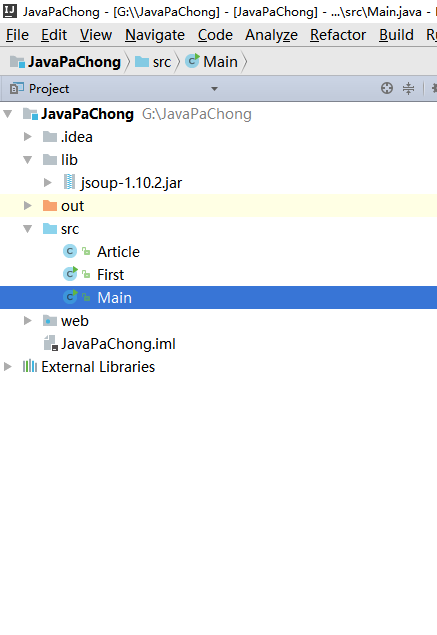
所需要的jar包为: jsoup-1.10.2.jar

/**

 * Created by wangzheng on 2017/2/19.

 */

public class Article {

    /**

     * 文章链接的相对地址

     */

    private String address;

    /**

     * 文章标题

     */

    private String title;

    /**

     * 文章简介

     */

    private String desption;

    /**

     * 文章发表时间

     */

    private String time;

    public String getAddress() {

        return address;

    }

    public void setAddress(String address) {

        this.address = address;

    }

    public String getTitle() {

        return title;

    }

    public void setTitle(String title) {

        this.title = title;

    }

    public String getDesption() {

        return desption;

    }

    public void setDesption(String desption) {

        this.desption = desption;

    }

    public String getTime() {

        return time;

    }

    public void setTime(String time) {

        this.time = time;

    }

}
/**

 * Created by wangzheng on 2017/2/19.

 */

import java.io.IOException;

import java.util.ArrayList;

import java.util.List;

import org.jsoup.Connection;

import org.jsoup.Jsoup;

import org.jsoup.nodes.Document;

import org.jsoup.nodes.Element;

import org.jsoup.select.Elements;

public class First {

    // 需要进行爬取得博客首页

    // private static final String URL = "http://blog.csdn.net/guolin_blog";

    private static final String URL = "http://blog.csdn.net/qq_33599520/article/list/1";

    public static void main(String[] args) throws IOException {

        // 获取url地址的http链接Connection

        Connection conn = Jsoup.connect(URL)    // 博客首页的url地址

                .userAgent("Mozilla/5.0 (Windows NT 6.1; rv:47.0) Gecko/20100101 Firefox/47.0") // http请求的浏览器设置

                .timeout(5000)   // http连接时长

                .method(Connection.Method.GET);  // 请求类型是get请求,http请求还是post,delete等方式

        //获取页面的html文档

        Document doc = conn.get();

        Element body = doc.body();

        // 将爬取出来的文章封装到Artcle中,并放到ArrayList里面去

        List<Article> resultList = new ArrayList<Article>();

        Element articleListDiv = body.getElementById("article_list");

        Elements articleList = articleListDiv.getElementsByClass("list_item");

        for(Element article : articleList){

            Article articleEntity = new Article();

            Element linkNode = (article.select("div h1 a")).get(0);

            Element desptionNode = (article.getElementsByClass("article_description")).get(0);

            Element articleManageNode = (article.getElementsByClass("article_manage")).get(0);

            articleEntity.setAddress(linkNode.attr("href"));

            articleEntity.setTitle(linkNode.text());

            articleEntity.setDesption(desptionNode.text());

            articleEntity.setTime(articleManageNode.select("span:eq(0").text());

            resultList.add(articleEntity);

        }

        // 遍历输出ArrayList里面的爬取到的文章

        System.out.println("文章总数:" + resultList.size());

        for(Article article : resultList) {

            System.out.println("文章绝对路劲地址:http://blog.csdn.net" + article.getAddress());

        }

    }

}
/**

 * Created by wangzheng on 2017/2/19.

 */

import java.io.IOException;

import java.util.ArrayList;

import java.util.List;

import org.jsoup.*;

import org.jsoup.nodes.*;

import org.jsoup.select.*;

public class Main {

    private static final String URL = "http://blog.csdn.net/qq_33599520";

    public static void main(String[] args) throws IOException {

        Connection conn = Jsoup.connect(URL)

                .userAgent("Mozilla/5.0 (X11; Ubuntu; Linux x86_64; rv:50.0) Gecko/20100101 Firefox/50.0")

                .timeout(5000)

                .method(Connection.Method.GET);

        Document doc = conn.get();

        Element body = doc.body();

        // 获取总页数

        String totalPageStr = body.getElementById("papelist").select("span:eq(0)").text();

        String regex = ".+共(\\d+)页";

        totalPageStr = totalPageStr.replaceAll(regex, "$1");

        int totalPage = Integer.parseInt(totalPageStr);

        int pageNow = 1;

        List<Article> articleList = new ArrayList<Article>();

        for(pageNow = 1; pageNow <= totalPage; pageNow++){

            articleList.addAll(getArtitcleByPage(pageNow));

        }

        // 遍历输出博主所有的文章

        for(Article article : articleList) {

            System.out.println("文章标题:" + article.getTitle());

            System.out.println("文章绝对路劲地址:http://blog.csdn.net" + article.getAddress());

            System.out.println("文章简介:" + article.getDesption());

            System.out.println("发表时间:" + article.getTime());

        }

    }

    public static List<Article> getArtitcleByPage(int pageNow) throws IOException{

        Connection conn = Jsoup.connect(URL + "/article/list/" + pageNow)

                .userAgent("Mozilla/5.0 (Windows NT 6.1; rv:47.0) Gecko/20100101 Firefox/47.")

                .timeout(5000)

                .method(Connection.Method.GET);

        Document doc = conn.get();

        Element body = doc.body();

        List<Article> resultList = new ArrayList<Article>();

        Element articleListDiv = body.getElementById("article_list");

        Elements articleList = articleListDiv.getElementsByClass("list_item");

        for(Element article : articleList){

            Article articleEntity = new Article();

            Element linkNode = (article.select("div h1 a")).get(0);

            Element desptionNode = (article.getElementsByClass("article_description")).get(0);

            Element articleManageNode = (article.getElementsByClass("article_manage")).get(0);

            articleEntity.setAddress(linkNode.attr("href"));

            articleEntity.setTitle(linkNode.text());

            articleEntity.setDesption(desptionNode.text());

            articleEntity.setTime(articleManageNode.select("span:eq(0").text());

            resultList.add(articleEntity);

        }

        return resultList;

    }

}
JAVA爬虫代码的更多相关文章
- c#代码 天气接口 一分钟搞懂你的博客为什么没人看 看完python这段爬虫代码,java流泪了c#沉默了 图片二进制转换与存入数据库相关 C#7.0--引用返回值和引用局部变量 JS直接调用C#后台方法(ajax调用) Linq To Json SqlServer 递归查询
天气预报的程序.程序并不难. 看到这个需求第一个想法就是只要找到合适天气预报接口一切都是小意思,说干就干,立马跟学生沟通价格. 不过谈报价的过程中,差点没让我一口老血喷键盘上,话说我们程序猿的人 ...
- 福利贴——爬取美女图片的Java爬虫小程序代码
自己做的一个Java爬虫小程序 废话不多说.先上图. 目录命名是用标签缩写,假设大家看得不顺眼能够等完成下载后手动改一下,比方像有强迫症的我一样... 这是挂了一个晚上下载的总大小,只是还有非常多由于 ...
- 初识Java爬虫之Jsoup,提供参考代码
本文主要分享的是关于Java爬虫技术其中一个方式 ==> Jsoup 1.Jsoup简介 推开技术大门,爬虫技术琳琅满目,而今天要分享的Jsoup是一款Java的HTML解析神器,,可直接 ...
- webmagic的设计机制及原理-如何开发一个Java爬虫
之前就有网友在博客里留言,觉得webmagic的实现比较有意思,想要借此研究一下爬虫.最近终于集中精力,花了三天时间,终于写完了这篇文章.之前垂直爬虫写了一年多,webmagic框架写了一个多月,这方 ...
- JAVA爬虫挖取CSDN博客文章
开门见山,看看这个教程的主要任务,就去csdn博客,挖取技术文章,我以<第一行代码–安卓>的作者为例,将他在csdn发表的额博客信息都挖取出来.因为郭神是我在大学期间比较崇拜的对象之一.他 ...
- Java爬虫搜索原理实现
permike 原文 Java爬虫搜索原理实现 没事做,又研究了一下爬虫搜索,两三天时间总算是把原理闹的差不多了,基本实现了爬虫搜索的原理,本次实现还是俩程序,分别是按广度优先和深度优先完成的,广度优 ...
- JAVA爬虫 WebCollector
JAVA爬虫 WebCollector 爬虫简介: WebCollector是一个无须配置.便于二次开发的JAVA爬虫框架(内核),它提供精简的的API,只需少量代码即可实现一个功能强大的爬虫. 爬虫 ...
- 爬虫入门 手写一个Java爬虫
本文内容 涞源于 罗刚 老师的 书籍 << 自己动手写网络爬虫一书 >> ; 本文将介绍 1: 网络爬虫的是做什么的? 2: 手动写一个简单的网络爬虫; 1: 网络爬虫是做 ...
- JAVA爬虫实践(实践三:爬虫框架webMagic和csdnBlog爬虫)
WebMagic WebMagic是一个简单灵活的Java爬虫框架.基于WebMagic,你可以快速开发出一个高效.易维护的爬虫. 采用HttpClient可以实现定向的爬虫,也可以自己编写算法逻辑来 ...
随机推荐
- 简单Elixir游戏服务器开篇
以前的Elixir游戏服设计系列种种原因没有完成. 后来虽然用Elixir + riak 完成了一个麻将的初始版本,可惜公司也挂了. 现在到新公司,比较空闲,想着像完成一个心愿一样,还是重启下吧(希望 ...
- zoj1797 Least Common Multiple 最小公倍数
Least Common Multiple Time Limit: 2 Seconds Memory Limit: 65536 KB The least common multiple (L ...
- 压缩SQLServer数据库日志的一个存储过程
use master --注意,此存储过程要建在master数据库中 go if exists (select * from dbo.sysobjects where id = object_id(N ...
- 第四章 MySQL高级查询(二)
第四章 MySQL高级查询(二) 一.EXISTS子查询 在执行create 或drop语句之前,可以使用exists语句判断该数据库对像是否存在,返回值是true或false.除此之外,exists ...
- C#仪器数据文件解析-Excel文件(xls、xlsx)
不少仪器工作站可以将数据导出为Excel文件,包括97-2003版本的xls文件和2007+的xlsx文件. 采集Excel文件相比采集pdf文件更容易.程序更健壮,毕竟Excel中数据有明确的行.列 ...
- 当谈到 GitLab CI 的时候,我们该聊些什么(上篇)
"微服务"这个概念近两年非常热,正在慢慢改变 DevOps 的思路.微服务架构把一个庞大的业务系统拆解开来,每一个组件变得更加独立自治.松耦合.但是,同时也伴随着部署单元粒度越来越 ...
- ABAP 开启制定路径下的文件或网址URL
REPORT ZTEST001. CALL FUNCTION 'CALL_INTERNET_ADRESS' EXPORTING PI_ADRESS = * PI_TECHKEY = EXCEPTION ...
- 用node.js实现ORM的一种思路
ORM是O和R的映射.O代表面向对象,R代表关系型数据库.二者有相似之处同时也各有特色.就是因为这种即是又非的情况,才需要做映射的. 理想情况是,根据关系型数据库(含业务需求)的特点来设计数据库.同时 ...
- Java中对图片文件的类型的获取
public static void main(String[] args) { File f = new File("c://test.jpg"); ...
- C++点滴20130802
1.sprintf与printf,fprintf为三兄弟.其中printf输出到屏幕,fprintf输出到文件,而sprintf输出到字符串中.通常情况下,屏幕是可以输出的,文件也可以写的(除非磁盘满 ...