
swaggerui在asp.net web api core 中的应用
Swaggerui 可以为我们的webapi提供美观的在线文档,如下图:
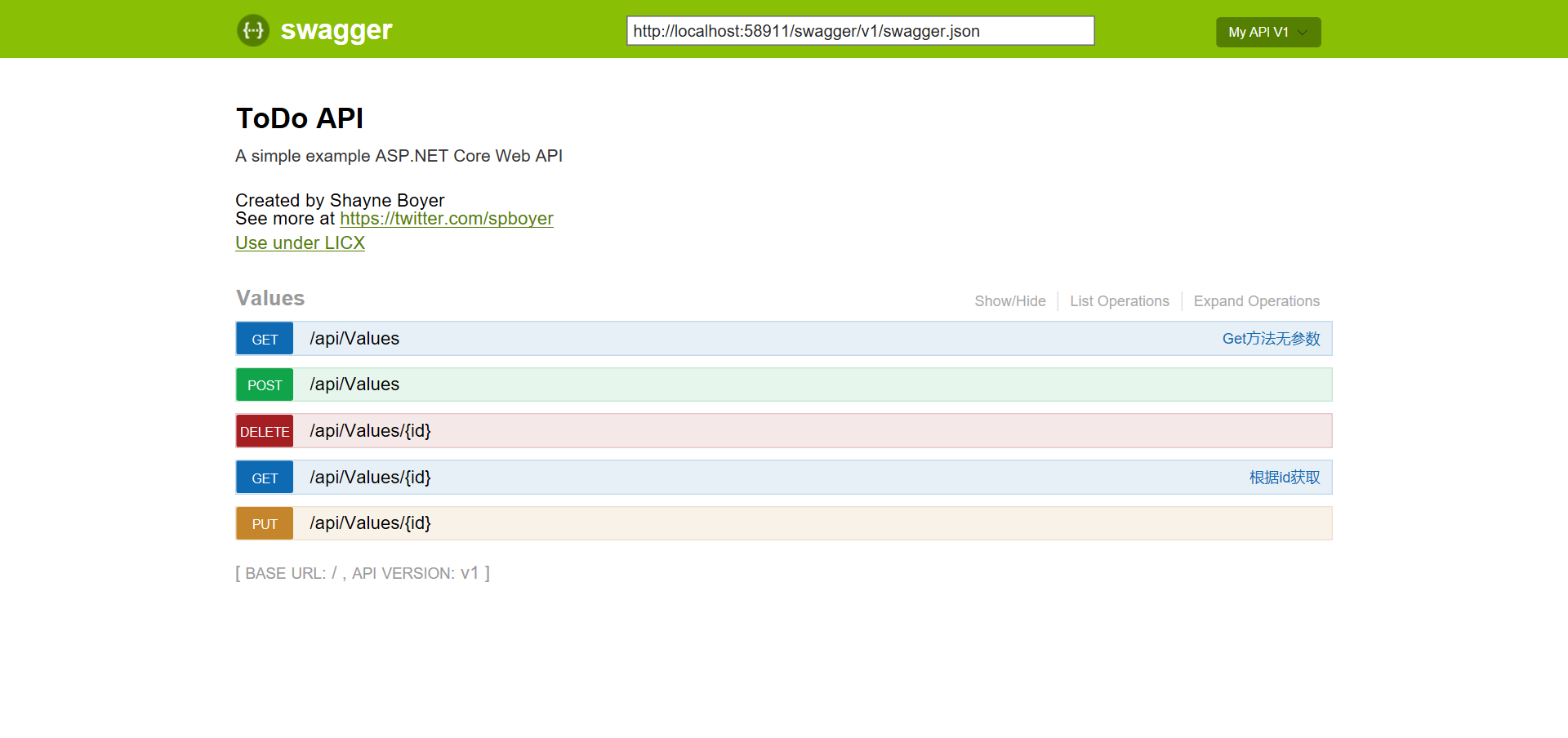
实现步骤:
- NuGet Packages Install-Package Swashbuckle.AspNetCore
- 在startup文件中配置swagger
            // Register the Swagger generator, defining one or more Swagger documents

            services.AddSwaggerGen(c =>

            {

                c.SwaggerDoc("v1", new Info

                {

                    Version = "v1",

                    Title = "ToDo API",

                    Description = "A simple example ASP.NET Core Web API",

                    TermsOfService = "None",

                    Contact = new Contact { Name = "Shayne Boyer", Email = "", Url = "https://twitter.com/spboyer" },

                    License = new License { Name = "Use under LICX", Url = "https://example.com/license" }

                });

                //Set the comments path for the swagger json and ui.

                var basePath = PlatformServices.Default.Application.ApplicationBasePath;

                var xmlPath = Path.Combine(basePath, "MyWebApiCore.xml");

                c.IncludeXmlComments(xmlPath);

            });

        }

        // This method gets called by the runtime. Use this method to configure the HTTP request pipeline.

        public void Configure(IApplicationBuilder app, IHostingEnvironment env, ILoggerFactory loggerFactory)

        {

            loggerFactory.AddConsole(Configuration.GetSection("Logging"));

            loggerFactory.AddDebug();

            app.UseMvc();

            app.UseSwagger();

            app.UseSwaggerUI(c =>

            {

                c.SwaggerEndpoint("/swagger/v1/swagger.json", "My API V1");

            });

} - XML Comments,点击项目属性=》生成=》XML文档文件打勾,然后在你的action上添加注释

  /// <summary>

        /// Get方法无参数

        /// </summary>

        /// <returns>string[]数组</returns>

        [HttpGet]

        public IEnumerable<string> Get()

        {

            return new string[] { "value1", "value2" };

        }

        /// <summary>

        /// 根据id获取

        /// </summary>

        /// <param name="id"></param>

        /// <returns></returns>

        /// <remarks>

        /// Note that the id is an integer.

        /// </remarks>

        [HttpGet("{id}")]

        public string Get(int id)

        {

            return "value";

} - 运行项目,输入文档地址http://localhost:58911/swagger/

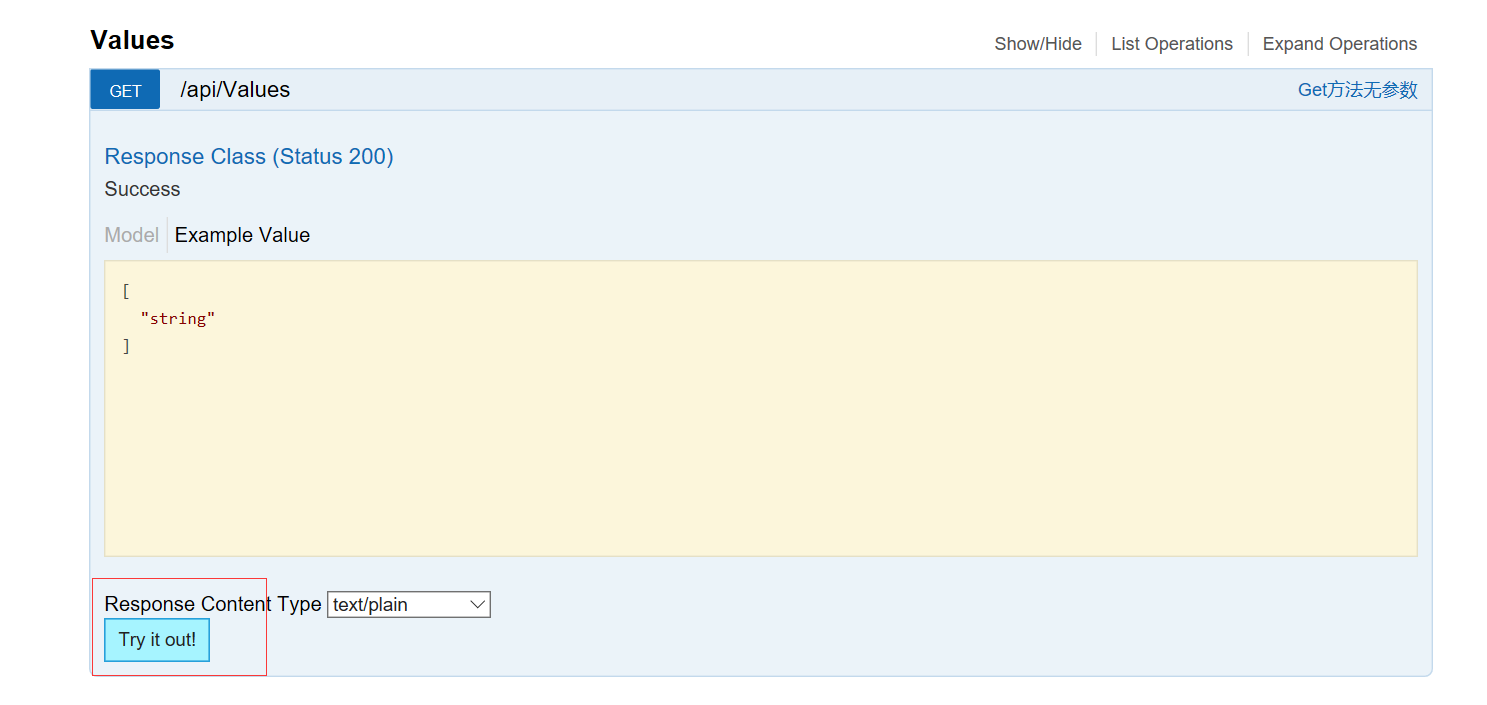
你可以选择方法进行在线测试
参考文档:https://docs.microsoft.com/zh-cn/aspnet/core/tutorials/web-api-help-pages-using-swagger
swaggerui在asp.net web api core 中的应用的更多相关文章
- 【swaggerui】swaggerui在asp.net web api core 中的应用
Swaggerui 可以为我们的webapi提供美观的在线文档,如下图: 实现步骤: NuGet Packages Install-Package Swashbuckle.AspNetCore 在s ...
- ASP.NET Web API 2 中的属性路由使用(转载)
转载地址:ASP.NET Web API 2 中的属性路由使用
- 在ASP.NET Web API项目中使用Hangfire实现后台任务处理
当前项目中有这样一个需求:由前端用户的一个操作,需要触发到不同设备的消息推送.由于推送这个具体功能,我们采用了第三方的服务.而这个服务调用有时候可能会有延时,为此,我们希望将消息推送与用户前端操作实现 ...
- 在ASP.NET Web API 2中使用Owin基于Token令牌的身份验证
基于令牌的身份验证 基于令牌的身份验证主要区别于以前常用的常用的基于cookie的身份验证,基于cookie的身份验证在B/S架构中使用比较多,但是在Web Api中因其特殊性,基于cookie的身份 ...
- ASP.NET Web API 2 中的特性路由
ASP.NET MVC 5.1 开始已经支持基于特性的路由(http://attributerouting.net),ASP.NET WEB API 2 同时也支持了这一特性. 启用特性路 由只需要在 ...
- ASP.NET Web API 2中的错误处理
前几天在webapi项目中遇到一个问题:Controller构造函数中抛出异常时全局过滤器捕获不到,于是网搜一把写下这篇博客作为总结. HttpResponseException 通常在WebAPI的 ...
- [翻译]ASP.NET Web API 2 中的全局错误处理
目录 已存在的选项 解决方案预览 设计原则 什么时候去用 方案详情 示例 附录: 基类详情 原文链接 Global Error Handling in ASP.NET Web API 2 由于翻译水平 ...
- 在ASP.NET Web API 2中使用Owin OAuth 刷新令牌(示例代码)
在上篇文章介绍了Web Api中使用令牌进行授权的后端实现方法,基于WebApi2和OWIN OAuth实现了获取access token,使用token访问需授权的资源信息.本文将介绍在Web Ap ...
- ASP.NET Web API 2中的属性路由(Attribute Routing)
如何启用属性路由并描述属性路由的各种选项? Why Attribute Routing? Web API的第一个版本使用基于约定的路由.在这种类型的路由中,您可以定义一个或多个路由模板,这些模板基本上 ...
随机推荐
- 浅谈python 复制(深拷贝,浅拷贝)
博客参考:点击这里 python中对象的复制以及浅拷贝,深拷贝是存在差异的,这儿我们主要以可变变量来演示,不可变变量则不存在赋值/拷贝上的问题(下文会有解释),具体差异如下文所示 1.赋值: a=[1 ...
- PHP常用表达式用法
1.匹配正整数:/^[1-9]\d*$/ 2.匹配非负整数(正整数+0):/^\d+$/ 3.匹配中文:/^[\x{4e00}-\x{9fa5}]+$/u 4.匹配Email:/^\w+([-+.]\ ...
- JS中replace()用法举例
语法: string.replace(regexp,replacement) 参数: regexp:声明了要替换的模式的RegExp对象.如果该参数是一个字符串,则将它作为要检索的直接量文本模式,而不 ...
- 【转】open参数O_DIRECT的学习
open参数O_DIRECT的学习 使用 O_DIRECT 需要注意的地方 posix_memalign详细解释 free:这里好几个方法我都没测试成功,最后还是用posix_memalign 对齐的 ...
- Problem X
Problem Description Recently, iSea went to an ancient country. For such a long time, it was the most ...
- Handshakes
Description Last week, n students participated in the annual programming contest of Marjar Universit ...
- Hive安装和部署
在root的用户下搭建的 构建hive之前必须要先搭建好hadoop才可以. hive定义了一种类似SQL查询语言--HQL 类似SQL ,但是不完全相同 Hive是一个数据仓库,它部署在Hadoop ...
- JavaNIO阻塞IO
package com.java.NIO; import java.io.IOException; import java.net.InetSocketAddress; import java.nio ...
- 英语学习笔记---01---新概念第一册---Lesson 1 Excuse me!
Lesson 1 Excuse me! [词汇] excuse [iks5kju:z] v. 原谅 劳驾.借光 me ...
- AngularJS学习篇(十二)
AngularJS SQL ASP.NET 中执行 SQL 获取数据 <!DOCTYPE html> <html> <head> <meta charset= ...