
swaggerui在asp.net web api core 中的应用
Swaggerui 可以为我们的webapi提供美观的在线文档,如下图:
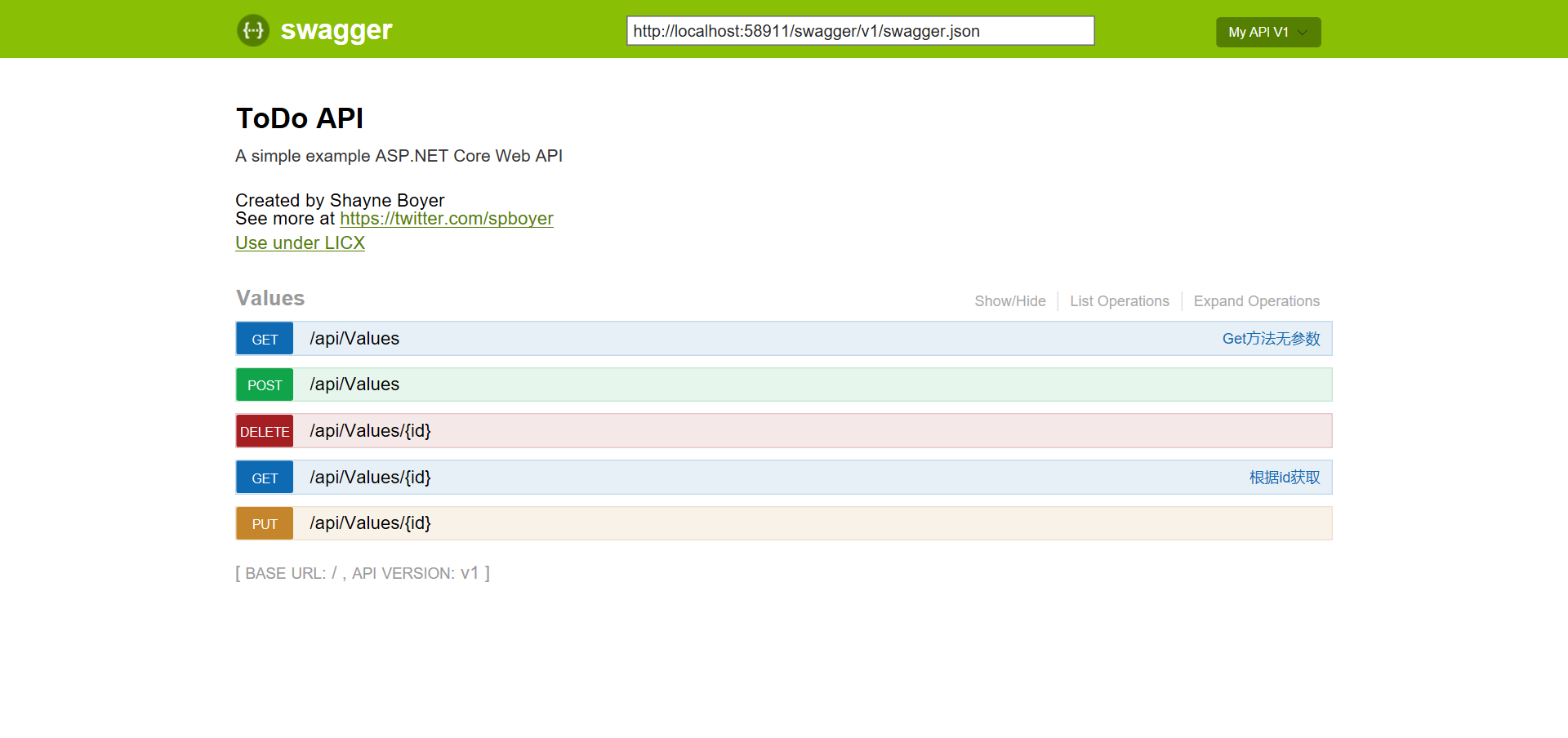
实现步骤:
- NuGet Packages Install-Package Swashbuckle.AspNetCore
- 在startup文件中配置swagger
            // Register the Swagger generator, defining one or more Swagger documents

            services.AddSwaggerGen(c =>

            {

                c.SwaggerDoc("v1", new Info

                {

                    Version = "v1",

                    Title = "ToDo API",

                    Description = "A simple example ASP.NET Core Web API",

                    TermsOfService = "None",

                    Contact = new Contact { Name = "Shayne Boyer", Email = "", Url = "https://twitter.com/spboyer" },

                    License = new License { Name = "Use under LICX", Url = "https://example.com/license" }

                });

                //Set the comments path for the swagger json and ui.

                var basePath = PlatformServices.Default.Application.ApplicationBasePath;

                var xmlPath = Path.Combine(basePath, "MyWebApiCore.xml");

                c.IncludeXmlComments(xmlPath);

            });

        }

        // This method gets called by the runtime. Use this method to configure the HTTP request pipeline.

        public void Configure(IApplicationBuilder app, IHostingEnvironment env, ILoggerFactory loggerFactory)

        {

            loggerFactory.AddConsole(Configuration.GetSection("Logging"));

            loggerFactory.AddDebug();

            app.UseMvc();

            app.UseSwagger();

            app.UseSwaggerUI(c =>

            {

                c.SwaggerEndpoint("/swagger/v1/swagger.json", "My API V1");

            });

} - XML Comments,点击项目属性=》生成=》XML文档文件打勾,然后在你的action上添加注释

  /// <summary>

        /// Get方法无参数

        /// </summary>

        /// <returns>string[]数组</returns>

        [HttpGet]

        public IEnumerable<string> Get()

        {

            return new string[] { "value1", "value2" };

        }

        /// <summary>

        /// 根据id获取

        /// </summary>

        /// <param name="id"></param>

        /// <returns></returns>

        /// <remarks>

        /// Note that the id is an integer.

        /// </remarks>

        [HttpGet("{id}")]

        public string Get(int id)

        {

            return "value";

} - 运行项目,输入文档地址http://localhost:58911/swagger/

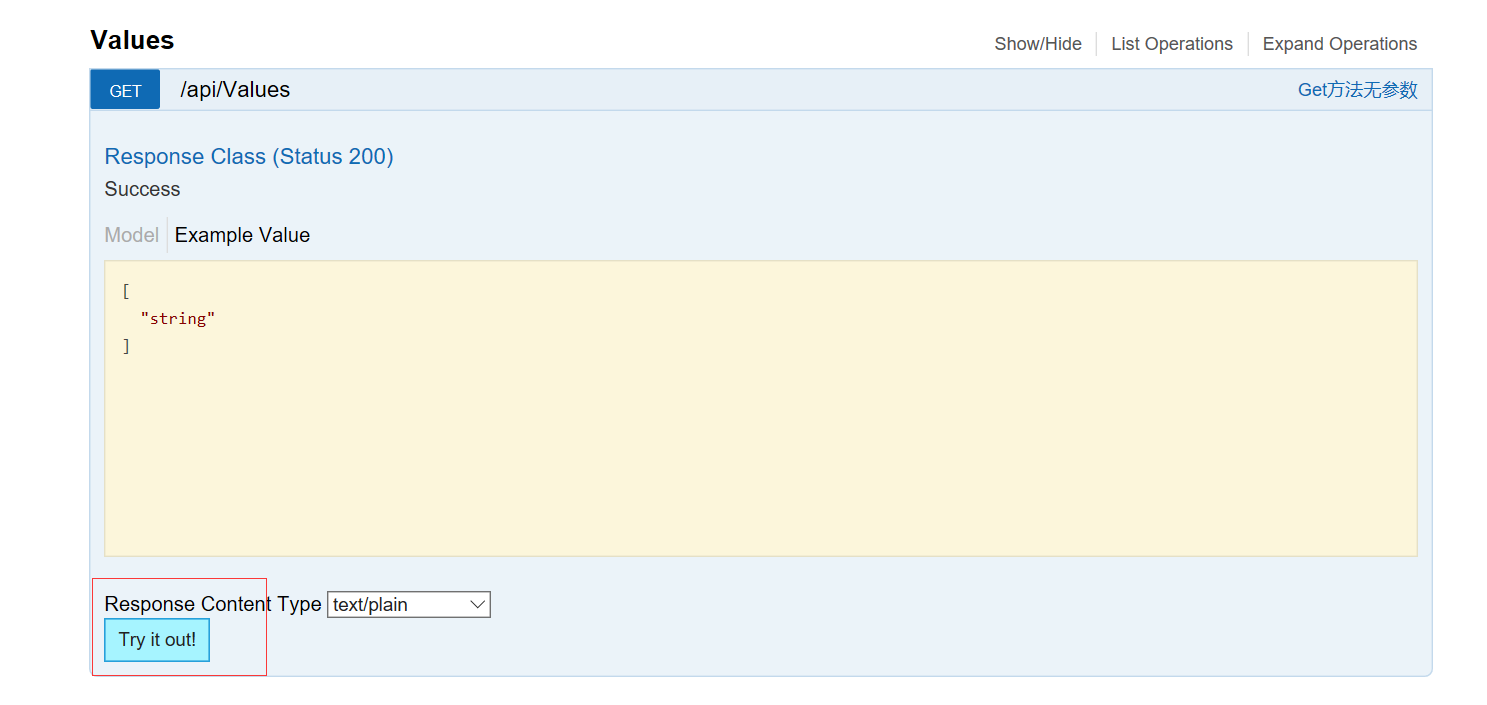
你可以选择方法进行在线测试
参考文档:https://docs.microsoft.com/zh-cn/aspnet/core/tutorials/web-api-help-pages-using-swagger
swaggerui在asp.net web api core 中的应用的更多相关文章
- 【swaggerui】swaggerui在asp.net web api core 中的应用
Swaggerui 可以为我们的webapi提供美观的在线文档,如下图: 实现步骤: NuGet Packages Install-Package Swashbuckle.AspNetCore 在s ...
- ASP.NET Web API 2 中的属性路由使用(转载)
转载地址:ASP.NET Web API 2 中的属性路由使用
- 在ASP.NET Web API项目中使用Hangfire实现后台任务处理
当前项目中有这样一个需求:由前端用户的一个操作,需要触发到不同设备的消息推送.由于推送这个具体功能,我们采用了第三方的服务.而这个服务调用有时候可能会有延时,为此,我们希望将消息推送与用户前端操作实现 ...
- 在ASP.NET Web API 2中使用Owin基于Token令牌的身份验证
基于令牌的身份验证 基于令牌的身份验证主要区别于以前常用的常用的基于cookie的身份验证,基于cookie的身份验证在B/S架构中使用比较多,但是在Web Api中因其特殊性,基于cookie的身份 ...
- ASP.NET Web API 2 中的特性路由
ASP.NET MVC 5.1 开始已经支持基于特性的路由(http://attributerouting.net),ASP.NET WEB API 2 同时也支持了这一特性. 启用特性路 由只需要在 ...
- ASP.NET Web API 2中的错误处理
前几天在webapi项目中遇到一个问题:Controller构造函数中抛出异常时全局过滤器捕获不到,于是网搜一把写下这篇博客作为总结. HttpResponseException 通常在WebAPI的 ...
- [翻译]ASP.NET Web API 2 中的全局错误处理
目录 已存在的选项 解决方案预览 设计原则 什么时候去用 方案详情 示例 附录: 基类详情 原文链接 Global Error Handling in ASP.NET Web API 2 由于翻译水平 ...
- 在ASP.NET Web API 2中使用Owin OAuth 刷新令牌(示例代码)
在上篇文章介绍了Web Api中使用令牌进行授权的后端实现方法,基于WebApi2和OWIN OAuth实现了获取access token,使用token访问需授权的资源信息.本文将介绍在Web Ap ...
- ASP.NET Web API 2中的属性路由(Attribute Routing)
如何启用属性路由并描述属性路由的各种选项? Why Attribute Routing? Web API的第一个版本使用基于约定的路由.在这种类型的路由中,您可以定义一个或多个路由模板,这些模板基本上 ...
随机推荐
- win10 uwp 保存用户选择文件夹
如果我们每次把临时处理的文件保存,都要让用户选择一次,用户会不会觉得uwp垃圾?如果我们每次打开应用,都从某个文件读取,而这个文件不在应用目录和已知的目录,那么每次都需要用户选择,用户会不会觉得uwp ...
- Windows 10新功能
Windows 10 中面向开发人员的新增功能 Windows 10 及新增的开发人员工具将提供新通用 Windows 平台支持的工具.功能和体验.在 Windows 10 上安装完工具和 SDK后, ...
- KDevelop使用笔记【中文】
师从官方文档: https://userbase.kde.org/KDevelop4/Manual https://docs.kde.org/trunk5/en/extragear-kdevelop/ ...
- 多线程之Map:Hashtable HashMap 以及ConcurrentHashMap
1.Map体系参考:http://java.chinaitlab.com/line/914247.htmlHashtable是JDK 5之前Map唯一线程安全的内置实现(Collections.syn ...
- Cocos 2d-X Lua 游戏添加苹果内购(一) 图文详解准备流程
事前准备 最近给游戏添加了苹果的内购,这一块的东西也是刚刚做完,总结一下,其实这里不管是游戏还是我们普通的App添加内购这一块的东西都是差不多的,多出来的部分就是我们Lua和OC的交互的部分,以前刚开 ...
- 开发《WORD阅读器》小结(1)
这是一个相对原生的APP开发, 从GITHUB上下载了相应的框架,应该是至少2年以前的一个lovereader,是我能快速找到的为数不多的WORD阅读器的源码.应该是用ECLIPSE开发的,而我现在只 ...
- java8Stream原理深度解析
Java8 Stream原理深度解析 Author:Dorae Date:2017年11月2日19:10:39 转载请注明出处 上一篇文章中简要介绍了Java8的函数式编程,而在Java8中另外一个比 ...
- 【唯星宠物】——CSS/BootStrap/Jquery爬坑之响应式首页
前言:唯星宠物产品官网,分为首页.子页和登录注册页三个页面,除网页内容设计与图片素材的部分使用网上的材料之外,其余内容呈现以及功能模块全部为自己重构. 一.响应式轮播banner 思路:使用BootS ...
- Xilinx ISE 14.1生成Rom内核并读取Rom中的数据
<一>建立一个项目readDataFromRom 详细过程参照另一篇文章 http://www.cnblogs.com/LCCRNblog/p/3397666.html <二> ...
- Windows解决anaconda下双python版本安装TensorFlow
首先,就是双版本anaconda的安装: 以前安装好的是python2.7版本,而TensorFlow的安装仅支持3.5版本的.但是自己本来的2.7版本又不想遗弃.所以安装双版本的: 在anacond ...