
Locust性能测试工具的安装及实际应用
一、安装Locust
安装Locust之前先安装的库:
gevent库:第三方库,gevent为python提供了比较完善的协程支持。使用gevent,可以获得极高的并发性能。
pip install gevent==1.1.2
flask库:Flask是一个使用 Python 编写的轻量级 Web 应用框架。
pip install flask==0.10.1
requests库:用python写过接口测试的朋友应该都不陌生,Requests 是用Python语言编写,基于 urllib,采用 Apache2 Licensed 开源协议的 HTTP 库。它比 urllib 更加方便,可以节约我们大量的工作,完全满足 HTTP 测试需求。
pip install requests==2.10.0
msgpack-python库:比JSON快10倍的序列化包。
pip install msgpack-python==0.4.2
six库:six 提供了一些简单的工具用来封装 Python 2 和 Python 3 之间的差异性。
pip install six==1.10.0
pyzmq库:Pyzmq是zeromq的Python绑定。
pip install pyzmq==15.2.0
安装库的过程中可能会遇到一些报错信息:
ReadTimeoutError: HTTPSConnectionPool(host=’pypi.python.org’, port=443): Read timed out.
解决方案:
更新pip版本到pip官网下载:https://pypi.python.org/simple/pip/
比如下载pip-9.0.1-py2.py3-none-any.whl
pip install pip-9.0.1-py2.py3-none-any.whl
如果还报错再执行:
pip –default-timeout=100 install -U pip
其他第三方库都安装完成后,接下来再安装locust:
pip install locustio
安装locustio库时可能会报错:
error:command ‘gcc’ failed with exit status 1
解决方案:yum install gcc python-devel
安装完成后,执行:locust–help
看到如下locust相关命令介绍,说明安装成功。
Usage: locust [options] [LocustClass [LocustClass2 … ]]
Options:
-h, –help show this help message and exit
-H HOST, –host=HOST Host to load test in the following format:
http://10.21.32.33
–web-host=WEB_HOST Host to bind the web interface to. Defaults to ” (all
interfaces)
-P PORT, –port=PORT, –web-port=PORT
Port on which to run web host
-f LOCUSTFILE, –locustfile=LOCUSTFILE
Python module file to import, e.g. ‘../other.py’.
Default: locustfile
–master Set locust to run in distributed mode with this
process as master
–slave Set locust to run in distributed mode with this
process as slave
–master-host=MASTER_HOST
Host or IP address of locust master for distributed
load testing. Only used when running with –slave.
Defaults to 127.0.0.1.
–master-port=MASTER_PORT
The port to connect to that is used by the locust
master for distributed load testing. Only used when
running with –slave. Defaults to 5557. Note that
slaves will also connect to the master node on this
port + 1.
–master-bind-host=MASTER_BIND_HOST
Interfaces (hostname, ip) that locust master should
bind to. Only used when running with –master.
Defaults to * (all available interfaces).
–master-bind-port=MASTER_BIND_PORT
Port that locust master should bind to. Only used when
running with –master. Defaults to 5557. Note that
Locust will also use this port + 1, so by default the
master node will bind to 5557 and 5558.
–no-web Disable the web interface, and instead start running
the test immediately. Requires -c and -r to be
specified.
-c NUM_CLIENTS, –clients=NUM_CLIENTS
Number of concurrent clients. Only used together with
–no-web
-r HATCH_RATE, –hatch-rate=HATCH_RATE
The rate per second in which clients are spawned. Only
used together with –no-web
-n NUM_REQUESTS, –num-request=NUM_REQUESTS
Number of requests to perform. Only used together with
–no-web
-L LOGLEVEL, –loglevel=LOGLEVEL
Choose between DEBUG/INFO/WARNING/ERROR/CRITICAL.
Default is INFO.
–logfile=LOGFILE Path to log file. If not set, log will go to
stdout/stderr
–print-stats Print stats in the console
–only-summary Only print the summary stats
-l, –list Show list of possible locust classes and exit
–show-task-ratio print table of the locust classes’ task execution
ratio
–show-task-ratio-json
print json data of the locust classes’ task execution
ratio
-V, –version show program’s version number and exit
二、使用Locust测试淘宝首页
 #locust_taobao.py

 #!/usr/bin/env python

 #-*-coding:utf-8-*-

 #author:@TT

 from locust import HttpLocust, TaskSet, task

 #定义用户行为

 class UserBehavior(TaskSet):

 @task

 def taobao_page(self): #定义一个方法访问淘宝首页

 self.client.get("/")

 class WebsiteUser(HttpLocust):

 task_set = UserBehavior

 min_wait = 3000 #用户等待时间下限

 max_wait = 5000 #用户等待时间上限
执行:
locust -f locust_taobao.py --host=https://www.taobao.com
提示:Starting web monitor at *.8089
Starting Locust 0.7.5
说明已经启动成功,浏览器输入:http://120.76.139.13:8089即可看到设置页面,并监控
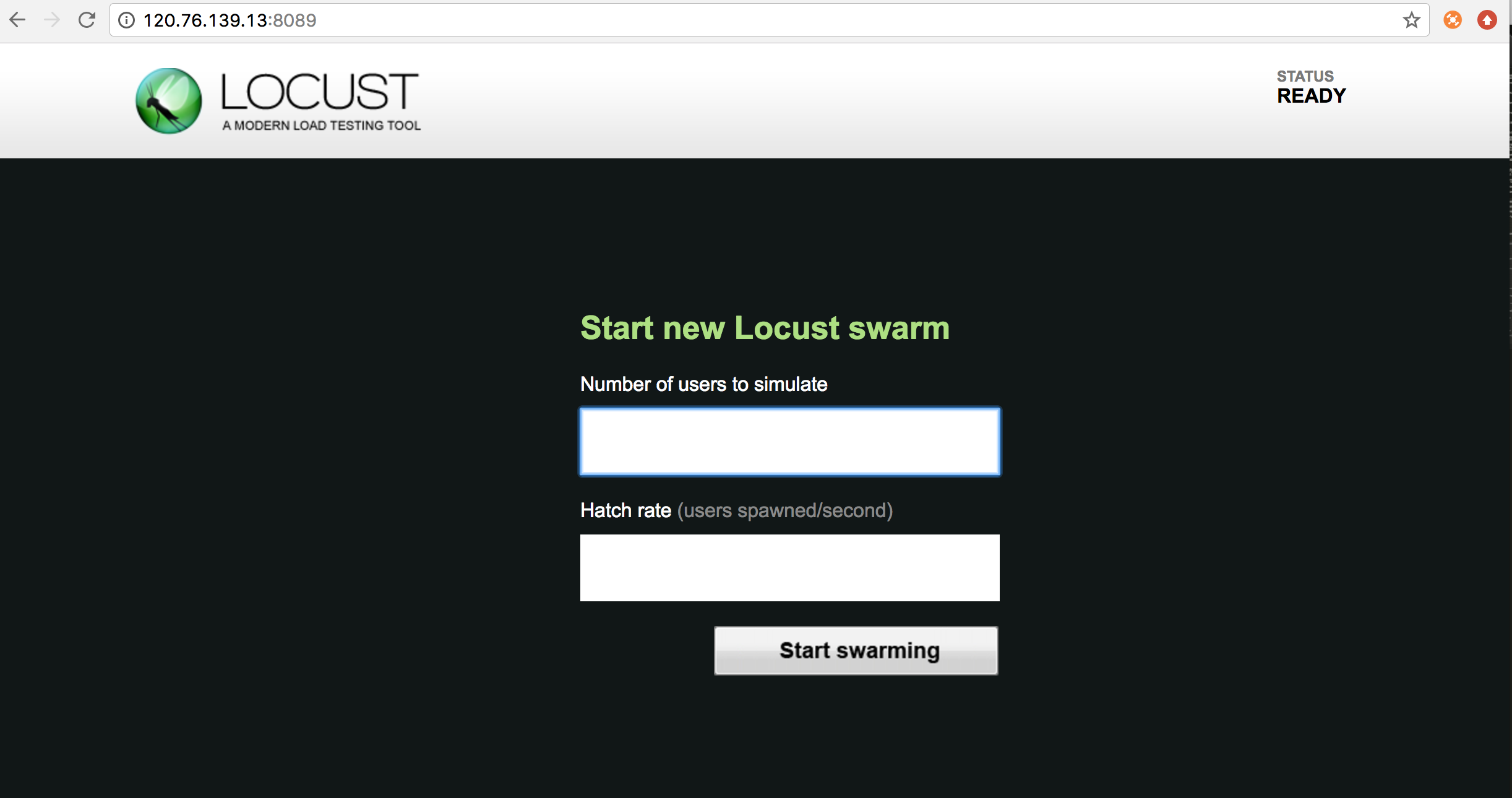

Number of users to simulate:设置需要模拟的用户数量,这次只是为了演示,设置为10;
Hatch rate:每秒需要启动的用户数量,这次只是为了演示,设置为2;
点击『start swarming』,开始了性能测试:
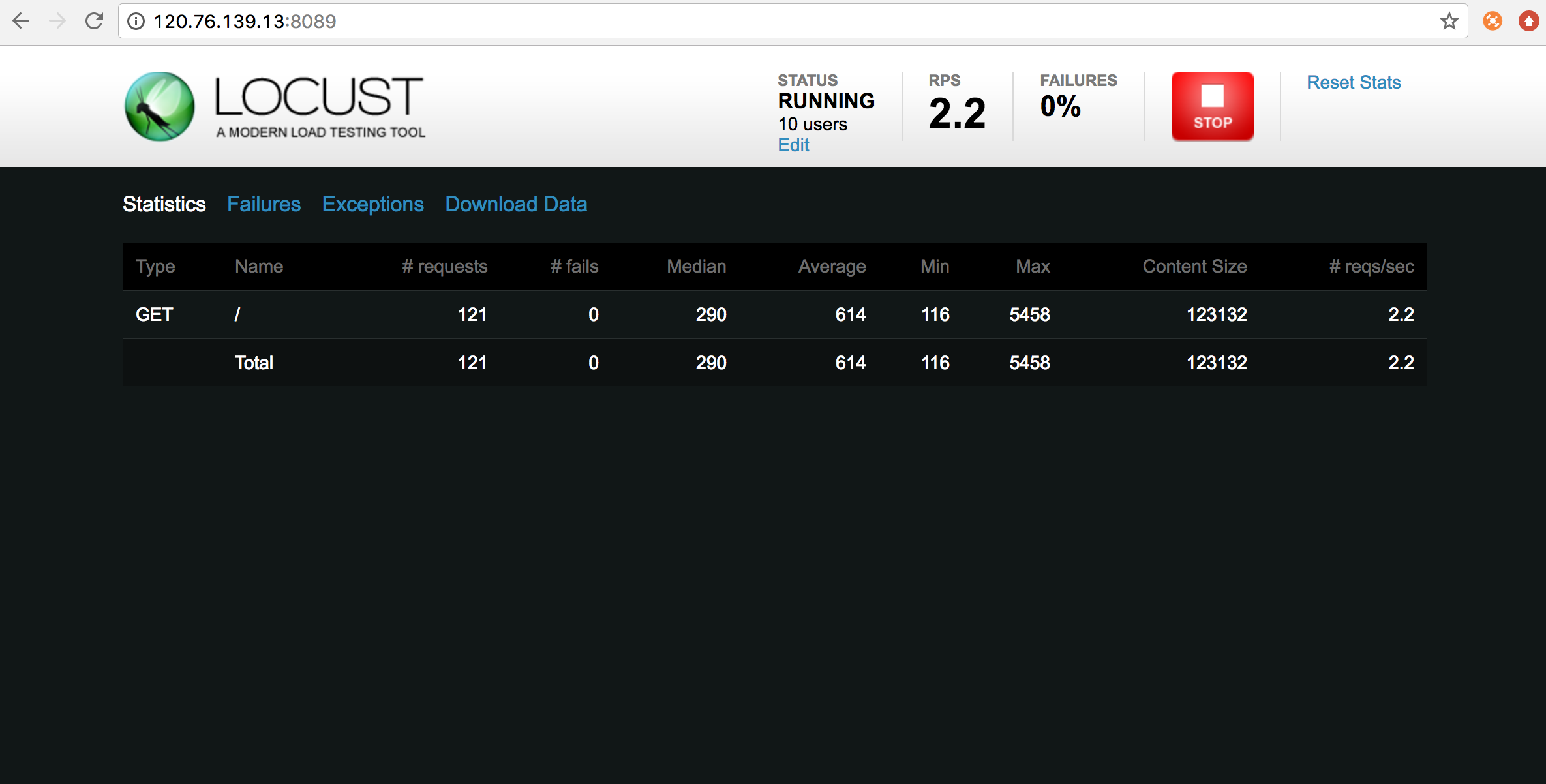
Type:请求的类型;
Name:请求的url或者自定义的统计分组名字;
requests:当前请求的数量;
fails:当前请求失败的数量;
Median:中间值,一半的服务器响应时间高于该值,而另一半的服务器响应时间低于该值(毫秒);
Average:所有请求的平均响应时间(毫秒);
Min:请求最小响应时间(毫秒);
Max:请求最大响应时间(毫秒);
Content Size:单个请求的大小(字节);
reqs/sec:每秒请求的个数;
今天就先整理到这里,如果按照以上内容操作,对Locust的安装和性能测试的执行有了大概的了解。后续会不断更新……
了解更多请关注微信公众号:测试架构师

Locust性能测试工具的安装及实际应用的更多相关文章
- Locust性能测试工具核心技术@task和@events
Tasks和Events是Locust性能测试工具的核心技术,有了它们,Locust才能称得上是一个性能工具. Tasks 从上篇文章知道,locustfile里面必须要有一个类,继承User类,当性 ...
- Locust 性能测试工具安装使用说明
1. 介绍 它是一个开源性能测试工具.使用 Python 代码来定义用户行为.用它可以模拟百万计的并发用户访问你的系统. 性能工具对比 LoadRunner 是非常有名的商业性能测试工具,功能 ...
- 性能测试工具 wrk 安装与使用
介绍 今天给大家介绍一款开源的性能测试工具 wrk,简单易用,没有Load Runner那么复杂,他和 apache benchmark(ab)同属于性能测试工具,但是比 ab 功能更加强大,并且可以 ...
- 云存储性能测试工具--COSBench安装
COSBench安装 Cosbench是Intel的开源云存储性能测试软件,COSBench目前已经广泛使用与云存储测试,并作为云存储的基准测试工具使用 1 环境 1.1 操作系统 COSBench可 ...
- 002_性能测试工具wrk安装与使用
介绍 今天给大家介绍一款开源的性能测试工具 wrk,简单易用,没有Load Runner那么复杂,他和 apache benchmark(ab)同属于性能测试工具,但是比 ab 功能更加强大,并且可以 ...
- HTTP性能测试工具wrk安装及使用
wrk 是一个很简单的 http 性能测试工具,没有Load Runner那么复杂,他和 apache benchmark(ab)同属于HTTP性能测试工具,但是比 ab 功能更加强大,并且可以支持l ...
- Mysql多线程性能测试工具sysbench 安装、使用和测试
From:http://www.cnblogs.com/zhoujinyi/archive/2013/04/19/3029134.html 摘要: sysbench是一个开源的.模块化的.跨 ...
- RGW/SWIFT对象存储性能测试工具--COSBench安装
Cosbench是Intel的开源云存储性能测试软件,COSBench目前已经广泛使用与云存储测试,并作为云存储的基准测试工具使用 https://github.com/intel-cloud/cos ...
- Locust性能测试1--简介安装及基本使用
1. Locust简介 Locust是易于使用的分布式用户负载测试工具,旨在对网站(或其他系统)进行负载测试,并弄清一个系统可以处理多少个并发用户,Locust翻译过来是蝗虫的意思,在测试期间,意在一 ...
随机推荐
- Java常用类String的面试题汇总
比较两个字符串时使用"=="还是equals()方法? 当然是equals方法."=="测试的是两个对象的引用是否相同,而equals()比较的是两个字符串的值 ...
- 验证表格多行某一input是否为空
function checkTableKeyWordVal(tableId){ var result = true; $("#"+tableId+" tbody tr&q ...
- AngularJS模块
方式一: <body ng-app="myApp"> <div ng-controller="myCtrl1"> <h1>{ ...
- PouchDB 基础
GUIDES http://pouchdb.com/guides/ 1.建立couchDB环境 下载并安装CouchDB: https://couchdb.apache.org/#download 测 ...
- pl_sql develope连接远程数据库的方法
需要修改你所安装的数据的路径下 tnsnames.ora 文件(我安装路径是F:\app\Aside\product\11.2.0\dbhome_1\NETWORK\ADMIN) tnsnames.o ...
- 进击的AssetBundles和它的工具们
0x00 前言 周末的时候在家看了下去年的Unite16 LA的视频.其中一个session很有趣,是AssetBundles开发团队Reichert的一个"总结过往,畅想未来"的 ...
- 在Linux环境如何在不解压情况下搜索多个zip包中匹配的字符串内容
今天有个生产文件需要查日志,但因为是比较久远的故障,日志已经被归档为zip包放到某个目录下了,在不知道具体日期时间的情况下,总不能一个一个解压搜索吧.于是就研究一下怎么在多个压缩包里搜索字符串了.目前 ...
- linux可用更新源
Kali 2.0更新源kali-rolling:#中科大deb http://mirrors.ustc.edu.cn/kali kali-rolling main non-free contribde ...
- Jenkins设置svn授权
1.问题引入 在job的scm部分,subversion modules/credentials出现错误 "Unable to access https://xxx/code : svn: ...
- shell十分钟教程
1.先介绍下shell的工作原理 Shell可以被称作是脚本语言,因为它本身是不需要编译的,而是通过解释器解释之后再编译执行,和传统语言相比多了解释的过程所以效率会略差于传统的直接编译的语言. 但是s ...