
.net framework 4.6 asp.net mvc 使用NLog
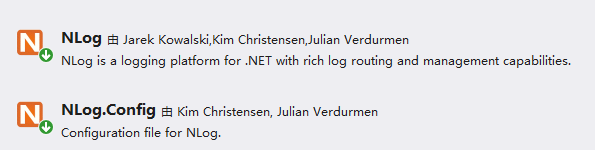
NUGET添加NLog和NLog.Config的引用
配置NLog.config
<?xml version="1.0" encoding="utf-8" ?>

<nlog xmlns="http://www.nlog-project.org/schemas/NLog.xsd"

      xmlns:xsi="http://www.w3.org/2001/XMLSchema-instance"

      xsi:schemaLocation="http://www.nlog-project.org/schemas/NLog.xsd NLog.xsd"

      autoReload="true"

      throwExceptions="false"

      internalLogLevel="Off" internalLogFile="c:\temp\nlog-internal.log">

  <!--archiveAboveSize以字节为单位,1K位1024字节,1048576表示1M,104857600表示100M-->

  <targets>

    <target xsi:type="File" name="logfile" fileName="/data/logs/${shortdate}.log"

        archiveFileName="/data/logs/${shortdate}.{#####}.txt"

        archiveAboveSize="10485760"

        archiveNumbering="Rolling"

        concurrentWrites="true"

        maxArchiveFiles="5"

        keepFileOpen="false" />

  </targets>

  <rules>

    <!--DEBUG,INFO,WARN,ERROR,FATAL-->

    <logger name="*" minlevel="Debug" writeTo="logfile" />

  </rules>

</nlog>
添加LogHelper
    /// <summary>

    /// NLog辅助类

    /// 创建人:苏本东

    /// 创建时间:2019/3/22 10:49:00

    /// </summary>

    public class LogHelper

    {

        private static Logger Logger = LogManager.GetCurrentClassLogger();

        #region 普通级别

        /// <summary>

        /// 普通级别

        /// </summary>

        /// <param name="content"></param>

        public static void Info(string content)

        {

            Logger.Info(content);

        }

        /// <summary>

        /// 普通级别

        /// </summary>

        /// <param name="exception"></param>

        /// <param name="content"></param>

        public static void Info(Exception exception, string content)

        {

            Logger.Info(exception, content);

        }

        #endregion

        #region 警告级别

        /// <summary>

        /// 警告级别

        /// </summary>

        /// <param name="content"></param>

        public static void Warn(string content)

        {

            Logger.Warn(content);

        }

        /// <summary>

        /// 警告级别

        /// </summary>

        /// <param name="exception"></param>

        /// <param name="content"></param>

        public static void Warn(Exception exception, string content)

        {

            Logger.Warn(exception, content);

        }

        #endregion

        #region 错误级别

        /// <summary>

        /// 错误级别

        /// </summary>

        /// <param name="content"></param>

        public static void Error(string content)

        {

            Logger.Error(content);

        }

        /// <summary>

        /// 错误级别

        /// </summary>

        /// <param name="exception"></param>

        /// <param name="content"></param>

        public static void Error(Exception exception, string content)

        {

            Logger.Error(exception, content);

        }

        #endregion

    }
使用NLog
    public class LogController : Controller

    {

        public ActionResult Index()

        {

            LogHelper.Info("普通信息日志");

            LogHelper.Warn("警告信息日志");

            LogHelper.Error("错误信息日志");

            LogHelper.Info(new Exception("异常发生"), "异常信息");

            return Content("success");

        }

    }
注意:根据我的配置,日志会输出到C盘根目录下,而不是项目根目录下,这点需要注意。
参考网址:https://www.cnblogs.com/kejie/p/6211597.html,上半部分内容。
.net framework 4.6 asp.net mvc 使用NLog的更多相关文章
- [转]Sorting, Filtering, and Paging with the Entity Framework in an ASP.NET MVC Application (3 of 10)
本文转自:http://www.asp.net/mvc/overview/older-versions/getting-started-with-ef-5-using-mvc-4/sorting-fi ...
- ASP.NET MVC 与NLog的使用
NLog是一个.NET 下一个完善的日志工具,个人已经在项目中使用很久,与ELMAH相比,可能EAMAH更侧重 APS.NET MVC 包括调试路由,性能等方面,而NLog则更简洁. github: ...
- MVC中使用EF(1):为ASP.NET MVC程序创建Entity Framework数据模型
为ASP.NET MVC程序创建Entity Framework数据模型 (1 of 10) By Tom Dykstra |July 30, 2013 Translated by litdwg ...
- ASP.NET MVC随想录——锋利的KATANA
正如上篇文章所述那样,OWIN在Web Server与Web Application之间定义了一套规范(Specs),意在解耦Web Server与Web Application,从而推进跨平台的实现 ...
- 连接弹性和命令拦截的 ASP.NET MVC 应用程序中的实体框架
最近悟出来一个道理,在这儿分享给大家:学历代表你的过去,能力代表你的现在,学习代表你的将来. 十年河东十年河西,莫欺少年穷 学无止境,精益求精 上篇博客我们学习了EF 之 MVC 排序,查询,分 ...
- [渣译文] 使用 MVC 5 的 EF6 Code First 入门 系列:为ASP.NET MVC应用程序读取相关数据
这是微软官方教程Getting Started with Entity Framework 6 Code First using MVC 5 系列的翻译,这里是第七篇:为ASP.NET MVC应用程序 ...
- [渣译文] 使用 MVC 5 的 EF6 Code First 入门 系列:为ASP.NET MVC应用程序更新相关数据
这是微软官方教程Getting Started with Entity Framework 6 Code First using MVC 5 系列的翻译,这里是第八篇:为ASP.NET MVC应用程序 ...
- [渣译文] 使用 MVC 5 的 EF6 Code First 入门 系列:为ASP.NET MVC应用程序使用异步及存储过程
这是微软官方教程Getting Started with Entity Framework 6 Code First using MVC 5 系列的翻译,这里是第九篇:为ASP.NET MVC应用程序 ...
- 压测 linux + jexus + mono + asp.net mvc
环境: 1.centos 7 + jexus 5.8.1 + mono 4.4.2 + asp.net mvc 4 做了一点小优化: 一.调整文件描述符数量限制编辑 /etc/security/lim ...
随机推荐
- 读SRE Google运维解密有感(三)
前言 这是读“SRE Google运维解密”有感第三篇,之前的文章可访问www.addops.cn来查看.我们今天来聊聊“on call”也就是运维值班制度, 本人到目前为止也还在参与一线运维的值班, ...
- 简单对比 Libevent、libev、libuv
Libevent.libev.libuv三个网络库,都是c语言实现的异步事件库Asynchronousevent library). 异步事件库本质上是提供异步事件通知(Asynchronous Ev ...
- 洛谷P2239 螺旋矩阵
传送门 分析:将整个矩阵看成 "回" 形状的分层结构,然后进行去层处理,使得要求得 \((i,j)\) 处于最外层,然后再分情况讨论.最外面的一层共有数: $ 4 * n - 4 ...
- 用Python实现Excel的读写
一.读excel文件的简单示例 #!/usr/bin/env python # -*- coding:utf-8 -*- import xlrd from xlrd.book import Book ...
- python 全栈开发,Day86(上传文件,上传头像,CBV,python读写Excel,虚拟环境virtualenv)
一.上传文件 上传一个图片 使用input type="file",来上传一个文件.注意:form表单必须添加属性enctype="multipart/form-data ...
- CSS3:HSL和HSLA
<!DOCTYPE html><html lang="en"><head> <meta charset="UTF-8" ...
- JS高级 - 面向对象2(prototype定义)
定义和用法 prototype 属性允许您向对象添加属性和方法 注意: Prototype 是全局属性,适用于所有的Javascript对象. 语法 object.prototype.name=val ...
- PowerDesigner使用积累
PowerDesigner想必没人不知道吧?著名的CASE工具,目前最新版本为15.2,用于软件建模,可以从需求直到物理模型,支持UML2.0语法,可用于UML图绘制.最大特色是能够使设计到实现无缝衔 ...
- [转] Anaconda使用总结
机器上的不同用户完全可以安装.配置自己的Anaconda,不会互相影响. 对于Mac.Linux系统,Anaconda安装好后,实际上就是在主目录下多了个文件夹(~/anaconda)而已,Windo ...
- Spring3.X jdk8 java.lang.IllegalArgumentException
异常提示: javax.servlet.ServletException: Servlet.init() for servlet springMVC threw exception org.apach ...