
GreenDao与ReactiveX的完美搭配
转载请注明出处:http://www.cnblogs.com/cnwutianhao/p/6719380.html
作为Android开发者,一定不会对 GreenDao 和 ReactiveX 陌生。
GreenDao 号称Android最快的关系型数据库

ReactiveX Rx是一个编程模型,目标是提供一致的编程接口,帮助开发者更方便的处理异步数据流。

下面我们就通过一个实例,来讲解有无Rx支持的时候GreenDao应该怎么用,实现增删操作。
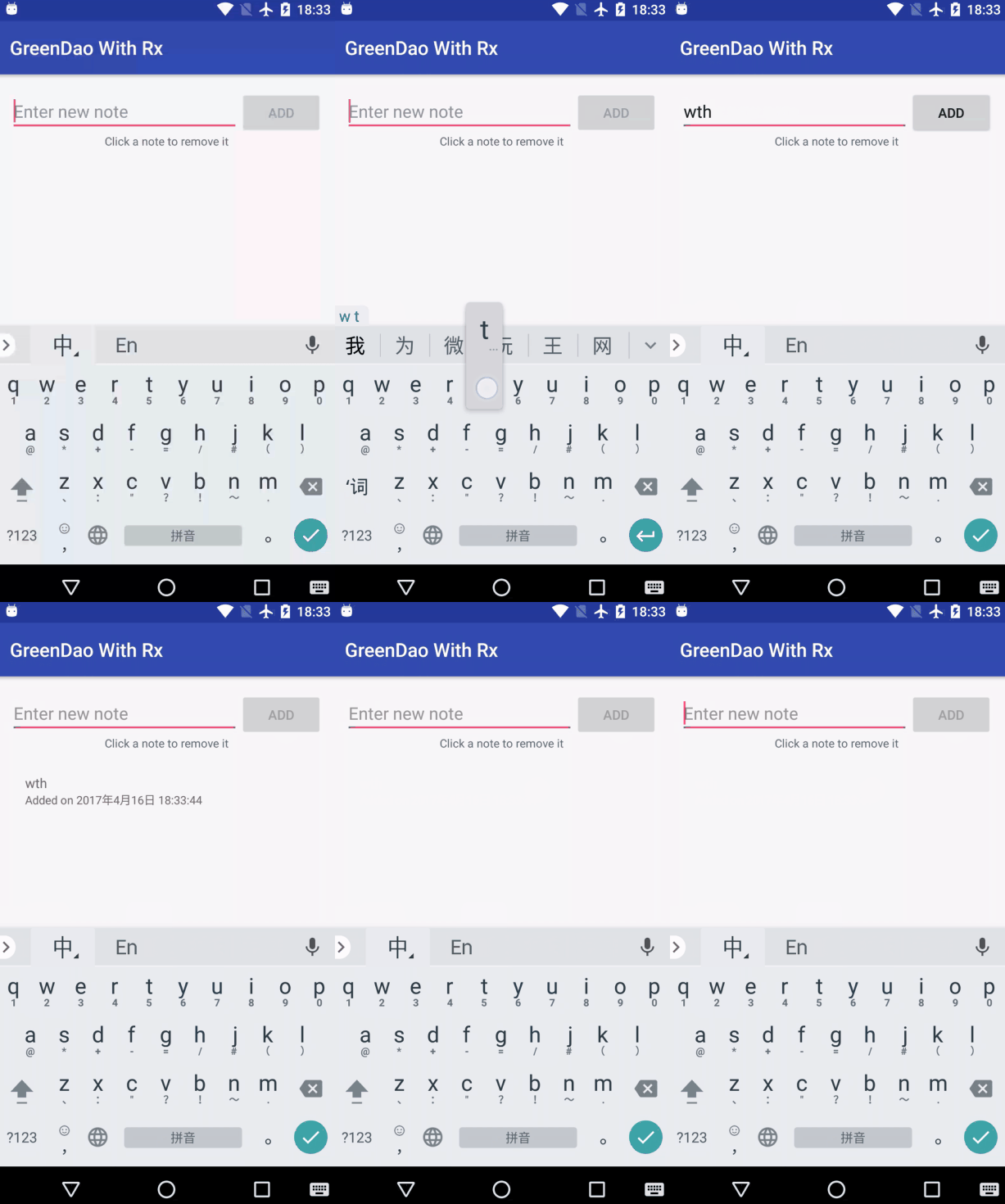
首先导入需要的库(本文针对的 GreenDao 是 3.x 版本, Rx 是 1.x 版本)
GreenDao导入需求库的说明: https://github.com/greenrobot/greenDAO/
在 build.gradle(Project:Xxx) 下,添加:
buildscript {

    repositories {

        ...

        mavenCentral()

        ...

    }

    dependencies {

        ...

        classpath 'org.greenrobot:greendao-gradle-plugin:3.2.2'

        ...

    }

}
在 build.gradle(Module:Xxx) 下,添加:
...

apply plugin: 'org.greenrobot.greendao'

...

dependencies {

    ...

    compile 'org.greenrobot:greendao:3.2.2'

    ...

}
Rx导入需求库的说明: https://github.com/ReactiveX/RxJava/tree/1.x
在 build.gradle(Module:Xxx) 下,添加:
dependencies {

    ...

    compile 'io.reactivex:rxjava:1.2.9'

    compile 'io.reactivex:rxandroid:1.2.1'

    ...

}
需求库添加完之后就可以进入正题了
1.参考GreenDao官方文档,添加必要的类 Note 、 NotesAdapter 、 NoteType 、 NoteTypeConverter
Note :
/**

 * Entity mapped to table "NOTE".

 */

@Entity(indexes = {

        @Index(value = "text, date DESC", unique = true)

})

public class Note {

    @Id

    private Long id;

    @NotNull

    private String text;

    private String comment;

    private java.util.Date date;

    @Convert(converter = NoteTypeConverter.class, columnType = String.class)

    private NoteType type;

    @Generated(hash = 1272611929)

    public Note() {

    }

    public Note(Long id) {

        this.id = id;

    }

    @Generated(hash = 1686394253)

    public Note(Long id, @NotNull String text, String comment, java.util.Date date, NoteType type) {

        this.id = id;

        this.text = text;

        this.comment = comment;

        this.date = date;

        this.type = type;

    }

    public Long getId() {

        return id;

    }

    public void setId(Long id) {

        this.id = id;

    }

    @NotNull

    public String getText() {

        return text;

    }

    /**

     * Not-null value; ensure this value is available before it is saved to the database.

     */

    public void setText(@NotNull String text) {

        this.text = text;

    }

    public String getComment() {

        return comment;

    }

    public void setComment(String comment) {

        this.comment = comment;

    }

    public java.util.Date getDate() {

        return date;

    }

    public void setDate(java.util.Date date) {

        this.date = date;

    }

    public NoteType getType() {

        return type;

    }

    public void setType(NoteType type) {

        this.type = type;

    }

}
NotesAdapter :
public class NotesAdapter extends RecyclerView.Adapter<NotesAdapter.NoteViewHolder> {

    private NoteClickListener clickListener;

    private List<Note> dataset;

    public interface NoteClickListener {

        void onNoteClick(int position);

    }

    static class NoteViewHolder extends RecyclerView.ViewHolder {

        public TextView text;

        public TextView comment;

        public NoteViewHolder(View itemView, final NoteClickListener clickListener) {

            super(itemView);

            text = (TextView) itemView.findViewById(R.id.textViewNoteText);

            comment = (TextView) itemView.findViewById(R.id.textViewNoteComment);

            itemView.setOnClickListener(new View.OnClickListener() {

                @Override

                public void onClick(View view) {

                    if (clickListener != null) {

                        clickListener.onNoteClick(getAdapterPosition());

                    }

                }

            });

        }

    }

    public NotesAdapter(NoteClickListener clickListener) {

        this.clickListener = clickListener;

        this.dataset = new ArrayList<Note>();

    }

    public void setNotes(@NonNull List<Note> notes) {

        dataset = notes;

        notifyDataSetChanged();

    }

    public Note getNote(int position) {

        return dataset.get(position);

    }

    @Override

    public NotesAdapter.NoteViewHolder onCreateViewHolder(ViewGroup parent, int viewType) {

        View view = LayoutInflater.from(parent.getContext())

                .inflate(R.layout.item_note, parent, false);

        return new NoteViewHolder(view, clickListener);

    }

    @Override

    public void onBindViewHolder(NotesAdapter.NoteViewHolder holder, int position) {

        Note note = dataset.get(position);

        holder.text.setText(note.getText());

        holder.comment.setText(note.getComment());

    }

    @Override

    public int getItemCount() {

        return dataset.size();

    }

}
NoteType :
public enum NoteType {

    TEXT, LIST, PICTURE

}
NoteTypeConverter :
public class NoteTypeConverter implements PropertyConverter<NoteType, String> {

    @Override

    public NoteType convertToEntityProperty(String databaseValue) {

        return NoteType.valueOf(databaseValue);

    }

    @Override

    public String convertToDatabaseValue(NoteType entityProperty) {

        return entityProperty.name();

    }

}
必要的类添加之后,接下来就是重头戏:
用代码说话,横向比较 GreenDao 在有无 Rx 的支持下应该如何书写
1.初始化类
无 Rx 写法
private NoteDao noteDao;

private Query<Note> notesQuery;
有 Rx 写法
private RxDao<Note, Long> noteDao;

private RxQuery<Note> notesQuery;
2.将记录保存到DAO里
无 Rx 写法
DaoSession daoSession = ((BaseApplication) getApplication()).getDaoSession();

noteDao = daoSession.getNoteDao();
有 Rx 写法
DaoSession daoSession = ((BaseApplication) getApplication()).getDaoSession();

noteDao = daoSession.getNoteDao().rx();
3.查询所有记录,按A-Z分类
无 Rx 写法
notesQuery = noteDao.queryBuilder().orderAsc(NoteDao.Properties.Text).build();
有 Rx 写法
notesQuery = daoSession.getNoteDao().queryBuilder().orderAsc(NoteDao.Properties.Text).rx();
4.初始化View
无 Rx 写法
protected void setUpViews() {

        RecyclerView recyclerView = (RecyclerView) findViewById(R.id.recyclerViewNotes);

        //noinspection ConstantConditions

        recyclerView.setHasFixedSize(true);

        recyclerView.setLayoutManager(new LinearLayoutManager(this));

        notesAdapter = new NotesAdapter(noteClickListener);

        recyclerView.setAdapter(notesAdapter);

        addNoteButton = findViewById(R.id.buttonAdd);

        //noinspection ConstantConditions

        addNoteButton.setEnabled(false);

        editText = (EditText) findViewById(R.id.editTextNote);

        editText.setOnEditorActionListener(new TextView.OnEditorActionListener() {

            @Override

            public boolean onEditorAction(TextView v, int actionId, KeyEvent event) {

                if (actionId == EditorInfo.IME_ACTION_DONE) {

                    addNote();

                    return true;

                }

                return false;

            }

        });

        editText.addTextChangedListener(new TextWatcher() {

            @Override

            public void onTextChanged(CharSequence s, int start, int before, int count) {

                boolean enable = s.length() != 0;

                addNoteButton.setEnabled(enable);

            }

            @Override

            public void beforeTextChanged(CharSequence s, int start, int count, int after) {

            }

            @Override

            public void afterTextChanged(Editable s) {

            }

        });

    }
有 Rx 写法
protected void setUpViews() {

        RecyclerView recyclerView = (RecyclerView) findViewById(R.id.recyclerViewNotes);

        //noinspection ConstantConditions

        recyclerView.setHasFixedSize(true);

        recyclerView.setLayoutManager(new LinearLayoutManager(this));

        notesAdapter = new NotesAdapter(noteClickListener);

        recyclerView.setAdapter(notesAdapter);

        addNoteButton = findViewById(R.id.buttonAdd);

        editText = (EditText) findViewById(R.id.editTextNote);

        //noinspection ConstantConditions

        RxTextView.editorActions(editText).observeOn(AndroidSchedulers.mainThread())

                .subscribe(new Action1<Integer>() {

                    @Override

                    public void call(Integer actionId) {

                        if (actionId == EditorInfo.IME_ACTION_DONE) {

                            addNote();

                        }

                    }

                });

        RxTextView.afterTextChangeEvents(editText).observeOn(AndroidSchedulers.mainThread())

                .subscribe(new Action1<TextViewAfterTextChangeEvent>() {

                    @Override

                    public void call(TextViewAfterTextChangeEvent textViewAfterTextChangeEvent) {

                        boolean enable = textViewAfterTextChangeEvent.editable().length() > 0;

                        addNoteButton.setEnabled(enable);

                    }

                });

    }
5.更新记录
无 Rx 写法
private void updateNotes() {

    List<Note> notes = notesQuery.list();

    notesAdapter.setNotes(notes);

}
有 Rx 写法
private void updateNotes() {

    notesQuery.list()

            .observeOn(AndroidSchedulers.mainThread())

            .subscribe(new Action1<List<Note>>() {

                @Override

                public void call(List<Note> notes) {

                    notesAdapter.setNotes(notes);

                }

            });

}
6.添加记录
无 Rx 写法
private void addNote() {

        String noteText = editText.getText().toString();

        editText.setText("");

        final DateFormat df = DateFormat.getDateTimeInstance(DateFormat.MEDIUM, DateFormat.MEDIUM);

        String comment = "Added on " + df.format(new Date());

        Note note = new Note();

        note.setText(noteText);

        note.setComment(comment);

        note.setDate(new Date());

        note.setType(NoteType.TEXT);

        noteDao.insert(note);

        Log.d("DaoExample", "Inserted new note, ID: " + note.getId());

        updateNotes();

    }
有 Rx 写法
private void addNote() {

        String noteText = editText.getText().toString();

        editText.setText("");

        final DateFormat df = DateFormat.getDateTimeInstance(DateFormat.MEDIUM, DateFormat.MEDIUM);

        String comment = "Added on " + df.format(new Date());

        Note note = new Note(null, noteText, comment, new Date(), NoteType.TEXT);

        noteDao.insert(note)

                .observeOn(AndroidSchedulers.mainThread())

                .subscribe(new Action1<Note>() {

                    @Override

                    public void call(Note note) {

                        Log.d("DaoExample", "Inserted new note, ID: " + note.getId());

                        updateNotes();

                    }

                });

    }
7.删除记录
无 Rx 写法
NotesAdapter.NoteClickListener noteClickListener = new NotesAdapter.NoteClickListener() {

        @Override

        public void onNoteClick(int position) {

            Note note = notesAdapter.getNote(position);

            Long noteId = note.getId();

            noteDao.deleteByKey(noteId);

            Log.d("DaoExample", "Deleted note, ID: " + noteId);

            updateNotes();

        }

    };
有 Rx 写法
NotesAdapter.NoteClickListener noteClickListener = new NotesAdapter.NoteClickListener() {

        @Override

        public void onNoteClick(int position) {

            Note note = notesAdapter.getNote(position);

            final Long noteId = note.getId();

            noteDao.deleteByKey(noteId)

                    .observeOn(AndroidSchedulers.mainThread())

                    .subscribe(new Action1<Void>() {

                        @Override

                        public void call(Void aVoid) {

                            Log.d("DaoExample", "Deleted note, ID: " + noteId);

                            updateNotes();

                        }

                    });

        }

    };
最后别忘了新建一个Application类,并添加到Manifest中
public class BaseApplication extends Application {

    /**

     * A flag to show how easily you can switch from standard SQLite to the encrypted SQLCipher.

     */

    public static final boolean ENCRYPTED = true;

    private DaoSession daoSession;

    @Override

    public void onCreate() {

        super.onCreate();

        DaoMaster.DevOpenHelper helper = new DaoMaster.DevOpenHelper(
                this, ENCRYPTED ? "notes-db-encrypted" : "notes-db");

        Database db = ENCRYPTED ? helper.getEncryptedWritableDb("super-secret") : helper.getWritableDb();

        daoSession = new DaoMaster(db).newSession();

    }

    public DaoSession getDaoSession() {

        return daoSession;

    }

}
文中额外可能会用到的库
compile 'com.jakewharton.rxbinding:rxbinding:1.0.1'

compile 'net.zetetic:android-database-sqlcipher:3.5.6'
关注我的新浪微博,获取更多Android开发资讯!
关注科技评论家,领略科技、创新、教育以及最大化人类智慧与想象力!
GreenDao与ReactiveX的完美搭配的更多相关文章
- GreenDao与Rx的完美搭配
作为Android开发者,一定不会对 GreenDao 和 ReactiveX 陌生. GreenDao 号称Android最快的关系型数据库 ReactiveX Rx是一个编程模型,目标是 ...
- LESS-Middleware:Node.js 和 LESS 的完美搭配
LESS 是一个编写 CSS 的很好的方式 ,让你可以使用变量,嵌套规则,混入以及其它许多有用的功能,它可以帮助您更好地组织你的 CSS 代码. 最近我一直在研究 Node.js ,并想用 less- ...
- HDU4685 Prince and Princess 完美搭配+良好的沟通
意甲冠军:今天,有n王子,m公主.现在给他们配对,与王子会嫁给一个男人,他喜欢.公主无法做出选择. 这标题去咬硬,还有一类似的题目poj1904.那个题目也是给王子与公主配对,但那个是王子公主各n个, ...
- asp.net mvc 加三层架构 完美搭配
http://www.hysql.org/aspnet/20180630/5712.html 先来一张项目的层级结构图: Model:模型层,主要是各种类型.枚举以及ORM框架,框架完成数据库和实体类 ...
- WebClient+Fiddler2完美搭配下载远程页面信息
WebClient可以下载远程页面信息,这个大家应该都知道,核心代码如下: WebClient web = new WebClient(); string url = String.Format(&q ...
- 出错处理完美搭配之perror&exit
对于库函数出错处理有两个十分有用的函数perror和exit: 一.错误报告 perror函数用一种简单统一的方式报告错误.ANSI C中的许多库函数,尤其是I/O函数,会调用操作系统去执行一些工作. ...
- flask和pymongo的完美搭配
1.如何进行mongo数据库的链接 import pymongo client = pymongo.MongoClient(host='192.168.*.*', port=27017,) db_au ...
- EasyNVR完美搭配腾讯云CDN/阿里云CDN进行RTMP、HLS直播加速的使用说明
1.相关资料入口 腾讯云LVB EasyNVR.com 2.加速说明 2.1. 腾讯LVB加速 2.1.1. 开通服务 腾讯云视频LVB开通入口 2.1.2. 登录进入控制台 腾讯云直播控制台 2.1 ...
- 为革命保护视力 --- 给 Visual Studio 换颜色
“为革命,保护视力,预防近视,眼保健操开始......” 这个应该是最老版本的眼保健操了,你听过? 一堆废话 且不说上面这个眼保健操到底有木有用,让眼睛放松下还是很有必要的,尤其是现在天天对着不是手机 ...
随机推荐
- weblogic基本目录介绍,位数查看,启动与发布项目,修改JVM参数,设置项目为默认项目
这里的基本目录%base%表示安装目录,如我的目录为:E:/weblogic就是%base% 1.weblogic目录介绍 weblogic主要的目录介绍: 1.日志目录: 每个domain(域)都有 ...
- List Control控件
List Control控件 显示方式 属性[View]选择成[Report]. 添加成员变量 绑定变量:m_listCtrl 设置值 // 表头添加 m_listCtrl.SetExtendedSt ...
- 【转】Python之日志处理(logging模块)
[转]Python之日志处理(logging模块) 本节内容 日志相关概念 logging模块简介 使用logging提供的模块级别的函数记录日志 logging模块日志流处理流程 使用logging ...
- Subarray Sum & Maximum Size Subarray Sum Equals K && Subarray Sum Equals K
Subarray Sum Given an integer array, find a subarray where the sum of numbers is zero. Your code sho ...
- diff命令的参数详解和实例 【转】
转自:http://blog.chinaunix.net/uid-25324849-id-270254.html diff命令参数: diff - 找出两个文件的不同点 总览 diff [选项] 源文 ...
- Linux内核中常见内存分配函数【转】
转自:http://blog.csdn.net/wzhwho/article/details/4996510 1. 原理说明 Linux内核中采用了一种同时适用于32位和64位系统的内存分页 ...
- 自动化监控白皮书——WAS监控
WebSphere(WAS)是一些大型企业常用的中间件,由于was自身提供的工具有时不能满足多样化的监控需求,而我们又会经常遇到对was进行监控的应用场景,所以我们有必要自己动手做一些was的监控脚本 ...
- 基于内容的图片检索CBIR简介
原文地址:http://blog.csdn.net/davebobo/article/details/53171311 传统的图像检索过程,先通过人工对图像进行文字标注,再利用关键字来检索图像,这种依 ...
- sql 学习
.查看表结构用desc desc emp; 2.空表dual,最常用的空表,如: select 2 * 4 from dual; select sysdate from dual; 3.双引号 ...
- vue系列之webstrom开发vue,无法热更新
用vue-cli构建了项目之后在webstorm开发,用npm run dev跑本地服务,经常修改之后在浏览器刷新没反应,偶尔才会有刷新,需要重新跑一遍npm run dev才会更新,这是怎么回事呢? ...