
Selenium 15: How to Run Parallel Tests Using Selenium Grid and JUnit
In this post, I will give two techniques and describe how to run your selenium tests in parallel by using Selenium Grid (SG) and JUnit.
First, if you do not know how to use SG, please check this article. In this article, we created hub.json, node.json, starthub.bat and startnode.bat files. Now, lets modify them for parallel test execution.
Selenim Grid Setup for Parallel Test Execution
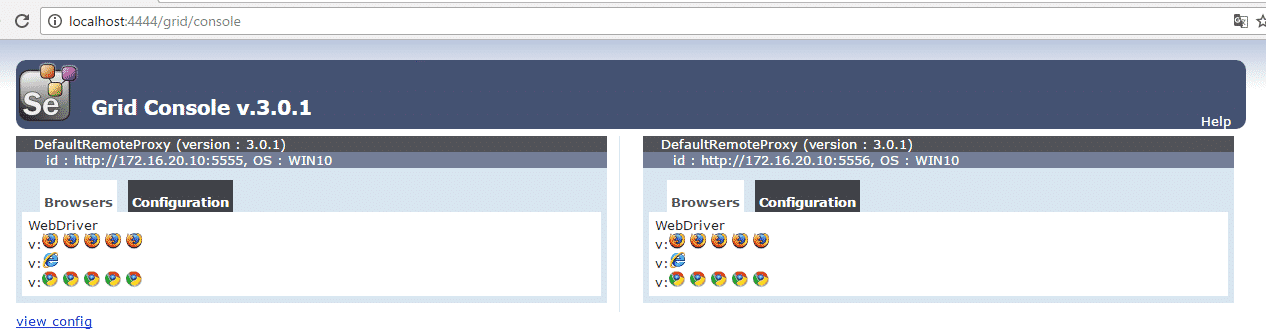
Our setup will be like that; we will have two nodes and one hub. Each node has got 5 Chrome, 5 Firefox and 1 Internet Explorer browser instances. First node will use port 5555 and second one will use 5556. Thus, we will create two node JSON files. These are node1.json and node2.json. The only difference between these JSON files is port number.
node1.json
{

  "capabilities":

  [fusion_builder_container hundred_percent="yes" overflow="visible"][fusion_builder_row][fusion_builder_column type="1_1" background_position="left top" background_color="" border_size="" border_color="" border_style="solid" spacing="yes" background_image="" background_repeat="no-repeat" padding="" margin_top="0px" margin_bottom="0px" class="" id="" animation_type="" animation_speed="0.3" animation_direction="left" hide_on_mobile="no" center_content="no" min_height="none"][

    {

      "browserName": "firefox",

      "maxInstances": 5,

      "seleniumProtocol": "WebDriver"

    },

    {

      "browserName": "chrome",

      "maxInstances": 5,

      "seleniumProtocol": "WebDriver"

    },

    {

      "browserName": "internet explorer",

      "maxInstances": 1,

      "seleniumProtocol": "WebDriver"

    }

  ],

  "proxy": "org.openqa.grid.selenium.proxy.DefaultRemoteProxy",

  "maxSession": 5,

  "port": 5555,

  "register": true,

  "registerCycle": 5000,

  "hub": "http://localhost:4444",

  "nodeStatusCheckTimeout": 5000,

  "nodePolling": 5000,

  "role": "node",

  "unregisterIfStillDownAfter": 60000,

  "downPollingLimit": 2,

  "debug": false,

  "servlets" : [],

  "withoutServlets": [],

  "custom": {}

}
node2.json
{

  "capabilities":

  [

    {

      "browserName": "firefox",

      "maxInstances": 5,

      "seleniumProtocol": "WebDriver"

    },

    {

      "browserName": "chrome",

      "maxInstances": 5,

      "seleniumProtocol": "WebDriver"

    },

    {

      "browserName": "internet explorer",

      "maxInstances": 1,

      "seleniumProtocol": "WebDriver"

    }

  ],

  "proxy": "org.openqa.grid.selenium.proxy.DefaultRemoteProxy",

  "maxSession": 5,

  "port": 5556,

  "register": true,

  "registerCycle": 5000,

  "hub": "http://localhost:4444",

  "nodeStatusCheckTimeout": 5000,

  "nodePolling": 5000,

  "role": "node",

  "unregisterIfStillDownAfter": 60000,

  "downPollingLimit": 2,

  "debug": false,

  "servlets" : [],

  "withoutServlets": [],

  "custom": {}

}
We created two node JSON files. Our hub.JSON file remains same as shown below.
{

  "port": 4444,

  "newSessionWaitTimeout": -1,

  "servlets" : [],

  "withoutServlets": [],

  "custom": {},

  "capabilityMatcher": "org.openqa.grid.internal.utils.DefaultCapabilityMatcher",

  "throwOnCapabilityNotPresent": true,

  "cleanUpCycle": 5000,

  "role": "hub",

  "debug": false,

  "browserTimeout": 0,

  "timeout": 1800

}
In order to start Selenium Grid (hub and nodes) we should write .bat files. These are; startnode1.bat, startnode2.bat, starthub.bat and to trigger all of these .bat files with a single .bat file I will create a rungrid.bat file. All these .bat files is shown below.
java -jar selenium-server-standalone-3.0.1.jar -role hub -hubConfig hub.json
startnode1.bat

java -jar -Dwebdriver.gecko.driver=C:\Selenium\drivers\firefox\geckodriver.exe -Dwebdriver.chrome.driver=C:\Selenium\drivers\chrome\chromedriver.exe selenium-server-standalone-3.0.1.jar -role node -nodeConfig node1.json

startnode2.bat
java -jar -Dwebdriver.gecko.driver=C:\Selenium\drivers\firefox\geckodriver.exe -Dwebdriver.chrome.driver=C:\Selenium\drivers\chrome\chromedriver.exe selenium-server-standalone-3.0.1.jar -role node -nodeConfig node2.json
rungrid.bat

start starthub.bat

start startnode1.bat

start startnode2.bat
After these settings our C:\Selenium\Grid folder will look like below.
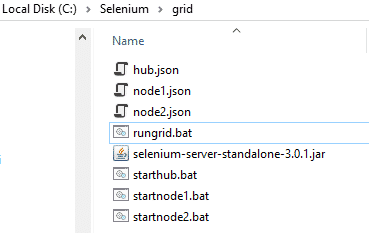
When we run “rungrid.bat” file it starts hub a nd nodes consecutively. After that, when you go to http://localhost:4444/grid/console you will see that two nodes registered to one hub as shown below.
Now, we are ready to code parallel test execution with our grid setup. I will show you two techniques to run your selenium tests with JUnit.
JUnit Parallel Test Execution Techniques
1) Run Selenium Tests in Parallel using JUnit’s Parallel Computer Class
ParallelComputer documentation is here: http://junit.org/junit4/javadoc/4.12/org/junit/experimental/ParallelComputer.html
By using below logic you can run your junit cases in parallel.
@Test

    public void runAllTests() {

        Class<?>[] classes = {ParallelTest1.class,ParallelTest2.class};

        // ParallelComputer(true,true) will run all classes and methods

        // in parallel.  (First arg for classes, second arg for methods)

        // I set true, true this means classes and methods runs in parallel.

        JUnitCore.runClasses(new ParallelComputer(true, true), classes);

    }
In above method first parameter of ParallelComputer() is for classes and second one is for methods. Here, I will run classes and methods in parallel. Because I set both parameters as true.
Now, Lets prepare a test scenario and then write its code.
Test Scenario:
- In first test Class;
- Open Facebook with Chrome in first test method
- Open Amazon with Firefox in second test method
- In second test Class;
- Open Yahoo with Chrome.
We have two test classes. In first test class, we have two test methods and in second one we have one test method.
Test Code:
I used 4 classes for this test. First one is DriverManager, it sets which browser driver will be used for the test. GridParallelComputerTest class modifies ParallelComputer class and runs the tests in parallel, the other two classes are test classes, ParallelTest1 and ParallelTest2.
import org.openqa.selenium.Platform;

import org.openqa.selenium.WebDriver;

import org.openqa.selenium.remote.DesiredCapabilities;

import org.openqa.selenium.remote.RemoteWebDriver;

import java.net.MalformedURLException;

import java.net.URL;

/**

 * Created by ONUR on 24.11.2016.

 */

//Driver Manager Class

public class DriverManager {

    public WebDriver driver;

    public WebDriver getDriver(String browser) throws MalformedURLException {

        //Set Browser Type

        DesiredCapabilities caps = null;

        if (browser == "chrome") {

            caps = DesiredCapabilities.chrome();

        } else if (browser == "firefox") {

            caps = DesiredCapabilities.firefox();

        }

        caps.setPlatform(Platform.WINDOWS);

        return driver = new RemoteWebDriver(new URL("http://localhost:4444/wd/hub"), caps);

    }

}
import org.junit.After;

import org.junit.Before;

import org.junit.Test;

import org.junit.experimental.ParallelComputer;

import org.junit.runner.JUnitCore;

import org.openqa.selenium.By;

import org.openqa.selenium.Platform;

import org.openqa.selenium.WebDriver;

import org.openqa.selenium.WebElement;

import org.openqa.selenium.remote.DesiredCapabilities;

import org.openqa.selenium.remote.RemoteWebDriver;

import java.net.MalformedURLException;

import java.net.URL;

/**

 * Created by ONUR on 20.11.2016.

 */

public class GridParallelComputerTest {

    /* ~~~~~~Description~~~~~~

    Run All Test in Parallel with JUnit's ParallelComputer feature.

    By using below logic you can run your junit cases in parallel.

    Class[] cls={test1.class,test2.class,test3.class,test4.class};

    JUnitCore.runClasses(new ParallelComputer(true,true),cls);

    In above method first parameter of ParallelComputer() indicates classes and second one is for methods.

    Here I'm running classes and methods in parallel.

    ParallelComputer Class documentation is below:

    http://junit-team.github.io/junit/javadoc/4.10/org/junit/experimental/ParallelComputer.html

    */

    @Test

    public void runAllTests() {

        Class<?>[] classes = {ParallelTest1.class,ParallelTest2.class};

        // ParallelComputer(true,true) will run all classes and methods

        // in parallel.  (First arg for classes, second arg for methods)

        // I set true, true this means classes and methods runs in parallel.

        JUnitCore.runClasses(new ParallelComputer(true, true), classes);

    }

}
import org.junit.After;

import org.junit.Test;

import java.net.MalformedURLException;

/**

 * Created by ONUR on 24.11.2016.

 */

public  class ParallelTest1 extends DriverManager {

        //Chrome Test

        @Test

        public void testChrome1() throws MalformedURLException {

            driver = new DriverManager().getDriver("chrome");

            driver.navigate().to("http://www.facebook.com/");

            driver.manage().window().maximize();

        }

        //Firefox Test

        @Test

        public void testFirefox1() throws MalformedURLException {

            driver = new DriverManager().getDriver("firefox");

            driver.navigate().to("http://www.amazon.com/");

            driver.manage().window().maximize();

        }

        @After

        public void quitDriver() {

            driver.quit();

        }

}
import org.junit.After;

import org.junit.Test;

import java.net.MalformedURLException;

/**

 * Created by ONUR on 24.11.2016.

 */

//Second Test Class

public  class ParallelTest2 extends DriverManager {

    //Chrome Test

    @Test

    public void testChrome2() throws MalformedURLException {

        driver = new DriverManager().getDriver("chrome");

        driver.navigate().to("http://www.yahoo.com/");

        driver.manage().window().maximize();

    }

    @After

    public void quitDriver() {

        driver.quit();

    }

}
2) Run Selenium Tests in Parallel using JUnit’s Parametrized Class
Parallellized class is a helper class and you can define threat count in this class’s ThreadPoolScheduler method. In GridParallelTestBase class, I set which browsers I will use for the test by using @Parameterized.Parameters annotation. Here, I added Chrome and Firefox browsers. Thus, our test will open two browsers and they will be Chrome and Firefox.
I created DesiredCapabilities and RemoteWebdriver below @Before annotation. All test setup is done in this Class’s setup method and I also added a screenshot capture method in this class.
GridParallelTest class is our test class and it extends GridParallelTestBase class. In its test method, I set the platform, go to yahoo.com, print the yahoo’s title, and take a screenshot.
import org.junit.runners.Parameterized;

import org.junit.runners.model.RunnerScheduler;

import java.util.concurrent.ExecutorService;

import java.util.concurrent.Executors;

import java.util.concurrent.TimeUnit;

public class Parallelized extends Parameterized {

    private static class ThreadPoolScheduler implements RunnerScheduler {

        private ExecutorService executor;

        //You can set number of parallel threads in this method.

        //I set 5 and our grid will run 5 parallel test execution.

        public ThreadPoolScheduler() {

            String threads = System.getProperty("junit.parallel.threads", "5");

            int numThreads = Integer.parseInt(threads);

            executor = Executors.newFixedThreadPool(numThreads);

        }

        //@Override

        public void finished() {

            executor.shutdown();

            try {

                executor.awaitTermination(10, TimeUnit.MINUTES);

            } catch (InterruptedException exc) {

                throw new RuntimeException(exc);

            }

        }

        //@Override

        public void schedule(Runnable childStatement) {

            executor.submit(childStatement);

        }

    }

    public Parallelized(Class<?> klass) throws Throwable {

        super(klass);

        setScheduler(new ThreadPoolScheduler());

    }

}
import org.apache.commons.io.FileUtils;

import org.junit.Before;

import org.junit.runners.Parameterized;

import org.openqa.selenium.*;

import org.openqa.selenium.firefox.FirefoxDriver;

import org.openqa.selenium.firefox.FirefoxProfile;

import org.openqa.selenium.remote.Augmenter;

import org.openqa.selenium.remote.CapabilityType;

import org.openqa.selenium.remote.DesiredCapabilities;

import org.openqa.selenium.remote.RemoteWebDriver;

import java.io.File;

import java.io.IOException;

import java.net.URL;

import java.util.LinkedList;

/**

 * Created by onurb on 26-Nov-16.

 */

public class GridParallelTestBase {

    //Declare DesiredCapabilities configuration variables

    protected String browserName;

    protected Platform platformName;

    protected WebDriver driver;

    //Hold all Configuration values in a LinkedList

    //Extra Usage Information: http://www.swtestacademy.com/junit-parametrized-tests/

    @Parameterized.Parameters

    public static LinkedList<String[]> getEnvironments() throws Exception {

        LinkedList<String[]> env = new LinkedList<String[]>();

        env.add(new String[]{"firefox"});

        env.add(new String[]{"chrome"});

        //add more browsers here

        return env;

    }

    //Constructor

    public GridParallelTestBase(String browserName) {

        this.browserName = browserName;

    }

    public void setPlatform (Platform platform) {

        platformName = platform;

    }

    @Before

    public void setUp() throws Exception {

        //Set DesiredCapabilities

        DesiredCapabilities capabilities = new DesiredCapabilities();

        //Firefox Profile Settings

        if (browserName.equals("firefox")) {

            FirefoxProfile profile = new FirefoxProfile();

            //Accept Untrusted Certificates

            profile.setAcceptUntrustedCertificates(true);

            profile.setAssumeUntrustedCertificateIssuer(false);

            //Use No Proxy Settings

            profile.setPreference("network.proxy.type", 0);

            //Set Firefox profile to capabilities

            capabilities.setCapability(FirefoxDriver.PROFILE, profile);

        }

        //Set Platform

        capabilities.setPlatform(platformName);

        //Set BrowserName

        capabilities.setCapability("browserName", browserName);

        capabilities.setCapability("build", "JUnit-Parallel");

        driver = new RemoteWebDriver(new URL("http://localhost:4444/wd/hub"), capabilities);

    }

    //TakeScreenShot

    public void takeScreenShot () {

        driver = new Augmenter().augment(driver);

        File srcFile = ((TakesScreenshot) driver).getScreenshotAs(OutputType.FILE);

        String screenshotName = getClass().getSimpleName();

        System.out.println("ScreenShotName: " + screenshotName);

        try {

            FileUtils.copyFile(srcFile, new File("screenshotName.png"));

        } catch (IOException e) {

            e.printStackTrace();

        }

    }

}
import org.junit.After;

import org.junit.Test;

import org.junit.runner.RunWith;

import org.openqa.selenium.Platform;

@RunWith(Parallelized.class)

public class GridParallelTest extends GridParallelTestBase{

    //Constructor

    public GridParallelTest(String browserName) {

        super(browserName);

    }

    @Test

    public void parallelGridTest() throws Exception {

        //Set Platform Name

        setPlatform(Platform.WIN10);

        //Go to Amazon.com

        System.out.println("Test is started for: "+ browserName);

        driver.get("http://www.yahoo.com");

        System.out.println("Page title is: " + driver.getTitle());

        System.out.println("Test is finished for: "+ browserName);

        //ScreenShot Section

        takeScreenShot();

    }

    @After

    public void tearDown() throws Exception {

        driver.quit();

    }

}
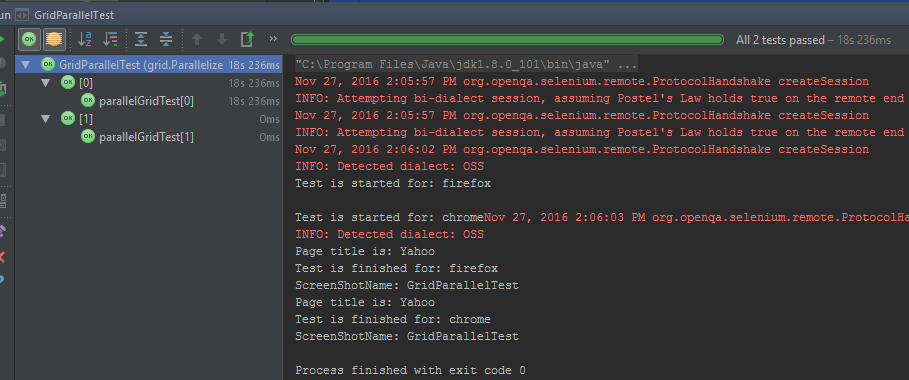
After run this test you will see that two browsers (Chrome & Firefox) will open in parallel and tests will be passed.
Selenium 15: How to Run Parallel Tests Using Selenium Grid and JUnit的更多相关文章
- Parallel Tests
Parallel Tests Parallel Android Tests Appium provides a way for users to automate multiple Android s ...
- Selenium终极自动化测试环境搭建(二)Selenium+Eclipse+Python
Selenium终极自动化测试环境搭建(二)Selenium+Eclipse+Python 前面举例了Selenium+Eclipse+Junit+TestNG自动化测试环境的搭建,在前一篇的基础上, ...
- Selenium终极自动化测试环境搭建(一) Selenium+Eclipse+Junit+TestNG
Selenium终极自动化测试环境搭建(一)Selenium+Eclipse+Junit+TestNG 第一步 安装JDK JDk1.7. 下载地址:http://www.oracle.com/tec ...
- No tests found with test runner 'JUnit 3'
报异常:No tests found with test runner 'JUnit 3' 解决方案: 主要因为你当前建的JUnit类是3的版本,将该类备份,重新创建一个类. 1.右键目录New--O ...
- python+selenium+bs4爬取百度文库内文字 && selenium 元素可以定位到,但是无法点击问题 && pycharm多行缩进、左移
先说一下可能用到的一些python知识 一.python中使用的是unicode编码, 而日常文本使用各类编码如:gbk utf-8 等等所以使用python进行文字读写操作时候经常会出现各种错误, ...
- Unable to run Kiwi tests on iOS8 device
本文转载至 http://stackoverflow.com/questions/25871601/unable-to-run-kiwi-tests-on-ios8-device 5down vote ...
- ASP.Net MVC3 - The easier to run Unit Tests by moq #Reprinted#
From: http://www.cnblogs.com/techborther/archive/2012/01/10/2317998.html 前几天调查完了unity.现在给我的任务是让我调查Mo ...
- 【Selenium】4.创建你的第一个Selenium IDE脚本
http://newtours.demoaut.com/ 这个网站将会用来作为我们测试的网址. 通过录制来创建一个脚本 让我们来用最普遍的方法——录制来创建一个脚本.然后,我们将会用回放的功能来执行录 ...
- 使用selenium时提示:ImportError:No module named selenium
问题分析: 用的是mac系统,已经通过sudo pip install -U selenium安装好了selenium, 但是无论用命令行还是用sublime导入selenium都会提示错误. 于是查 ...
随机推荐
- Javascript-do_while....
<!DOCTYPE html> <html> <head lang="en"> <meta charset="UTF-8&quo ...
- Javascript-可莱托指数判断
<!DOCTYPE html> <html> <head lang="en"> <meta charset="UTF-8&quo ...
- itextsharp display:none无效的bug
在使用itextsharp实现 html 2 pdf时,发现display:none无效.如 <div style="display: none">应该隐藏</d ...
- uvm设计分析——report
uvm_report实现中的类图,如下: 1)uvm_component均从uvm_report_object extend而来,其中定义了report_warning,error,info,fata ...
- QT5 QT4--LNK2019 无法解析的外部符号
新创建的工程 #include <QtWidgets/QApplication> #include <QtWidgets/QWidget> #include <QtWid ...
- mysql 问题:连不上
问题描述: 客户端报错: MySQL Authentication plugin ‘caching_sha2_password’ cannot be loaded 解决方式: ALTER USER ' ...
- Linux Shell入门
转自:http://www.mamicode.com/info-detail-605431.html
- 20165215 预备作业3 Linux安装及学习
Linux安装 根据老师的链接,我VirtualBox下载的是5.2.6的版本,下载Ubuntu时使用老师的链接总是出现404 Not found的页面,于是我采用其它方式下载了16.04.3的版本 ...
- 关于spark进行实时日志解析,保存hbase与mysql
进行地域分析 rowkey=中国_上海_201901016 value=访问次数 areaStartAmt.foreachRDD(rdd => { rdd.foreachPartition(pa ...
- The logback manual #02# Architecture
索引 Logback's architecture Logger, Appenders and Layouts Effective Level(有效等级)又名Level Inheritance Ret ...