
我的QML
1、键盘加Text
import QtQuick 2.7

import QtGraphicalEffects 1.0

Rectangle{

    width:;

    height:;

    color:"#C0C0C0";

    focus:true;

    Keys.enabled:true;

    Keys.onEscapePressed:Qt.quit();

    Keys.onBackPressed:Qt.quit();

    Keys.onPressed:{

        switch(event.key){

        case Qt.Key_0:

        case Qt.Key_1:

        case Qt.Key_2:

        case Qt.Key_3:

        case Qt.Key_4:

        case Qt.Key_5:

        case Qt.Key_6:

        case Qt.Key_7:

        case Qt.Key_8:

        case Qt.Key_9:

            event.accepted=true;

            keyView.text = event.key-Qt.Key_0;

            break;

        }

    }

    Text{

        id:keyView;

        font.bold:true;

        font.pixelSize:;

        text:"Waiting";

        anchors.centerIn:parent;

        color:"#FF0000";

    }

    Glow{//光影

        anchors.fill:keyView;

        radius:;

        samples:;

        color:"white";

        source:keyView;

    }

}

2、按钮+信号
import QtQuick 2.7

import QtQuick.Controls 2.2

Rectangle{

    width:;

    height:;

    color:"gray";

    Button{

        text:"Quit";

        anchors.centerIn:parent;

        onClicked:Qt.quit();

    }

}

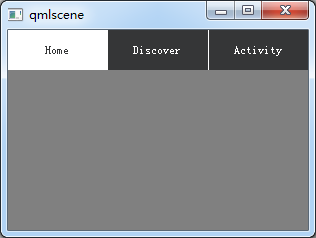
3、TabBar
import QtQuick 2.7

import QtQuick.Controls 2.2

Rectangle{

    width:;

    height:;

    color:"gray";

    TabBar {

      id:bar

      width:parent.width

      TabButton {

        text:qsTr("Home")

      }

      TabButton {

        text:qsTr("Discover")

      }

      TabButton {

        text:qsTr("Activity")

      }

   }
}
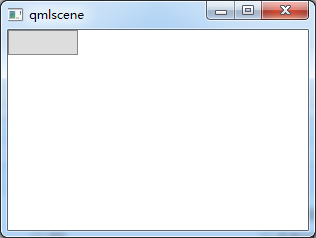
4、按钮+Compnent+风格
import QtQuick 2.2

import QtQuick.Controls 1.1

import QtQuick.Controls.Styles 1.4

Rectangle{

    width:;

    height:;

    Component{

    id:btnStyle;

    ButtonStyle{

        background:Rectangle{

            implicitWidth:;

            implicitHeight:;

            color:"#DDDDDD";

            border.width:control.pressed?:;

            border.color:(control.hovered||control.pressed)?"green":"#888888";

            }

        }

    }

    Button{

        style:btnStyle;

    }

}
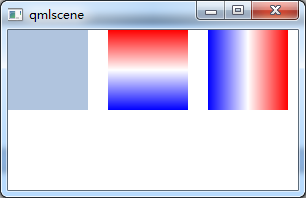
5、矩形+颜色渐变+旋转
转自:https://blog.csdn.net/qq21497936/article/details/78526200
import QtQuick 2.2

import QtQuick.Controls 1.1

Item {

    Rectangle {

        x: ; width: ; height:

        color: "lightsteelblue"

    }

    Rectangle {

        x: ; width: ; height:

        gradient: Gradient {

            GradientStop { position: 0.0; color: "red" }

            GradientStop { position: 0.5; color: "white" }

            GradientStop { position: 1.0; color: "blue" }

        }

    }

    Rectangle {

        x: ; width: ; height:

        rotation:  // 旋转90度

        gradient: Gradient { // 只能从上到下,若需要横向则需要旋转90°

            GradientStop { position: 0.0; color: "red" }

            GradientStop { position: 0.5; color: "white" }

            GradientStop { position: 1.0; color: "blue" }

        }

    }

}
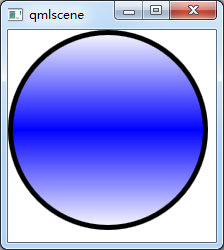
6、通过设置半径来画圆
转自:https://blog.csdn.net/qq21497936/article/details/78526200

import QtQuick 2.2

import QtQuick.Controls 1.1
Item {

    Rectangle {

        id: rect1;

        width: ;

        height: ;

        radius: width/;

        gradient: Gradient {

            GradientStop { position: 0.0; color: "white"; }

            GradientStop { position: 0.5; color: "blue"; }

            GradientStop { position: 1.0; color: "white"; }

        }

        border.width: ;

        border.color: "black";

    }

}
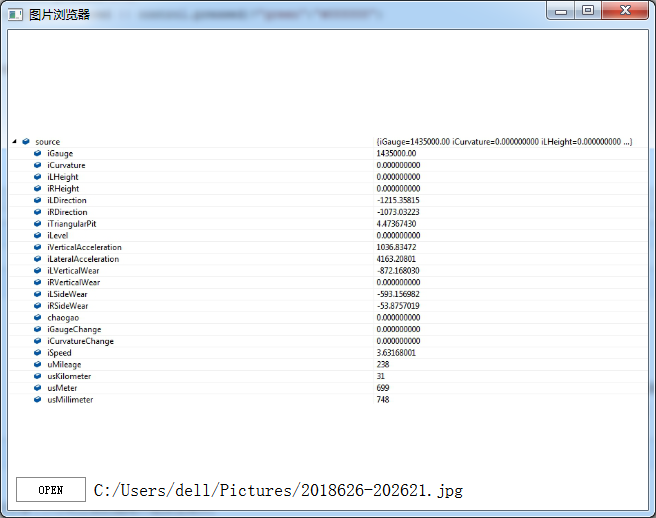
7、简单的图片浏览器
import QtQuick 2.2

import QtQuick.Window 2.1

import QtQuick.Controls 1.2

import QtQuick.Controls.Styles 1.2

import QtQuick.Dialogs 1.1

Window {

    visible: true;

    width: ;

    height: ;

    title: "图片浏览器";

    minimumWidth: ;

    minimumHeight: ;

    BusyIndicator{

        id: busy;

        running: false;

        anchors.centerIn: parent;

        z:;

    }

    Text {

        id: stateLabel;

        visible: false;

        anchors.centerIn: parent;

        z:;

    }

    Image {

        id: iamgeViewr;

        asynchronous: true;

        cache:false;

        anchors.fill: parent;

        fillMode: Image.PreserveAspectFit;

        onStatusChanged: {

            if(iamgeViewr.status===Image.Loading){

                busy.running = true;

                stateLabel.visible = false;

            }

            else if(iamgeViewr.status===Image.Ready){

                busy.running=false;

            }

            else if(iamgeViewr.status===Image.Error)

            {

                busy.running = false;

                stateLabel.visible = true;

                stateLabel.text = "ERROR";

            }

        }

    }

    Text {

        id: imagePath;

        anchors.left: openFileBtn.right;

        anchors.leftMargin: ;

        anchors.verticalCenter: openFileBtn.verticalCenter;

        font.pixelSize: ;

    }

    FileDialog{

        id:fileDialog;

        title: "open a picture";

        nameFilters: ["Image Files(*.jpg *.png *.gif)"];

        onAccepted: {

            iamgeViewr.source = fileDialog.fileUrl;

            var imageFile = String(fileDialog.fileUrl);

            imagePath.text = imageFile.slice();

        }

    }

    Button{

        id:openFileBtn;

        text:"OPEN";

        anchors.left: parent.left;

        anchors.leftMargin: ;

        anchors.bottom: parent.bottom;

        anchors.bottomMargin: ;

        style:ButtonStyle{

            background: Rectangle{

                implicitWidth: ;

                implicitHeight: ;

                color:"#FFFFFF";

                border.width: control.pressed?:;

                border.color: (control.hovered || control.pressed)?"green":"#888888";

            }

        }

        onClicked: fileDialog.open();

        z:;

    }

}
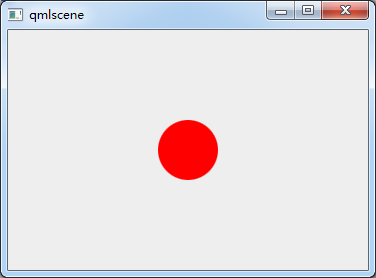
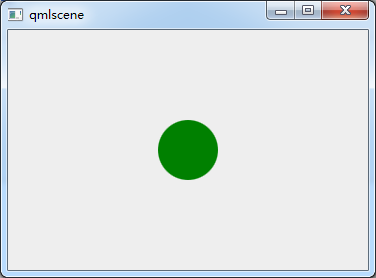
8、颜色动画ColorAnimation
import QtQuick 2.2

Rectangle{

    id: rootItem

    width:

    height:

    color: "#EEEEEE"

    Rectangle{

        id: rect

        width:

        height:

        anchors.centerIn: parent

        radius:

        color: "red"

        MouseArea{

            id: mouseArea

            anchors.fill: parent

            onClicked: ColorAnimation{

                target: rect

                property: "color"

                to: "green"

                duration:

            }

        }

    }

}

9、MouseArea拖动
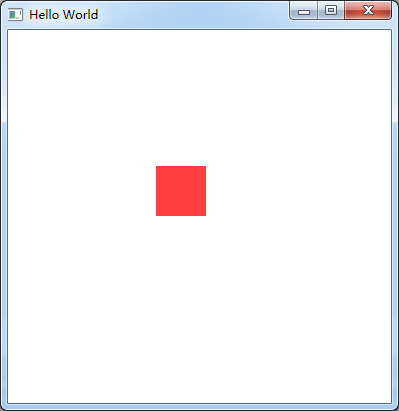
import QtQuick 2.6

import QtQuick.Window 2.2

import QtQuick.Controls 1.4

Window {

    visible: true

    width:

    height:

    title: qsTr("Hello World")

    Rectangle {

         id: container

         width: ; height:

         Rectangle {

             id: rect

             width: ; height:

             color: "red"

             opacity: (600.0 - rect.x) /

             MouseArea {

                 anchors.fill: rect

                 drag.target: rect

                 drag.axis:Drag.XAndYAxis

                 drag.minimumX:

                 drag.maximumX: container.width - rect.width

                 drag.minimumY:

                 drag.maximumY: container.width - rect.width

             }

         }

     }

}
ps:试过给Window或者ApplicationWindow添加MouseArea来移动整个窗口,但是失败了。
分析:MouseArea只能移动有父类的Item
10、Keys
import QtQuick 2.6

import QtQuick.Window 2.2

import QtQuick.Controls 1.4

Window {

    id:main;

    visible: true

    width:

    height:

    Rectangle{

        width: ;

        height: ;

        anchors.fill: parent;

        focus:true;//获取焦点

        Keys.enabled: true;//使能按键

        Keys.forwardTo: text;//将按键事件传递到text对象

        Rectangle {

            id: text;

            width: ;

            height: ;

            color: "red";

            Keys.enabled: true;

            Keys.onPressed: {

                switch(event.key){

                case Qt.Key_Left:

                    x-=;

                    break;

                case Qt.Key_Right:

                    x+=;

                    break;

                case Qt.Key_Down:

                    y+=;

                    break;

                case Qt.Key_Up:

                    y-=;

                    break;

                default:

                    break;

                }

                event.accepted = true;//在这里把按键事件吃了,不再向下传递

            }

        }

    }

}
我的QML的更多相关文章
- QML 从无到有 3 (自动更新)
新的需求出来啦,需要自动更新功能,不怕程序升级了. 自动更新,QML不好写,需要c++来辅助,这里就涉及QML中调用c++功能(这里就不写了,百度一下,很多). 思路:获取版本>下载程序> ...
- QML 从无到有 2 (移动适配)
随着项目深入,需要移植到安卓上,问题来了,QML安卓适配! 幸好PC端程序和手机屏幕长宽比例相似.虽然单位像素,尺寸不同,通过比例缩放,可以实现组件PC和安卓通用代码. 第一步:定义全局的转换函数(3 ...
- QML 从无到有 (基础)
小公司,没办法,什么都得自己亲自来. 服务端是MVC,现在需要可PC客户端和移动APP. 考虑到网页应用有很多界面框架,可以做出很漂亮的界面来,就尝试着使用nwjs来实现,可是在使用了2天的nwjs后 ...
- QML杂记
1.QML编写可视化元素,运行后程序窗口上无显示.检查电脑的显卡是否支持OpenGL,如果支持请更新显卡驱动. 2.加载图片显示QML Image: Cannot open.解决在qml.qrc右击添 ...
- Qml 写的弹出层控件
QML弹出窗口组件,灯箱效果.动画效果,可拖拽 核心思路:一个mask层,一个最顶层,都用rectangle,禁止事件穿透 使用 Popup { id: popup width: 200; heigh ...
- Qt qml 单例模式
Qt qml 单例模式,没什么好说的,看代码吧.单例模式很适合做全局的配置文件. [示例下载] http://download.csdn.net/detail/surfsky/8539313 [以下是 ...
- Qt qml listview 列表视图控件(下拉刷新、上拉分页、滚动轴)
Qt qml listview下拉刷新和上拉分页主要根据contentY来判断.但要加上顶部下拉指示器.滚动条,并封装成可简单调用的组件,着实花了我不少精力:) [先看效果] [功能] 下拉刷新 ...
- Qt qml treeview 树控件
qml并没有提供树控件,只能自己写了.model仍然用ListModel对象,弄成层级的就行.delegate必须用loader动态的增加子控件,如此而已. [先看效果] [下载] http://do ...
- qt qml qchart 图表组件
qt qml qchart 图表组件 * Author: Julien Wintz * Created: Thu Feb 13 23:41:59 2014 (+0100) 这玩意是从chart.js迁 ...
- qt qml fuzzyPanel 毛玻璃效果
毛玻璃效果,用qml来写代码真是简短,大爱qml:) [下载地址]http://download.csdn.net/detail/surfsky/8426641 [核心代码] Rectangle{ c ...
随机推荐
- 29.html5 移动端开发总结
手机与浏览器 浏览器: 移动端开发主要针对手机,ipad等移动设备,随着地铁里的低头族越来越多,移动端开发在前端的开发任务中站的比重也越来越大.各种品牌及尺寸的手机也不尽相同.尺寸不同就算了分辨率,视 ...
- System.BadImageFormatException”C#报错
在平常的开发中或多或少会遇到一些问题,而本次向小编这里是自己刚刚解决的一个问题,贴出来与大家分享一下,纠结了一个下午,终于解决了,是有关平台的一个报错问题. 方法/步骤 报错”“Syste ...
- 切记!pycharm向mysql数据库添加数据过程
python 导入包import requests 以爬取腾讯招聘网的招聘信息为例:(完整代码) import requestsfrom lxml import etreeimport pymys ...
- IIS转发需要的模块
1.Application Request Routing https://www.iis.net/downloads/microsoft/application-request-routing 2 ...
- AngularJs ng-change事件/指令(转)
from:http://blog.csdn.net/u011127019/article/details/52564111 定义和用法 ng-change 指令用于告诉 AngularJS 在 HTM ...
- Discuz!代码大全
1.[ u]文字:在文字的位置可以任意加入您需要的字符,显示为下划线效果. 2.[ align=center]文字:在文字的位置可以任意加入您需要的字符,center位置center表示居中,left ...
- AssetBoundle加载非预设资源
1.定义一个协程LoadNonObjFromAB IEnumerator LoadNonObjFromAB(string ABURL, GameObject go, string assetName) ...
- materials
http://interactivepython.org/runestone/static/pythonds/index.html https://blog.michaelyin.info/scrap ...
- VIM For Windows 1
some tips for using vim in windows. 1,download the software vim and install it, you can go to the Of ...
- KKT条件原理
问题引入 max f(x, y) s.t. g(x,y) <= 0 几何解释 a. g(x ,y) <= 0为上图中z = 0平面中的圆,圆的边表示g(x, y) = 0,圆的内部表示g ...