
nginx实现动静分离的负载均衡集群
实战:
一、源码编译安装nginx
[root@tiandong63 ~]#yum groupinstall "Development Tools" "Development Libraries" -y 安装开发包
[root@tiandong63 ~]#yum install gcc gcc-c++ autoconf automake zlib zlib-devel openssl openssl-devel pcre* -y 安装依赖包
[root@tiandong63 ~]#tar -zxvf nginx-1.9.4.tar.gz -C /usr/local/src/
[root@tiandong63 ~]#cd /usr/local/src/
[root@tiandong63 src]#cd nginx-1.9.4/
[root@tiandong63 nginx-1.9.4]#./configure --prefix=/usr/local/nginx --with-http_dav_module --with-http_stub_status_module --with-http_addition_module --with-http_sub_module --with-http_flv_module --with-http_mp4_module
参数:--with-http_dav_module 启用ngx_http_dav_module支持(增加PUT,DELETE,MKCOL:创建集合,COPY和MOVE方法)默认情况下为关闭,需编译开启--with-http_stub_status_module 启用ngx_http_stub_status_module支持(获取nginx自上次启动以来的工作状态)--with-http_addition_module 启用ngx_http_addition_module支持(作为一个输出过滤器,支持不完全缓冲,分部分响应请求)--with-http_sub_module 启用ngx_http_sub_module支持(允许用一些其他文本替换nginx响应中的一些文本)--with-http_flv_module 启用ngx_http_flv_module支持(提供寻求内存使用基于时间的偏移量文件)--with-http_mp4_module 启用对mp4文件支持(提供寻求内存使用基于时间的偏移量文件
[root@tiandong63 nginx-1.9.4]#make && make install
[root@tiandong63 nginx-1.9.4]#useradd -M -u 8001 -s /sbin/nologin nginx
[root@tiandong63 ~]# /usr/local/nginx/sbin/nginx 启动nginx
[root@tiandong63 ~]# netstat -antup|grep nginx
tcp 0 0 0.0.0.0:80 0.0.0.0:* LISTEN 42350/nginx
测试nginx

二、nginx服务器日常操作:
配置nginx为分发器实现动静分离
vim /usr/local/nginx/conf/nginx.conf
2 user nginx nginx;
43 location / {
44 root html;
45 index index.html index.htm;
46 if ($request_uri ~* \.html$){
47 proxy_pass http://htmlservers;
48 }
49 if ($request_uri ~* \.php$){
50 proxy_pass http://phpservers;
51 }
52 proxy_pass http://picservers;
53 }
123 upstream htmlservers { #定义负载均衡服务器组名称
124 server 192.168.199.4:80;
125 server 192.168.199.5:80;
126 }
127 upstream phpservers{
128 server 192.168.199.4:80;
129 server 192.168.199.5:80;
130 }
131 upstream picservers {
132 server 192.168.199.4:80;
133 server 192.168.199.5:80;
134 }
135 }
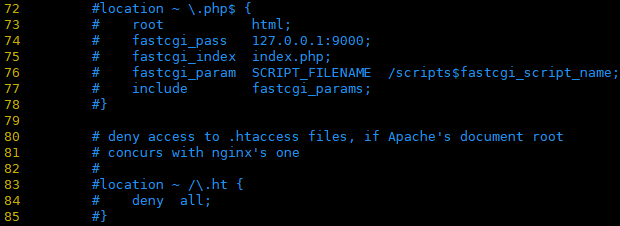
把一下文件注释了,否组php文件直接在nginx服务器上解析了,不在解析给后端的服务器。
[root@tiandong63 ~]# ln -s /usr/local/nginx/sbin/* /usr/bin/
[root@tiandong63 ~]# nginx -t
nginx: the configuration file /usr/local/nginx/conf/nginx.conf syntax is ok
nginx: configuration file /usr/local/nginx/conf/nginx.conf test is successful
[root@tiandong63 ~]# nginx -s reload
三、配置后端服务器(tiandong64和tiandong65上面配置一样):
[root@tiandong64 ~]# yum install php httpd -y
[root@tiandong65 ~]# yum -y install php httpd -y
[root@tiandong64 ~]# cd /var/www/html/
[root@tiandong64 html]# more index.html
192.168.199.4
[root@tiandong64 html]# more test.php
192.168.199.4
<?php
phpinfo();
?>
[root@tiandong64 html]#
[root@tiandong64 html]# ll
total 12
-rw-r--r-- 1 root root 14 Mar 20 00:24 index.html
-rw-r--r-- 1 root root 790 Dec 24 2018 pic.PNG
-rw-r--r-- 1 root root 35 Mar 20 00:25 test.php
重启Apache服务:
[root@tiandong64 ~]# /etc/init.d/httpd restart
[root@tiandong65 ~]# /etc/init.d/httpd restart
四、测试:
测试html页面:
[root@tiandong66 ~]# curl 192.168.199.3
192.168.199.5
[root@tiandong66 ~]# curl 192.168.199.3
192.168.199.4
[root@tiandong66 ~]# curl 192.168.199.3
192.168.199.5
[root@tiandong66 ~]# curl 192.168.199.3
192.168.199.4
测试php页面:

测试服务器性能:
[root@tiandong66 ~]# ab -n 1000 -c 1000 http://192.168.199.3/index.html 运行正常
[root@tiandong66 ~]# ab -n 2000 -c 2000 http://192.168.199.3/index.html 运行报错
This is ApacheBench, Version 2.3 <$Revision: 1430300 $>
Copyright 1996 Adam Twiss, Zeus Technology Ltd, http://www.zeustech.net/
Licensed to The Apache Software Foundation, http://www.apache.org/
Benchmarking 192.168.199.3 (be patient)
socket: Too many open files (24) #测试时,一次打开的socket文件太多。系统默认的一次打开的最多问1024个
[root@tiandong66 ~]# ulimit -n 10240
[root@tiandong63 ~]# ulimit -n 10240
五、nginx负载的五中策略设置方法:
1、轮询(默认)
upstream htmlservers { #定义负载均衡服务器组名称
server 192.168.199.4:80;
server 192.168.199.5:80;
}
2、指定权重(指定轮询几率,weight和访问比例成正比,用户后端服务器性能不均的情况)
upstream htmlservers { #定义负载均衡服务器组名称
server 192.168.199.4:80 weight=1;
server 192.168.199.5:80 weight=2;
}
3、IP绑定 ip_hash
每个请求按访问ip的hash结果分配,这样每个访客固定访问一个后端服务器,可以解决session的问题。
upstream backserver {
ip_hash;
server 192.168.199.4:80;
server 192.168.199.5:80;
}
4、fair(第三方)
按后端服务器的响应时间来分配请求,响应时间短的优先分配。
upstream backserver {
server server1;
server server2;
fair;
}
5、url_hash(第三方)
按访问url的hash结果来分配请求,使每个url定向到同一个后端服务器,后端服务器为缓存时比较有效。
upstream backserver {
server squid1:3128;
server squid2:3128;
hash $request_uri;
hash_method crc32;
}
六、故障演练
当其中一台Apache宕机
[root@tiandong64 ~]# /etc/init.d/httpd stop
Stopping httpd: [ OK ]
[root@tiandong66 ~]# curl 192.168.199.3
192.168.199.4
[root@tiandong66 ~]# curl 192.168.199.3
192.168.199.5
[root@tiandong66 ~]# curl 192.168.199.3
192.168.199.4
[root@tiandong66 ~]# curl 192.168.199.3
192.168.199.5
[root@tiandong66 ~]# curl 192.168.199.3
192.168.199.5
[root@tiandong66 ~]# curl 192.168.199.3
192.168.199.5
[root@tiandong66 ~]# curl 192.168.199.3
192.168.199.5
一直访问的是另外一台机器
故障恢复:
[root@tiandong66 ~]# curl 192.168.199.3
192.168.199.5
[root@tiandong66 ~]# curl 192.168.199.3
192.168.199.4
[root@tiandong66 ~]# curl 192.168.199.3
192.168.199.5
[root@tiandong66 ~]# curl 192.168.199.3
192.168.199.4
[root@tiandong66 ~]# curl 192.168.199.3
192.168.199.5
OK!!!!
nginx实现动静分离的负载均衡集群的更多相关文章
- 使用nginx实现动静分离的负载均衡集群
一.概述: LB负载均衡集群分两类: LVS (四层)和 nginx或haproxy (七层) 客户端通过访问分发器的VIP来访问网站 |现在应用更复杂,比如现在网站页面有: .php .html . ...
- Nginx + Tomcat 动静分离实现负载均衡(转)
0.前期准备 使用Debian环境.安装Nginx(默认安装),一个web项目,安装tomcat(默认安装)等. 1.一份Nginx.conf配置文件 # 定义Nginx运行的用户 和 用户组 如果对 ...
- Nginx + Tomcat 动静分离实现负载均衡
0.前期准备 使用Debian环境.安装Nginx(默认安装),一个web项目,安装tomcat(默认安装)等. 1.一份Nginx.conf配置文件 # 定义Nginx运行的用户 和 用户组 如果对 ...
- 【转载】Nginx+Tomcat 动静分离实现负载均衡
0.前期准备 使用Debian环境.安装Nginx(默认安装),一个web项目,安装tomcat(默认安装)等. 1.一份Nginx.conf配置文件 1 # 定义Nginx运行的用户 和 用户组 如 ...
- 负载均衡 | Nginx+Tomcat 动静分离实现负载均衡
0.前期准备 使用Debian环境.安装Nginx(默认安装),一个web项目,安装tomcat(默认安装)等. 1.一份Nginx.conf配置文件 基本配置这个文件,就可以实现负载了.但是里面的各 ...
- Nginx+Keepalived搭建高可用负载均衡集群
本文的重点是Keepalived的配置,Nginx的配置就简略带过.软件:CentOS 7.2 / Nginx 1.12.2 / Keepalived 1.3.9 ha-01:192.168.1.97 ...
- Nginx 动静分离与负载均衡的实现
一.前提 企业中,随着用户的增长,数据量也几乎成几何增长,数据越来越大,随之也就出现了各种应用的瓶颈问题. 问题出现了,我们就得想办法解决,一般网站环境,均会使用LAMP或者LNMP,而我们对于网站环 ...
- Keepalived+Nginx实现高可用负载均衡集群
一 环境介绍 1.操作系统CentOS Linux release 7.2.1511 (Core) 2.服务keepalived+nginx双主高可用负载均衡集群及LAMP应用keepalived-1 ...
- Apache和Nginx负载均衡集群及测试分析
一.应用场景介绍 本文主要是介绍Apache和Tomcat在Linux环境下的安装讲解以及AJP协议动静分离负载均衡的实现,以及与Nginx负载性能比较.联网安装较为简单,故此处只说脱机的Linux环 ...
随机推荐
- Python 字符串——巧取值和列表——巧取值 对比
Python 字符串——巧取值和列表——巧取值 对比 1.字符串取值实例: samp_string = "Whatever you are, be a good one." for ...
- 完全卸载RabbitMQ和Erlang
要从计算机中完全卸载RabbitMQ和Erlang,请执行以下操作:(1)打开Windows控制面板,双击“程序和功能”. (2)在当前安装的程序列表中,右键单击RabbitMQ Server,然后单 ...
- Eclipse MyEclipse 反编译.class文件 myeclipse source not found
首先,需要下载两个必须的插件包. 一个是:准备反编译需要的jad.exe 下载地址:http://varaneckas.com/jad/ 二个是:反编译编辑器net.sf.jadclipse_3.3. ...
- 启动tomcat提示某个端口被占用
原文参见:https://www.cnblogs.com/liuyanxia/p/6755520.html 解决办法 找出占用1099端口的进程,进入windows命令,查看什么进程占用了1099端口 ...
- bootsctrap4 datepicker时间选择插件
现在网上基本都是v3的时间选择插件,花了点时间改了找了个v4能用的 bootstrap-datepicker <!DOCTYPE html> <html> <head&g ...
- Win10 通过附加进程调试时出现“此任务要求应用程序具有提升的权限”
最近有新人在使用vs调试时出现了“此任务要求应用程序具有提升的权限”的提示,每次调试vs就会重启一次. 问到我时,我经过查了一番资料才给解决掉了. 其实,问题主要是因为直接启动vs项目时没有足够的权限 ...
- 前端基础(六):Bootstrap框架
Bootstrap介绍 Bootstrap是Twitter开源的基于HTML.CSS.JavaScript的前端框架. 它是为实现快速开发Web应用程序而设计的一套前端工具包. 它支持响应式布局,并且 ...
- .NET SignalR中长连接与HUB连接的使用方式以及区别
1 using Microsoft.AspNet.SignalR; 2 using System; 3 using System.Collections.Generic; 4 using System ...
- java—锁的学习研究
摘抄自博客:https://www.cnblogs.com/qifengshi/p/6831055.html 标题:Java中的锁分类 锁的分类: 公平锁/非公平锁 可重入锁 独享锁/共享锁 互斥锁/ ...
- HTML5——2 HTML5视频
在以往我们还是使用flash来进行播放视频,但是它有先天的缺陷,比如,很多的浏览器并不会直接去支持flash插件,需要你自己去安装,而且版本也很难去统一,也有浏览器先天集成了这个插件,比如Chrome ...