
VirtualBox——在Win7的HOST上安装配置虚拟机CentOS7
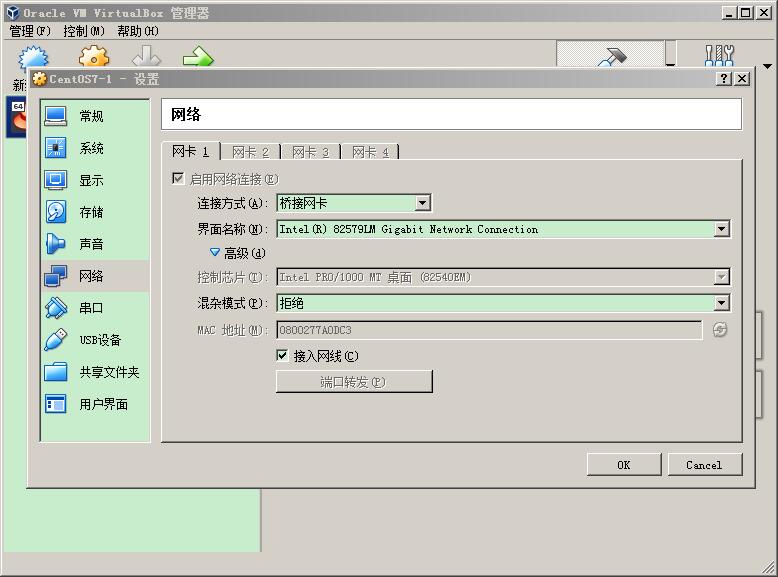
在Win7为HOST的环境下,安装VirtualBox,在其中安装CentOS7,以Bridge的方式搭建网络环境。
主要配置包括VirtualBox中的网络设置,以及CentOS中的网络配置。另外还有个重要的注意点就是如果HOST使用的是无线网,那么即使bridge配置成功了,虚拟机能够与主机互相ping通,虚拟机也无法访问外网。
VirtualBox网络配置
CentOS网络配置
修改网络配置文件:
vi /etc/sysconfig/network-scripts/ifcfg-enp0s3
修改后内容:
TYPE=Ethernet

PROXY_METHOD=none

BROWSER_ONLY=no

BOOTPROTO=static

DEFROUTE=yes

IPV4_FAILURE_FATAL=no

IPV6INIT=yes

IPV6_AUTOCONF=yes

IPV6_DEFROUTE=yes

IPV6_FAILURE_FATAL=no

IPV6_ADDR_GEN_MODE=stable-privacy

NAME=enp0s3

UUID=6ce977fe-843a-4fb3-8bda-40b7ae4fc4f5

DEVICE=enp0s3

ONBOOT=yes

HWADDR=:::7a:0d:c3

IPADDR=192.168.0.150

NETMASK=255.255.255.0

GATEWAY=192.168.0.1

DNS1=192.168.0.1
安装VirtualBox Guest Additational
安装依赖:
yum install kernel-headers

yum install kernel-devel

yum install gcc*

yum install make
安装完成之后重启一下,然后点击虚拟机窗口上的安装增强(如果guest中已经加在过了镜像,就将其退出),然后稍等一会就安装完成了。
如果报以下错误:
this system is currently not set up to build kernel modules
则有可能是kernel的几个包的版本不一致,使用命令:
rpm -qa kernel* |sort -V |tail -n 5
查看几个包的版本是否一致:
kernel-3.10.-.el7.x86_64

kernel-devel-3.10.-693.5..el7.x86_64

kernel-headers-3.10.-693.5..el7.x86_64

kernel-tools-3.10.-.el7.x86_64

kernel-tools-libs-3.10.-.el7.x86_64
如果不一致,可以使用以下命令进行更新:
yum -y upgrade kernel kernel-devel kernel-devel
更新完重启后,再次安装增强控件。
CentOS分辨率问题(存在问题)
以下过程是参照网络上的资料执行的,不过在执行过程中报了一个错,可能是缺少驱动的问题,此处我没有再进一步解决,就此打住了,因为是打算设置一个Linux的Java开发环境,因此打算换一个比较容易操作的版本,换成Ubuntu了。
下面的操作直接导致系统卡在启动界面了,解决方法可以参考日志:
执行命令:
Xorg : -configure
执行结果:
X.Org X Server 1.19.

Release Date: --

X Protocol Version , Revision

Build Operating System:  3.10.-514.16..el7.x86_64

Current Operating System: Linux localhost.localdomain 3.10.-693.5..el7.x86_64 # SMP Fri Oct  :: UTC  x86_64

Kernel command line: BOOT_IMAGE=/vmlinuz-3.10.-693.5..el7.x86_64 root=/dev/mapper/centos-root ro crashkernel=auto rd.lvm.lv=centos/root rd.lvm.lv=centos/swap rhgb quiet LANG=zh_CN.UTF-

Build Date:  August   ::43AM

Build ID: xorg-x11-server 1.19.-.el7

Current version of pixman: 0.34.

    Before reporting problems, check http://wiki.x.org

    to make sure that you have the latest version.

Markers: (--) probed, (**) from config file, (==) default setting,

    (++) from command line, (!!) notice, (II) informational,

    (WW) warning, (EE) error, (NI) not implemented, (??) unknown.

(==) Log file: "/var/log/Xorg.1.log", Time: Tue Nov   ::

List of video drivers:

    ati

    dummy

    intel

    nouveau

    qxl

    radeon

    v4l

    vmware

    modesetting

    vesa

    fbdev

(++) Using config file: "/root/xorg.conf.new"

(==) Using config directory: "/etc/X11/xorg.conf.d"

(==) Using system config directory "/usr/share/X11/xorg.conf.d"

(EE)

(EE) Backtrace:

(EE) : Xorg (xorg_backtrace+0x55) [0x55b8bcdb6655]

(EE) : Xorg (0x55b8bcc0a000+0x1b0369) [0x55b8bcdba369]

(EE) : /lib64/libpthread.so. (0x7fcf0c3ca000+0xf5e0) [0x7fcf0c3d95e0]

(EE)

(EE) Segmentation fault at address 0x0

(EE)

Fatal server error:

(EE) Caught signal  (Segmentation fault). Server aborting

(EE)

(EE)

Please consult the The X.Org Foundation support

     at http://wiki.x.org

 for help.

(EE) Please also check the log file at "/var/log/Xorg.1.log" for additional information.

(EE)

(EE) Server terminated with error (). Closing log file.

已放弃(吐核)
然后将生成的配置文件拷贝到目标路径下:
cp /root/xorg.conf.new /etc/X11/xorg.conf
该文件中的原始内容为:
Section "ServerLayout"

    Identifier     "X.org Configured"

    Screen        "Screen0"

    InputDevice    "Mouse0" "CorePointer"

    InputDevice    "Keyboard0" "CoreKeyboard"

EndSection

Section "Files"

    ModulePath   "/usr/lib64/xorg/modules"

    FontPath     "catalogue:/etc/X11/fontpath.d"

    FontPath     "built-ins"

EndSection

Section "Module"

    Load  "glx"

EndSection

Section "InputDevice"

    Identifier  "Keyboard0"

    Driver      "kbd"

EndSection

Section "InputDevice"

    Identifier  "Mouse0"

    Driver      "mouse"

    Option        "Protocol" "auto"

    Option        "Device" "/dev/input/mice"

    Option        "ZAxisMapping" "4 5 6 7"

EndSection

Section "Monitor"

    Identifier   "Monitor0"

    VendorName   "Monitor Vendor"

    ModelName    "Monitor Model"

EndSection

Section "Device"

        ### Available Driver options are:-

        ### Values: <i>: integer, <f>: float, <bool>: "True"/"False",

        ### <string>: "String", <freq>: "<f> Hz/kHz/MHz",

        ### <percent>: "<f>%"

        ### [arg]: arg optional

        #Option     "SWcursor"               # [<bool>]

        #Option     "kmsdev"                 # <str>

        #Option     "ShadowFB"               # [<bool>]

        #Option     "AccelMethod"            # <str>

        #Option     "PageFlip"               # [<bool>]

        #Option     "ZaphodHeads"            # <str>

        #Option     "DoubleShadow"           # [<bool>]

    Identifier  "Card0"

    Driver      "modesetting"

    BusID       "PCI:0:2:0"

EndSection

Section "Screen"

    Identifier "Screen0"

    Device     "Card0"

    Monitor    "Monitor0"

    SubSection "Display"

        Viewport

        Depth

    EndSubSection

    SubSection "Display"

        Viewport

        Depth

    EndSubSection

    SubSection "Display"

        Viewport

        Depth

    EndSubSection

    SubSection "Display"

        Viewport

        Depth

    EndSubSection

    SubSection "Display"

        Viewport

        Depth

    EndSubSection

    SubSection "Display"

        Viewport

        Depth

    EndSubSection

EndSection
在其中的:
SubSection "Display"

    Viewport

    Depth

EndSubSection
插入内容后形成:
SubSection "Display"

    Viewport

    Depth

    Models    "800x600" "1366x768" "1440x900"

EndSubSection
其中分辨率根据子集的屏幕来设置。
VirtualBox——在Win7的HOST上安装配置虚拟机CentOS7的更多相关文章
- Windows 7上安装配置TensorFlow-GPU运算环境
Windows 7上安装配置TensorFlow-GPU运算环境 1. 概述 在深度学习实践中,对于简单的模型和相对较小的数据集,我们可以使用CPU完成建模过程.例如在MNIST数据集上进行手写数字识 ...
- 在Centos 7上安装配置 Apche Kafka 分布式消息系统集群
Apache Kafka是一种颇受欢迎的分布式消息代理系统,旨在有效地处理大量的实时数据.Kafka集群不仅具有高度可扩展性和容错性,而且与其他消息代理(如ActiveMQ和RabbitMQ)相比,还 ...
- 在win2003上安装配置win 服务 遇到的问题
在win2003上安装配置win 服务 win服务安装后启动不起来 .. 没有装.net framework4.0 要装这个版本 mysql-connector-net-6.3.4.zip ...
- linux上安装配置samba服务器
linux上安装配置samba服务器 在linux上安装配置samba服务器 在这给大家介绍一个不错的家伙,samba服务.如果您正在犯愁,如何在Windows和Linux之间实现资源共享,就请看看这 ...
- Windows上安装配置SSH教程(4)——WinSCP+OpenSSH 使用公钥自动登陆
-------------------- 知识点汇总:http://www.cnblogs.com/feipeng8848/p/8559803.html -------------------- 重要 ...
- 如何在Ubuntu 16.04上安装配置Redis
如何在Ubuntu 16.04上安装配置Redis Redis是一个内存中的键值存储,以其灵活性,性能和广泛的语言支持而闻名.在本指南中,我们将演示如何在Ubuntu 16.04服务器上安装和配置Re ...
- ubuntu16.04上安装配置DHCP服务的详细过程
DHCP服务器是为客户端机器分配IP地址的,所有分配的IP地址都保存在DHCP服务器的数据库中.为了在子网中实现DHCP分配IP地址,需要在目标主机上安装配置DHCP服务 1. 安装DHCP服务 安装 ...
- Jenkins-在CentOS7 上安装配置
Jenkins-在CentOS7 上安装配置 1.安装JDK yum install -y java 2.安装jenkins 方法1:添加Jenkins库到yum库,Jenkins将从这里下载安装. ...
- Linux上安装配置Keepalived
Linux上安装配置Keepalived 1.下载 自行去Keepalived官网进行下载,也可以通过如下链接进行下载2.0.18版本(目前的稳定版) 链接:https://pan.baidu.com ...
随机推荐
- centos7andcentos6初始化脚本
#!/bin/bash # get OS verison RELEASEVER=$(rpm -q --qf "%{Version}" $(rpm -q --whatprovides ...
- hbuilder打包集成文件预览
<div class="attachments"> <div class="name">附件</div> <div c ...
- 在Windows server 2019 Core 版本上安装SQL2016
安装系统后,通过网络等方式先把安装ISO的文件copy过来,虚拟机则用挂一个虚拟光驱即可,然后cd进入目录,执行以下命名即可安装核心服务了: Setup.exe /qs /ACTION=Install ...
- 异步通信&同步通信
首先是两者的不同: 同步通信要求接收端时钟频率和发送端时钟频率一致,发送端发送连续的比特流:异步通信时不要求接收端时钟和发送端时钟同步,发送端发送完一个字节后,可经过任意长的时间间隔再发送下一个字节. ...
- The basic concept of information theory.
Deep Learning中会接触到的关于Info Theory的一些基本概念.
- DNS原理及实战配置指南
目录 DNS简介 DNS域名结构介绍 顶级域名 DNS工作原理 工作模式和端口 资源记录 安装bind(详细) 实战:配置一个正反向解析 实战:配置DNS转发 实战:配置DNS主从 实战:子域授权 实 ...
- ogg12c 配置
环境:source 192.168.2.182 : 系统:Windows Server 2012 oracle: Release 12.1.0.2.0 ogg: 12.2.0.2.3 target 1 ...
- Winforms界面开发DevExpress v19.2:Map、Pivot Grid等功能增强
DevExpress Winforms Controls 内置140多个UI控件和库,完美构建流畅.美观且易于使用的应用程序.无论是Office风格的界面,还是分析处理大批量的业务数据,DevExpr ...
- Web前端开发——HTML概述
HTML HyperText MakeUp Language,“超文本标记语言”,它是制作网页的标准语言 超文本就是通过链接的方式将文本有机地组织在一起,HTML的标记称为标签. 标签 HTML由标 ...
- Jmeter接口测试之用例数据分离
之前我们的用例数据都是配置在 Jmeter Http 请求中,每次需要增加,修改用例都需要打开 jmeter 重新编辑,当用例越来越多的时候,用例维护起来就越来越麻烦,有没有好的方法来解决这种情况呢? ...