
(八)SpringBoot之freeMarker基本使用
一、案例
1.1 pom.xml
<dependencies>

        <!-- 除去logback支持 -->

        <dependency>

            <groupId>org.springframework.boot</groupId>

            <artifactId>spring-boot-starter-web</artifactId>

            <exclusions>

                <exclusion>

                    <groupId>org.springframework.boot</groupId>

                    <artifactId>spring-boot-starter-logging</artifactId>

                </exclusion>

            </exclusions>

        </dependency>

        <dependency>

            <groupId>org.springframework.boot</groupId>

            <artifactId>spring-boot-starter-test</artifactId>

            <scope>test</scope>

        </dependency>

        <!-- 使用log4j2,该包paren标签中已经依赖 -->

        <dependency>

            <groupId>org.springframework.boot</groupId>

            <artifactId>spring-boot-starter-log4j2</artifactId>

        </dependency>

        <dependency>

            <groupId>org.springframework.boot</groupId>

            <artifactId>spring-boot-devtools</artifactId>

        </dependency>

        <!-- 引入freemarker包 -->

        <dependency>

            <groupId>org.springframework.boot</groupId>

            <artifactId>spring-boot-starter-freemarker</artifactId>

        </dependency>

    </dependencies>

    <build>

        <plugins>

            <plugin>

                <groupId>org.springframework.boot</groupId>

                <artifactId>spring-boot-maven-plugin</artifactId>

            </plugin>

        </plugins>

    </build>
1.2 application.properties
#主配置文件,配置了这个会优先读取里面的属性覆盖主配置文件的属性

spring.profiles.active=dev

server.port=8888

logging.config=classpath:log4j2-dev.xml
1.3 编写控制器
package com.shyroke.controller;

import java.util.ArrayList;

import java.util.List;

import org.springframework.stereotype.Controller;

import org.springframework.web.bind.annotation.RequestMapping;

import org.springframework.web.servlet.ModelAndView;

@Controller

@RequestMapping(value = "/index")

public class IndexController {

    @RequestMapping(value = "/login")

    public ModelAndView index(ModelAndView modelAndView) {

        modelAndView.setViewName("index");

        List<String> userList=new ArrayList<String>();

        userList.add("admin");

        userList.add("user1");

        userList.add("user2");

        modelAndView.addObject("userList", userList);

        return modelAndView;

    }

}
1.5 编写index.ftl
<!DOCTYPE html>

<html>

<head lang="en">

<title>Spring Boot Demo - FreeMarker</title>

<link href="/css/index.css" rel="stylesheet">

<script type="text/javascript" src="/jars/jquery-3.2.1.min.js"></script>

<script type="text/javascript" src="/js/index.js"></script>

</head>

<body>

    <h2>首页<h2>

    <font>

        <#list userList as item>

            ${item!}<br />

        </#list>

    </font>

    <button class="a"> click me</button>

</body>

</html>
1.6 index.js
$(function() {

    $('.a').click(function() {

        alert('hello world');

    });

})
1.7 index.css
h2{color:red}
1.8 目录结构

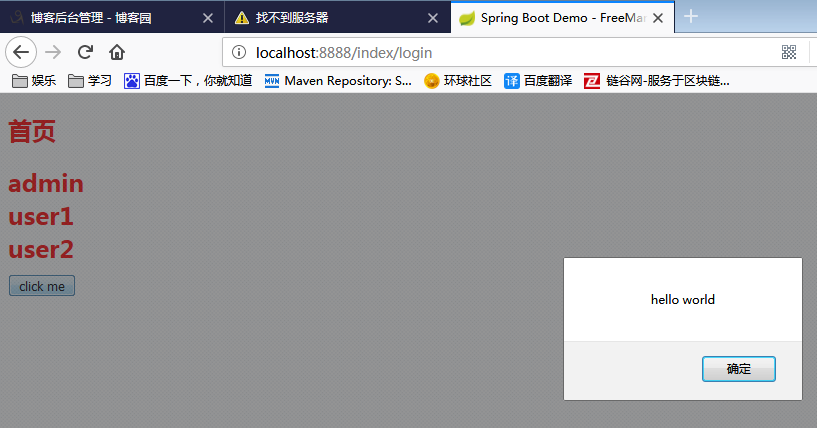
结果
(八)SpringBoot之freeMarker基本使用的更多相关文章
- springboot整合freemarker
前后端分离现在越来越多,如何有效的使用springboot来整合我们的页面是一个很重要的问题. springboot整合freemarker有以下几个步骤,也总结下我所犯的错误: 1.加依赖: 2.配 ...
- springboot使用Freemarker继承
最近需要用到Freemarker的继承.但是发现没有关于springboot配置Freemarker的继承的.所以趁现在有时间写个博客. 1. Freemarker继承介绍 Freemarker 通过 ...
- 记springboot+mybatis+freemarker+bootstrap的使用(1)
一..springboot的配置 1.安装并配置maven maven是项目管理工具,可以自动下载并管理jar包之间的依赖关系,可通过maven自动配置springboot 参照百度经验https:/ ...
- SpringBoot学习8:springboot整合freemarker
1.创建maven项目,添加pom依赖 <!--springboot项目依赖的父项目--> <parent> <groupId>org.springframewor ...
- springboot整合freemarker(转)
添加依赖 <dependency> <groupId>org.springframework.boot</groupId> <artifactId>sp ...
- springboot 使用 freemarker 无法正常跳转的问题?
1.springboot 使用 freemarker 无法正常跳转的问题? 参考:https://blog.csdn.net/Lin_xiaofeng/article/details/79122053 ...
- springboot 整合 freemarker
springboot 整合 freemarker 依赖 <parent> <groupId>org.springframework.boot</groupId> & ...
- SpringBoot整合freemarker 引用基础
原 ElasticSearch学习笔记Ⅲ - SpringBoot整合ES 新建一个SpringBoot项目.添加es的maven坐标如下: <dependency> <groupI ...
- 【SpringBoot】09.SpringBoot整合Freemarker
SpringBoot整合Freemarker 1.修改pom文件,添加坐标freemarker启动器坐标 <project xmlns="http://maven.apache.org ...
随机推荐
- WebSocketSharp中WebSocket类
websocket-sharp.clone, Version=1.0.2.39869 WebSocket由方法调用事件改为实例化委托调用,两种构造 1.构造函数 第一种 // // 摘要: // In ...
- union all 和 union 的 区别
https://www.cnblogs.com/wen-zi/p/9133754.html 主要: Union:对两个结果集进行并集操作,不包括重复行,同时进行默认规则的排序: Union All:对 ...
- layui问题之模拟select点击事件
一.问题 不操作页面,实现模拟select的事件,即,自动出现下拉框,自动点击下拉框的值,select文本框的值随之改变 二.经过 刚开始查看layui官方文档,发现仅仅只是有select监听事件,即 ...
- 【Java】浅谈Java内部类(转载)
说得挺细的,不是泛泛而谈.https://blog.csdn.net/weixin_42762133/article/details/82890555
- IOS APP开发入门案例
1.创建新项目 2.设计布局,main.storyboard中,在控件库中 3.布局控件关联控制器 4.设置事件或者显示模式 5.编写代码: import UIKit class ViewContro ...
- net start mysql 发生系统错误2 系统找不到指定的文件
以管理员身份运行,在命令行输入cd+mySQL的bin目录的安装路径 C:\Windows\system32>cd C:\Program Files\MySQL\MySQL Server5.6\ ...
- 阿里fastjson工具类
package com.common.utils.jsonUtils; import com.alibaba.fastjson.JSON; import com.alibaba.fastjson.JS ...
- Win10使用mysqldump导出csv文件及期间遇到的问题
作为测试,我们这里使用了名为testdb的数据库中的名为test_table的表,首先我们使用如下SQL来查看其中有何数据: select * from testdb.test_table 数据如下: ...
- JS读取本地文件及目录的方法
Javascript是网页制作中离不开的脚本语言,依靠它,一个网页的内容才生动活泼.富有朝气.但也许你还没有发现并应用它的一些更高级 的功能吧?比如,对文件和文件夹进行读.写和删除,就象在VB.VC等 ...
- Docker 容器的资源限制 cgroup(九)
目录 一.cgroup简介 二.CPU资源配额控制 1.CPU份额控制 2.CPU周期控制 3.CPU core控制 4.CPU配额控制参数的混合使用 二.对内存的限额 三.对 Block IO 的限 ...