
(八)SpringBoot之freeMarker基本使用
一、案例
1.1 pom.xml
<dependencies>

        <!-- 除去logback支持 -->

        <dependency>

            <groupId>org.springframework.boot</groupId>

            <artifactId>spring-boot-starter-web</artifactId>

            <exclusions>

                <exclusion>

                    <groupId>org.springframework.boot</groupId>

                    <artifactId>spring-boot-starter-logging</artifactId>

                </exclusion>

            </exclusions>

        </dependency>

        <dependency>

            <groupId>org.springframework.boot</groupId>

            <artifactId>spring-boot-starter-test</artifactId>

            <scope>test</scope>

        </dependency>

        <!-- 使用log4j2,该包paren标签中已经依赖 -->

        <dependency>

            <groupId>org.springframework.boot</groupId>

            <artifactId>spring-boot-starter-log4j2</artifactId>

        </dependency>

        <dependency>

            <groupId>org.springframework.boot</groupId>

            <artifactId>spring-boot-devtools</artifactId>

        </dependency>

        <!-- 引入freemarker包 -->

        <dependency>

            <groupId>org.springframework.boot</groupId>

            <artifactId>spring-boot-starter-freemarker</artifactId>

        </dependency>

    </dependencies>

    <build>

        <plugins>

            <plugin>

                <groupId>org.springframework.boot</groupId>

                <artifactId>spring-boot-maven-plugin</artifactId>

            </plugin>

        </plugins>

    </build>
1.2 application.properties
#主配置文件,配置了这个会优先读取里面的属性覆盖主配置文件的属性

spring.profiles.active=dev

server.port=8888

logging.config=classpath:log4j2-dev.xml
1.3 编写控制器
package com.shyroke.controller;

import java.util.ArrayList;

import java.util.List;

import org.springframework.stereotype.Controller;

import org.springframework.web.bind.annotation.RequestMapping;

import org.springframework.web.servlet.ModelAndView;

@Controller

@RequestMapping(value = "/index")

public class IndexController {

    @RequestMapping(value = "/login")

    public ModelAndView index(ModelAndView modelAndView) {

        modelAndView.setViewName("index");

        List<String> userList=new ArrayList<String>();

        userList.add("admin");

        userList.add("user1");

        userList.add("user2");

        modelAndView.addObject("userList", userList);

        return modelAndView;

    }

}
1.5 编写index.ftl
<!DOCTYPE html>

<html>

<head lang="en">

<title>Spring Boot Demo - FreeMarker</title>

<link href="/css/index.css" rel="stylesheet">

<script type="text/javascript" src="/jars/jquery-3.2.1.min.js"></script>

<script type="text/javascript" src="/js/index.js"></script>

</head>

<body>

    <h2>首页<h2>

    <font>

        <#list userList as item>

            ${item!}<br />

        </#list>

    </font>

    <button class="a"> click me</button>

</body>

</html>
1.6 index.js
$(function() {

    $('.a').click(function() {

        alert('hello world');

    });

})
1.7 index.css
h2{color:red}
1.8 目录结构

结果
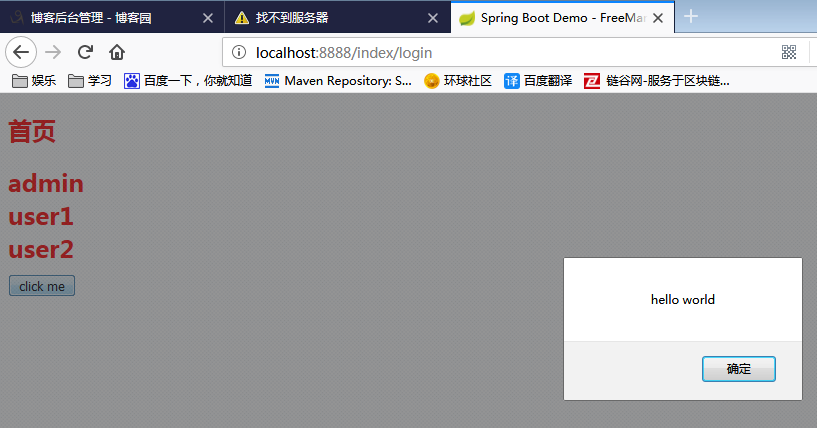
(八)SpringBoot之freeMarker基本使用的更多相关文章
- springboot整合freemarker
前后端分离现在越来越多,如何有效的使用springboot来整合我们的页面是一个很重要的问题. springboot整合freemarker有以下几个步骤,也总结下我所犯的错误: 1.加依赖: 2.配 ...
- springboot使用Freemarker继承
最近需要用到Freemarker的继承.但是发现没有关于springboot配置Freemarker的继承的.所以趁现在有时间写个博客. 1. Freemarker继承介绍 Freemarker 通过 ...
- 记springboot+mybatis+freemarker+bootstrap的使用(1)
一..springboot的配置 1.安装并配置maven maven是项目管理工具,可以自动下载并管理jar包之间的依赖关系,可通过maven自动配置springboot 参照百度经验https:/ ...
- SpringBoot学习8:springboot整合freemarker
1.创建maven项目,添加pom依赖 <!--springboot项目依赖的父项目--> <parent> <groupId>org.springframewor ...
- springboot整合freemarker(转)
添加依赖 <dependency> <groupId>org.springframework.boot</groupId> <artifactId>sp ...
- springboot 使用 freemarker 无法正常跳转的问题?
1.springboot 使用 freemarker 无法正常跳转的问题? 参考:https://blog.csdn.net/Lin_xiaofeng/article/details/79122053 ...
- springboot 整合 freemarker
springboot 整合 freemarker 依赖 <parent> <groupId>org.springframework.boot</groupId> & ...
- SpringBoot整合freemarker 引用基础
原 ElasticSearch学习笔记Ⅲ - SpringBoot整合ES 新建一个SpringBoot项目.添加es的maven坐标如下: <dependency> <groupI ...
- 【SpringBoot】09.SpringBoot整合Freemarker
SpringBoot整合Freemarker 1.修改pom文件,添加坐标freemarker启动器坐标 <project xmlns="http://maven.apache.org ...
随机推荐
- vim 操作命令大全(转)
1. 关于Vim vim是我最喜欢的编辑器,也是Linux下第二强大的编辑器. 虽然emacs是公认的世界第一,我认为使用emacs并没有使用vi进行编辑来得高效. 如果是初学vi,运行一下vimtu ...
- 你了解 Virtual DOM 吗?解释一下它的工作原理
Virtual DOM 是一个轻量级的 JavaScript 对象,它最初只是 real DOM 的副本.它是一个节点树,它将元素.它们的属性和内容作为对象及其属性. React 的渲染函数从 Rea ...
- 转换为CString
CString a, b, c;c = a + b; 使用Format方法方便的实现int.float和double等数字类型转换为CString字符串. %c 单个字符 %d 十进制整数(int) ...
- List三个子类的特点
List的三个子类的特点 ArrayList: 底层数据结构是数组,查询快,增删慢. 线程不安全,效率高. Vector: 底层数据结构是数组,查询快,增删慢. 线程安全,效率低. Vector相对A ...
- Carve ifc failed
Detected IFC version: IFC2X3 Warning: Sweeper::createTriangulated3DFace, carve::triangulate::incorpo ...
- 华为OpenStack开源团队人才招募中
职位要求: 1. 三年以上软件开发经验,编程技能良好. 2. 熟练使用Python.Java.Go或其他语言开发. 3. 有OpenStack经验或者存储经验优先考虑. 4. 良好的学习和沟通能力,责 ...
- Java基础教程:IDEA单元测试
Java基础教程:IDEA单元测试 环境配置 使用idea IDE 进行单元测试,首先需要安装JUnit 插件. 安装JUnit插件步骤 File-->settings-->Plguins ...
- 关于LSTM的输入和训练过程的理解
1.训练的话一般一批一批训练,即让batch_size 个样本同时训练: 2.每个样本又包含从该样本往后的连续seq_len个样本(如seq_len=15),seq_len也就是LSTM中cell的个 ...
- ES SQL使用说明文档
ES SQL使用说明文档 一.Elasticsearch术语介绍 l 接近实时(NRT): Elasticsearch 是一个接近实时的搜索平台.这意味着,从索引一个文档直到这个文档能够被搜索到有一 ...
- 在MAC上安装gitlab
转载引用:https://www.cnblogs.com/floodwater/p/10138265.html 1.安装docker 2.安装gitlab-ce 1.安装docker 下载地址: ht ...