
Java Naming and Directory Interface (JNDI) Java 命名和目录接口
https://www.oracle.com/technetwork/java/jndi/index.html
Lesson: Overview of JNDI (The Java™ Tutorials > Java Naming and Directory Interface) https://docs.oracle.com/javase/tutorial/jndi/overview/
Lesson: Overview of JNDI
The Java Naming and Directory Interface™ (JNDI) is an application programming interface (API) that provides naming and directory functionality to applications written using the Java™ programming language. It is defined to be independent of any specific directory service implementation. Thus a variety of directories -new, emerging, and already deployed can be accessed in a common way.
Architecture
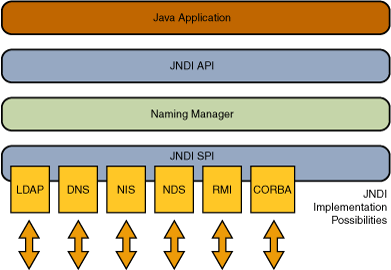
The JNDI architecture consists of an API and a service provider interface (SPI). Java applications use the JNDI API to access a variety of naming and directory services. The SPI enables a variety of naming and directory services to be plugged in transparently, thereby allowing the Java application using the JNDI API to access their services. See the following figure:
Packaging
JNDI is included in the Java SE Platform. To use the JNDI, you must have the JNDI classes and one or more service providers. The JDK includes service providers for the following naming/directory services:
- Lightweight Directory Access Protocol (LDAP)
- Common Object Request Broker Architecture (CORBA) Common Object Services (COS) name service
- Java Remote Method Invocation (RMI) Registry
- Domain Name Service (DNS)
Other service providers can be downloaded from the JNDI page or obtained from other vendors.
The JNDI is divided into five packages:
The next part of the lesson has a brief description of the JNDI packages.
Java SE — 核心技术 — Java 命名和目录接口 (JNDI) https://www.oracle.com/technetwork/cn/java/javase/tech/index-jsp-140184-zhs.html
Java 命名和目录接口 (JNDI) 是 Java 平台的一部分,为基于 Java 技术的应用程序提供了一个访问多种命名和目录服务的统一接口。利用此行业标准,您可以构建强大、可移植的、支持目录的应用程序。
命名和目录服务通过提供对有关用户、计算机、网络、服务和应用程序的各种信息的网络级共享,在内联网和互联网中起着至关重要的作用。
JNDI 和 Java EE 技术
JNDI 与 Java Platform, Enterprise Edition (Java EE) 中的其他技术协作,在分布式计算环境中对组件进行组织和定位。
JNDI 文档:J2SE 1.4.2 | J2SE 5.0 | Java SE 6
Java Naming and Directory Interface (JNDI) Java 命名和目录接口的更多相关文章
- 命名和目录接口 JNDI-The Java Naming and Directory Interface
命名和目录接口 JNDI-The Java Naming and Directory Interface JNDI (The Java Naming and Directory Interface)为 ...
- JNDI(Java Naming and Directory Interface)
# 前言 内容基本拷贝,整理出来,方便以后回忆. # What The Java Naming and Directory Interface™ (JNDI) is an application pr ...
- JNDI(Java Naming and Directory Interface,Java命名和目录接口)
JNDI(Java Naming and Directory Interface,Java命名和目录接口)是SUN公司提供的一种标准的Java命名系统接口,JNDI提供统一的客户端API,通过不同的访 ...
- J2EE学习从菜鸟变大鸟之四 JNDI(Java Naming and Directory Interface)
掌握 J2EE 是件不是很轻松的事哈,但是很有意思,抽象抽象哈哈,因为它包含的技术和缩略语在不断地增长.Java 命名和目录接口(Java Naming and Directory Interface ...
- spring配置JNDI(Java Naming and Directory Interface,Java命名和目录接口)数据源
1.在tomcat下的server.xml的 <GlobalNamingResources> </GlobalNamingResources>添加下面代码 <Resour ...
- 【JNDI】Java Naming and Directory Interface
一.数据源的由来 在Java开发中,使用JDBC操作数据库的四个步骤如下: ①加载数据库驱动程序(Class.forName("数据库驱动类");) ②连接数据库(Conn ...
- Java命名和目录接口——JNDI
JNDI即Java命名和目录接口(JavaNaming and Directory Interface),它属于J2EE规范范畴,是J2EE的核心技术之一,提供了一组接口.类和关于命名空间的概念.JD ...
- JNDI Java 命名与目录接口
jsp <% Context ctx = new InitialContext(); String jndiName = (String) ctx.lookup("java:comp/ ...
- JNDI--Java命名和目录接口
JNDI主要用于在容器中配置某些资源,让所有项目可以使用.JNDI可以提供: 1:数据库连接池. 自定义连接池 第三方连接池 Dbcp ...
随机推荐
- apache -- xampp配置虚拟主机
<VirtualHost *:80> ServerName www.myblog.com DocumentRoot "F:/Code/myblog"<Direct ...
- centos7命令总结
1,查看cpu信息 lscpu 2,网络配置 ip route 查看路由 nmcli nmcli connection show 显示所有连接 nmcli connection show ...
- dos中执行cd命令切换不到对应的盘解决方法
可以使用cd命令,不过需要加参数 /d,如: cd /d e:
- Spring-MVC案例:Spitter的笔记
源码地址:https://github.com/Young4Dream/yan/tree/master/Maven_spittr 笔记: 1.当DispatcherServlet启动时,会创建Spri ...
- C#获取IP信息
/// <summary> /// 通过IP得到IP所在地省市(Porschev) /// </summary> /// <param name="ip&quo ...
- ionic 页面加载事件及loading动画
页面加载完成事件(非刷新情况下,页面切换是不会重复触发此事件的,只在第一次进入页面时触发,需要重复触发的话请使用 $ionicView.enter 事件) angular.module('app.co ...
- docker学习-docker核心技术
镜像:集装箱 ---build 仓库:超级码头 ----ship 容器:运行程序的地方 ----run docker运行一个程序的过程:去仓库把镜像拉到本地,然后用一条命令把镜像运行起 ...
- join()函数的用法【python】
转自:http://www.jb51.net/article/63598.htm
- C# string.Format("{0:C3}", 2)
- JavaScript作用域原理——预编译
JavaScript是一种脚本语言, 它的执行过程, 是一种翻译执行的过程.并且JavaScript是有预编译过程的,在执行每一段脚本代码之前, 都会首先处理var关键字和function定义式(函数 ...