
[翻译] JHChainableAnimations
JHChainableAnimations

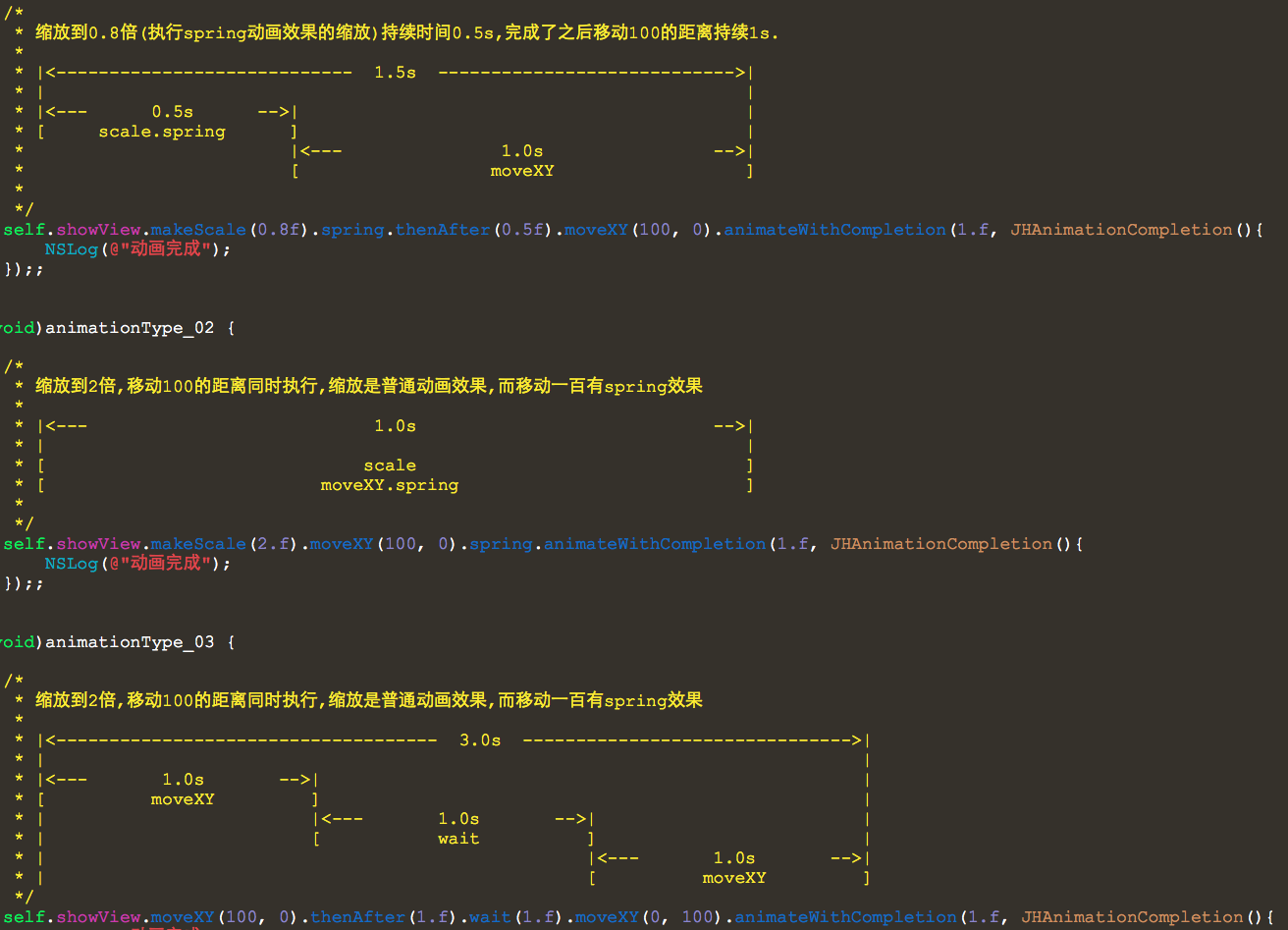
- (void)animationType_01 {

    /*

     * 缩放到0.8倍(执行spring动画效果的缩放)持续时间0.5s,完成了之后移动100的距离持续1s.

     *

     * |<----------------------------  1.5s  ---------------------------->|

     * |                                                                  |

     * |<---      0.5s      -->|                                          |

     * [     scale.spring      ]                                          |

     *                         |<---               1.0s                -->|

     *                         [                  moveXY                  ]

     *

     */

    self.showView.makeScale(0.8f).spring.thenAfter(0.5f).moveXY(, ).animateWithCompletion(.f, JHAnimationCompletion(){

        NSLog(@"动画完成");

    });;

}

- (void)animationType_02 {

    /*

     * 缩放到2倍,移动100的距离同时执行,缩放是普通动画效果,而移动一百有spring效果

     *

     * |<---                           1.0s                            -->|

     * |                                                                  |

     * [                              scale                               ]

     * [                          moveXY.spring                           ]

     *

     */

    self.showView.makeScale(.f).moveXY(, ).spring.animateWithCompletion(.f, JHAnimationCompletion(){

        NSLog(@"动画完成");

    });;

}

- (void)animationType_03 {

    /*

     * 缩放到2倍,移动100的距离同时执行,缩放是普通动画效果,而移动一百有spring效果

     *

     * |<------------------------------------  3.0s  ------------------------------->|

     * |                                                                             |

     * |<---       1.0s       -->|                                                   |

     * [          moveXY         ]                                                   |

     * |                         |<---       1.0s       -->|                         |

     * |                         [           wait          ]                         |

     * |                                                   |<---       1.0s       -->|

     * |                                                   [          moveXY         ]

     */

    self.showView.moveXY(, ).thenAfter(.f).wait(.f).moveXY(, ).animateWithCompletion(.f, JHAnimationCompletion(){

        NSLog(@"动画完成");

    });;

}
Whats wrong with animations?
CAAnimations and UIView animations are extremely powerful, but it is difficult to chain multiple animations together, especially while changing anchor points.
Furthermore, complicated animations are difficult to read.
CAAnimations以及UIView的动画非常的强大,但是,如果要实现动画的组合操作似乎不大容易,尤其是要改变anchor点之类的操作.再者,复杂的动画效果代码量大,不便于理解与维护.
Say I want to move myView 50 pixels to the right with spring and then change the background color with inward easing when the movement has finished:
比方说,我先要向右移动50像素做spring动画,在移动结束后修改背景色:
The Old Way
    [UIView animateWithDuration:1.0

                          delay:0.0

         usingSpringWithDamping:0.8

          initialSpringVelocity:1.0

                        options:0 animations:^{

                            CGPoint newPosition = self.myView.frame.origin;

                            newPosition.x += 50;

                            self.myView.frame.origin = newPosition;

    } completion:^(BOOL finished) {

        [UIView animateWithDuration:0.5

                              delay:0.0

                            options:UIViewAnimationOptionCurveEaseIn

                         animations:^{

            self.myView.backgroundColor = [UIColor purpleColor];

        } completion:nil];

    }];
Thats pretty gross huh... With JHChainableAnimations it is one line of code.
其实要向上面这么写...是不是很恶心.如果用JHChainableAnimations,乙方代码就搞定,如下.
The New Way (JHChainableAnimations!!!)
self.myView.moveX(50).spring.thenAfter(1.0).makeBackground([UIColor purpleColor]).easeIn.animate(0.5);
There are also a lot of really good animation libraries out there such as RBBAnimation,DCAnimationKit, and PMTween, but they still fall short of having powerful chainable animations AND easy to read/write syntax.
当然,有着好多非常不错的动画库如 RBBAnimation,DCAnimationKit, 和 PMTween ,但是,他们也不会像我写的这种使用方式简单而暴力.
Usage
Either clone the repo and manually add the Files in JHChainableAnimations or add the following to your Podfile
你可以拷贝源码到你的项目中去,或者是使用Podfile来导入:
pod 'JHChainableAnimations', '~> 1.3.0'
Then just import the following header.
然后引入头文件.
#import "JHChainableAnimations.h"
This is all a UIView category, so these chainables can be used on any UIView in a file where the header is imported.
所有的文件都是基于UIView的category,所以,你可以在任何引入头文件的地方使用.
Animating
Chainable properties like moveX(x) must come between the view and the animate(t) function
Below is an example of how to double an objects size over the course of one second.
链表属性,例如moveX(x)需要在view与animate(t)之间.
view.makeScale(2.0).animate(1.0);
If you want to move the view while you scale it, add another chainable property. Order is not important
如果你想移动view的同时也缩放它,添加另外一个链表属性即可.顺序不重要.
view.makeScale(2.0).moveXY(100, 50).animate(1.0);

// the same as view.moveXY(100, 50).makeScale(2.0).animate(1.0);
A full list of chainable properties can be found here
一个完整的链表属性可以在这里找到.
Chaining Animations
To chain animations seperate the chains with the thenAfter(t) function.
你需要使用 thenAfter(t) 来分割链表动画.
Below is an example of how to scale and object for 0.5 seconds, and then move it for 1 second when that is done.
以下就是一个例子,先缩放0.5秒钟,然后移动一秒钟.
view.makeScale(2.0).thenAfter(0.5).moveXY(100, 50).animate(1.0);
Animation Effects
To add an animation effect, call the effect method after the chainable property you want it to apply to.
Below is an example of scaling a view with a spring effect.
为了添加动画效果,你可以在链表属性之后使用一个效果,如下所示:
view.makeScale(2.0).spring.animate(1.0);
If you add 2 to the same chainable property the second will cancel the first out.
如果你添加了2个效果到一个链表属性上去了,只有最后一个会生效.
view.makeScale(2.0).bounce.spring.animate(1.0);

// The same as view.makeScale(2.0).spring.animate(1.0);
A full list of animation effect properties can be found here
一个完整的动画效果列表可以在这里找到.
Anchoring
To anchor your view call an achoring method at some point in an animation chain. Like effects, calling one after another in the same chain will cancel the first out.
Below is an example of rotating a view around different anchor points
view.rotate(180).anchorTopLeft.thenAfter(1.0).rotate(90).anchorCenter.animate(1.0);

// view.rotate(90).anchorTopLeft.anchorCenter == view.rotate(90).anchorCenter
A full list of anchor properties can be found here
Delays
To delay an animation call the wait(t) or delay(t) chainable property.
延时动画的执行可以调用 wait(t) 或者 delay(t) 链表属性.
Below is an example of moving a view after a delay of 0.5 seconds
view.moveXY(100, 50).wait(0.5).animate(1.0);

// The same as view.moveXY(100, 50).delay(0.5).animate(1.0);
Completion
To run code after an animation finishes set the animationCompletion property of your UIView or call the animateWithCompletion(t, completion) function.
动画结束后要执行代码,你可以设置 animationCompletion 或者调用方法 animateWithCompletion(t, completion)
view.makeX(0).animateWithCompletion(1.0, JHAnimationCompletion(){

    NSLog(@"Animation Done");

});
Is the same as:
view.animationCompletion = JHAnimationCompletion(){

    NSLog(@"Animation Done");

};

view.makeX(0).animate(1.0);
Is the same as:
view.makeX(0).animate(1.0).animationCompletion = JHAnimationCompletion(){

    NSLog(@"Animation Done");

};
Bezier Paths
You can also animate a view along a UIBezierPath. To get a bezier path starting from the views position, call the bezierPathForAnimation method. Then add points or curves or lines to it and use it in a chainable property.
你也可以让view沿着贝塞尔曲线移动.为了得到view的起始移动位置,调用方法 bezierPathForAnimation 即可.然后你在路径处添加控制点即可.
UIBezierPath *path = [view bezierPathForAnimation];

[path addLineToPoint:CGPointMake(25, 400)];

[path addLineToPoint:CGPointMake(300, 500)];

view.moveOnPath(path).animate(1.0);
Animation effects do not work on path movements.
Semantics
I included a chainable property called seconds that is there purely for show. It does however, make the code a little more readable (if you're into that sort of thing).
view.makeScale(2.0).thenAfter(0.5).seconds.moveX(20).animate(1.0);

// view.makeScale(2.0).thenAfter(0.5).moveX(20).animate(1.0);
Transforms
Use the transform chainable properties. These are better for views constrained with Autolayout. You should not mix these with other chainable properties
viewWithConstraints.transformX(50).transformScale(2).animate(1.0);
Animating Constraints
Typically frames and autolayout stuff shouldn't mix so use the makeConstraint and moveConstraintchainable properties with caution (i.e dont try and scale a view when it has a height and width constraint). These properties should only be used with color, opacity, and corner radius chainable properties because they dont affect the layers position and therfore won't affect constraints.
This was only added as a syntactically easy way to animate constraints. The code below will set the constant of topConstraint to 50 and then trigger an animated layout pass in the background.
// You have a reference to some constraint for myView

self.topConstraint = [NSLayoutConstraint ...];

...

self.myView.makeConstraint(self.topConstraint, 50).animate(1.0);
This does not support animation effects yet.
Using with Swift
Using JHChainableAnimations with Swift is a little different. Every chainable property must have ()between the name and the parameters.
// swift code

view.makeScale()(2.0).spring().animate()(1.0);

// is the same as

// view.makeScale(2.0).spring.animate(1.0);

// in Objective-C
Masonry, which uses a similar chainable syntax eventually made SnapKit to make get rid of this weirdness. That may be on the horizon.
Draveness copied my code into swift and it looks pretty good. DKChainableAnimationKit
Chainable Properties
| Property | Takes a... | Usage |
|---|---|---|
| - (JHChainableRect) makeFrame; | CGRect | view.makeFrame(rect).animate(1.0); |
| - (JHChainableRect) makeBounds; | CGRect | view.makeBounds(rect).animate(1.0); |
| - (JHChainableSize) makeSize; | (CGFloat: width, CGFloat: height) | view.makeSize(10, 20).animate(1.0); |
| - (JHChainablePoint) makeOrigin; | (CGFloat: x, CGFloat: y) | view.makeOrigin(10, 20).animate(1.0); |
| - (JHChainablePoint) makeCenter; | (CGFloat: x, CGFloat: y) | view.makeCenter(10, 20).animate(1.0); |
| - (JHChainableFloat) makeX; | (CGFloat: f) | view.makeX(10).animate(1.0); |
| - (JHChainableFloat) makeY; | (CGFloat: f) | view.makeY(10).animate(1.0); |
| - (JHChainableFloat) makeWidth; | (CGFloat: f) | view.makeWidth(10).animate(1.0); |
| - (JHChainableFloat) makeHeight; | (CGFloat: f) | view.makeHeight(10).animate(1.0); |
| - (JHChainableFloat) makeOpacity; | (CGFloat: f) | view.makeOpacity(10).animate(1.0); |
| - (JHChainableColor) makeBackground; | (UIColor: color) | view.makeBackground(color).animate(1.0); |
| - (JHChainableColor) makeBorderColor; | (UIColor: color) | view.makeBorderColor(color).animate(1.0); |
| - (JHChainableFloat) makeBorderWidth; | (CGFloat: f) | view.makeBorderWidth(3.0).animate(1.0); |
| - (JHChainableFloat) makeCornerRadius; | (CGFloat: f) | view.makeCornerRadius(3.0).animate(1.0); |
| - (JHChainableFloat) makeScale; | (CGFloat: f) | view.makeScale(2.0).animate(1.0); |
| - (JHChainableFloat) makeScaleX; | (CGFloat: f) | view.makeScaleX(2.0).animate(1.0); |
| - (JHChainableFloat) makeScaleY; | (CGFloat: f) | view.makeScaleY(2.0).animate(1.0); |
| - (JHChainablePoint) makeAnchor; | (CGFloat: x, CGFloat: y) | view.makeAnchor(0.5, 0.5).animate(1.0); |
| - (JHChainableFloat) moveX; | (CGFloat: f) | view.moveX(50).animate(1.0) |
| - (JHChainableFloat) moveY; | (CGFloat: f) | view.moveY(50).animate(1.0) |
| - (JHChainablePoint) moveXY; | (CGFloat: x, CGFloat: y) | view.moveXY(100, 50).animate(1.0) |
| - (JHChainableFloat) moveHeight; | (CGFloat: f) | view.moveHeight(50).animate(1.0) |
| - (JHChainableFloat) moveWidth; | (CGFloat: f) | view.moveWidth(50).animate(1.0) |
| - (JHChainableDegrees) rotate; | (CGFloat: angle) #not radians! | view.rotate(360).animate(1.0); |
| - (JHChainablePolarCoordinate) movePolar; | (CGFloat: radius, CGFloat: angle) | view.movePolar(30, 90).animate(1.0); |
| - (JHChainableBezierPath) moveOnPath; | (UIBezierPath *path) | view.moveOnPath(path).animate(1.0); |
| - (JHChainableBezierPath) moveAndRotateOnPath; | (UIBezierPath *path) | view.moveAndRotateOnPath(path).animate(1.0); |
| - (JHChainableBezierPath) moveAndReverseRotateOnPath; | (UIBezierPath *path) | view.moveAndReverseRotateOnPath(path).animate(1.0); |
| - (JHChainableFloat) transformX; | (CGFloat f) | view.transformX(50).animate(1.0); |
| - (JHChainableFloat) transformX; | (CGFloat f) | view.transformX(50).animate(1.0); |
| - (JHChainableFloat) transformY; | (CGFloat f) | view.transformY(50).animate(1.0); |
| - (JHChainableFloat) transformZ; | (CGFloat f) | view.transformZ(50).animate(1.0); |
| - (JHChainablePoint) transformXY; | (CGFloat x, CGFloat y) | view.transformXY(50, 100).animate(1.0); |
| - (JHChainableFloat) transformScale; | (CGFloat f) | view.transformScale(50).animate(1.0); |
| - (JHChainableFloat) transformScaleX; | (CGFloat f) | view.transformScaleX(50).animate(1.0); |
| - (JHChainableFloat) transformScaleY; | (CGFloat f) | view.transformScaleY(50).animate(1.0); |
| - (UIView *) transformIdentity; | Nothing | view.transformIdentity.animate(1.0); |
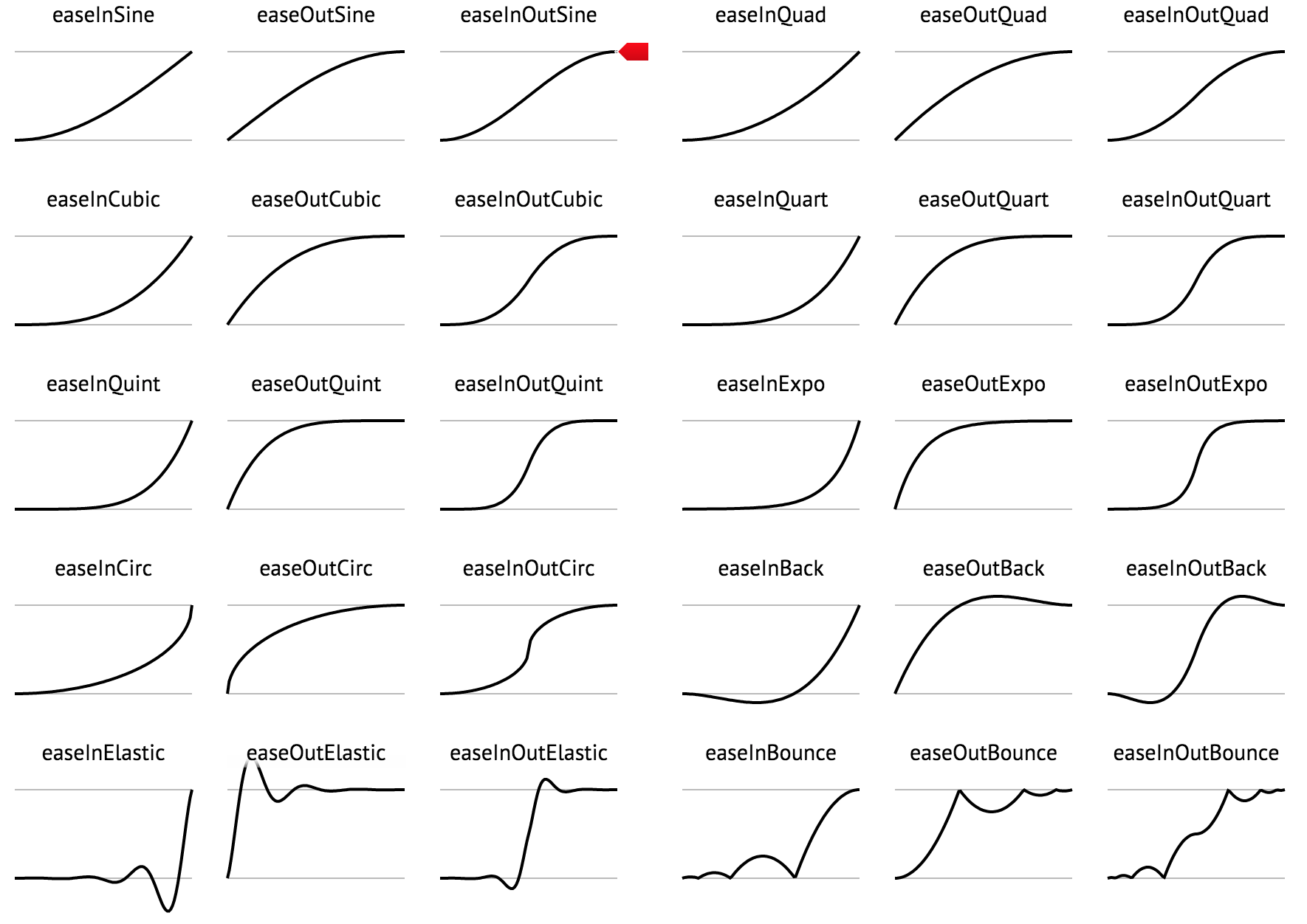
Animation Effects
A quick look at these funcs can be found here
These animation functions were taken from a cool keyframe animation library that can be found here
They are based off of JQuery easing functions that can be found here
Anchoring
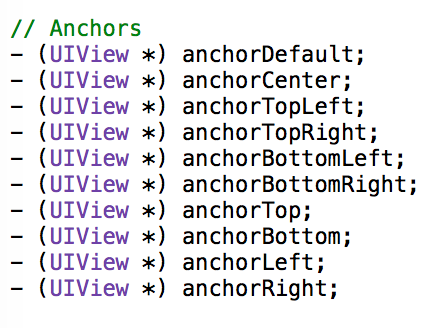
Info on anchoring can be found here
To Do
I have gotten a ton of great suggestions of what to do next. If you think this is missing anything please let me know! The following is what I plan on working on in no particular order.
- OSX port
Contact Info && Contributing
Feel free to email me at jhurray33@gmail.com. I'd love to hear your thoughts on this, or see examples where this has been used.
[翻译] JHChainableAnimations的更多相关文章
- 《Django By Example》第五章 中文 翻译 (个人学习,渣翻)
书籍出处:https://www.packtpub.com/web-development/django-example 原作者:Antonio Melé (译者@ucag注:大家好,我是新来的翻译, ...
- 《Django By Example》第四章 中文 翻译 (个人学习,渣翻)
书籍出处:https://www.packtpub.com/web-development/django-example 原作者:Antonio Melé (译者注:祝大家新年快乐,这次带来<D ...
- [翻译]开发文档:android Bitmap的高效使用
内容概述 本文内容来自开发文档"Traning > Displaying Bitmaps Efficiently",包括大尺寸Bitmap的高效加载,图片的异步加载和数据缓存 ...
- 【探索】机器指令翻译成 JavaScript
前言 前些时候研究脚本混淆时,打算先学一些「程序流程」相关的概念.为了不因太枯燥而放弃,决定想一个有趣的案例,可以边探索边学. 于是想了一个话题:尝试将机器指令 1:1 翻译 成 JavaScript ...
- 《Django By Example》第三章 中文 翻译 (个人学习,渣翻)
书籍出处:https://www.packtpub.com/web-development/django-example 原作者:Antonio Melé (译者注:第三章滚烫出炉,大家请不要吐槽文中 ...
- 《Django By Example》第二章 中文 翻译 (个人学习,渣翻)
书籍出处:https://www.packtpub.com/web-development/django-example 原作者:Antonio Melé (译者注:翻译完第一章后,发现翻译第二章的速 ...
- 《Django By Example》第一章 中文 翻译 (个人学习,渣翻)
书籍出处:https://www.packtpub.com/web-development/django-example 原作者:Antonio Melé (译者注:本人目前在杭州某家互联网公司工作, ...
- 【翻译】Awesome R资源大全中文版来了,全球最火的R工具包一网打尽,超过300+工具,还在等什么?
0.前言 虽然很早就知道R被微软收购,也很早知道R在统计分析处理方面很强大,开始一直没有行动过...直到 直到12月初在微软技术大会,看到我软的工程师演示R的使用,我就震惊了,然后最近在网上到处了解和 ...
- ASP.NET MVC with Entity Framework and CSS一书翻译系列文章之第一章:创建基本的MVC Web站点
在这一章中,我们将学习如何使用基架快速搭建和运行一个简单的Microsoft ASP.NET MVC Web站点.在我们马上投入学习和编码之前,我们首先了解一些有关ASP.NET MVC和Entity ...
随机推荐
- 安装php readline扩展报错 Please reinstall libedit
现象:configure: error: Please reinstall libedit – I cannot find readline.h解决办法:安装 Editline Library (li ...
- package-info类解读
类不能带有public.private访问权限.package-info.java再怎么特殊,也是一个类文件,也会被编译成package-info.class,但是在package-info.java ...
- mysql存储之int
开始之前给大家出个问题,数据库表test中两个字段 a int(2),b int(3),现在想执行下面的插入语句 ,) 思考是否可以插入? 答案是能插入 再看下面的语句 ,) 思考能不能插入?注意第 ...
- 打乱数组——shuffle
在学习vue移动端音乐项目时,看到一个打乱数组函数,感觉很有意思就记录一下(意外发现:slice是个有趣的知识点) 原理:遍历数组,(let i = 0; i < _arr.length; i+ ...
- PHP的一些语句 if...else...elseif - Switch - while - for
条件语句用于基于不同条件执行不同的动作 PHP 条件语句 在您编写代码时,经常会希望为不同的决定执行不同的动作.您可以在代码中使用条件语句来实现这一 点. 在 PHP 中,我们可以使用以下条件语句: ...
- Visual Studio for Mac 安装无响应或者无法连接网络等解决方法
1.无法连接到网络 2.点击安装和更新无响 这两种情况造成的原因都是由于被墙的原因,第一种情况有部分可以通过fq解决,第二种情况是我遇到过的 反正我全局也失败 这里给出一个我自己用过的解决方案 查看控 ...
- 常用JS、jquery 命令(不断更新中)
设置用户粘贴板中的文本信息:window.clipboardData.setData('Text', location.href); 获取用户粘贴板中的文本信息: window.clipboardDa ...
- Java 锁机制总结
锁的种类 独享锁 VS 共享锁 独享锁:锁只能被一个线程持有(synchronized) 共享锁:锁可以被多个程序所持有(读写锁) 乐观锁 VS 悲观锁 乐观锁:每次去拿数据的时候都乐观地认为别人不会 ...
- ssm项目快速搭建(注解)
dao层配置 dao层配置注意事项: 1.Mapper.xml 文件中的 namespace 与 mapper 接口的类路径相同 2.Mapper.xml 接口方法名和 Mapper.xml 中定义的 ...
- BZOJ2656 [Zjoi2012]数列
Description 小白和小蓝在一起上数学课,下课后老师留了一道作业,求下面这个数列的通项公式: $$\begin{aligned}A_0 &= 0\\A_1 &= 1\\A_{2 ...