
swift 第一个IOS应用程序
swift 出来也有一阵子了,一直没有时间来研究。简单的看了看。随手写几篇文章。特此声明:本博客纯属个人学习,有不足之处,属于正常,希望多多见谅.
第一个IOS应用程序开发
一.准备工作:
(1)Mac OS X操作系统 10.9.3,
(2)Xcode6.0,临时我的Bt版本号(有意外退出,和代码提示不全等现象)
二.本节涉及内容:
(1)变量和常量、函数、? !等符号的意义,简单的输出。IOS项目HellowroId
三.開始:
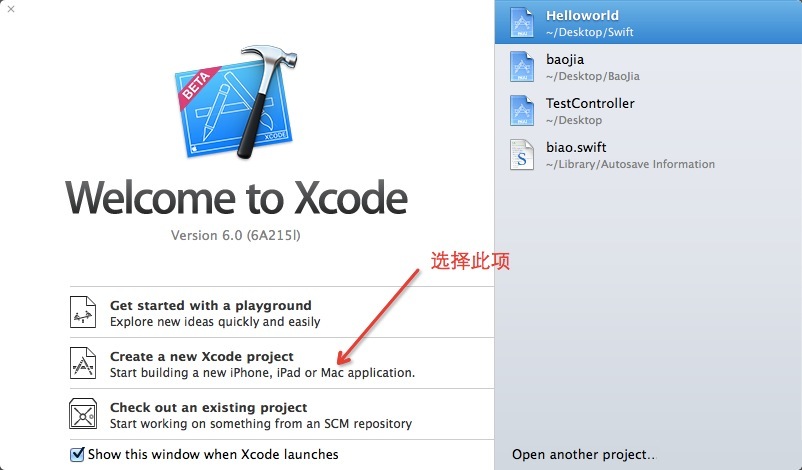
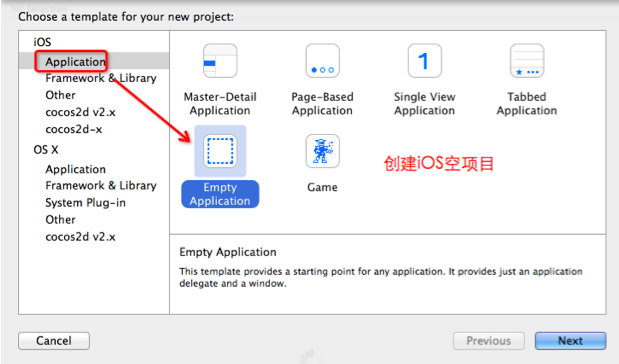
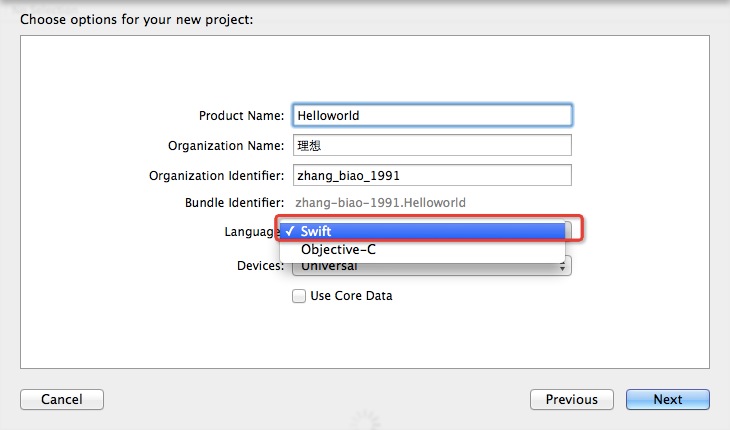
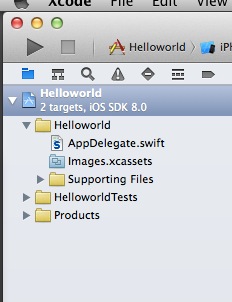
在这里就直接创建IOS项目了,在开发过程中遇到相关swift知识点在细谈,如图:
import UIKit
@UIApplicationMain
//class 在swift
中是声明一个类,在IOS项目中AppDelegate原来oc中的AppDelegate,应用程序的入口对象
class AppDelegate:UIResponder,
UIApplicationDelegate
{
/*
var 声明变量keyword
window 是变量名
UIWindow 变量类型
?
可选类型在这里理解为空(nil)就可以
*/
//声明一个全局变量
var window:
UIWindow?
/*
关于swift
中变量和常量:
变量
var 声明变量keyword
var 声明没有类型。在变量的名字后面能够指定类型
如:
var i:Int = 3; // 声明一个int类型的变量,变量名字为 i变量的值为 3
常量:
let 常量声明keyword
let 声明没有类型,在变量的名字后面能够指定类型,常量的值是不能够改变的
如:
let d:Double =3.1415926;
d=3.5 //错误写法,由于常量的值是不能够改变的
*/
/*
函数:
swift 函数特点
(1)函数的參数中有标签(OC中的方法签名)
(2)函数的返回值在函数的尾部用指针符号(箭头)指向返回值类型
(3)函数声明keyword:func
*/
//第一个执行的入口函数,IOS生命周期那几个函数,可能会略有不同。你懂得,不懂后面说
func application(application:
UIApplication, didFinishLaunchingWithOptions launchOptions:
NSDictionary?) ->
Bool
{
//UIWindow()
创建一个UIWindow对象
參数为 这个UIWindow的frame,以下我细说
self.window =UIWindow(frame:
UIScreen.mainScreen().bounds)
// Override point for customization after application launch.
// !
的意思是同意window==nil 时候执行。可是window==nil程序执行崩溃
!
self.window!.makeKeyAndVisible()
//
声明一个color 常量(color
是一个对象)。 UIColor
类调用redCorlor()类方法
let color =
UIColor.redColor();
//设置self.window的背景颜色
self.window!.backgroundColor = color;
//输出
println("Hellowrold IOS第一个项目");
/*
关于输出:
swift 的输出用 println
输出一个字符串Hellowrold
println("Hellowrold");
输出一个变量的值如:var f = 30.5
var f = 30.5
println("f=\(f)");
*/
return
true
}
//下边以后在具体介绍
func applicationWillResignActive(application:
UIApplication) {
// Sent when the application is about to move from active to inactive state. This can occur for certain types of temporary interruptions (such as an incoming phone call or SMS message) or when the user quits the application
and it begins the transition to the background state.
// Use this method to pause ongoing tasks, disable timers, and throttle down OpenGL ES frame rates. Games should use this method to pause the game.
}
func applicationDidEnterBackground(application:UIApplication) {
// Use this method to release shared resources, save user data, invalidate timers, and store enough application state information to restore your application to its current state in case it is terminated later.
// If your application supports background execution, this method is called instead of applicationWillTerminate: when the user quits.
}
func applicationWillEnterForeground(application:UIApplication) {
// Called as part of the transition from the background to the inactive state; here you can undo many of the changes made on entering the background.
}
func applicationDidBecomeActive(application:
UIApplication) {
// Restart any tasks that were paused (or not yet started) while the application was inactive. If the application was previously in the background, optionally refresh the user interface.
}
func applicationWillTerminate(application:
UIApplication) {
// Called when the application is about to terminate. Save data if appropriate. See also applicationDidEnterBackground:.
}
}
swift 第一个IOS应用程序的更多相关文章
- iOS 11开发教程(三)运行第一个iOS 11程序
iOS 11开发教程(三)运行第一个iOS 11程序 运行iOS11程序 创建好项目之后,就可以运行这个项目中的程序了.单击运行按钮,如果程序没有任何问题的话,会看到如图1.6和1.7的运行效果. 图 ...
- Xamarin iOS开发实战第1章使用C#编写第一个iOS应用程序
Xamarin iOS开发实战第1章使用C#编写第一个iOS应用程序 C#原本是用来编写Windows以及Windows Phone的应用程序.自从Xamarin问世后.C#的作用就发生了非常大的变化 ...
- Flutter 与 Swift - 在创建 iOS 应用程序时应该押注什么技术?
Swift 和 Flutter 是考虑创建 iOS 应用程序的公司最想要的两种技术.开发者能用原生技术取胜吗?如何选择,哪种更适合您的应用?让我们一探究竟吧! 根据 Statista 的数据, 201 ...
- 手把手教你写一个RN小程序!
时间过得真快,眨眼已经快3年了! 1.我的第一个App 还记得我14年初写的第一个iOS小程序,当时是给别人写的一个单机的相册,也是我开发的第一个完整的app,虽然功能挺少,但是耐不住心中的激动啊,现 ...
- [ios基础]IOS应用程序的生命周期问题
—程序的生命周期 a.程序的生命周期是指应用程序启动到应用程序结束整个阶段的全过程 b.每一个IOS应用程序都包含一个UIApplication对象,IOS系统通过该U ...
- iOS应用程序的生命周期
iOS应用程序一般都是由自己编写的代码和系统框架(system frameworks)组成,系统框架提供一些基本infrastructure给所有app来运行,而你提供自己编写的代码来定制app的外观 ...
- iOS 应用程序的生命周期
iOS 应用程序的生命周期(网络资源总结) http://blog.csdn.net/totogo2010/article/details/8048652 http://www.cocoachina. ...
- IOS应用程序生命周期&启动周期函数
—程序的生命周期 a.程序的生命周期是指应用程序启动到应用程序结束整个阶段的全过程 b.每一个IOS应用程序都包含一个UIApplication对象,IOS系统通过该U ...
- iOS/iPhone 程序文件目录结构以及启动流程
要想清晰的理解IOS应用程序的启动过程,毫无疑问需要深入了解一下ios应用程序的文件系统.一个ios应用程序都有一个属于自己沙盒(sandbox),应用沙盒就是文件系统目录,并且与文件系统的其他部分隔 ...
随机推荐
- 第7章 Scrapy突破反爬虫的限制
7-1 爬虫和反爬的对抗过程以及策略 Ⅰ.爬虫和反爬虫基本概念 爬虫:自动获取网站数据的程序,关键是批量的获取. 反爬虫:使用技术手段防止爬虫程序的方法. 误伤:反爬虫技术将普通用户识别为爬虫,如果误 ...
- ef——存储过程
数据库中存在存储过程GetCategory: ALTER proc [dbo].[GetCategory] @cid int as begin select * from Categories w ...
- DataGridView 直接修改数据操作
DataGridView单元格进入编辑模式的方法: 双击或者f2: EditCellOnEnter 属性设为True,对DataGridView进行配置,当用户移动到该单元格后,该单元格可立即切换到编 ...
- <深入理解JavaScript>学习笔记(2)_揭秘命名函数表达式
写在前面的话 注:本文是拜读了 深入理解JavaScript 之后深有感悟,故做次笔记方便之后查看. 感觉这章的内容有点深奥....略难懂啊. 先坐下笔记,加深一下印象吧. 我主要记一下自己感觉有用的 ...
- 关系型数据库之MySQL基础总结_part1
一:数据库的操作语言的种类 MySQL 是我们最常使用的关系型数据库,对于MySQL的操作的语言种类又可以分为:DDL,DML,DCL,DQL DDL:是数据库的定义语言:主要对于数据库信息的一些定义 ...
- 七、并发容器ConcurrentHashMap
一.简介 我们知道,HashMap是线程不安全的.而HashTable是线程安全的,但是JDK已经不建议使用HashTable,它已经被作为废除的实现. 在JDK并发包里面,ConcurrentHas ...
- 四、闭锁之CountDownLatch
一.简介 闭锁是Java的一种同步工具类.我们在程序运行过程中,某个任务需要等待其它一个到多个的任务全部完成才会执行,这个等待的期间就叫做闭锁. CountDownLatch是闭锁的一种实现,它支持一 ...
- java队列queue的我觉得很好的使用方式
LinkedList实现了queue接口,通常使用LinkedList 其中关键两个函数:offer().poll() offer()表示“排队”----插入到队列最前,poll()表示轮到了队列最前 ...
- docker 无法启动容器,run容器后状态为restarting
问题:如题,无法进入容器,docker logs 容器id 发现 哦 ,原来缺少个文件,这些就容易了
- 【Chromium】GPU进程启动流程
本篇文档以gpu进程的创建和启动为例,讲述chormium如何启动一个browser进程的子进程 PS:本文使用的chromium代码版本为71 前言 GPU进程的启动时机是由browser进程负责的 ...