
ASP.NET Core MVC中的IActionFilter.OnActionExecuted方法执行时,Controller中Action返回的对象是否已经输出到Http Response中
我们在ASP.NET Core MVC项目中有如下HomeController:
using Microsoft.AspNetCore.Mvc;

namespace AspNetCoreActionFilter.Controllers

{

    public class HomeController : Controller

    {

        /// <summary>

        /// 显示一个网页供测试

        /// </summary>

        public IActionResult Index()

        {

            return View();

        }

        /// <summary>

        /// 返回一个Json对象到客户端浏览器

        /// </summary>

        /// <returns>Json对象</returns>

        public IActionResult GetJson()

        {

            return Json(new { Message = "This is a GetJson message!" });

        }

    }

}
其代码非常简单,HomeController只有两个Action:
- Index这个Action,输出一个简单的网页供测试
- GetJson这个Action,输出一个Json对象到客户端浏览器
现在我们在浏览器上输入Url地址"Home/GetJson"来访问HomeController的GetJson这个Action,结果如下:
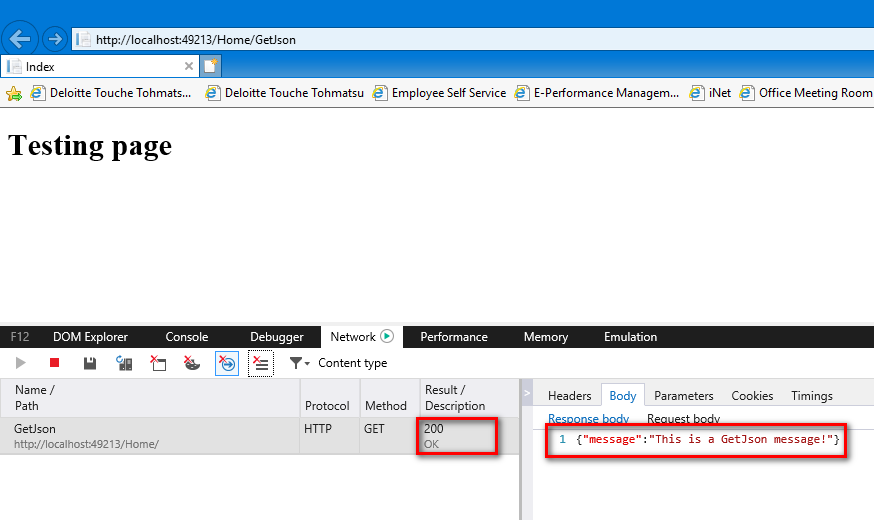
通过IE浏览器的开发者工具,我们看到,浏览器成功接收到了HomeController的GetJson这个Action返回的Json对象,其message属性值为我们在GetJson这个Action中返回的"This is a GetJson message!"。
然后我们定义一个IActionFilter拦截器叫MyActionFilterAttribute,利用IActionFilter的OnActionExecuted方法,我们可以在HomeController的GetJson这个Action方法执行后,替换GetJson方法返回的Json对象:
using Microsoft.AspNetCore.Mvc;

using Microsoft.AspNetCore.Mvc.Filters;

using System;

namespace AspNetCoreActionFilter.Filters

{

    /// <summary>

    /// 定义一个IActionFilter拦截器叫MyActionFilterAttribute

    /// </summary>

    public class MyActionFilterAttribute : Attribute, IActionFilter

    {

        /// <summary>

        /// IActionFilter.OnActionExecuted在Controller的Action方法执行完后执行

        /// </summary>

        public void OnActionExecuted(ActionExecutedContext context)

        {

            //等Controller的Action方法执行完后,通过更改ActionExecutedContext类的Result属性,来替换Action方法返回的Json对象

            context.Result = new JsonResult(new { Message = "This is a MyActionFilter message!" });

        }

        /// <summary>

        /// IActionFilter.OnActionExecuting在Controller的Action方法执行前,但是Action方法的参数模型绑定完成后执行

        /// </summary>

        public void OnActionExecuting(ActionExecutingContext context)

        {

            //Do something...

            //context.Result = new EmptyResult();//在IActionFilter.OnActionExecuting方法中,context的Result属性只要被赋值了不为null,就不会执行Controller的Action了,也不会执行该IActionFilter拦截器的OnActionExecuted方法,同时在该IActionFilter拦截器之后注册的其它Filter拦截器也都不会被执行了

        }

    }

}
但问题是当ASP.NET Core MVC执行IActionFilter的OnActionExecuted方法时,HomeController的GetJson这个Action方法返回的Json对象,是否已经被输出到Http Response中发送给客户端浏览器了呢?
我们将上面定义的IActionFilter拦截器MyActionFilterAttribute注册到HomeController的GetJson方法上:
using AspNetCoreActionFilter.Filters;

using Microsoft.AspNetCore.Mvc;

namespace AspNetCoreActionFilter.Controllers

{

    public class HomeController : Controller

    {

        /// <summary>

        /// 显示一个网页供测试

        /// </summary>

        public IActionResult Index()

        {

            return View();

        }

        /// <summary>

        /// 返回一个Json对象到客户端浏览器

        /// </summary>

        /// <returns>Json对象</returns>

        [MyActionFilter]

        public IActionResult GetJson()

        {

            return Json(new { Message = "This is a GetJson message!" });

        }

    }

}
然后再在浏览器中输入Url地址"Home/GetJson"来访问HomeController的GetJson这个Action,这次结果如下:

我们可以看到这次浏览器收到的Json对象是MyActionFilterAttribute拦截器中OnActionExecuted方法替换的Json对象,其message属性值为"This is a MyActionFilter message!",而HomeController的GetJson这个Action返回的Json对象根本就没有被浏览器收到,说明HomeController的GetJson这个Action返回的Json对象完全没有被输出到Http Response中发送给客户端浏览器。所以这很好地说明了ASP.NET Core MVC中IActionFilter拦截器的OnActionExecuted方法,会在Controller的Action返回的对象被输出到Http Response之前执行。
我们还可以在ASP.NET Core MVC中的.cshtml视图文件中写几个C#代码打上断点,在IActionFilter拦截器的OnActionExecuted方法中也打上断点,在Visual Studio调试中我们会发现,IActionFilter拦截器的OnActionExecuted方法的断点先被执行,然后才执行.cshtml视图文件中的断点,这也很清晰地证明了上面黑色粗体字的观点。当然如果你在Controller的Action方法中,直接使用Response.Body的Stream流输出数据到客户端浏览器,IActionFilter拦截器的OnActionExecuted方法执行时数据肯定已经发送给客户端浏览器了。
ASP.NET Core MVC中的IActionFilter.OnActionExecuted方法执行时,Controller中Action返回的对象是否已经输出到Http Response中的更多相关文章
- ASP.NET CORE MVC 2.0 项目中引用第三方DLL报错的解决办法 - InvalidOperationException: Cannot find compilation library location for package
目前在学习ASP.NET CORE MVC中,今天看到微软在ASP.NET CORE MVC 2.0中又恢复了允许开发人员引用第三方DLL程序集的功能,感到甚是高兴!于是我急忙写了个Demo想试试,我 ...
- ASP.NET Core - ASP.NET Core MVC 的功能划分
概述 大型 Web 应用比小型 Web 应用需要更好的组织.在大型应用中,ASP.NET MVC(和 Core MVC)所用的默认组织结构开始成为你的负累.你可以使用两种简单的技术来更新组织方法并及时 ...
- ASP.NET Core MVC 授权的扩展:自定义 Authorize Attribute 和 IApplicationModelProvide
一.概述 ASP.NET Core MVC 提供了基于角色( Role ).声明( Chaim ) 和策略 ( Policy ) 等的授权方式.在实际应用中,可能采用部门( Department , ...
- ASP.NET Core MVC如何上传文件及处理大文件上传
用文件模型绑定接口:IFormFile (小文件上传) 当你使用IFormFile接口来上传文件的时候,一定要注意,IFormFile会将一个Http请求中的所有文件都读取到服务器内存后,才会触发AS ...
- ASP.NET Core MVC 2.x 全面教程_ASP.NET Core MVC 12. Views 下
ASP.NET Core MVC 13. 安装前端库 Partial VIew 就是部分View,他没有自己的数据,数据来自图中白色的那块,它的数据需要传进去,第一个参数是View的名称,第二个参数就 ...
- ASP.NET Core MVC中的IActionFilter.OnActionExecuting方法,可以获取Controller的Action方法参数值
用过ASP.NET Core MVC中IActionFilter拦截器的开发人员,都知道这是一个非常强大的MVC拦截器.最近才发现IActionFilter的OnActionExecuting方法,甚 ...
- 在ASP.NET Core MVC中子类Controller拦截器要先于父类Controller拦截器执行
我们知道在ASP.NET Core MVC中Controller上的Filter拦截器是有执行顺序的,那么如果我们在有继承关系的两个Controller类上,声明同一种类型的Filter拦截器,那么是 ...
- 如何在ASP.NET Core中构造UrlHelper,及ASP.NET Core MVC路由讲解
参考文章: Unable to utilize UrlHelper 除了上面参考文章中介绍的方法,其实在ASP.NET Core MVC的Filter拦截器中要使用UrlHelper非常简单.如下代码 ...
- ASP.NET MVC和ASP.NET Core MVC中获取当前URL/Controller/Action (转载)
ASP.NET MVC 一.获取URL(ASP.NET通用): [1]获取完整url(协议名+域名+虚拟目录名+文件名+参数) string url=Request.Url.ToString(); [ ...
随机推荐
- UOJ450. 【集训队作业2018】复读机
传送门 \(d=1\) 输出 \(k^n\) \(d=2\),构造生成函数,就是求 \[(\sum_{i=0}^{\infty}[2|i]\frac{x^i}{i!})^k[x^n]=(\frac{e ...
- POJ P2318 TOYS与POJ P1269 Intersecting Lines——计算几何入门题两道
rt,计算几何入门: TOYS Calculate the number of toys that land in each bin of a partitioned toy box. Mom and ...
- 【疑难杂症01】TypeError: alert is not a function
一.背景 话说今天在调试js的时候,碰到一个很奇怪的问题,现记录一下.当使用alert()函数弹出提示时,总是报错,你没看错,alert函数报错了. 二.详细说明 当时正在做一个关于告警的页面展示功能 ...
- Azure 订阅和服务限制、配额和约束
最后更新时间:2016年10月24日 概述 本文档指定一些最常见的 Azure 限制.请注意,本文档目前未涵盖所有 Azure 服务.一段时间后,将展开并更新这些限制以包含多个平台. NOTE: 如果 ...
- SpringMVC与shiro集成及配置文件说明!
在项目中xml文件的配置是必不可少的,特别是SpringMVC框架.但是几乎所有项目的配置都是大同小异,很多人都是直接复制黏贴了事,不少人对其具体含义及用途都不甚全知.本片文章将正对项目中常用的框架S ...
- [翻译] WZFlashButton
WZFlashButton This is a custom button with flash-like effect. Inspired by Ripple Effect. 这是一个自定义的按钮, ...
- linux 无法安装gcc, 可以试试换用 阿里的yum
1.备份 mv /etc/yum.repos.d/CentOS-Base.repo /etc/yum.repos.d/CentOS-Base.repo.backup 2.下载新的CentOS-Base ...
- Python实例---简单的选课系统
要求 思路: 构造方法传递过去学校名称,同时利用UUID创建一个随机字符串,用这个字符串来作为要写入的文件名 利用类的__str__方法来实现类对象接口返回学校名称的操作 利用pickle的dumps ...
- Java实例---flappy-bird实例[最终版]
代码分析 解析版: Java实例---flappy-bird实例解析 完整版: TestBirdFly.java package testfly; import java.awt.Color; imp ...
- Asp.Net MVC Identity 2.2.1 使用技巧(五)
创建用户管理相关视图 1.添加视图 打开UsersAdminController.cs 将鼠标移动到public ActionResult Index()上 右键>添加视图 系统会弹出 ...