
swoole WebSocket 消息推送
server.php
<?php

//连接本地的 Redis 服务

$redis = new Redis();

$redis->connect('127.0.0.1', 6379);

$redis->set("fd", "[]");    //每次第一次执行都需要先清空reids里面的标识

$server = new swoole_websocket_server("0.0.0.0", 9502);

$server->on('open', function (swoole_websocket_server $server, $request) use($redis) {

    echo "访客{$request->fd}进来了\n";

    $server->push($request->fd, "{$request->fd}客户进来了");

    $str = json_decode($redis->get("fd"), true);

    if($str == "") $str = [];

     if(!in_array($request->fd, $str)){

        array_push($str, $request->fd);

         $str = json_encode($str);

         $redis->set("fd", $str);

         echo "目前在线访客:";

         print_r($redis->get("fd"));

     }

});

$server->on('message', function (swoole_websocket_server $server, $frame) use($redis) {

    echo "系统消息说:{$frame->data}\n";

    $str = json_decode($redis->get("fd"), true);

     foreach ($str as $key => $value) {

         if($frame->fd != $value){

             $server->push($value, "系统消息说:".$frame->data);

         }

     }

});

$server->on('close', function ($ser, $fd) use($redis) {

     echo "client {$fd} closed\n";

     $str = json_decode($redis->get("fd"), true);

     $point = array_keys($str, $fd, true);  //search key

     array_splice($str, $point['0'],1);  //delete array

     $str = json_encode($str);

     $redis->set("fd", $str);

     echo "删除后在线访客:";

     print_r($redis->get("fd"));

});

$server->start();
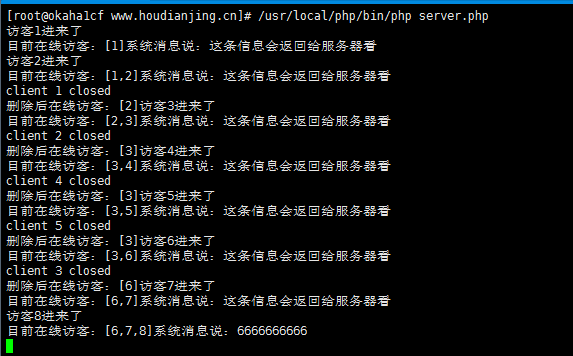
Cli命令行执行:/usr/local/php/bin/php server.php
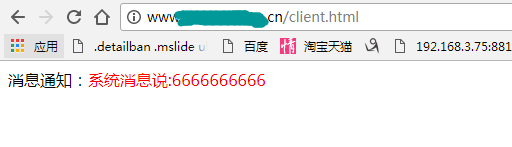
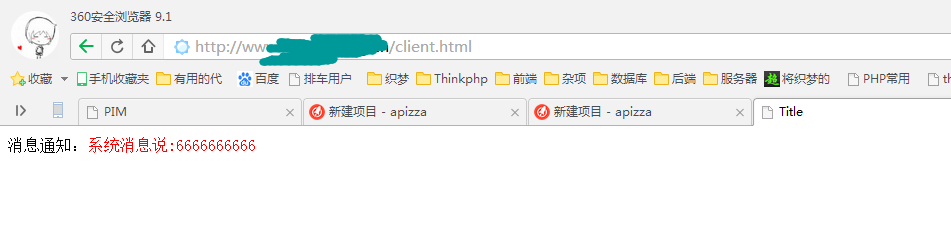
client.html
<!DOCTYPE html>

<html lang="en">

<head>

    <meta charset="UTF-8">

    <title>Title</title>

</head>

<body>

<div id="main">

    <div class="msgs">

        消息通知:<span id="push_content" style="color:red"></span>

    </div>

</div>

</body>

<script>

    var socket = new WebSocket('ws://23.27.127.32:9502');  //监听端口

    socket.onopen = function () {  //监听是否连接服务器成功触发

        console.log('Connected!');

         //socket.send("这条信息会返回给服务器看");    //重要!!客户端返回服务器

    };

    socket.onmessage = function (event) {  // **接收到服务器数据**触发

        console.log(event.data);

//        alert('Received data: ' + event.data);

        document.getElementById("push_content").innerHTML = event.data;

//        socket.close();

    };

    socket.onclose = function () {  //与服务器连接断开触发

        console.log('Lost connection!');

    };

    socket.onerror = function () { //与服务器连接出现错误触发

        console.log('Error!');

    };

//    socket.send('hello, world!');

</script>

</html>
admin.html
<!DOCTYPE html>

<html lang="en">

<head>

    <meta charset="UTF-8">

    <title>后台推送界面</title>

</head>

<body>

<div>

    <input type="text" name="content" placeholder="请输入需要推送的信息">

    <button id="push_button">推送</button>

</div>

</body>

<script>

    window.onload = function () {

        var socket = new WebSocket('ws://23.27.127.32:9502');  //监听端口

        var push_button = document.getElementById("push_button");

        var push_content = document.getElementsByName("content");

        push_button.onclick = function () {

            socket.send(push_content['0'].value);

        }

        socket.onmessage = function (event) {  // **接收到服务器数据**触发

            // alert('Received data: ' + event.data);   //这里应该返回发送成功的额标识

        };

        socket.onopen = function () {  //监听是否连接服务器成功触发

            console.log('Connected!');

            // socket.send(push_content['0'].value);    //重要!!客户端返回服务器

        };

        socket.onclose = function () {  //与服务器连接断开触发

            console.log('Lost connection!');

        };

        socket.onerror = function () { //与服务器连接出现错误触发

            console.log('Error!');

        };

    };

</script>

</html>

swoole WebSocket 消息推送的更多相关文章
- node.js Websocket消息推送---GoEasy
Goeasy, 它是一款第三方推送服务平台,使用它的API可以轻松搞定实时推送!个人感觉goeasy推送更稳定,推送 速度快,代码简单易懂上手快 浏览器兼容性:GoEasy推送 支持websocket ...
- C(++) Websocket消息推送---GoEasy
Goeasy, 它是一款第三方推送服务平台,使用它的API可以轻松搞定实时推送!个人感觉goeasy推送更稳定,推送 速度快,代码简单易懂上手快 浏览器兼容性:GoEasy推送 支持websocket ...
- 【WebSocket】WebSocket消息推送
准备使用WebSocket实现Java与Vue或者安卓间的实时通信,实现私密聊天.群聊.查询下资料备用. WebSocket客户端 websocket允许通过JavaScript建立与远程服务器的连接 ...
- swoole websocket服务推送
用过workerman, 两个字"好用",对于swoole最近有时间也研究研究 swoole的websocket 很好实现 如官网 https://wiki.swoole.com/ ...
- 使用swoole进行消息推送通知,配合vb.net进行客户端开发一样爽[开发篇]
在以前的项目中,就曾听说过swoole的大名,想用来进行消息推送,但是当时只是有了初步的了解,并不敢大胆的运用到线上产品.所谓 识不足则多虑,威不足则多怒.所以就是怕,只能跟领导说了运用极光的推送功能 ...
- websocket消息推送实现
一.服务层 package com.demo.websocket; import java.io.IOException; import java.util.Iterator; import java ...
- WebSocket消息推送
WebSocket协议是基于TCP的一种新的网络协议,应用层,是TCP/IP协议的子集. 它实现了浏览器与服务器全双工(full-duplex)通信,客户端和服务器都可以向对方主动发送和接收数据.在J ...
- spring boot下WebSocket消息推送(转)
原文地址:https://www.cnblogs.com/betterboyz/p/8669879.html WebSocket协议 WebSocket是一种在单个TCP连接上进行全双工通讯的协议.W ...
- spring+rabbitmq+stomp搭建websocket消息推送(非spring boot方式)
前言: 两年前做过spring+activemq+stomp的ws推送,那个做起来很简单,但现在公司用的mq中间件是rabbitmq,因此需要通过rabbitmq去做ws通信.仔细搜了搜百度/谷歌,网 ...
随机推荐
- Linux下Moodle平台的快速安装方案
一种快速安装与配置Moodle平台的方案,基本步骤: 1.选择与安装Linux系统 2.配置网络,开启shh和网络端口 3.一键安装集成环境(使用oneinstack方案) 4.服务器配置,端口和PH ...
- Bootstrap-Plugin:按钮(Button)插件
ylbtech-Bootstrap-Plugin:按钮(Button)插件 1.返回顶部 1. Bootstrap 按钮(Button)插件 按钮(Button)在 Bootstrap 按钮 一章中介 ...
- Bootstrap-CL:面包屑导航
ylbtech-Bootstrap-CL:面包屑导航 1.返回顶部 1. Bootstrap 面包屑导航(Breadcrumbs) 面包屑导航(Breadcrumbs)是一种基于网站层次信息的显示方式 ...
- mysql用一个表更新另一个表的方法
Solution 1: 修改1列(navicate可行) update student s, city c set s.city_name = c.name where s.city_code = ...
- Hive默认分割符
1.Hive默认的分隔符 Hive的表数据,不管导出到HDFS还是本地文件系统,如果用户在导出时没有指定分割符,那么Hive表的数据在写入文件时,会使用默认的分隔符作为列分隔符,该默认的分割是“CTR ...
- JavaScript(一) - 精简
javascript一 javascript 是什么? 1. 运行在浏览器端 ,定义网页的行为, 2.所有的html页面都有js. 二 javascript 定义方式? 1 在html文件里 js 可 ...
- C#中的参数关键字params
class 参数 { public void doSome(string str,params int[] values){ ) { ; i < values.Length; i++) { Co ...
- Loadrunner11在新建Microsoft Word 报告时提示指定的转换无效
HP Loadrunner11中文教程的学习基本已经结束,最后困扰我的就是这个在创建Microsoft Word 报告时不停的提示“指定的转换无效”的问题.在网上搜索了好长时间,好多朋友回答说没有生成 ...
- python之CMDB
浅谈ITIL TIL即IT基础架构库(Information Technology Infrastructure Library, ITIL,信息技术基础架构库)由英国政府部门CCTA(Central ...
- 我的第一个C程序
// // main.c // one // // Created by Shuang Gai on 2019/1/19. // Copyright © 2019 Shuang Gai. All ri ...