
Bootstrap table前端分页(ssm版)


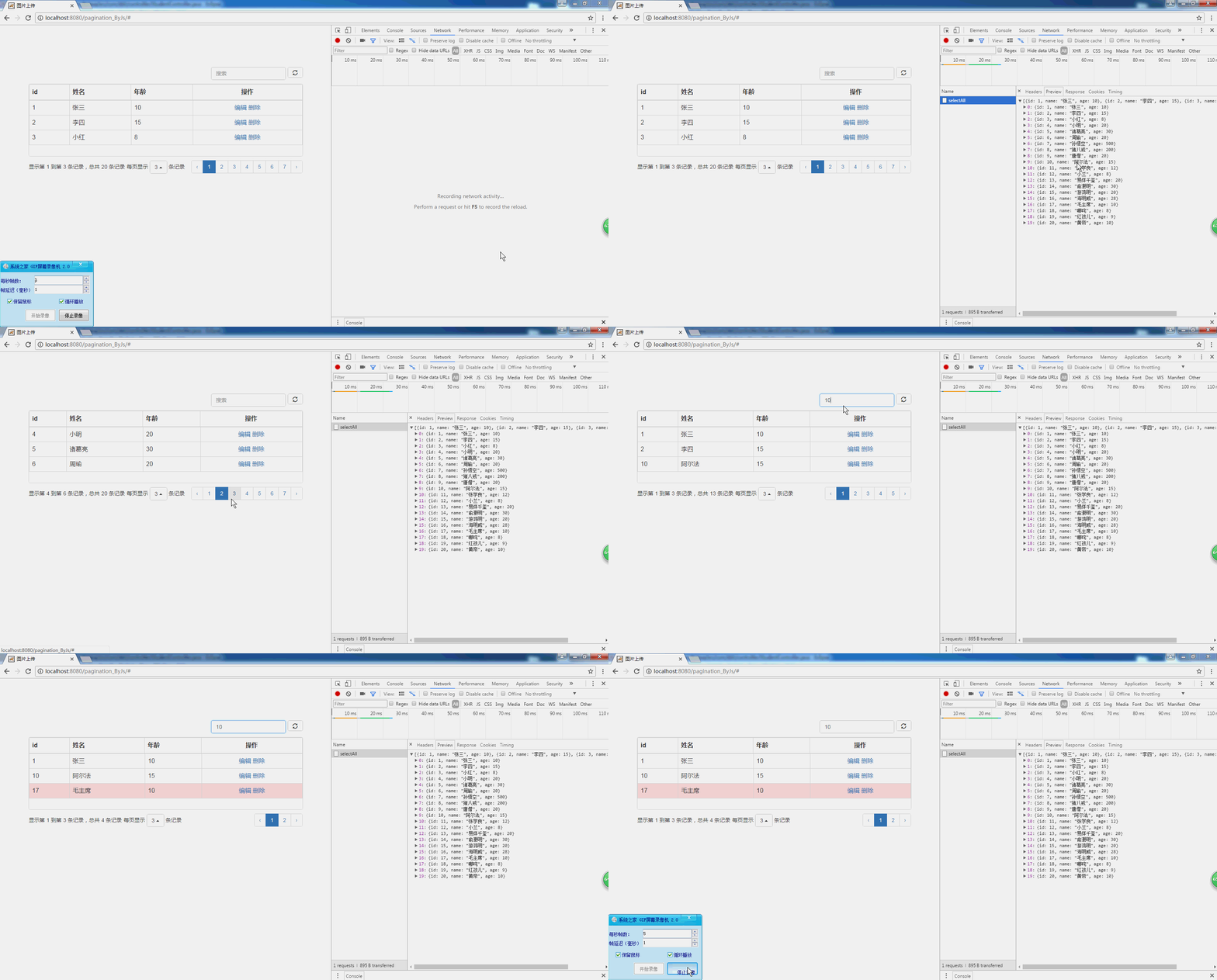
说明
bootstrap table可以前端分页,也可以后端sql用limit分页。
前端分页下性能和意义都不大,故一般情况下不用这种,请看我的另一篇后端分页的博客
源码下载地址:https://git.oschina.net/dshvv/pagination_byjs.git
该文主要讲前端分页:
1、后端一次性查询所,(底层因该是有个缓存json)然后前端分页
2、查询也是前端搜索(即搜索前端缓存的json内容),不进入服务器
源码
html
<%@ page contentType="text/html;charset=UTF-8" language="java" %>

<%

    String path = request.getContextPath();

    String basePath = request.getScheme()+"://"+request.getServerName()+":"+request.getServerPort()+path+"/";

%>

<html>

    <head>

        <meta charset="utf-8">

        <title>图片上传</title>

        <!-- jq -->

        <script type="text/javascript" src="<%=basePath%>js/jquery-3.1.1.min.js"></script>

        <!-- bootstrap -->

        <link rel="stylesheet" href="<%=basePath%>/plugs/bootstrap/css/bootstrap.min.css">

        <script type="text/javascript" src="<%=basePath%>/plugs/bootstrap/js/bootstrap.min.js"></script>

        <!-- 分页插件 -->

        <link rel="stylesheet" href="<%=basePath%>plugs/bootstrap-table/bootstrap-table.min.css">

        <script type="text/javascript" src="<%=basePath%>plugs/bootstrap-table/bootstrap-table.min.js"></script>

        <script type="text/javascript" src="<%=basePath%>plugs/bootstrap-table/bootstrap-table-locale-all.min.js"></script>

    </head>

    <body>

        <div class="container" style="margin-top:100px">

            <div class="row">

                <!-- 表格 -->

                <div class="col-xs-12">

                    <table class="table table-striped table-bordered table-hover" ></table>

                </div>

            </div>

        </div>

        <script type="text/javascript">

            class BstpTable{

                constructor(obj) {

                    this.obj=obj;

                }

                inint(){

                     //---先销毁表格 ---

                     this.obj.bootstrapTable('destroy');

                     //---初始化表格,动态从服务器加载数据---

                     this.obj.bootstrapTable({

                        //【发出请求的基础信息】

                        url: '<%=basePath%>student/selectAll',

                        method: 'post',

                        contentType: "application/x-www-form-urlencoded",

                        //【其它设置】

                        locale:'zh-CN',//中文支持

                        pagination: true,//是否开启分页(*)

                        pageNumber:1,//初始化加载第一页,默认第一页

                        pageSize: 3,//每页的记录行数(*)

                        pageList: [2,3,4],//可供选择的每页的行数(*)

                        sidePagination: "client", //分页方式:client客户端分页,server服务端分页(*)

                        showRefresh:true,//刷新按钮

                        search: true,//是否显示表格搜索,此搜索是客户端搜索,不会进服务端

                        //【样式设置】

                        height: 300,//table的高度

                        //按需求设置不同的样式:5个取值代表5中颜色['active', 'success', 'info', 'warning', 'danger'];

                        rowStyle: function (row, index) {

                            var style = "";

                            if (row.name=="毛主席") {style ='danger';}

                            return { classes: style }

                        },

                        //【设置列】

                        columns: [

                         {field: 'id',title: 'id'},

                         {field: 'name',title: '姓名'},

                         {field: 'age',title: '年龄'},

                         {field: 'tool',title: '操作', align: 'center',

                            formatter:function(value,row,index){

                                var element =

                                "<a class='edit' data-id='"+row.id +"'>编辑</a> "+

                                "<a class='delet' data-id='"+row.id +"'>删除</a> ";

                                return element;

                            }

                          }

                        ]

                    })

                 }

            }

            var bstpTable=new BstpTable($("table"));

            bstpTable.inint()

        </script>

    </body>

</html>
controller
package com.dsh.controller;

import java.util.List;

import org.springframework.beans.factory.annotation.Autowired;

import org.springframework.stereotype.Controller;

import org.springframework.web.bind.annotation.RequestMapping;

import org.springframework.web.bind.annotation.ResponseBody;

import com.dsh.pojo.Student;

import com.dsh.service.StudentService;

@Controller

@RequestMapping("student")

public class StudentController {

    @Autowired

    private StudentService studentService;

    @RequestMapping("selectAll")

    @ResponseBody

    public List<Student> getAll(){

        return studentService.selectAll();

    }

}
service
package com.dsh.service.imp;

import java.util.List;

import org.springframework.beans.factory.annotation.Autowired;

import org.springframework.stereotype.Service;

import com.dsh.mapper.StudentMapper;

import com.dsh.pojo.Student;

import com.dsh.pojo.StudentExample;

import com.dsh.pojo.StudentExample.Criteria;

import com.dsh.service.StudentService;

@Service

public class StudentServiceImp implements StudentService {

    @Autowired

    private StudentMapper studentMapper;

    public List<Student> selectAll() {

        //这里我用的是mybatis自定生成的代码里Example查询用法,不需理解,会用就行

        StudentExample example=new StudentExample();

        Criteria criteria=example.createCriteria();

        criteria.getAllCriteria();

        return studentMapper.selectByExample(example);

    }

}
Bootstrap table前端分页(ssm版)的更多相关文章
- bootstrap table 服务器端分页例子分享
这篇文章主要介绍了bootstrap table 服务器端分页例子分享,需要的朋友可以参考下 1,前台引入所需的js 可以从官网上下载 复制代码代码如下: function getTab(){var ...
- [转]Bootstrap table后端分页(ssm版)
原文地址:https://www.cnblogs.com/flyins/p/6752285.html 说明bootstrap table可以前端分页,也可以后端sql用limit分页.这里讲的是后端分 ...
- Bootstrap table后端分页(ssm版)
说明bootstrap table可以前端分页,也可以后端sql用limit分页.这里讲的是后端分页,即实用limit.性能较好,一般均用这种源码下载地址:https://git.oschina.ne ...
- [前端插件]Bootstrap Table服务器分页与在线编辑应用总结
先看Bootstrap Table应用效果: 表格用来显示数据库中的数据,数据通过AJAX从服务器加载,同时分页功能有服务器实现,避免客户端分页,在加载大量数据时造成的用户体验不好.还可以设置查询数据 ...
- 161222、Bootstrap table 服务器端分页示例
bootstrap版本 为 3.X bootstrap-table.min.css bootstrap-table-zh-CN.min.js bootstrap-table.min.js 前端boot ...
- C# Bootstrap table之 分页
效果如图: 一.声明talbe <div class="container"> <table id="table" class="t ...
- bootstrap table 前端搜索
1.bootstrap-table对于前端的搜索可以通过官网设置,但发现前端搜索出现bug,网上找到一个bootstrap-table的扩充js bootstrap-table-mytoolbar. ...
- [转]C# Bootstrap table之 分页
本文转自:https://www.cnblogs.com/zhangjd/p/7895453.html 效果如图: 一.声明talbe <div class="container&qu ...
- bootstrap table 服务器端分页--ashx+ajax
1.准备静态页面 1 <!DOCTYPE html> 2 <html> 3 <head> 4 <meta http-equiv="Content-T ...
随机推荐
- PL/SQL编程1-基础
编写第一个存储过程 create or replace procedure test_pro1 is begin ','zydev'); end; / 查看错误 show error 执行存储过程 e ...
- Binary XML file line #17<vector> tag requires viewportWidth > 0
Android高版本对比低版本 在我的项目中更改成 //buildToolsVersion '21.1.2'buildToolsVersion '24.0.1' // 24.0.1 必须用这个否则报B ...
- Effective C++ —— 继承与面向对象设计(六)
条款32 : 确定你的public继承塑模出is-a关系 以C++进行面向对象编程,最重要的一个规则是:public inheritance(公开继承)意味“is-a”(是一种)的关系.请务必牢记.当 ...
- AndroidのBuild工具之Ant动手实践
好久没有写博客了,没半年也应该有几个月了.在工作上的项目遇到过很多问题或者说积累了不少经验,曾经都蛮想发到博客留个纪念什么的,不求可以为别人获得点经验技巧,只求在多年后遇到同样的问题可以找到个记录.但 ...
- 【IOS6.0 自学瞎折腾】(五)应用程序的启动过程和Application生命周期
一 :main函数入口 看下项目资源结构,其实程序的入口也是在main.m里面. #import <UIKit/UIKit.h> #import "BvinAppDelegate ...
- struts2基础---->第一个Struts2程序
学习struts2的第一个程序,这里只会涉及到简单的代码编写.有一个夜晚我烧毁了所有的记忆,从此我的梦就透明了:有一个早晨我扔掉了所有的昨天,从此我的脚步就轻盈了. Struts的项目
- java三方---->html解析jsoup的使用
jsoup 是一款 Java 的HTML 解析器,可直接解析某个URL地址.HTML文本内容.它提供了一套非常省力的API,可通过DOM,CSS以及类似于JQuery的操作方法来取出和操作数据.今天我 ...
- 静态同步synchronized方法和synchronized(class)代码块
关键字synchronized还可以应用在static静态方法上,如果这样写,那是对当前的*.java文件对应的Class类进行持锁. package synStaticMethod; /** * C ...
- 用Iterator实现遍历集合
使用Collection类的Iterator,可以方便的遍历Vector, ArrayList, LinkedList等集合元素,避免通过get()方法遍历时,针对每一种对象单独进行编码. 示例: C ...
- 条件注释判断IE浏览器版本
lt,lte,gt,gte分别表示什么 lt:小于当前版本 lte:小于或等于当前版本,包括本身 gt:大于当前版本 gte:大于或等于当前版本,包括本身 使用格式 // 如IE9以下(不包括IE9加 ...