
大数据【三】YARN集群部署
一 概述
YARN是一个资源管理、任务调度的框架,采用master/slave架构,主要包含三大模块:ResourceManager(RM)、NodeManager(NM)、ApplicationMaster(AM)。
>ResourceManager负责所有资源的监控、分配和管理,运行在主节点;
>NodeManager负责每一个节点的维护,运行在从节点;
>ApplicationMaster负责每一个具体应用程序的调度和协调,只有在有任务正在执行时存在。
对于所有的applications,RM拥有绝对的控制权和对资源的分配权。而每个AM则会和RM协商资源,同时和NodeManager通信来执行和监控task。
二 运行流程
1‘ client向RM提交应用程序,其中包括启动该应用的ApplicationMaster的必须信息,例如ApplicationMaster程序、启动ApplicationMaster的命令、用户程序等。
2’ ResourceManager启动一个container用于运行ApplicationMaster。
3‘ 启动中的ApplicationMaster向ResourceManager注册自己,启动成功后与RM保持心跳。
4’ ApplicationMaster向ResourceManager发送请求,申请相应数目的container。
5‘ ResourceManager返回ApplicationMaster的申请的containers信息。申请成功的container,由ApplicationMaster进行初始化。container的启动信息初始化后,AM与对应的NodeManager通信,要求NM启动container。AM与NM保持心跳,从而对NM上运行的任务进行监控和管理。
6’ container运行期间,ApplicationMaster对container进行监控。container通过RPC协议向对应的AM汇报自己的进度和状态等信息。
7‘ 应用运行期间,client直接与AM通信获取应用的状态、进度更新等信息。
8’ 应用运行结束后,ApplicationMaster向ResourceManager注销自己,并允许属于它的container被收回。
三 管理YARN集群
1‘ 配置YARN集群
>切换到master服务器上,前提是HDFS结点已经启动,方法见上一篇博客>> http://www.cnblogs.com/1996swg/p/7286136.html
>指定YARN主节点,编辑文件“/usr/cstor/hadoop/etc/hadoop/yarn-site.xml”,将如下内容嵌入此文件里configuration标签间:
<property><name>yarn.resourcemanager.hostname</name><value>master</value></property>
<property><name>yarn.nodemanager.aux-services</name><value>mapreduce_shuffle</value></property>
yarn-site.xml是YARN守护进程的配置文件。第一句配置了ResourceManager的主机名,第二句配置了节点管理器运行的附加服务为mapreduce_shuffle,只有这样才可以运行MapReduce程序。

>将配置好的YARN配置文件拷贝至slaveX、client
命令如下: 查看子集 cat ~/data/4/machines
拷贝到子集 for x in `cat ~/data/4/machines` ; do echo $x ; scp /usr/cstor/hadoop/etc/hadoop/yarn-site.xml $x:/usr/cstor/hadoop/etc/hadoop/ ; done;
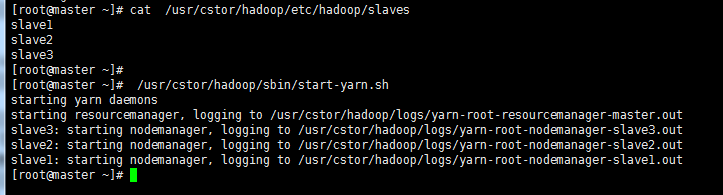
>确认已配置slaves文件,在master机器上查看;
>统一启动YARN,命令 /usr/cstor/hadoop/sbin/start-yarn.sh 如图所示
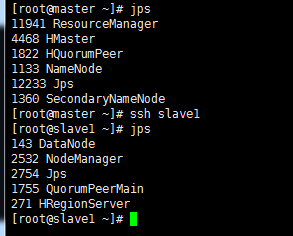
>验证用 jps 命令,在其余子集上同时验证,如图所示验证成功
2’ 在client机上提交DistributedShell任务
distributedshell,可以看做YARN编程中的“hello world”,主要功能是并行执行用户提供的shell命令或者shell脚本。
-jar指定了包含ApplicationMaster的jar文件,-shell_command指定了需要被ApplicationMaster执行的Shell命令。
在 上再打开一个client 的连接,执行:
/usr/cstor/hadoop/bin/yarn org.apache.hadoop.yarn.applications.distributedshell.Client -jar /usr/cstor/hadoop/share/hadoop/yarn/hadoop-yarn-applications-distributedshell-2.7.1.jar -shell_command uptime
运行结果显示:
 17/08/05 02:51:34 INFO distributedshell.Client: Initializing Client

 17/08/05 02:51:34 INFO distributedshell.Client: Running Client

 17/08/05 02:51:34 INFO client.RMProxy: Connecting to ResourceManager at master/10.1.21.27:8032

 17/08/05 02:51:34 WARN util.NativeCodeLoader: Unable to load native-hadoop library for your platform... using builtin-java classes where applicable

 17/08/05 02:51:34 INFO distributedshell.Client: Got Cluster metric info from ASM, numNodeManagers=3

 17/08/05 02:51:34 INFO distributedshell.Client: Got Cluster node info from ASM

 17/08/05 02:51:34 INFO distributedshell.Client: Got node report from ASM for, nodeId=slave1:42602, nodeAddressslave1:8042, nodeRackName/default-rack, nodeNumContainers0

 17/08/05 02:51:34 INFO distributedshell.Client: Got node report from ASM for, nodeId=slave2:57070, nodeAddressslave2:8042, nodeRackName/default-rack, nodeNumContainers0

 17/08/05 02:51:34 INFO distributedshell.Client: Got node report from ASM for, nodeId=slave3:38580, nodeAddressslave3:8042, nodeRackName/default-rack, nodeNumContainers0

 17/08/05 02:51:34 INFO distributedshell.Client: Queue info, queueName=default, queueCurrentCapacity=0.0, queueMaxCapacity=1.0, queueApplicationCount=0, queueChildQueueCount=0

 17/08/05 02:51:34 INFO distributedshell.Client: User ACL Info for Queue, queueName=root, userAcl=SUBMIT_APPLICATIONS

 17/08/05 02:51:34 INFO distributedshell.Client: User ACL Info for Queue, queueName=root, userAcl=ADMINISTER_QUEUE

 17/08/05 02:51:34 INFO distributedshell.Client: User ACL Info for Queue, queueName=default, userAcl=SUBMIT_APPLICATIONS

 17/08/05 02:51:34 INFO distributedshell.Client: User ACL Info for Queue, queueName=default, userAcl=ADMINISTER_QUEUE

 17/08/05 02:51:35 INFO distributedshell.Client: Max mem capabililty of resources in this cluster 8192

 17/08/05 02:51:35 INFO distributedshell.Client: Max virtual cores capabililty of resources in this cluster 32

 17/08/05 02:51:35 INFO distributedshell.Client: Copy App Master jar from local filesystem and add to local environment

 17/08/05 02:51:35 INFO distributedshell.Client: Set the environment for the application master

 17/08/05 02:51:35 INFO distributedshell.Client: Setting up app master command

 17/08/05 02:51:35 INFO distributedshell.Client: Completed setting up app master command {{JAVA_HOME}}/bin/java -Xmx10m org.apache.hadoop.yarn.applications.distributedshell.ApplicationMaster --container_memory 10 --container_vcores 1 --num_containers 1 --priority 0 1><LOG_DIR>/AppMaster.stdout 2><LOG_DIR>/AppMaster.stderr

 17/08/05 02:51:35 INFO distributedshell.Client: Submitting application to ASM

 17/08/05 02:51:36 INFO impl.YarnClientImpl: Submitted application application_1501872322130_0001

 17/08/05 02:51:37 INFO distributedshell.Client: Got application report from ASM for, appId=1, clientToAMToken=null, appDiagnostics=, appMasterHost=N/A, appQueue=default, appMasterRpcPort=-1, appStartTime=1501872695990, yarnAppState=ACCEPTED, distributedFinalState=UNDEFINED, appTrackingUrl=http://master:8088/proxy/application_1501872322130_0001/, appUser=root

 17/08/05 02:51:38 INFO distributedshell.Client: Got application report from ASM for, appId=1, clientToAMToken=null, appDiagnostics=, appMasterHost=N/A, appQueue=default, appMasterRpcPort=-1, appStartTime=1501872695990, yarnAppState=ACCEPTED, distributedFinalState=UNDEFINED, appTrackingUrl=http://master:8088/proxy/application_1501872322130_0001/, appUser=root

 17/08/05 02:51:39 INFO distributedshell.Client: Got application report from ASM for, appId=1, clientToAMToken=null, appDiagnostics=, appMasterHost=N/A, appQueue=default, appMasterRpcPort=-1, appStartTime=1501872695990, yarnAppState=ACCEPTED, distributedFinalState=UNDEFINED, appTrackingUrl=http://master:8088/proxy/application_1501872322130_0001/, appUser=root

 17/08/05 02:51:40 INFO distributedshell.Client: Got application report from ASM for, appId=1, clientToAMToken=null, appDiagnostics=, appMasterHost=slave2/10.1.32.41, appQueue=default, appMasterRpcPort=-1, appStartTime=1501872695990, yarnAppState=RUNNING, distributedFinalState=UNDEFINED, appTrackingUrl=http://master:8088/proxy/application_1501872322130_0001/, appUser=root

 17/08/05 02:51:41 INFO distributedshell.Client: Got application report from ASM for, appId=1, clientToAMToken=null, appDiagnostics=, appMasterHost=slave2/10.1.32.41, appQueue=default, appMasterRpcPort=-1, appStartTime=1501872695990, yarnAppState=RUNNING, distributedFinalState=UNDEFINED, appTrackingUrl=http://master:8088/proxy/application_1501872322130_0001/, appUser=root

 17/08/05 02:51:42 INFO distributedshell.Client: Got application report from ASM for, appId=1, clientToAMToken=null, appDiagnostics=, appMasterHost=slave2/10.1.32.41, appQueue=default, appMasterRpcPort=-1, appStartTime=1501872695990, yarnAppState=RUNNING, distributedFinalState=UNDEFINED, appTrackingUrl=http://master:8088/proxy/application_1501872322130_0001/, appUser=root

 17/08/05 02:51:43 INFO distributedshell.Client: Got application report from ASM for, appId=1, clientToAMToken=null, appDiagnostics=, appMasterHost=slave2/10.1.32.41, appQueue=default, appMasterRpcPort=-1, appStartTime=1501872695990, yarnAppState=RUNNING, distributedFinalState=UNDEFINED, appTrackingUrl=http://master:8088/proxy/application_1501872322130_0001/, appUser=root

 17/08/05 02:51:44 INFO distributedshell.Client: Got application report from ASM for, appId=1, clientToAMToken=null, appDiagnostics=, appMasterHost=slave2/10.1.32.41, appQueue=default, appMasterRpcPort=-1, appStartTime=1501872695990, yarnAppState=FINISHED, distributedFinalState=SUCCEEDED, appTrackingUrl=http://master:8088/proxy/application_1501872322130_0001/, appUser=root

 17/08/05 02:51:44 INFO distributedshell.Client: Application has completed successfully. Breaking monitoring loop

 17/08/05 02:51:44 INFO distributedshell.Client: Application completed successfully
3’ 在client机上提交MapReduce任务
(1)指定在YARN上运行MapReduce任务
首先,在master机上,将文件“/usr/cstor/hadoop/etc/hadoop/mapred-site.xml. template”重命名为“/usr/cstor/hadoop/etc/hadoop/mapred-site.xml”;
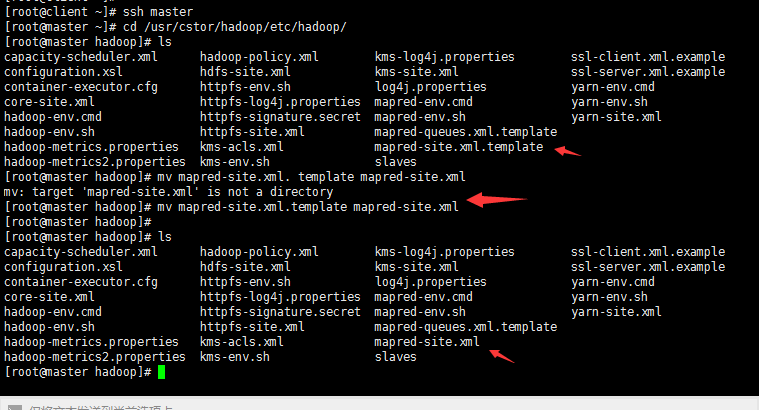
接着,编辑此文件并将如下内容嵌入此文件的configuration标签间:
<property><name>mapreduce.framework.name</name><value>yarn</value></property>
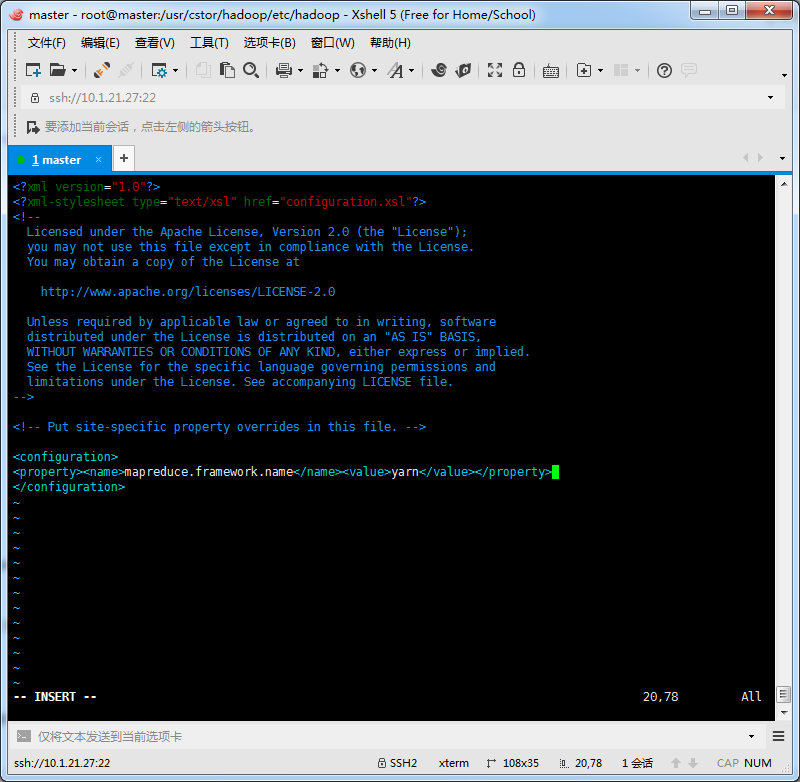
最后,将master机的“/usr/local/hadoop/etc/hadoop/mapred-site.xml”文件拷贝到slaveX与client,(拷贝方法同上YARN配置拷贝方法),重新启动集群。
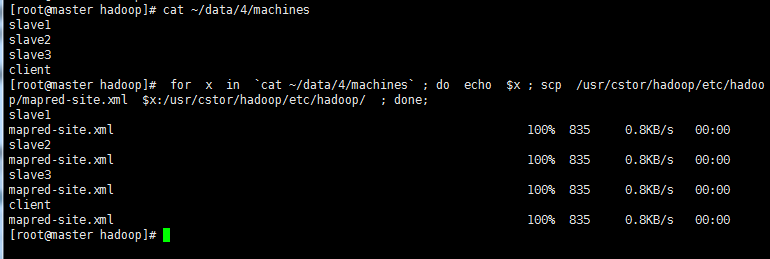
(2)在client端提交PI Estimator任务
首先进入Hadoop安装目录:/usr/cstor/hadoop/,然后提交PI Estimator任务。
命令最后两个两个参数的含义:第一个参数是指要运行map的次数,这里是2次;第二个参数是指每个map任务,取样的个数;而两数相乘即为总的取样数。Pi Estimator使用Monte Carlo方法计算Pi值的。
bin/hadoop jar share/hadoop/mapreduce/hadoop-mapreduce-examples-2.7.1.jar pi 2 10
显示结果如下:
 Number of Maps  = 2

 Samples per Map = 10

 17/08/05 03:03:30 WARN util.NativeCodeLoader: Unable to load native-hadoop library for your platform... using builtin-java classes where applicable

 Wrote input for Map #0

 Wrote input for Map #1

 Starting Job

 17/08/05 03:03:31 INFO client.RMProxy: Connecting to ResourceManager at master/10.1.21.27:8032

 17/08/05 03:03:32 INFO input.FileInputFormat: Total input paths to process : 2

 17/08/05 03:03:32 INFO mapreduce.JobSubmitter: number of splits:2

 17/08/05 03:03:32 INFO mapreduce.JobSubmitter: Submitting tokens for job: job_1501872322130_0002

 17/08/05 03:03:32 INFO impl.YarnClientImpl: Submitted application application_1501872322130_0002

 17/08/05 03:03:32 INFO mapreduce.Job: The url to track the job: http://master:8088/proxy/application_1501872322130_0002/

 17/08/05 03:03:32 INFO mapreduce.Job: Running job: job_1501872322130_0002

 17/08/05 03:03:39 INFO mapreduce.Job: Job job_1501872322130_0002 running in uber mode : false

 17/08/05 03:03:39 INFO mapreduce.Job:  map 0% reduce 0%

 17/08/05 03:03:45 INFO mapreduce.Job:  map 50% reduce 0%

 17/08/05 03:03:46 INFO mapreduce.Job:  map 100% reduce 0%

 17/08/05 03:03:52 INFO mapreduce.Job:  map 100% reduce 100%

 17/08/05 03:03:52 INFO mapreduce.Job: Job job_1501872322130_0002 completed successfully

 17/08/05 03:03:52 INFO mapreduce.Job: Counters: 49

     File System Counters

         FILE: Number of bytes read=50

         FILE: Number of bytes written=347208

         FILE: Number of read operations=0

         FILE: Number of large read operations=0

         FILE: Number of write operations=0

         HDFS: Number of bytes read=522

         HDFS: Number of bytes written=215

         HDFS: Number of read operations=11

         HDFS: Number of large read operations=0

         HDFS: Number of write operations=3

     Job Counters

         Launched map tasks=2

         Launched reduce tasks=1

         Data-local map tasks=2

         Total time spent by all maps in occupied slots (ms)=7932

         Total time spent by all reduces in occupied slots (ms)=3443

         Total time spent by all map tasks (ms)=7932

         Total time spent by all reduce tasks (ms)=3443

         Total vcore-seconds taken by all map tasks=7932

         Total vcore-seconds taken by all reduce tasks=3443

         Total megabyte-seconds taken by all map tasks=8122368

         Total megabyte-seconds taken by all reduce tasks=3525632

     Map-Reduce Framework

         Map input records=2

         Map output records=4

         Map output bytes=36

         Map output materialized bytes=56

         Input split bytes=286

         Combine input records=0

         Combine output records=0

         Reduce input groups=2

         Reduce shuffle bytes=56

         Reduce input records=4

         Reduce output records=0

         Spilled Records=8

         Shuffled Maps =2

         Failed Shuffles=0

         Merged Map outputs=2

         GC time elapsed (ms)=347

         CPU time spent (ms)=2630

         Physical memory (bytes) snapshot=683196416

         Virtual memory (bytes) snapshot=2444324864

         Total committed heap usage (bytes)=603979776

     Shuffle Errors

         BAD_ID=0

         CONNECTION=0

         IO_ERROR=0

         WRONG_LENGTH=0

         WRONG_MAP=0

         WRONG_REDUCE=0

     File Input Format Counters

         Bytes Read=236

     File Output Format Counters

         Bytes Written=97

 Job Finished in 20.592 seconds

 Estimated value of Pi is 3.80000000000000000000
小结:
关于YARN框架的学习不需多深入,只需搭建好配置环境,以供下面MapReduce的学习。
在新版Hadoop中,Yarn作为一个资源管理调度框架,是Hadoop下MapReduce程序运行的生存环境。其实MapRuduce除了可以运行Yarn框架下,也可以运行在诸如Mesos,Corona之类的调度框架上,使用不同的调度框架,需要针对Hadoop做不同的适配。
大数据【三】YARN集群部署的更多相关文章
- 大数据学习——Kafka集群部署
1下载安装包 2解压安装包 -0.9.0.1.tgz -0.9.0.1 kafka 3修改配置文件 cp server.properties server.properties.bak # Lice ...
- 大数据学习——yarn集群启动
启动yarn命令: start-yarn.sh 验证是否启动成功 jps查看进程 http://192.168.74.100:8088页面 关闭 stop-yarn.sh
- ElasticSearch 深入理解 三:集群部署设计
ElasticSearch 深入理解 三:集群部署设计 ElasticSearch从名字中也可以知道,它的Elastic跟Search是同等重要的,甚至以Elastic为主要导向. Elastic即可 ...
- CDH构建大数据平台-配置集群的Kerberos认证安全
CDH构建大数据平台-配置集群的Kerberos认证安全 作者:尹正杰 版权声明:原创作品,谢绝转载!否则将追究法律责任. 当平台用户使用量少的时候我们可能不会在一集群安全功能的缺失,因为用户少,团 ...
- 朝花夕拾之--大数据平台CDH集群离线搭建
body { border: 1px solid #ddd; outline: 1300px solid #fff; margin: 16px auto; } body .markdown-body ...
- 大数据测试之hadoop集群配置和测试
大数据测试之hadoop集群配置和测试 一.准备(所有节点都需要做):系统:Ubuntu12.04java版本:JDK1.7SSH(ubuntu自带)三台在同一ip段的机器,设置为静态IP机器分配 ...
- Ha-Federation-hdfs +Yarn集群部署方式
经过一下午的尝试,终于把这个集群的搭建好了,搭完感觉也没有太大的必要,就当是学习了吧,为之后搭建真实环境做基础. 以下搭建的是一个Ha-Federation-hdfs+Yarn的集群部署. 首先讲一下 ...
- Laxcus大数据管理系统单机集群版
Laxcus大数据管理系统是我们Laxcus大数据实验室历时5年,全体系全功能设计研发的大数据产品,目前的最新版本是2.1版本.从三年前的1.0版本开始,Laxcus大数据系统投入到多个大数据和云计算 ...
- Laxcus大数据操作系统单机集群版
Laxcus大数据管理系统是我们Laxcus大数据实验室历时5年,全体系全功能设计研发的大数据产品,目前的最新版本是2.1版本.从三年前的1.0版本开始,Laxcus大数据系统投入到多个大数据和云计算 ...
随机推荐
- Python相关在线文档手册地址
Python相关: 五星推荐:http://python.usyiyi.cn/ Python 2.7官方中文文档:http://doc.iplaypy.com/python2/ 英文: htt ...
- xamarin 编译出现Xamarin.Build.Forms.Tasks.GetTaskAbi 无法加载的错误解决方法
最新升级最新的vs2017后发现编译xamarin forms 会出现错误 Xamarin.Forms.Build.Tasks.GetTasksAbi task could not be loaded ...
- FactoryMethod工厂方法模式(创建型模式)
1.工厂方法模式解决的问题 现在有一个抽象的游戏设施建造系统,负责构建一个现代风格和古典风格的房屋和道路. 前提:抽象变化较慢,实现变化较快(不稳定) 整个抽象的游戏设施建造系统相对变化较慢,本例中只 ...
- 03-01:springboot 整合jsp
1.修改pom文件,添加坐标 <!-- jstl --> <dependency> <groupId>javax.servlet ...
- 第一章-Javac编译器介绍
1.Javac概述 编译器可以将编程语言的代码转换为其他形式,如Javac,将Java语言转换为虚拟机能够识别的.class文件形式.而这种将java源代码(以.java做为文件存储格式)转换为cla ...
- Mysql索引会失效的几种情况分析
转:https://www.jb51.net/article/50649.htm 学习啦
- Python高级特性: 12步轻松搞定Python装饰器
12步轻松搞定Python装饰器 通过 Python 装饰器实现DRY(不重复代码)原则: http://python.jobbole.com/84151/ 基本上一开始很难搞定python的装 ...
- mysqlbinlog命令介绍及实战
MySQL的binlog日志的作用 - 1:用来记录mysql内部增删改查等对MySQL数据有更新内容的记录.像show和select一般不会记录 - 2:mysqlbinlog --base64-o ...
- logstash与kafka消息传输<一>
1.版本: logstash6.1.2.kafka-0.11.kafka-0.8.2.java1.8 Note: Logstash requires Java 8. Java 9 is not sup ...
- Swift基础
github上找了swift中文翻译,上传到百度云,给大家分享下 链接:http://pan.baidu.com/s/1hqGOxfe 密码:asto