
CSS3实现的几个小loading效果
昨晚上闲的没事突然想做几个小loading效果,下面是昨晚上做的几个小案例,分享给大家
1.水波loading:这个loading是我觉得非常简单,但是看上去的效果却非常不错的一个小loading
 这个是效果图片
下面我直接把代码放上来,大家需要的可以直接拉走
核心思想:(旋转,以及overflow:hidden属性),可以把代码中的overflow属性注释掉,保准你看一眼明白了,看不明白回来找我,我对你负责
<!DOCTYPE html>

<html lang="en">

<head>

    <meta charset="UTF-8">

    <meta name="viewport" content="width=device-width, initial-scale=1.0">

    <meta http-equiv="X-UA-Compatible" content="ie=edge">

    <title>Document</title>

    <style>

        * {

            margin:;

            padding: 0

        }

        body {

            background-color: black

        }

        .box {

            margin: 200px auto;

            height: 50px;

            width: 50px;

            border-radius: 10px;

            background-color: rgb(0, 174, 255);

            position: relative;

            overflow: hidden;

            border: 1px solid rgb(0, 174, 255);

            border-top: none;

        }

        .a {

            width: 200px;

            height: 200px;

           background: black;

            position: absolute;

            left: -80px;

            top: -180px;

            border-radius: 80px;

            animation: xuanzhuan 5s linear infinite;

            z-index: 2

        }

        @keyframes xuanzhuan{

            0%{transform: rotate(0deg)}

            100%{transform: rotate(360deg)}

        }

    </style>

</head>

<body>

    <div class="box">

        <div class="a"></div>

        <div class="b"></div>

    </div>

</body>

</html>
2.普通的圆形loading 这个也很简单 没啥好说的,直接上代码了

<!DOCTYPE html>

<html lang="en">

<head>

    <meta charset="UTF-8">

    <meta name="viewport" content="width=device-width, initial-scale=1.0">

    <meta http-equiv="X-UA-Compatible" content="ie=edge">

    <title>Document</title>

    <style>

    *{margin:;padding:}

    li{list-style: none}

    body,html{

        background-color: black;

    }

    ul{

        height: 40px;

        width: 200px;

        margin: 50px auto;

    }

    ul>li{

        float: left;

        height: 20px;

        width: 20px;

        border-radius: 50%;

        background: white;

        margin-left: 10px;

        animation: move 2s infinite alternate;

        transform: scale(0.5)

    }

    ul>li:nth-of-type(2){

        animation-delay: 0.5s;

    }

    ul>li:nth-of-type(3){

        animation-delay:1s;

    }

    @keyframes move{

        0%{transform: scale(0.5);opacity: 0.5}

        100%{transform: scale(1);opacity:;}

    }

    </style>

</head>

<body>

    <ul>

        <li></li>

        <li></li>

        <li></li>

    </ul>

</body>

</html>
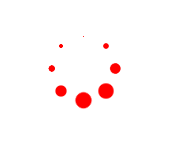
3.圆形转圈loading
思想(把小圆用定位排成圆形,再给每个上添加动画,用delay控制延迟事件即可)
<!DOCTYPE html>

<html>

    <head>

        <meta charset="utf-8" />

        <title></title>

    </head>

    <style>

        *{

            margin:;

            padding:;

        }

        .d1{

            width: 50px;

            height: 50px;

            position: absolute;

            margin: 100px;

        }

        .d1 p{

            width: 14px;

            height: 14px;

            border-radius: 50%;

            background: red;

            position: absolute;

            animation: dong 1.5s linear infinite;

        }

        .d1 p:nth-child(1){

            top:;

            left:;

        }

        .d1 p:nth-child(2){

            top:;

            right:;

        }

        .d1 p:nth-child(3){

            right:;

            bottom:;

        }

        .d1 p:nth-child(4){

            bottom:;

            left:;

        }

        .d1:nth-of-type(2){

            transform: rotate(45deg);

        }

        @keyframes dong{

            0%{

                transform: scale(0);

            }

            50%{

                transform: scale(1);

            }

            100%{

                transform: scale(0);

            }

        }

        .d1:nth-of-type(1) p:nth-of-type(1){

            /*负值:动画直接开始,但跳过前...秒动画*/

            animation-delay: -0.1s;

        }

        .d1:nth-of-type(2) p:nth-of-type(1){

            animation-delay: -0.3s;

        }

        .d1:nth-of-type(1) p:nth-of-type(2){

            animation-delay: -0.5s;

        }

        .d1:nth-of-type(2) p:nth-of-type(2){

            animation-delay: -0.7s;

        }

        .d1:nth-of-type(1) p:nth-of-type(3){

            animation-delay: -0.9s;

        }

        .d1:nth-of-type(2) p:nth-of-type(3){

            animation-delay: -1.1s;

        }

        .d1:nth-of-type(1) p:nth-of-type(4){

            animation-delay: -1.3s;

        }

        .d1:nth-of-type(2) p:nth-of-type(4){

            animation-delay: -1.5s;

        }

    </style>

    <body>

        <div class="d1">

            <p></p>

            <p></p>

            <p></p>

            <p></p>

        </div>

        <div class="d1">

            <p></p>

            <p></p>

            <p></p>

            <p></p>

        </div>

    </body>

</html>
4.交叉效果
这个稍微复杂一点,其实只要捋明白思路,也挺简单的(PS:大家可以把动画挨个取消试试,你就会发现好像并不是很难)

<!doctype html>

<html lang="zh-cn">

<head>

    <meta charset="UTF-8">

    <meta name="renderer" content="webkit">

</head>

<body>

    <style>

        body {

            background-color: #F5F5F5;

            padding: 100px 120px;

        }

        .box {

            margin-left: 500px;

            display: block;

            width: 64px;

            height: 64px;

            transform-origin: 16px 16px;

            /* 旋转 */

            animation: xuanzhuan 5s infinite;

        }

        /* 平移 */

        .ping {

            animation: pingyi 2.5s infinite;

            position: absolute;

        }

       .hang {

            width: 64px;

            height: 24px;

            position: absolute;

        }

        .hang:nth-child(0) {

            transform: rotate(0deg);

        }

        .hang:nth-child(1) {

            transform: rotate(90deg);

        }

        .hang:nth-child(2) {

            transform: rotate(180deg);

        }

        .hang:nth-child(3) {

            transform: rotate(270deg);

        }

        /* 第一个小珠子 */

       .ping:nth-child(1) {

            width: 8px;

            height: 8px;

            top: 50%;

            left: 50%;

            margin-top: -4px;

            margin-left: -4px;

            border-radius: 4px;

            animation-delay: -0.3s;

        }

        /* 第二个小珠子 */

        .ping:nth-child(2) {

            width: 16px;

            height: 16px;

            top: 50%;

            left: 50%;

            margin-top: -8px;

            margin-left: -8px;

            border-radius: 8px;

            -webkit-animation-delay: -0.6s;

            animation-delay: -0.6s;

        }

         /* 第三个小珠子 */

        .ping:nth-child(3) {

            width: 24px;

            height: 24px;

            top: 50%;

            left: 50%;

            margin-top: -12px;

            margin-left: -12px;

            border-radius: 12px;

            animation-delay: -0.9s;

        }

        .blue {

            background-color: #1f4e5a;

        }

        .red {

            background-color: #ff5955;

        }

        .yellow {

            background-color: #ffb265;

        }

        .green {

            background-color: #00a691;

        }

        @keyframes xuanzhuan {

            0% { transform: rotate(0deg);}

            100% { transform: rotate(360deg);}

     }

        @keyframes pingyi {

            0% {transform: translateX(0);}

             25% { transform: translateX(-64px); }

            75% { transform: translateX(32px);}

            100% {transform: translateX(0);}

        }

    </style>

        <div class="box">

            <div class="hang">

                <div class="ping blue"></div>

                <div class="ping blue"></div>

                <div class="ping blue"></div>

            </div>

            <div class="hang">

                <div class="ping yellow"></div>

                <div class="ping yellow"></div>

                <div class="ping yellow"></div>

            </div>

            <div class="hang">

                <div class="ping red"></div>

                <div class="ping red"></div>

                <div class="ping red"></div>

            </div>

            <div class="hang">

                <div class="ping green"></div>

                <div class="ping green"></div>

                <div class="ping green"></div>

            </div>

        </div>

</body>

</html>
5.圆形正方形切换小loading
这个是真的简单!!!!!

<!doctype html>

<html lang="zh-cn">

<head>

<meta charset="UTF-8">

<meta name="renderer" content="webkit">

<link rel="shortcut icon" type="images/x-icon" href="/template/images/ufw.ico">

<title>loading-04</title>

</head>

<body>

<style>

    body{

        padding: 80px 100px;

    }

    .csshub-loading-icon{

        padding:10px;

        width:10px;

        height:10px;

        border-top:20px solid #ED5548;

        border-right:20px solid #599CD3;

        border-bottom: 20px solid #5CBD5E;

        border-left:20px solid #FDD901;

        background:transparent;

        animation: csshub-rotate-right-round 1.2s ease-in-out infinite  alternate ;

    }

    @keyframes csshub-rotate-right-round

        {

        0% { transform: rotate(0deg);}

        50% {transform: rotate(180deg); }

        100% {transform: rotate(360deg);border-radius:50%;}

    }

</style>

    <div class="csshub-loading-icon"></div>

</body>

</html>
好啦,今天先分享这些,以后再有loading我会再补充上来的,嗷,对了,我懒得没做兼容,要是再某些浏览器不能运行,加一下浏览器前缀就好啦
CSS3实现的几个小loading效果的更多相关文章
- JQuery+CSS3实现Ajax加载时loading效果
之前通过Ajax请求加载数据的时候,在数据还没有呈现出来前,为了更好的用户体验,总会弄个loading告诉用户其实内容正在加载,而不是网站崩了.但是貌似之前使用gif图片的情况比较多,可能是为了兼容各 ...
- CSS3+HTML5特效7 - 特殊的 Loading 效果
效果如下 实现原理: 利用CSS3的@keyframes规则创建动画效果: 使用CSS3的animation效果完成滚动切换. 代码说明: 样式表中@-webkit-keyframes及@ke ...
- 用CSS3实现饼状loading效果
原文地址:http://visugar.com/2017/05/17/CSS3%E9%A5%BC%E7%8A%B6loading%E6%95%88%E6%9E%9C/ 写在前面 (附录有源码及效果) ...
- 【转】 CSS3实现10种Loading效果
昨晚用CSS3实现了几种常见的Loading效果,虽然很简单,但还是分享一下,顺便也当是做做笔记…… PS:如需转载,请注明出处! 第1种效果: 代码如下: <div class="l ...
- CSS3轻松实现清新 Loading 效果
至今HTML5中国已经为大家分享过几百种基于 CSS3 的Loading加载动画,效果酷炫代码简洁,非常值得学习借鉴;今天就先给大家分享两个常用的CSS3的Loading的案例. 第一种效果: HTM ...
- CSS3实现10种Loading效果
昨晚用CSS3实现了几种常见的Loading效果,虽然很简单,但还是分享一下,顺便也当是做做笔记…… 第1种效果: 代码如下: <div class="loading"> ...
- CSS3实现8种Loading效果【第二波】
原文:CSS3实现8种Loading效果[第二波] 今晚吃完饭回宿舍又捣鼓了另外几种Loading效果,老规矩,直接“上菜“…… 注:gif图片动画有些卡顿,非实际效果! PS:若要转载请注明出处,尊 ...
- css3 之炫酷的loading效果
css3 之炫酷的loading效果 今天实现了一个炫酷的loading效果,基本全用css来实现,主要练习一下css3的熟练运用 js需要引入jquery 只用到了一点点js 先看效果图 html: ...
- HTML5+CSS3 loading 效果收集--转载
用gif图片来做loading的时代已经过去了,它显得太low了,而用HTML5/CSS3以及SVG和canvas来做加载动画显得既炫酷又逼格十足.这已经成为一种趋势. 这里收集了几十个用html5和 ...
随机推荐
- python3处理json数据
获取actuator的值 [root@mongo_rs1 tmp]# cat test.py import requests import json url = 'http://wxtest.mayo ...
- odoo开发基础--模型之基本字段类型
定义模型的时候,和python的其他框架类似,可以对比Django,同样是一个模型即:一个class对应生成数据库中的一张表, 只是odoo的继承机制比较复杂一点,在日常的开发中,定义模型的时候, 基 ...
- MVC3学习:利用mvc3+ajax实现全选和批量删除
本例数据库操作使用EF code first; 先利用mvc自带的模板,先生成一个list视图,然后再手动添加复选框和删除按钮 <table> <tr> @*在标题行添加一个全 ...
- (转)python3之模块io使用流的核心工具
原文:https://www.cnblogs.com/zhangxinqi/p/9135038.html https://blog.csdn.net/Rozol/article/details/710 ...
- (转载)elasticsearch 查询(match和term)
原文地址:https://www.cnblogs.com/yjf512/p/4897294.html elasticsearch 查询(match和term) es中的查询请求有两种方式,一种是简易版 ...
- SQL Server 跨域访问
# SQL Server 跨服务器访问数据 参考链接: [sp_addlinkedserver](https://msdn.microsoft.com/zh-cn/library/ms190479.a ...
- Eclipse怎么样添加智能感知提示功能(含Windows版和Mac版)
近日感兴趣于安卓,开始学习Android开发……第一次使用Eclipse,用久了VS,也习惯了他的智能提示,刚转到Eclipse下实在是不习惯…… 网上有人说按Alt + / 可以实现单词补全功能,实 ...
- Apache版本的Hadoop HA集群启动详细步骤【包括Zookeeper、HDFS HA、YARN HA、HBase HA】(图文详解)
不多说,直接上干货! 1.先每台机器的zookeeper启动(bigdata-pro01.kfk.com.bigdata-pro02.kfk.com.bigdata-pro03.kfk.com) 2. ...
- CSS3 Drop-Shadows效果制作教程分享
要求 必备知识 基本了解CSS语法,初步了解CSS3语法知识. 开发环境 Adobe Dreamweaver CS6/Chrome浏览器 演示地址 演示地址 Drop-Shadow效果,其实就是大家熟 ...
- KMP算法理解(转)
(作者matrix67) KMP算法是拿来处理字符串匹配的.换句话说,给你两个字符串,你需要回答,B串是否是A串的子串(A串是否包含B串).比如,字符串A="I'm matrix67&quo ...