
自制“低奢内”CSS3注册表单,包含JS验证哦。请别嫌弃,好吗?。
要求
必备知识
基本了解CSS语法,初步了解CSS3语法知识。和JS/JQuery基本语法。
开发环境
Adobe Dreamweaver CS6
演示地址
预览截图(抬抬你的鼠标就可以看到演示地址哦):
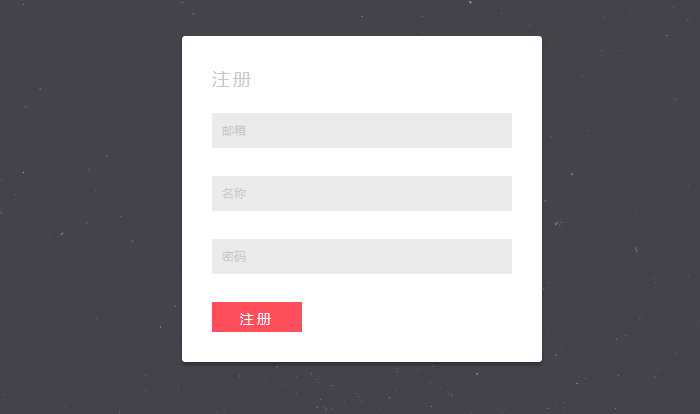
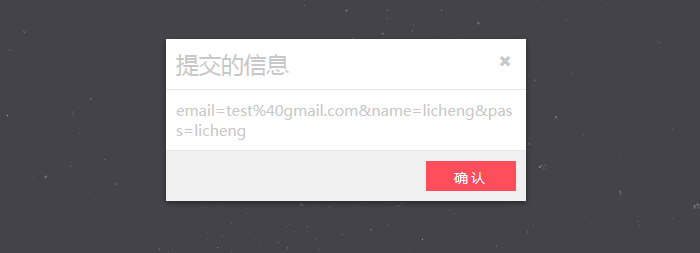
制作步骤:
一, html结构
<div id="home">

    <div class="tip current1">

        <h2>提交的信息</h2>

        <div class="msg">

            <p></p>

        </div>

        <div class="button">

            <button>确认</button>

        </div>

        <i class="fa fa-times icon"></i>

    </div>

    <form id="regist" class="current1" method="post">

                <h3>注册</h3>

                <label>邮箱<input type="text" name="email" /><span>邮箱为空</span></label>

                <label>名称<input  type="text" name="name" /><span>用户名为空</span></label>

                <label>密码<input type="password" name="pass" /><span>密码为空</span></label>

                <button type="button">注册</button>

    </form>

</div>
二, css代码
*{padding:;margin:;}

/* 清除浮动 */

.clearfix:after {content: "";display: table;clear: both;}

html, body { height: 100%; }

body {    font-family:"Microsoft YaHei"; background:#EBEBEB; background:url(../images/stardust.png);       font-weight:;  font-size: 15px;  color: #333;overflow: hidden;}

a {text-decoration: none;}

/*home*/

#home{padding-top:100px;}

.tip{background-color: #FFFFFF;width:360px;  margin:auto; position:relative;

box-shadow: 0 2px 5px rgba(0, 0, 0, 0.44);

}

.tip h2{ font-weight:normal; padding:10px;border-bottom: 1px solid #E7E7E7;color:#C8C8C8;}

.tip div.msg{ padding:10px;color:#C8C8C8; border-bottom: 1px solid #E7E7E7; word-break:break-all; }

.tip div.button{ height:50px; background:#F0F0F0;}

.tip button{ float:right; margin:10px;}

.tip .icon{ display:block; position:absolute; right:15px; top:15px; color:#C8C8C8; cursor:pointer;}

/*regist界面*/

#regist{ padding:30px; width:300px; background:#FFF; margin:auto; position:relative; top:-182px;

border-radius: 3px;

box-shadow: 0 3px 3px rgba(0, 0, 0, 0.3);

}

.current1{

-moz-transform: scale(0);

-webkit-transform: scale(0);

-o-transform: scale(0);

-ms-transform: scale(0);

transform: scale(0);

-moz-transition: all 0.4s ease-in-out;

-webkit-transition: all 0.4s ease-in-out;

-o-transition: all 0.4s ease-in-out;

transition: all 0.4s ease-in-out;

}

.current{

-moz-transform: scale(1);

-webkit-transform: scale(1);

-o-transform: scale(1);

-ms-transform: scale(1);

transform: scale(1);

}

#regist h3{ font-size:18px; line-height:25px; font-weight:; letter-spacing:3px; margin-bottom:22px; color:#C8C8C8;}

#regist label{ color:#C8C8C8; display:block; height:35px; padding:0 10px; font-size:12px; line-height:35px;  background:#EBEBEB; margin-bottom:28px;position:relative;}

#regist label input{  font:13px/20px "Microsoft YaHei"; background:none;  height:20px; border:none; margin:7px 0 0 10px;width:245px;outline:none ; letter-spacing:normal;  z-index:; position:relative;  }

#regist label  span{ display:block;  height:35px; color:#F30; width:100px; position:absolute; top:; left:190px; text-align:right;padding:0 10px 0 0; z-index:; display:none; }

#regist button,.tip button{ font-family:"Microsoft YaHei"; cursor:pointer; width:90px;  height:30px; background:#FE4E5B; border:none; font-size:14px; line-height:30px;  letter-spacing:3px; color:#FFF; position:relative;

-moz-transition: all 0.2s ease-in;

-webkit-transition: all 0.2s ease-in;

-o-transition: all 0.2s ease-in;

transition: all 0.2s ease-in;}

#regist button:hover,.tip button:hover{ background:#F87982; color:#000;}
三, JS代码
$(function(){

    $("#regist").addClass("current");

    /**

     * 正则检验邮箱

     * email 传入邮箱

     * return true 表示验证通过

     */

    function check_email(email) {

        if (/^[\w\-\.]+@[\w\-]+(\.[a-zA-Z]{2,4}){1,2}$/.test(email)) return true;

    }

    //input 按键事件

    $("input[name]").keyup(function(e){

          //禁止输入空格  把空格替换掉

          if($(this).attr('name')=="pass"&&e.keyCode==32){

              $(this).val(function(i,v){

                  return $.trim(v);

              });

          }

          if($.trim($(this).val())!=""){

              $(this).nextAll('span').eq(0).css({display:'none'});

          }

    });

    //错误信息

    var succ_arr=[];

    //input失去焦点事件

    $("input[name]").focusout(function(e){

            var msg="";

             if($.trim($(this).val())==""){

                  if($(this).attr('name')=='name'){

                          succ_arr[0]=false;

                          msg="用户名为空";

                  }else if($(this).attr('name')=='pass'){

                           succ_arr[1]=false;

                           msg="密码为空";

                  }else if($(this).attr('name')=='email'){

                           succ_arr[2]=false;

                           msg="邮箱为空";

                  }

            }else{

                  if($(this).attr('name')=='name'){

                          succ_arr[0]=true;

                  }else if($(this).attr('name')=='pass'){

                           succ_arr[1]=true;

                  }else if($(this).attr('name')=='email'){

                         succ_arr[2]=true;

                         if(!check_email($.trim($(this).val()))){

                            succ_arr[2]=false;

                            msg="格式不正确";

                        }

                  }

            }

              var a=$(this).nextAll('span').eq(0);

             a.css({display:'block'}).text(msg);

    });

    //Ajax用户注册

    $("button[type='button']").click(function(){

         $("input[name]").focusout();  //让所有的input标记失去一次焦点 来设置msg信息

         for (x in succ_arr){if(succ_arr[x]==false) return;}

         $("#regist").removeClass("current");

         $(".tip").addClass("current");

         var data=$('#regist').serialize(); //序列化表单元素

         $(".tip p").html(data);

        /**

             有兴趣的可以到这里 自行发送Ajax请求 实现注册功能

        */

    });

    $(".tip button,.tip i").click(function(){

         $("#regist").addClass("current");

         $(".tip").removeClass("current");

         $("input[name]").val("");

    });

});
这是要结束了吗?是的,结束了。是不是很简单呢?等等,好像少了一点一样,哦,代码需要引入了Font Awesome矢量字体图标呢! 可这是什么东西呢?点击下面链接进行查看吧:
Font Awesome 4.0.3 提供了369个网页常用的矢量字体图标,新浪、人人 的矢量图标也到其中哟
关于登入表单可以点击这里查看:
如以上文章或链接对你有帮助的话,别忘了在文章结尾处轻轻点击一下 “还不错”按钮或到页面右下角点击 “赞一个” 按钮哦。你也可以点击页面右边“分享”悬浮按钮哦,让更多的人阅读这篇文章。
自制“低奢内”CSS3注册表单,包含JS验证哦。请别嫌弃,好吗?。的更多相关文章
- 自制“低奢内”CSS3登入表单,包含JS验证,请别嫌弃哦。
要求 必备知识 基本了解CSS语法,初步了解CSS3语法知识.和JS/JQuery基本语法. 开发环境 Adobe Dreamweaver CS6 演示地址 演示地址 预览截图(抬抬你的鼠标就可以看到 ...
- 响应式的账号登录界面模板完整代码,内置form表单和js控件
响应式的账号登录界面模板,内置form表单和js控件 <!DOCTYPE html> <html lang="en"><head><met ...
- .NET中表单的JS验证
JS验证代码如下:(需要引入两个JS包) <script type="text/javascript" src="/js/jquery.validate.min.j ...
- CSS3制作分步注册表单
这个DEMO是使用CSS3制作的一个分步注册表单,每个input对应的是每一步,在表单得到焦点时,对应的step也会进行对应的改变.不过这个效果是使用js代码来实现,但整个表单的外观是由CSS3来完成 ...
- 免费 PSD 下载: 20个精美的登录和注册表单
注册表单有许多不同的形状和尺寸,有的只是单个的输入框,有的则需要多个步骤.登录表单的设计将定义网站的性质,因此它应进行针对性的设计.下面的列表提供了20个醒目的登录和注册表单设计为您提供灵感. 您可能 ...
- HTML6注册表单输入日志标题
一.找到元素. var d = document.getElementById("") var d = document.getElementsByName("" ...
- UX设计秘诀之注册表单设计,细节决定成败
以下内容由摹客团队翻译整理,仅供学习交流,摹客iDoc是支持智能标注和切图的产品协作设计神器. 说实话,现实生活中,又有多少人会真正喜欢填写表格?显然,并不多.因为填写表单这样的网页或App服务,并非 ...
- 一款基于jQuery的带Tooltip表单验证的注册表单
今天给大家分享一款基于jQuery的注册表单,这款注册表单的特点是确认提交注册信息时,表单会自动验证所填写的信息,如果信息填写有误,即会在相应的字段内以Tooltip提示框的形式显示错误信息.这款jQ ...
- Html注册表单示例
注册表单示例,出自<网页开发手记:Html,CSS,JavaScript实战详解>. <html> <head> <title>注册表单&l ...
随机推荐
- 1111 Online Map (30 分)
1111. Online Map (30)Input our current position and a destination, an online map can recommend sever ...
- 区间DP石子合并问题 & 四边形不等式优化
入门区间DP,第一个问题就是线性的规模小的石子合并问题 dp数组的含义是第i堆到第j堆进行合并的最优值 就是说dp[i][j]可以由dp[i][k]和dp[k+1][j]转移过来 状态转移方程 dp[ ...
- Swift3 今日(TodayExtension)扩展图文笔记
>图片1(创建今日扩展) >图片2 >图片3(设置大小) >图片4(绘画控件) >图片5(设置共享文件) >图片6(设置群组ID) >图片7(设置URL ...
- Monkey学习网址
http://***/2015/12/24/Android-Monkey-Test/ http://bbs.pediy.com/showthread.php?t=189584 http://***/2 ...
- deeplearning 源码收集
Theano – CPU/GPU symbolic expression compiler in python (from MILA lab at University of Montreal) To ...
- Git项目下载部分文件或文件夹
我们常常要在Github下载一些源码.示例等,但有时候项目库会比较大,而我关心的只是其中很少的一部分内容,由于众所周知的原因,我们下载git库是比较慢的,过大的项目经常会下载失败,所以只下载部分内容就 ...
- Linux Shell脚本编程基础(11)
实际上Shell是一个命令解释器,它解释由用户输入的命令并且把它们送到内核,不仅如此,Shell有自己的编程语言用于对命令的编辑,它允许用户编写由shell命令组成的程序.Shel编程语言具有普通编程 ...
- spring cloud学习(四) 动态路由
Zuul的主要功能是路由和过滤器.路由功能是微服务的一部分,zuul实现了负载均衡. 1.1 新建模块zuul pom.xml <?xml version="1.0" enc ...
- zookeeper安装小记
做了5个节点,但是查看状态的时候,发现 ./zkServer.sh statusJMX enabled by defaultUsing config: /opt/zookeeper/bin/../co ...
- Doxygen的使用,配置及实例
Doxygen是一种开源跨平台的,以类似JavaDoc风格描述的文档系统,可以从一套归档源文件开始,生成文档 下载Doxygen + Graphviz Doxygen可以生成动态文档 Graphviz ...