
IOS-日期处理
主要有以下类:
NSDate -- 表示一个绝对的时间点
NSTimeZone -- 时区信息
NSLocale -- 本地化信息
NSDateComponents -- 一个封装了具体年月日、时秒分、周、季度等的类
NSCalendar -- 日历类,它提供了大部分的日期计算接口,并且允许您在NSDate和NSDateComponents之间转换
NSDateFormatter -- 用来在日期和字符串之间转换
NSDate
NSDate用来表示公历的GMT时间(格林威治时间)。 有下面几种初始化方法:
1. - (id)init
默认初始化,返回当前时间,也可以直接调用类方法 +(id)date
NSDate *date = [[NSDate alloc] init];//NSDate *date = [NSDate date];NSLog(@"print date is %@",date);
将打印出计算机当前时间:2013-03-04 08:57:20 +0000
2. - (id)initWithTimeIntervalSinceNow:(NSTimeInterval)seconds
以当前时间的偏移秒数来初始化,也可以直接调用类方法 + (id)dateWithTimeIntervalSinceNow:(NSTimeInterval)seconds
NSDate *date = [[NSDate alloc] initWithTimeIntervalSinceNow:20];//NSDate *date = [NSDate dateWithTimeIntervalSinceNow:20];NSLog(@"print date is %@",date);
假如当前时间是2013-03-04 08:57:20 +0000,那么初始化后得到的时间是2013-03-04 08:57:40 +0000
3. - (id)initWithTimeIntervalSince1970:(NSTimeInterval)seconds
以GMT时间的偏移秒数来初始化,也可以直接调用类方法 + (id)dateWithTimeIntervalSince1970:(NSTimeInterval)seconds
NSDate *date = [[NSDate alloc] initWithTimeIntervalSince1970:-20];//NSDate *date = [NSDate dateWithTimeIntervalSince1970:-20];NSLog(@"print date is %@",date);
得到的时间是格林威治时间往前20秒,将打印出:1969-12-31 23:59:40 +0000
4. - (id)initWithTimeIntervalSinceReferenceDate:(NSTimeInterval)seconds
以2001-1-1 0:0:0的偏移秒数来初始化,也可以直接调用类方法 + (id)dateWithTimeIntervalSinceReferenceDate:(NSTimeInterval)seconds
NSDate *date = [[NSDate alloc] initWithTimeIntervalSinceReferenceDate:80];//NSDate *date = [NSDate dateWithTimeIntervalSinceReferenceDate:80];NSLog(@"print date is %@",date);
将打印出:2001-01-01 00:01:20 +0000
5. - (id)initWithTimeInterval:(NSTimeInterval)seconds sinceDate:(NSDate *)refDate
以基准时间的偏移秒数来初始化,也可以直接调用类方法 + (id)dateWithTimeInterval:(NSTimeInterval)seconds sinceDate:(NSDate *)date
NSDate *date1 = [[NSDate alloc] initWithTimeIntervalSinceReferenceDate:20];

NSLog(@"print date1 is %@",date1);


NSDate *date2 = [[NSDate alloc] initWithTimeInterval:10 sinceDate:date1];//NSDate *date2 = [NSDate dateWithTimeInterval:10 sinceDate:date1];NSLog(@"print date2 is %@",date2);
第一个基准时间是2001-01-01 00:00:20 +0000,根据基准时间偏移10秒的结果是2001-01-01 00:00:30 +0000
6. + (id)distantPast 与 + (id)distantFuture
这两个是类方法,分别用来返回一个极早的时间点和一个极晚的时间点
NSDate *date = [NSDate distantFuture];

NSLog(@"future date is %@",date);

NSDate *date2 = [NSDate distantPast];

NSLog(@"past date is %@",date2);
distantPast将返回:0001-12-30 00:00:00 +0000,distantFuture将返回:4001-01-01 00:00:00 +0000
NSDate的常用对象方法:
1. -(id)dateByAddingTimeInterval:(NSTimeInterval)seconds
返回以当前NSDate对象为基准,偏移多少秒后得到的新NSDate对象。(旧方法 - (id)addTimeInterval:(NSTimeInterval)seconds已被弃用)
NSDate *date = [NSDate dateWithTimeIntervalSince1970:0];

NSDate *date2 = [date dateByAddingTimeInterval:-20];

NSLog(@"%@",date2);
2. - (BOOL)isEqualToDate:(NSDate *)anotherDate
将当前对象与参数传递的对象进行比较,根据是否相同返回BOOL值
NSDate *date = [NSDate dateWithTimeIntervalSince1970:0];

NSDate *date2 = [NSDate dateWithTimeInterval:0 sinceDate:date];

BOOL isEqual = [date isEqualToDate:date2];

NSLog(@"%i",isEqual);
3. - (NSDate *)earlierDate:(NSDate *)anotherDate 与 - (NSDate *)laterDate:(NSDate *)anotherDate
比较两个NSDate对象,返回较早/较晚的时间点,并以新NSDate对象的形式返回
NSDate *date = [NSDate dateWithTimeIntervalSince1970:0];
NSDate *date2 = [NSDate dateWithTimeInterval:-50 sinceDate:date];

NSDate *date3 = [date earlierDate:date2];

NSLog(@"earlier date is %@",date3);

NSDate *date4 = [date laterDate:date2];

NSLog(@"later date is %@",date4);
4. - (NSComparisonResult)compare:(NSDate *)anotherDate
将当前对象与参数传递的对象进行比较,如果相同,返回0(NSOrderedSame);对象时间早于参数时间,返回-1(NSOrderedAscending);对象时间晚于参数时间,返回1(NSOrderedDescending)
NSDate *date = [NSDate dateWithTimeIntervalSince1970:0];

NSDate *date2 = [NSDate dateWithTimeInterval:-50 sinceDate:date];

NSInteger result = [date compare:date2];

NSLog(@"%i",result);
5. - (NSTimeInterval)timeIntervalSince1970
返回当前对象时间与1970-1-1 0:0:0的相隔秒数,也可以这样理解:从1970-1-1 0:0:0开始,经过多少秒到达对象指定时间。
NSDate *date = [NSDate dateWithTimeIntervalSince1970:50];

NSInteger seconds = [date timeIntervalSince1970];

NSLog(@"%i",seconds);
将返回结果50
6. - (NSTimeInterval)timeIntervalSinceReferenceDate
返回当前对象时间与2001-1-1 0:0:0的相隔秒数,也可以这样理解:从2001-1-1 0:0:0开始,经过多少秒到达对象指定时间。
NSDate *date = [NSDate dateWithTimeIntervalSinceReferenceDate:-30];

NSInteger seconds = [date timeIntervalSinceReferenceDate];

NSLog(@"%i",seconds);
将返回结果-30,负数代表从2001-1-1 0:0:0开始,倒退30秒到达当前时间。
7. - (NSTimeInterval)timeIntervalSinceNow
返回当前对象时间与客户端时间的相隔秒数,也可以这样理解:从客户端当前时间开始,经过多少秒到达对象指定时间。
NSDate *date = [NSDate dateWithTimeIntervalSinceNow:100];

NSInteger seconds = [date timeIntervalSinceNow];

NSLog(@"%i",seconds);
经测试返回了结果99,但初始化时提供的参数是100。这可能是因为第一句初始化代码到第二句计算代码之间有个1秒内的延时,所以计算时的客户端时间比初始化时的客户端时间快了1秒。
8. - (NSTimeInterval)timeIntervalSinceDate:(NSDate *)anotherDate
返回当前对象时间与参数传递的对象时间的相隔秒数,也可以这样理解:从参数时间开始,经过多少秒到达对象执行时间。
NSDate *date = [NSDate dateWithTimeIntervalSince1970:0];

NSDate *date2 = [NSDate dateWithTimeInterval:50 sinceDate:date];

NSInteger seconds = [date timeIntervalSinceDate:date2];

NSLog(@"%i",seconds);
将返回结果-50,date为1970-1-1 0:0:0,date2为1970-1-1 0:0:50,从date2的时间开始,倒退50秒到达date的时间。
NSTimeZone
NSTimeZone表示时区信息。 有下面几种初始化方法:
1. + (id)timeZoneWithName:(NSString *)aTimeZoneName / - (id)initWithName:(NSString *)aName
根据时区名称初始化。可以调用NSTimeZone的类方法 + (NSArray *)knownTimeZoneNames来返回所有已知的时区名称。
NSTimeZone *zone = [[NSTimeZone alloc] initWithName:@"America/Chicago"];//NSTimeZone *zone = [NSTimeZone timeZoneWithName:@"America/Chicago"];NSLog(@"%@",zone);
打印出:America/Chicago (CST) offset -21600
2. + (id)timeZoneWithAbbreviation:(NSString *)abbreviation
根据时区缩写初始化。例如:EST(美国东部标准时间)、HKT(香港标准时间)
NSTimeZone *zone = [NSTimeZone timeZoneWithAbbreviation:@"EST"];

NSLog(@"%@",zone);
打印出:Asia/Hong_Kong (HKT) offset 28800
3. + (NSTimeZone *)systemTimeZone
返回系统时区
NSTimeZone *zone = [NSTimeZone systemTimeZone];

NSLog(@"%@",zone);
假如时区是上海,打印出的时区信息将会是:Asia/Shanghai (CST (China)) offset 28800,28800代表相对于GMT时间偏移的秒数,即8个小时。(8*60*60)
4. + (NSTimeZone *)localTimeZone
返回本地时区,与systemTimeZone的区别在于:本地时区可以被修改,而系统时区不能修改。
[NSTimeZone setDefaultTimeZone:[[NSTimeZone alloc] initWithName:@"America/Chicago"]];
NSTimeZone *systemZone = [NSTimeZone systemTimeZone];

NSTimeZone *localZone = [NSTimeZone localTimeZone];

NSLog(@"%@",systemZone);

NSLog(@"%@",localZone);
打印出的系统时区仍然是:Asia/Shanghai (CST (China)) offset 28800;而本地时区经过修改后,变成了:Local Time Zone (America/Chicago (CST) offset -21600)
5. + (id)timeZoneForSecondsFromGMT:(NSInteger)seconds
根据零时区的秒数偏移返回一个新时区对象
NSTimeZone *zone = [NSTimeZone timeZoneForSecondsFromGMT:28800];

NSLog(@"%@",zone);
打印出:GMT+0800 (GMT+08:00) offset 28800
NSTimeZone常用对象方法与类方法:
1. + (NSArray *)knownTimeZoneNames
以数组的形式返回所有已知的时区名称
NSArray *zoneArray = [NSTimeZone knownTimeZoneNames];for(NSString *str in zoneArray)

{

    NSLog(@"%@",str);

}
2. - (NSString *)name / - (NSString *)abbreviation
返回时区对象的名称或缩写
NSTimeZone *zone = [NSTimeZone localTimeZone];

NSString *strZoneName = [zone name];

NSString *strZoneAbbreviation = [zone abbreviation];

NSLog(@"name is %@",strZoneName);

NSLog(@"abbreviation is %@",strZoneAbbreviation);
name is Asia/Hong_Kong
abbreviation is HKT
3. - (NSInteger)secondsFromGMT
得到当前时区与零时区的间隔秒数
NSTimeZone *zone = [NSTimeZone localTimeZone];int seconds = [zone secondsFromGMT];

NSLog(@"%i",seconds);
NSLoale
NSLoale类返回本地化信息,主要体现在"语言"和"区域格式"这两个设置项。有下面几种初始化方法:
1. + (id)systemLocale
返回系统初始本地化信息
NSLocale *locale = [NSLocale systemLocale];

NSLog(@"%@",[[locale objectForKey:NSLocaleCalendar] calendarIdentifier]);
2. + (id)currentLocale / + (id)autoupdatingCurrentLocale
这两个类方法都将返回当前客户端的本地化信息,区别在于:currentLocale取得的值会一直保持在cache中,第一次用此方法实例化对象后,即使修改了本地化设定,这个对象也不会改变。而使用autoupdatingCurrentLocale,当每次修改本地化设定,其实例化的对象也会随之改变。
下面的代码演示了区别所在,假设初始本地化信息为en_US,先用这两个函数分别初始化两个对象,然后修改本地化设定语言为台湾繁体中文,再重新打印这两个对象的信息:
NSLocale *locale1;
NSLocale *locale2;- (IBAction)doTest:(id)sender

{

    locale1 = [NSLocale currentLocale];

    locale2 = [NSLocale autoupdatingCurrentLocale];

    NSLog(@"%@",locale1.localeIdentifier); //print "en_US"

    NSLog(@"%@",locale2.localeIdentifier); //print "en_US"}- (IBAction)doAgain:(id)sender

{

    NSLog(@"%@",locale1.localeIdentifier); //print "en_US"

    NSLog(@"%@",locale2.localeIdentifier); //print "zh_TW"}
3. - (id)initWithLocaleIdentifier:(NSString *)string
用标示符初始化本地化信息
NSLocale *locale = [[NSLocale alloc] initWithLocaleIdentifier:@"zh_CN"];

NSString *strSymbol = [locale objectForKey:NSLocaleCurrencySymbol];

NSLog(@"%@",strSymbol);
代码用"zh_CN"来初始化对象,然后再打印出对象的货币符号,得到的结果是人民币符号¥
NSLoale常用对象方法与类方法:
1. - (id)objectForKey:(id)key
根据不同的key返回各种本地化信息,例如下面的代码返回了当前货币符号:
NSLocale *locale = [NSLocale currentLocale];

NSString *strSymbol = [locale objectForKey:NSLocaleCurrencySymbol];

NSCalendar *calendar = [[NSLocale currentLocale] objectForKey:NSLocaleCalendar];
2. - (NSString *)displayNameForKey:(id)key value:(id)value
显示特定地区代号下相应键的显示名称:
NSLocale *locale = [[NSLocale alloc] initWithLocaleIdentifier:@"zh_CN"];

NSString *str = [locale displayNameForKey:NSLocaleIdentifier value:@"en_US"];

NSLog(@"%@",str);
第一句代码代表以中文来实例化对象,然后得到"en_US"的NSLocaleIdentifier键的显示名称。最后输出的结果是"英文(美国)"
NSDateComponents
NSDateComponents封装了具体年月日、时秒分、周、季度等
NSDateComponents *compt = [[NSDateComponents alloc] init];
[compt setEra:1];

[compt setYear:2013];

[compt setMonth:3];

[compt setDay:15];

[compt setHour:11];

[compt setMinute:20];

[compt setSecond:55];

[compt setQuarter:2];

[compt setTimeZone:[NSTimeZone systemTimeZone]];

[compt setWeek:3];

[compt setWeekday:4];

[compt setWeekOfMonth:3];

[compt setWeekOfYear:2];

[compt setCalendar:[NSCalendar currentCalendar]];
NSDateComponents相关方法:
1. NSCalendar对象的 - (NSDateComponents *)components:(NSUInteger)unitFlags fromDate:(NSDate *)date
取得一个NSDate对象的1个或多个部分,用NSDateComponents来封装
NSCalendar *calendar = [NSCalendar currentCalendar];
NSDate *date = [NSDate date];//NSDateComponents *compt = [calendar components:NSDayCalendarUnit fromDate:date];NSDateComponents *compt = [calendar components:(NSYearCalendarUnit|NSMonthCalendarUnit|NSDayCalendarUnit) fromDate:date];

NSLog(@"%d,%@",[compt year],date);

NSLog(@"%d,%@",[compt month],date);

NSLog(@"%d,%@",[compt day],date);
需要注意的是,只有明确指定了unitFlags,NSDateComponents相应的那一部分才有值。
2. NSCalendar对象的 - (NSDateComponents *)components:(NSUInteger)unitFlags fromDate:(NSDate *)startingDate toDate:(NSDate *)resultDate options : (NSUInteger)opts
取得两个NSDate对象的时间间隔,用NSDateComponents来封装
NSCalendar *calendar = [NSCalendar currentCalendar];
NSDate *date = [NSDate date];

NSDate *date2 = [NSDate dateWithTimeInterval:5*60*60+75 sinceDate:date];

NSDateComponents *compt = [calendar components:(NSMinuteCalendarUnit|NSSecondCalendarUnit) fromDate:date toDate:date2 options:0];

NSLog(@"%d",[compt minute]);

NSLog(@"%d",[compt second]);
有几点需要注意:
① 得到的NSDateComponents对象可能会包含负数。例如:当toDate比fromDate晚10秒,second部分返回10;当toDate比fromDate早10秒,second部分返回-10
② 当指定unitFlags返回多个部分时,相隔的时间由多个部分共同组成(而不是独立去表示)。例如:上面的例子时间相差5小时1分15秒,如果指定只返回second部分,将得到18075秒;如果指定返回minute和second部分,将得到301分15秒;如果指定返回hour、minute和second,将得到5小时1分15秒。
3. NSCalendar对象的 - (NSDate *)dateFromComponents:(NSDateComponents *)comps
根据NSDateComponents对象得到一个NSDate对象
NSDateComponents *compt = [[NSDateComponents alloc] init];
[compt setYear:2012];

[compt setMonth:5];

[compt setDay:11];

NSCalendar *calendar = [NSCalendar currentCalendar];

NSDate *date = [calendar dateFromComponents:compt];//得到本地时间,避免时区问题NSTimeZone *zone = [NSTimeZone systemTimeZone];

NSInteger interval = [zone secondsFromGMTForDate:date];

NSDate *localeDate = [date dateByAddingTimeInterval:interval];

NSLog(@"%@",localeDate);
4. NSCalendar对象的 - (NSDate *)dateByAddingComponents:(NSDateComponents *)comps toDate:(NSDate *)date options:(NSUInteger)opts
在参数date基础上,增加一个NSDateComponents类型的时间增量
NSDateComponents *compt = [[NSDateComponents alloc] init];
[compt setDay:25];

[compt setHour:4];

[compt setMinute:66];

NSCalendar *calendar = [NSCalendar currentCalendar];

NSDate *date = [calendar dateByAddingComponents:compt toDate:[NSDate date] options:0];

//得到本地时间,避免时区问题NSTimeZone *zone = [NSTimeZone systemTimeZone];

NSInteger interval = [zone secondsFromGMTForDate:date];

NSDate *localeDate = [date dateByAddingTimeInterval:interval];

NSLog(@"%@",localeDate);
当前时间的基础上,增加25天4小时66秒
NSCalendar
1. + (id)currentCalendar / + (id)autoupdatingCurrentCalendar
这两个类方法都将返回当前客户端的逻辑日历,区别在于:currentCalendar取得的值会一直保持在cache中,第一次用此方法实例化对象后,即使修改了系统日历设定,这个对象也不会改变。而使用autoupdatingCurrentCalendar,当每次修改系统日历设定,其实例化的对象也会随之改变。
下面的代码演示了区别所在,假设初始Calendar设定为NSGregorianCalendar(公历),先用这两个函数分别初始化两个对象,然后修改系统日历为NSJapaneseCalendar(日本和历),再重新打印这两个对象的信息:
NSCalendar *calendar2;- (IBAction)doTest:(id)sender

{

    calendar = [NSCalendar currentCalendar];

    calendar2 = [NSCalendar autoupdatingCurrentCalendar];


    NSLog(@"%@",calendar.calendarIdentifier); //print "gregorian"

    NSLog(@"%@",calendar2.calendarIdentifier); //print "gregorian"}- (IBAction)doAgain:(id)sender

{

    NSLog(@"%@",calendar.calendarIdentifier); //print "gregorian"

    NSLog(@"%@",calendar2.calendarIdentifier); //print "japanese"}
2. - (id)initWithCalendarIdentifier:(NSString *)string
根据提供的日历标示符初始化
NSCalendar *calendar = [[NSCalendar alloc] initWithCalendarIdentifier:NSChineseCalendar];

NSLog(@"%@",calendar.calendarIdentifier);
系统中定义的日历有:
NSGregorianCalendar -- 公历
NSBuddhistCalendar -- 佛教日历
NSChineseCalendar -- 中国农历
NSHebrewCalendar -- 希伯来日历
NSIslamicCalendar -- 伊斯兰历
NSIslamicCivilCalendar -- 伊斯兰教日历
NSJapaneseCalendar -- 日本日历
NSRepublicOfChinaCalendar -- 中华民国日历(台湾)
NSPersianCalendar -- 波斯历
NSIndianCalendar -- 印度日历
NSISO8601Calendar -- ISO8601
NSCalendar常用对象方法与类方法:
1. - (void)setLocale:(NSLocale *)locale
设置本地化信息
NSCalendar *calendar = [[NSCalendar alloc] initWithCalendarIdentifier:NSGregorianCalendar];

[calendar setLocale:[[NSLocale alloc] initWithLocaleIdentifier:@"zh_CN"]];

NSLog(@"%@",calendar.locale.localeIdentifier);
2. - (void)setTimeZone:(NSTimeZone *)tz
设置时区信息
NSCalendar *calendar = [[NSCalendar alloc] initWithCalendarIdentifier:NSGregorianCalendar];

[calendar setTimeZone:[NSTimeZone timeZoneWithAbbreviation:@"HKT"]];

NSLog(@"%@",calendar.timeZone);
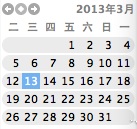
3. - (void)setFirstWeekday:(NSUInteger)weekday
设置每周的第一天从星期几开始,比如:1代表星期日开始,2代表星期一开始,以此类推。默认值是1
如图所示,如果从星期天开始,日历的表现形式:

如果从星期二开始,日历的表现形式:
NSCalendar *calendar = [NSCalendar currentCalendar];

[calendar setFirstWeekday:3];

NSLog(@"%i",calendar.firstWeekday);
4. - (void)setMinimumDaysInFirstWeek:(NSUInteger)mdw
设置每年及每月第一周必须包含的最少天数,比如:设定第一周最少包括3天,则value传入3
NSCalendar *calendar = [NSCalendar currentCalendar];

[calendar setMinimumDaysInFirstWeek:3];

NSLog(@"%i",calendar.minimumDaysInFirstWeek);
5. - (NSUInteger)ordinalityOfUnit:(NSCalendarUnit)smaller inUnit:(NSCalendarUnit)larger forDate:(NSDate *)date
获取一个小的单位在一个大的单位里面的序数
NSCalendarUnit包含的值有:
NSEraCalendarUnit -- 纪元单位。对于NSGregorianCalendar(公历)来说,只有公元前(BC)和公元(AD);而对于其它历法可能有很多,例如日本和历是以每一代君王统治来做计算。
NSYearCalendarUnit -- 年单位。值很大,相当于经历了多少年,未来多少年。
NSMonthCalendarUnit -- 月单位。范围为1-12
NSDayCalendarUnit -- 天单位。范围为1-31
NSHourCalendarUnit -- 小时单位。范围为0-24
NSMinuteCalendarUnit -- 分钟单位。范围为0-60
NSSecondCalendarUnit -- 秒单位。范围为0-60
NSWeekCalendarUnit -- 周单位。范围为1-53
NSWeekdayCalendarUnit -- 星期单位,每周的7天。范围为1-7
NSWeekdayOrdinalCalendarUnit -- 没完全搞清楚
NSQuarterCalendarUnit -- 几刻钟,也就是15分钟。范围为1-4
NSWeekOfMonthCalendarUnit -- 月包含的周数。最多为6个周
NSWeekOfYearCalendarUnit -- 年包含的周数。最多为53个周
NSYearForWeekOfYearCalendarUnit -- 没完全搞清楚
NSTimeZoneCalendarUnit -- 没完全搞清楚
下面是一些示例:
① 当小单位为NSWeekdayCalendarUnit,大单位为NSWeekCalendarUnit时(即某个日期在这一周是第几天),根据firstWeekday属性不同,返回的结果也不同。
NSCalendar *calendar = [NSCalendar currentCalendar];

NSDate *date = [NSDate dateWithTimeIntervalSinceReferenceDate:10];

//[calendar setFirstWeekday:2];int count = [calendar ordinalityOfUnit:NSWeekdayCalendarUnit inUnit:NSWeekCalendarUnit forDate:date];

NSLog(@"%d",count);
默认firstWeekday为1(星期天开始)的情况下,得到的结果是2,从下图可以看到是第2天。
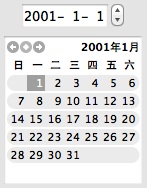
假如firstWeekday被设置为2(星期一开始)的情况下,得到的结果是1,从下图可以看到是第1天

② 当小单位为NSWeekCalendarUnit,大单位为NSYearCalendarUnit时(即某个日期在这一年中是第几周),根据minimumDaysInFirstWeek属性不同,返回的结果也不同。
NSDateComponents *compt = [[NSDateComponents alloc] init];
[compt setYear:2013];

[compt setMonth:1];

[compt setDay:20];

NSCalendar *calendar = [NSCalendar currentCalendar];

NSDate *date = [calendar dateFromComponents:compt];//[calendar setMinimumDaysInFirstWeek:6];int count = [calendar ordinalityOfUnit:NSWeekCalendarUnit inUnit:NSYearCalendarUnit forDate:date];

NSLog(@"%d",count);
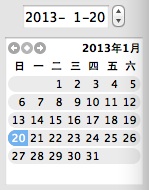
从上图的日历中可以看出,在没有设置minimumDaysInFirstWeek的情况下,1月20日得到的结果是4(第四个周)。
默认情况下第一个周有5天,如果将minimumDaysInFirstWeek设置为6天,则原本是第一周的1月1日--1月5日被划分到了上一年,返回0;而1月6日--1月12日升为第一周,1月13日--1月19日升为第二周。。依此类推。
所以需要关注的是minimumDaysInFirstWeek与实际第一周包含天数的大小比较,如果提供的minimumDaysInFirstWeek比实际第一周的天数小,则一切不变;否则统计"一年中第几周"、"一个月中第几周"会产生变化。
6. - (NSRange)rangeOfUnit:(NSCalendarUnit)smaller inUnit:(NSCalendarUnit)larger forDate:(NSDate *)date
根据参数提供的时间点,得到一个小的单位在一个大的单位里面的取值范围
NSDateComponents *compt = [[NSDateComponents alloc] init];
[compt setYear:2013];

[compt setMonth:2];

[compt setDay:21];

[compt setHour:9];

[compt setMinute:45];

[compt setSecond:30];

NSCalendar *calendar = [NSCalendar currentCalendar];

NSDate *date = [calendar dateFromComponents:compt];//得到本地时间,避免时区问题NSTimeZone *zone = [NSTimeZone systemTimeZone];

NSInteger interval = [zone secondsFromGMTForDate:date];

NSDate *localeDate = [date dateByAddingTimeInterval:interval];

NSRange range = [calendar rangeOfUnit:NSDayCalendarUnit inUnit:NSYearCalendarUnit forDate:localeDate];

NSLog(@"%d -- %d",range.location,range.length);
调用这个方法要明确一点,取得的是"范围"而不是"包含",下面是一些例子:
① 小单位是NSDayCalendarUnit,大单位是NSYearCalendarUnit,并不是要取这一年包含多少天,而是要取"天"(Day)这个单位在这一年(Year)的取值范围。其实不管你提供的日期是多少,返回的值都是"1--31"。
② 小单位是NSDayCalendarUnit,大单位是NSMonthCalendarUnit。要取得参数时间点所对应的月份下,"天"(Day)的取值范围。根据参数时间的月份不同,值也不同。例如2月是1--28、3月是1--31、4月是1--30。
③ 小单位是NSWeekCalendarUnit,大单位是NSMonthCalendarUnit。要取得参数时间点所对应的月份下,"周"(Week)的取值范围。需要注意的是结果会受到minimumDaysInFirstWeek属性的影响。在默认minimumDaysInFirstWeek情况下,取得的范围值一般是"1--5",从日历上可以看出来这个月包含5排,即5个周。
④ 小单位是NSDayCalendarUnit,大单位是NSWeekCalendarUnit。要取得周所包含的"天"(Day)的取值范围。下面是一个示例日历图:
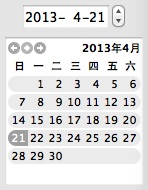
在上图的日期条件下,假如提供的参数是4月1日--4月6日,那么对应的week就是1(第一个周),可以看到第一个周包含有6天,从1号开始,那么最终得到的范围值为1--6。
假如提供的参数是4月18日,那么对应的week是3(第三个周),第三个周包含有7天,从14号开始,那么最终得到的范围值是14--7。
假如提供的参数是4月30日,那么对应的week是5(第五个周),第五个周只包含3天,从28号开始,那么最终得到的范围值是28--3。
7. - (BOOL)rangeOfUnit:(NSCalendarUnit)unit startDate:(NSDate **)datep interval:(NSTimeInterval *)tip forDate:(NSDate *)date
根据参数提供的时间点,返回所在日历单位的开始时间。如果startDate和interval均可以计算,则返回YES;否则返回NO
unit -- 日历单位
datep -- 开始时间,通过参数返回
tip -- 日历单位所对应的秒数,通过参数返回
date -- 时间点参数
NSTimeInterval count = 0;

NSDateComponents *compt = [[NSDateComponents alloc] init];

[compt setYear:2013];

[compt setMonth:3];

[compt setDay:22];

NSCalendar *calendar = [NSCalendar currentCalendar];

NSDate *date = [calendar dateFromComponents:compt];

BOOL b = [calendar rangeOfUnit:NSMonthCalendarUnit startDate:&dateOut interval:&count forDate:date];if(b)

{    //得到本地时间,避免时区问题

    NSTimeZone *zone = [NSTimeZone systemTimeZone];

    NSInteger interval = [zone secondsFromGMTForDate:dateOut];

    NSDate *localeDate = [dateOut dateByAddingTimeInterval:interval];


    NSLog(@"%@",localeDate);

    NSLog(@"%f",count);

}else{

    NSLog(@"无法计算");

}
上面的例子要求返回2013年3月22日当月的起始时间,以及当月的秒数。得到的结果是:2013-03-01 00:00:00 +0000,2678400。(2678400 = 31天 * 24小时 * 60分 * 60秒)。
假如将上面的日历单位改为NSWeekCalendarUnit,那么得到的结果是:2013-03-17 00:00:00 +0000,604800。当周的第一天是3月17日。(604800 = 7天 * 24小时 * 60分 * 60秒)。
假如将上面的日历单位改为NSYearCalendarUnit,那么得到的结果是:2013-01-01 00:00:00 +0000,31536000。这一年的第一天是1月1日,(31536000 =365天 * 24小时 * 60分 * 60秒)。
NSDateFormatter
NSDateFormatter的日期格式如下:
一般会显示公元前(BC)和公元(AD)

y -- 年

假如是2013年,那么yyyy=2013,yy=13  M -- 月

假如是3月,那么M=3,MM=03,MMM=Mar,MMMM=March

假如是11月,那么M=11,MM=11,MMM=Nov,MMMM=November

w -- 年包含的周

假如是1月8日,那么w=2(这一年的第二个周)

W -- 月份包含的周(与日历排列有关)

假如是2013年4月21日,那么W=4(这个月的第四个周)

F -- 月份包含的周(与日历排列无关)

和上面的W不一样,F只是单纯以7天为一个单位来统计周,例如7号一定是第一个周,15号一定是第三个周,与日历排列无关。

D -- 年包含的天数

假如是1月20日,那么D=20(这一年的第20天)

假如是2月25日,那么D=31+25=56(这一年的第56天)

d -- 月份包含的天数

假如是5号,那么d=5,dd=05

假如是15号,那么d=15,dd=15

E -- 星期 假如是星期五,那么E=Fri,EEEE=Friday

a -- 上午(AM)/下午(PM)

H -- 24小时制,显示为0--23

假如是午夜00:40,那么H=0:40,HH=00:40

h -- 12小时制,显示为1--12

假如是午夜00:40,那么h=12:40

K -- 12小时制,显示为0--11

假如是午夜00:40,那么K=0:40,KK=00:40

k -- 24小时制,显示为1--24

假如是午夜00:40,那么k=24:40

m -- 分钟

假如是5分钟,那么m=5,mm=05

假如是45分钟,那么m=45,mm=45

s -- 秒

假如是5秒钟,那么s=5,ss=05

假如是45秒钟,那么s=45,ss=45

S -- 毫秒

一般用SSS来显示

z -- 时区

表现形式为GMT+08:00

 Z -- 时区

表现形式为+0800
NSDateFormatter的两个最实用的方法是dateFromString和stringFromDate,前者将一个字符串经过格式化后变成NSDate对象,后者将NSDate对象格式化成字符串。
在调用setDateFormat设置格式化字符串时,可以加入一些别的字符串,用单引号来引入,例如:
[formatter setDateFormat:@"yyyy-MM-dd 'some ''special'' string' HH:mm:ss"];
使用NSDateFormatter转换时间字符串时,默认的时区是系统时区,例如在中国一般都是北京时间(+8),如果直接转换会导致结果相差8小时,所以一般的做法是先指定时区为GMT标准时间再转换,例如:
NSDateFormatter *formatter = [[NSDateFormatter alloc] init];
[formatter setTimeZone:[NSTimeZone timeZoneForSecondsFromGMT:0]];

[formatter setDateFormat:@"yyyy-MM-dd HH:mm:ss z"];

NSDateComponents *compt = [[NSDateComponents alloc] init];

[compt setYear:2013];

[compt setMonth:3];

[compt setDay:13];

[compt setHour:1];

[compt setMinute:55];

[compt setSecond:28];

NSCalendar *calendar = [NSCalendar currentCalendar];

[calendar setTimeZone:[NSTimeZone timeZoneForSecondsFromGMT:0]];

NSDate *date = [calendar dateFromComponents:compt];

NSLog(@"%@",date);

NSString *str = [formatter stringFromDate:date];

NSLog(@"%@",str);
我的代码
 //

 //  SimpleDateFormat.h

 //  日期格式化

 //

 //  Created by ma c on 16/4/12.

 //  Copyright © 2016年 博文科技. All rights reserved.

 //

 #import <Foundation/Foundation.h>

 @interface SimpleDateFormat : NSObject

 //日期转化日期字符串

 - (NSString *)turnDatetoSting:(NSDate *)date;

 //字符串转化日期

 - (NSDate *)turnStringtoDate:(NSString *)string;

 //日期转化时间戳

 - (double)turnDatetoTimestamp:(NSDate *)date;

 //时间戳转化日期

 - (NSDate *)turnTimestamptoDate:(double)second;

 //时间戳转化日期字符串

 - (NSString *)turnTimestamptoDateString:(double)second;

 @end

 //

 //  SimpleDateFormat.m

 //  日期格式化

 //

 //  Created by ma c on 16/4/12.

 //  Copyright © 2016年 博文科技. All rights reserved.

 //

 #import "SimpleDateFormat.h"

 @interface SimpleDateFormat ()

 @property (nonatomic, strong) NSDateFormatter *formatter;

 @end

 @implementation SimpleDateFormat

 - (NSString *)turnDatetoSting:(NSDate *)date

 {

     NSDateFormatter *formatter = self.formatter;

     formatter.dateFormat = @"yyyy-MM-dd HH:mm:ss";

     NSString *dateStr = [formatter stringFromDate:date];

     return dateStr;

 }

 - (NSDate *)turnStringtoDate:(NSString *)string

 {

     NSDateFormatter *formatter = self.formatter;

     NSTimeZone *timeZone = [NSTimeZone timeZoneForSecondsFromGMT:];

     formatter.timeZone = timeZone;

     formatter.dateFormat = @"yyyy-MM-dd HH:mm:ss";

     NSDate *newDate = [formatter dateFromString:string];

     return newDate;

 }

 - (double)turnDatetoTimestamp:(NSDate *)date

 {

     return [date timeIntervalSince1970];

 }

 - (NSDate *)turnTimestamptoDate:(double)second

 {

     NSString *dateStr = [self turnTimestamptoDateString:second];

     NSDate *newDate = [self turnStringtoDate:dateStr];

     return newDate;

 }

 - (NSString *)turnTimestamptoDateString:(double)second

 {

     NSDateFormatter *formatter = self.formatter;

     formatter.dateFormat = @"yyyy-MM-dd HH:mm:ss";

     NSTimeZone *timeZone = [NSTimeZone timeZoneWithName:@"Asia/Beijing"];

     [formatter setTimeZone:timeZone];

     NSDate *confromTimesp = [NSDate dateWithTimeIntervalSince1970:second];

     NSString *confromTimespStr = [formatter stringFromDate:confromTimesp];

     return confromTimespStr;

 }

 - (NSDateFormatter *)formatter

 {

     static dispatch_once_t onceToken;

     dispatch_once(&onceToken, ^{

         _formatter = [[NSDateFormatter alloc] init];

         [_formatter setDateStyle:NSDateFormatterMediumStyle];

         [_formatter setTimeStyle:NSDateFormatterShortStyle];

         NSLocale *locale = [[NSLocale alloc] initWithLocaleIdentifier:@"zh_CN"];

         [_formatter setLocale:locale];

     });

     return _formatter;

 }

 @end
 //

 //  main.m

 //  日期格式化

 //

 //  Created by ma c on 16/4/12.

 //  Copyright © 2016年 博文科技. All rights reserved.

 //

 #import <Foundation/Foundation.h>

 #import "SimpleDateFormat.h"

 int main(int argc, const char * argv[]) {

     @autoreleasepool {

         SimpleDateFormat *format = [[SimpleDateFormat alloc] init];

         NSLog(@"%@",[format turnDatetoSting:[NSDate date]]);

         NSLog(@"%@",[format turnStringtoDate:@"2014-07-16 06:20:21"]);

         NSTimeInterval timeInterval = [format turnDatetoTimestamp:[NSDate date]];

         NSLog(@"%lf",timeInterval);

         NSLog(@"%@",[format turnTimestamptoDate:timeInterval]);

         NSLog(@"%@",[format turnTimestamptoDateString:timeInterval]);

     }

     return ;

 }
IOS-日期处理的更多相关文章
- placeholder的字体样式改变,滚动条的颜色改变,ios日期兼容
placeholder:::-webkit-input-placeholder { color: rgba(153, 153, 153, 0.541);font-size:12px;}:-moz-pl ...
- Java与IOS日期格式
//JAVA日期格式 Date date = new Date(); SimpleDateFormat dateFormat = new SimpleDateFormat("yyyy-MM- ...
- ios日期显示NaN
ios中js通过getMonth()获取到的日期显示NaN,而在其他地方如pc.安卓都是ok的,这是为什么呢,原来这里有个ios的兼容问题,需要将日期中的“-”替换为“/” var time = ne ...
- ios日期格式转换
转自:http://blog.csdn.net/l_ch_g/article/details/8217725 1.如何如何将一个字符串如“ 20110826134106”装化为任意的日期时间格式,下面 ...
- IOS 日期的简洁格式展示
首先我要解释一下标题的意义,日期的简洁格式展示,之所以简介,是因为让人一目了然,不需要思考是什么时候. 在详细一点就是我们在微信朋友圈中 所看到的时间格式. 例如:刚刚 -几分钟前-几小时前等等. 今 ...
- iOS 日期处理 (Swift3.0 NSDate)
处理日期的常见情景 NSDate -> String & String -> NSDate 日期比较 日期计算(基于参考日期 +/- 一定时间) 计算日期间的差异 拆解NSDate ...
- IOS 日期选择
传统方式 一般情况下弹出日期选择的场景是:用户点击UITextField弹出日期选择,关键代码如下: 点击UITextField弹出日期选择 1 2 3 UITextField *textField; ...
- jquery仿ios日期时间插件
Demo下载: 手机时间控件.zip 使用之前,请在页面中加入以下js和css: jquery-1.9.1.js mobiscroll.core-2.5.2.js mobiscroll.core-2. ...
- IOS --- 日期时间格式 更改
1.怎样怎样将一个字符串如" 20110826134106"装化为随意的日期时间格式.以下列举两种类型: NSString* string =@"201108261 ...
- iOS 日期时间控件
UIDatePicker *picker = [[UIDatePicker alloc]initWithFrame:CGRectMake(0, 0,[UIParam widthScreen] ,50 ...
随机推荐
- Line---CodeForces 7C(扩展欧几里得算法)
题目链接:http://codeforces.com/problemset/problem/7/C AX+BY=C已知 A B C 求 X Y: #include <iostream> # ...
- oracle入门(1)——安装oracle 11g x64 for windows
[本文简介] 最近因为一个项目的需要,从零学习起了oracle,现在把学到的东西记录分享一下. 首先是安装篇,在win8 装10G 一直失败,网上各种方法都试过了,最后不得不放弃,选择了11G. 11 ...
- pyplot基本绘制
pyplot实现的功能与Matlab中的绘制方式很相似. 先看一个绘制折线的例子: import matplotlib.pyplot as plt plt.plot([1, 17, 8, 9]) pl ...
- H5新特性---新应用
1.持久化本地存储 可以不通过第三方插件实现数据的本地存储 2.WebSocket 页面之间可以双向通信 3.服务器推送事件(SSE) 从Web服务器将消息推送给浏览器(在手机中常见) 例如: < ...
- pycharm中创建并设置docker解释器
在Windows上使用Docker的其中一个目的是使其与PyCharm结合,形成Python代码的解释器,避免重复的Python解释环境搭建的问题,同时保持Windows开发环境和部署环境所用的Pyt ...
- React生命周期及事件详解
引用原文:http://blog.csdn.net/limm33/article/details/50942808 一.组件的详细说明和生命周期ComponentSpecs and Lifecycle ...
- 解析JDK动态代理实现原理
JDK动态代理使用实例 代理模式的类图如上.关于静态代理的示例网上有很多,在这里就不讲了. 因为本篇讲述要点是JDK动态代理的实现原理,直接从JDK动态代理实例开始. 首先是Subject接口类. p ...
- php上传文件后无法移动到指定目录的解决
从浏览器访问而触发PHP脚本运行的用户是 apache 用户 无法移动文件的原因主要是目标目录没有写入权限 1.将目标目录权限设置为 777 #chmod 777 tar_dir 2.将目标目录用户和 ...
- 为JAXB和response设置编码,解决wechat4j中文乱码
如果有哪一个做程序员的小伙伴说自己没有遇到中文乱码问题,我是不愿意相信的.今天在做微信订阅号的智能回复时,又一时迷乱的跳进了中文乱码这个火坑.刚解决问题时,都欢呼雀跃了,完全忘记了她曾经带给我的痛苦. ...
- no matching key exchange method found. Their offer: diffie-hellman-group1-sha1
1. 使用git克隆项目报错 $ git clone ssh://liuchao@192.168.7.32:29418/platform/Midou Cloning into 'Midou'... U ...