
一篇搞定Vuex
1.简介
首先,你必须明显明白vuex到底是干啥的,主要解决开发中的哪些问题?
Vuex是一个专门为Vue.js应用程序开发的状态管理模式,它采用集中式存储管理应用的所有组件的状态,并以相应的规则保证状态以一种可预测的方式变化
说白了,就是:提供了那么一个公共存储的地方,存放各个组件的数据,组件访问数据和操作数据访问这个地方即可
所以,Vuex主要解决是组件间数据传递问题,尤其是嵌套组件,项目一大时,父子组件间的数据传递就非常麻烦了,而Vuex则提供了一种集中管理组件数据的方案,当然小型项目就没必要用Vuex了
2.Demo准备
- vue init webpack-simple vuex-demo
- cd vuex-demo
- npm install
- npm install vuex -S
3.访问store对象的两种方式
Vuex的核心是Store(仓库),相当于是一个容器,一个store实例中包含以下属性的方法:
- state 定义属性(状态、数据)
- getters 用来获取属性
- actions 定义方法(动作)
- commit 提交变化,修改数据的唯一方式就是显式的提交mutations
- mutations 定义变化
注:不能直接修改数据,必须显式提交变化,目的是为了追踪到状态的变化
创建store.js文件,在main.js中导入并配置store.选项
import Vue from 'vue'

import Vuex from 'vuex'

Vue.use(Vuex);

//定义属性(数据)

var state = {

  count: 6

}

//创建store对象

const store = new Vuex.Store({

  state,

})

//导出store对象

export default store;
import Vue from 'vue'

import App from './App.vue'

import store from './store.js'  //导入store对象

new Vue({

  store,

  el: '#app',

  render: h => h(App)

})
方式一:通过this.$store访问
  //方式1:通过this.$store访问

  computed: {

    count() {

      return this.$store.state.count;

    }

  }
方式二:通过mapState、mapGetters、mapActions访问,vuex提供了两个方法
- mapState 获取state
- mapGetters 获取getters
- mapActions 获取actions
import Vue from 'vue'

import Vuex from 'vuex'

Vue.use(Vuex);

//定义属性(数据)

var state = {

  count: 6

}

//定义getters

var getters = {

  count(state) {

    return state.count;

  }

}

//定义actions,要执行的操作,如流程判断、异步请求

const actions = {

  increment(context) { //包含 commit dispatch state

    context.commit('increment');

  },

  decrement(context) {

    if (context.state.count > 10) {

      context.commit('decrement');

    }

  }

}

//定义mutations,处理状态(数据)的改变

const mutations = {

  increment(state) {

    state.count++;

  },

  decrement(state) {

    state.count--;

  }

}

//创建store对象

const store = new Vuex.Store({

  state,

  getters,

  actions,

  mutations,

})

//导出store对象

export default store;
<template>

  <div id="app">

    <button @click="increment">增加</button>

    <button @click="decrement">减小</button>

    <p>当前数字为:{{count}}</p>

  </div>

</template>

<script>

import { mapState, mapGetters, mapActions } from "vuex";

export default {

  name: "app",

  data() {

    return {

      msg: "Welcome to Your Vue.js App"

    };

  },

  //方式1:通过this.$store访问

  /*computed: {

    count() {

      return this.$store.state.count;

    }

  }*/

  /*computed:mapState([

    'count'

  ])*/

  computed: mapGetters(["count"]),

  methods:mapActions([

    'increment',

    'decrement',

  ])

};

</script>

<style>

</style>
分模块组织Vuex
上面那种方式,所有的都写在一个文件,项目大时,难免看起来显乱,所以需要分模块来组织,原则上就私有和公共的分开进行组织
其中modules存放每个模块的,actions.js,getters.js,mutations.js存放公共的,目录如下
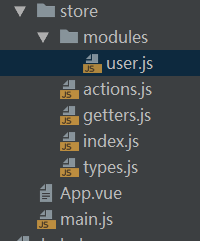
user.js
/**

 * 用户模块

 */

import types from '../types.js'

 const state={

 	count:6

 }

var getters={

	count(state){

		return state.count;

	}

}

const actions = {

	increment({commit,state}){

		commit(types.INCREMENT); //提交一个名为increment的变化,名称可自定义,可以认为是类型名

	},

	decrement({commit,state}){

		if(state.count>10){

			commit(types.DECREMENT);

		}

	}

}

const mutations={

	[types.INCREMENT](state){

		state.count++;

	},

	[types.DECREMENT](state){

		state.count--;

	}

}

export default {

	state,

	getters,

	actions,

	mutations

}
actions.js
import types from './types.js'

const actions={

	incrementAsync({commit,state}){

		//异步操作

		var p=new Promise((resolve,reject) => {

			setTimeout(() => {

				resolve();

			},3000);

		});

		p.then(() => {

			commit(types.INCREMENT);

		}).catch(() => {

			console.log('异步操作');

		});

	}

}

export default actions;
getters.js
const getters={

	isEvenOrOdd(state){

		return state.user.count%2==0?'偶数':'奇数';

	}

}

export default getters;
types.js
/**

 * 定义类型常量

 */

const INCREMENT='INCREMENT'

const DECREMENT='DECREMENT'

export default {

	INCREMENT,

	DECREMENT

}
index.js
import Vue from 'vue'

import Vuex from 'vuex'

Vue.use(Vuex);

import getters from './getters.js'

import actions from './actions.js'

import user from './modules/user.js'

export default new Vuex.Store({

	getters,

	actions,

	modules:{

		user

	}

});
main.js
import Vue from 'vue'

import App from './App.vue'

import store from './store/index.js'

new Vue({

  store,

  el: '#app',

  render: h => h(App)

})
分模块组织的访问
        console.log(this.$store);

        console.log(this.$store.getters['dirTestcaseData']);

        console.log(this.$store.getters['user/count']);

        console.log(this.$store.state['project']);

        console.log(this.$store.state.user['count']);

        this.$store.dispatch("asset/changeCurrentFundIndex", index);

        this.$store.dispatch('increment');

//导入

import { mapState, mapGetters } from "vuex";

//批量引入

    ...mapGetters("asset", {

      assetDetailType: "assetDetailType",

      tradeSelectVal: "tradeSelectVal",

      totalAsset: "totalAsset"

    })  //也支持数组
一篇搞定Vuex的更多相关文章
- 一篇搞定RSA加密与SHA签名|与Java完全同步
基础知识 什么是RSA?答:RSA是一种非对称加密算法,常用来对传输数据进行加密,配合上数字摘要算法,也可以进行文字签名. RSA加密中padding?答:padding即填充方式,由于RSA加密算法 ...
- 2021升级版微服务教程6—Ribbon使用+原理+整合Nacos权重+实战优化 一篇搞定
2021升级版SpringCloud教程从入门到实战精通「H版&alibaba&链路追踪&日志&事务&锁」 教程全目录「含视频」:https://gitee.c ...
- 一篇搞定微信分享和line分享
前言 在h5的页面开发中,分享是不可或缺的一部分,对于一些传播性比较强的页面,活动页之类的,分享功能极为重要.例如,京东等电商年末时会有一系列的总结h5在微信中传播,就不得不提到微信的分享机制. 微信 ...
- 一篇搞定MongoDB
MongoDB最基础的东西,我这边就不多说了,这提供罗兄三篇给大家热身 MongoDB初始 MongoDB逻辑与物理存储结构 MongoDB的基础操作 最后对上述内容和关系型数据做个对比 非关系型数据 ...
- 【java 数据结构】还不会二叉树?一篇搞定二叉树
二叉树是我们常见的数据结构之一,在学习二叉树之前我们需要知道什么是树,什么是二叉树,本篇主要讲述了二叉树,以及二叉树的遍历. 你能get到的知识点? 1.树的介绍 2.二叉树的介绍 3.二叉树遍历的四 ...
- 一篇搞定Python正则表达式
1. 正则表达式语法 1.1 字符与字符类 1 特殊字符:\.^$?+*{}[]()| 以上特殊字符要想使用字面值,必须使用\进行转义 2 字符类 1. 包含在[]中的一个或者多个字符被称为字符 ...
- python 一篇搞定所有的异常处理
一:什么是异常? 异常即是一个事件,该事件会在程序执行过程中发生,影响了程序的正常执行. 一般情况下,在python无法正常处理程序时就会发生一个异常(异常是python对象,表示一个错误) 异常就是 ...
- 阿里巴巴(alibaba)系列_druid 数据库连接池_监控(一篇搞定)记录执行慢的sql语句
参考帖子:http://www.cnblogs.com/han-1034683568/p/6730869.html Druid数据连接池简介 Druid是Java语言中最好的数据库连接池.Druid能 ...
- 一篇搞定vue请求和跨域
vue本身不支持发送AJAX请求,需要使用vue-resource.axios等插件实现 axios是一个基本Promise的HTTP请求客户端,用来发送请求,也是vue2.0官方推荐的,同时不再对v ...
随机推荐
- 点滴积累【other】---存储过程删除所有表中的数据(sql)
USE [QG_Mis24] GO /****** Object: StoredProcedure [dbo].[p_set1] Script Date: 07/18/2013 13:25:57 ** ...
- OpenJudge百炼习题解答(C++)--题4074:积水量
题: 总时间限制: 1000ms 内存限制:65536kB 描写叙述 凹凸不平的地面每当下雨的时候总会积水.如果地面是一维的.每一块宽度都为1,高度是非负整数.那么能够用一个数组来表达一块 ...
- size_t详细解释
在学习sizeof运算符的时候,它的值类型为size_t,结果在使用printf函数显示的时候,凭空多了很多警告,有点不不理解,为啥搞这么复杂?直接用个int类型多省事? 经过一番搜索和阅读文档,找到 ...
- 关于Unity实现游戏录制功能的思考
录制无非两种做法,录制操作和录制行为. 录制操作要考虑到随机行为,但其实也可以两者混合.如果随机行为过多,并且随机行为无法用种子复现,可以完全用录制的方式 最后再统一压缩 这里yy的就是录制行为的做法 ...
- atitit.流程标准化--- mysql启动不起来的排查流程attilax总结
atitit.流程标准化--- mysql启动不起来的排查流程attilax总结 1. mysql的启动日志文件 1 2. console方式 1 3. 安装为服务 1 3.1. 使用默认配置文件 1 ...
- 【ZYNQ-7000开发之九】使用VDMA在PL和PS之间传输视频流数据
[ZYNQ-7000开发之九]使用VDMA在PL和PS之间传输视频流数据 原创 2016年01月14日 11:35:02 标签: VDMA / zynq / zedbaord / AXI 10384 ...
- 【Objective-C】03-第一个OC程序
一.打开Xcode,新建Xcode项目 二.选择最简单的命令行项目 因为我们只是学习OC语法,还未正式进入iOS开发,所以选择命令行项目即可 三.输入项目名称,选择Foundation框架进行创建项目 ...
- 大型跨境电商 JVM 调优经历
前提: 某大型跨境电商业务发展非常快,线上机器扩容也很频繁,但是对于线上机器的运行情况,特别是jvm内存的情况,一直没有一个统一的标准来给到各个应用服务的owner.经过618大促之后,和运维的同学讨 ...
- 差异:git clone , git fetch, git pull和git rebase
随笔 - 96 文章 - 1 评论 - 6 Git Pull据我所知,当你使用git pull时,它将会获取远程服务器(你请求的,无论什么分支)上的代码,并且立即合并到你的本地厂库,Pull是 ...
- pip 使用技巧
指定豆瓣源安装 pip install configparser -i http://pypi.douban.com/simple/ --trusted-host=pypi.douban.com/si ...