
【Winform】.cs文件命名空间排序及注释批量处理工具
公司里每个程序员在命名空间的排序和注释上都有很多的不同。
杂乱的命名空间:
using System;

using System.Collections.Generic;

using Autodesk.Revit.UI;

using BIMCore.UI.ModelessForm;

using System.Text;

using System.Windows.Forms;

using System.Threading;

using RevitDocument = Autodesk.Revit.DB.Document;

using Autodesk.Revit.DB;

using BIMCore.UI;

using BIMCore.DB;

using System.ComponentModel;

using System.Data;

using System.Drawing;

using System.Linq;

using BIMCore.DB.Geometry;

using Res = Revit.Addin.isBIM.QuickFilters.Properties.Resources;

using BIMCore.DB.Log;

namespace Revit.Addin.isBIM.QuickFilters

{

    public partial class CustomForm : System.Windows.Forms.Form

    {

        RevitDocument rvtDoc_temp = null;

        public List<int> Resultlist = null;

        public List<int> Existinglist = null;

...   ....
有序的命名空间:
//

// (C) Copyright 2010-2016 by XXX, Inc.

//

// System namespaces

using System;

using System.Collections.Generic;

using System.Linq;

using System.Text;

// Autodesk namespaces

using Autodesk.Revit.DB;

using Autodesk.Revit.UI;

using Autodesk.Revit.UI.Selection;

// BIMCore namespaces

using BIMCore.DB;

using BIMCore.DB.Geometry;

// My namespaces

using Res = Revit.Addin.isBIM.PowerMeasure.Properties.Resources;

using Revit.Addin.isBIM.PowerMeasure.Views;

using Revit.Addin.isBIMAppWrapper;

namespace Revit.Addin.isBIM.PowerMeasure

{

...  ...
为了方便管理代码,这里我制作了一个批量处理.cs文件中命名空间排序及注释的工具。
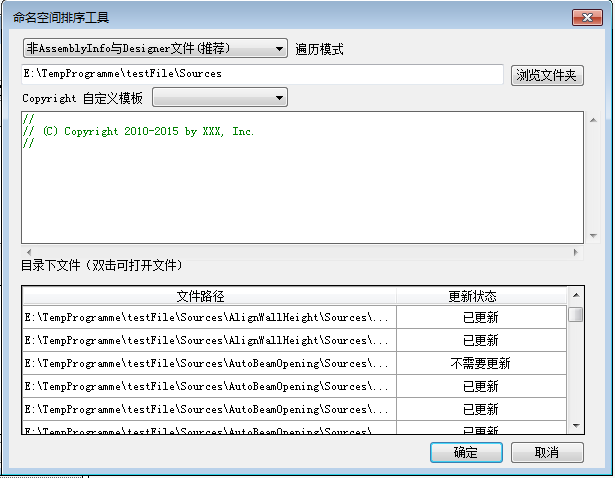
代码:
private void buttonConfirm_Click(object sender, EventArgs e)
{
string strfilepath = textBoxFilePath.Text;
List<string> liststrdocuments = new List<string>();
progressBarFiles.Visible = true;
if (!string.IsNullOrWhiteSpace(textBoxFilePath.Text) && System.IO.Directory.Exists(textBoxFilePath.Text)) //判断路径是否为空或者是否存在
{
if (!string.IsNullOrWhiteSpace(textBoxNameSpace.Text))
{
string[] strdocuments = Directory.GetFiles(strfilepath, "*.cs",SearchOption.AllDirectories); //得到文件夹路径下的所有cs文件路径
if (strdocuments.Length == ) //判断文件夹中是否没有cs文件
{
progressBarFiles.Visible = false;
MessageBox.Show(Properties.Resources.StringFileExist);
}
else
{
foreach (string strdocu in strdocuments) //排除部分cs文件,其中obj文件夹下的cs文件直接忽略
{
if(boolMode==true)
{
if (!strdocu.Contains("AssemblyInfo") && !strdocu.Contains("Designer") && !strdocu.Contains("obj") && !strdocu.Contains("designer"))
{
liststrdocuments.Add(strdocu);
}
}
else
{
if(!strdocu.Contains("obj"))
{
liststrdocuments.Add(strdocu);
}
}
} for (int i = ; i < liststrdocuments.Count; i++) //改变文件只读属性
{
if (File.GetAttributes(liststrdocuments[i]).ToString().IndexOf("ReadOnly") != -)
{
File.SetAttributes(liststrdocuments[i], FileAttributes.Normal);
}
}
int intprogress = ;
progressBarFiles.Maximum = liststrdocuments.Count;
DataTable dt = new DataTable();
dt.Columns.Add((Properties.Resources.StringDatagridViewCellHeaderOne), typeof(string));
dt.Columns.Add((Properties.Resources.StringDatagridViewCellHeaderTwo), typeof(string));
string strupdatestatus = null; foreach (string Documentpath in liststrdocuments) //遍历每个路径
{
System.Text.Encoding fileEncoding = GetFileEncodeType(Documentpath); //获取该文件的编码格式
intprogress++;
progressBarFiles.Value = intprogress;
string namespacerest = null;
string strusingsystem = null;
string strusingAutodesk = null;
string strusingBIMCore = null;
string strusingrest = null;
string namespaceresult = string.Empty;
string textboxcopyright = textBoxNameSpace.Text; List<string> listtempline = new List<string>();
List<string> listnamespacerest = new List<string>();
List<string> namespacesurplus = new List<string>(); if (DocumentChanged(Documentpath) == false)
{
strupdatestatus = Properties.Resources.StringUpdateStatusOne;
dt=BuildDataTable(dt,Documentpath,strupdatestatus);
}
else
{
string[] lines = File.ReadAllLines(Documentpath); //根据路径,分行读取该文件
foreach (string line in lines)
{
if (line.StartsWith("using"))
{
listtempline.Add(line); //得到命名空间的行
}
else if (!string.IsNullOrWhiteSpace(line))
{
listnamespacerest.Add(line); //记录剩下的部分
}
strupdatestatus = Properties.Resources.StringUpdateStatusTwo;
} #region 对namespace中的多余部分进行处理,保留没有空行的部分
foreach (string line in listnamespacerest)
{
if (line.StartsWith("namespace") || line.StartsWith("["))
{
break;
}
else if (!string.IsNullOrWhiteSpace(line))
{
namespacesurplus.Add(line);
}
}
if (namespacesurplus.Count != )
{
for (int i = ; i < listnamespacerest.Count; i++)
{
for (int j = ; j < namespacesurplus.Count; j++)
{
if (namespacesurplus[j] == listnamespacerest[i])
{
listnamespacerest.RemoveAt(i);
}
}
}
}
foreach (string line in listnamespacerest)
{
namespacerest += line + "\r\n";
}
#endregion listtempline.Sort(delegate(string str1, string str2) //对命名空间进行排序
{
return Comparer<string>.Default.Compare(str1.Trim(';'), str2.Trim(';'));
}); foreach (string line in listtempline) //对命名空间行归类
{
if (line.StartsWith("using System"))
{
strusingsystem += line + "\r\n";
}
else if (line.StartsWith("using Autodesk"))
{
strusingAutodesk += line + "\r\n";
}
else if (line.StartsWith("using BIMCore"))
{
strusingBIMCore += line + "\r\n";
}
else
{
strusingrest += line + "\r\n";
}
}
string strusingAutodeskresult;
string strusingBIMCoreresult;
string strusingrestresult;
strusingAutodeskresult = strusingBIMCoreresult = strusingrestresult = string.Empty;
string strusingsystemresult = "// System namespaces" + "\r\n" + strusingsystem + "\r\n"; if (!string.IsNullOrWhiteSpace(strusingAutodesk))
{
strusingAutodeskresult = strusingAutodesk;
strusingAutodeskresult = "// Autodesk namespaces" + "\r\n" + strusingAutodesk + "\r\n";
}
if (!string.IsNullOrWhiteSpace(strusingBIMCore))
{
strusingBIMCoreresult = strusingBIMCore;
strusingBIMCoreresult = "// BIMCore namespaces" + "\r\n" + strusingBIMCore + "\r\n";
}
if (!string.IsNullOrWhiteSpace(strusingrest))
{
strusingrestresult = strusingrest;
strusingrestresult = "// My namespaces" + "\r\n" + strusingrestresult + "\r\n";
}
namespaceresult = textboxcopyright + "\r\n" + strusingsystemresult + //重写文件
strusingAutodeskresult + strusingBIMCoreresult + strusingrestresult + namespacerest;
File.WriteAllText(Documentpath, namespaceresult, fileEncoding); textboxcopyright = strusingsystem = strusingAutodesk = strusingBIMCore = strusingrest = namespacerest = string.Empty; //变量清空
dt=BuildDataTable(dt, Documentpath, strupdatestatus); } } #region 控件属性的设置
dataGridViewfiles.DataSource = dt; //datagridview的设置
dataGridViewfiles.AllowUserToAddRows = false;
dataGridViewfiles.RowHeadersVisible = false;
dataGridViewfiles.AllowUserToResizeColumns = false;
dataGridViewfiles.AllowUserToResizeRows = false;
dataGridViewfiles.Columns[].Width = Convert.ToInt32(Math.Ceiling(0.3 * Convert.ToDouble(dataGridViewfiles.Width))); //设定更新状态栏的列宽
dataGridViewfiles.Columns[].DefaultCellStyle.Alignment = DataGridViewContentAlignment.MiddleCenter; //设定更新状态栏的字体居中
progressBarFiles.Visible = false;
#endregion
}
}
else
{
progressBarFiles.Visible = false;
MessageBox.Show(Properties.Resources.StringTextBoxCopyrightStauts);
}
}
else
{
progressBarFiles.Visible = false;
MessageBox.Show(Properties.Resources.StringTextBoxFileStatus);
}
}
169行对文件重写时依然使用文件原有编码格式,防止打开文件时候有乱码。
52行的子函数 GetFileEncodeType(string filename)判断编码格式 函数转载地址:http://www.cnblogs.com/swtseaman/archive/2011/05/17/2048689.html
 public System.Text.Encoding GetFileEncodeType(string filename)

       {

           System.IO.FileStream fs = new System.IO.FileStream(filename, System.IO.FileMode.Open, System.IO.FileAccess.Read, FileShare.ReadWrite);

           //FileShare.ReadWrite, 不然文件在进行其他IO操作时进程会被占用而报错

           System.IO.BinaryReader br = new System.IO.BinaryReader(fs);

           Byte[] buffer = br.ReadBytes();

           if(buffer[]>=0xEF)

           {

               if(buffer[]==0xEF && buffer[]==0xBB)

               {

                    return System.Text.Encoding.UTF8;

               }

               else if(buffer[]==0xFE && buffer[]==0xFF)

               {

                    return System.Text.Encoding.BigEndianUnicode;

               }

               else if(buffer[]==0xFF && buffer[]==0xFE)

               {

                    return System.Text.Encoding.Unicode;

               }

               else

               {

                    return System.Text.Encoding.Default;

               }

           }

           else

           {

                 return System.Text.Encoding.Default;

           }

       }

        #endregion
68行为文件更新判据:判断cs文件中是否有“// System namespaces”, 还有就是cs文件中的copyright部分是否与winform中的copyright文本框内容相同。
 private bool DocumentChanged(string path)

         {

             bool boolWholeStatus = true;

             bool boolStatus1 = false;

             bool boolStatus2 = false;

             string oralcopyright = string.Empty;

             string txtnamspace = textBoxNameSpace.Text+"\r\n";

             string[] lines = File.ReadAllLines(path);       //根据路径,分行读取该文件

             foreach (string line in lines)

             {

                 if (line.StartsWith("// System namespaces") || line.StartsWith("// System Namespaces") || line.StartsWith("//System namespaces") ||
                       line.StartsWith("//System Namespaces"))

                 {

                     boolStatus2 = true;

                     break;

                 }

                 else if(!string.IsNullOrEmpty("line"))

                 {

                     oralcopyright += line + "\r\n";

                 }

             }

             if (txtnamspace.Equals(oralcopyright))

             {

                 boolStatus1 = true;

             }

             if (boolStatus1 == true && boolStatus2 == true)

             {

                 boolWholeStatus = false;

             }

             return boolWholeStatus;

         }
71行的datatable构建方法:
private DataTable BuildDataTable(DataTable dt, string path, string status)

        {

            DataRow dr = dt.NewRow();

            dr[Properties.Resources.StringDatagridViewCellHeaderOne] = path;

            dr[Properties.Resources.StringDatagridViewCellHeaderTwo] = status;

            dt.Rows.Add(dr);

            return dt;

        }
【Winform】.cs文件命名空间排序及注释批量处理工具的更多相关文章
- 基于Winform的.cs文件命名空间排序及注释批量处理工具
公司里每个程序员在命名空间的排序和注释上都有很多的不同. 杂乱的命名空间: using System; using System.Collections.Generic; using Autodesk ...
- 百度翻译cs文件英文注释
原由:本人英语烂,没办法看不懂国外的代码注释!只能借助其他手段来助我一臂之力了. 虽然翻译内容不是很准确,但好过什么都看不懂的强. 对吧?! 代码有点乱有用的园友自个整理一下吧! 最近没时间所以翻译后 ...
- WinForm中AssemblyInfo.cs文件参数具体讲解
在.NET中有一个配置文件AssemblyInfo.cs主要用来设定生成的有关程序集的常规信息dll文件的一些参数,下面是默认的AssemblyInfo.cs文件的内容具体介绍 //是否符合公共语言规 ...
- CS文件类头注释
1.修改unity生成CS文件的模板(模板位置:Unity\Editor\Data\Resources\ScriptTemplates 文件名:81-C# Script-NewBehaviourScr ...
- 给VS类文件添加默认头注释
找到类文件所在路径:C:\Program Files (x86)\Microsoft Visual Studio 12.0\Common7\IDE\ItemTemplatesCache\CSharp\ ...
- 从java文件和CS文件里查询方法使用次数工具
前几天,领导让我找一下老系统(Java)里getRemoteUser方法都哪个文件用了,package是什么,方法被调用了多少次,当时因为着急,所以,直接人工找的,但是以后要是再出现,人工找就太讨厌了 ...
- WPF根据Oracle数据库的表,生成CS文件小工具
开发小工具的原因: 1.我们公司的开发是客户端用C#,服务端用Java,前后台在通讯交互的时候,会用到Oracle数据库的字段,因为服务器端有公司总经理开发的一个根据Oracle数据库的表生成的cla ...
- C# 调用WebService的3种方式 :直接调用、根据wsdl生成webservice的.cs文件及生成dll调用、动态调用
1.直接调用 已知webservice路径,则可以直接 添加服务引用--高级--添加web引用 直接输入webservice URL.这个比较常见也很简单 即有完整的webservice文件目录如下图 ...
- 根据wsdl文件生成webservice 的.cs文件 及 生成dll C#调用
Visual Studio 2013->Visual Studio Tools->VS2013 开发人员命令提示 命令行输入 wsdl E:\WS.wsdl /out ...
随机推荐
- SpringBoot学习:获取yml和properties配置文件的内容
项目下载地址:http://download.csdn.net/detail/aqsunkai/9805821 (一)yml配置文件: pom.xml加入依赖: <!-- 支持 @Configu ...
- hadoop 家族图
hadoop家族
- 获取项目中.txt 文件的内容
package com.fh.controller.ruitai.util; import java.io.BufferedInputStream; import java.io.File; impo ...
- Python的包(Packages)
包,Package,是一种Python模块的集合,从文件组织形式上看,包就是一个文件夹,里面放着各种模块(.py文件),也可以有子文件夹(子包).包名构建了一个Python模块的命名空间.比如,模块名 ...
- HTML+JS = 网站注册界面源代码
本注册页面未设置编码方式和兼容性,已测试,在Chrome浏览器显示正常 <!DOCTYPE html> <html> <head> <title>注册页 ...
- Apache POI:Excel读写库
1)Apache POI 简介 Apache POI是用Java编写的免费开源的跨平台的 Java API,Apache POI提供API给Java程式对Microsoft Office格式档案读和写 ...
- 简单构建基于RDF和SPARQL的KBQA(知识图谱问答系统)
本文主要通过python实例讲解基于RDF和SPARQL的KBQA系统的构建.该项目可在python2和python3上运行通过. 注:KBQA即是我们通常所说的基于知识图谱的问答系统.这里简单构建的 ...
- 吴恩达深度学习 反向传播(Back Propagation)公式推导技巧
由于之前看的深度学习的知识都比较零散,补一下吴老师的课程希望能对这块有一个比较完整的认识.课程分为5个部分(粗体部分为已经看过的): 神经网络和深度学习 改善深层神经网络:超参数调试.正则化以及优化 ...
- kvm网络虚拟化
网络虚拟化是虚拟化技术中最复杂的部分,学习难度最大. 但因为网络是虚拟化中非常重要的资源,所以再硬的骨头也必须要把它啃下来. 为了让大家对虚拟化网络的复杂程度有一个直观的认识,请看下图 这是 Open ...
- apache不解析php文件遍历目录
程序目录下有index.php缺不能正常解析,直接刷出整个目录. 解决:在后面添加index.php的解析即可.. DirectoryIndex index.html index.html.var i ...