
SpringBoot专题2----springboot与schedule的激情相拥
Schedule:计划,任务。就是我们常说的定时任务。这在我们做一些系统的时候,是经常需要用到的。比如:定时更新一些数据,定时更新索引,都需要这样的一个功能。
第一:创建一个名为springboot-schedule的maven项目:
pom.xml完整配置如下:
 <?xml version="1.0" encoding="UTF-8"?>

 <project xmlns="http://maven.apache.org/POM/4.0.0"

          xmlns:xsi="http://www.w3.org/2001/XMLSchema-instance"

          xsi:schemaLocation="http://maven.apache.org/POM/4.0.0 http://maven.apache.org/xsd/maven-4.0.0.xsd">

     <modelVersion>4.0.0</modelVersion>

     <groupId>springboot-schedule</groupId>

     <artifactId>springboot-schedule</artifactId>

     <version>1.0.1</version>

     <packaging>war</packaging>

     <name>springboot-schedule</name>

     <description>这是springboot定时任务</description>

     <parent>

         <groupId>org.springframework.boot</groupId>

         <artifactId>spring-boot-starter-parent</artifactId>

         <version>1.4.0.RELEASE</version>

         <relativePath></relativePath>

     </parent>

     <properties>

         <project.build.sourceEncoding>UTF-8</project.build.sourceEncoding>

         <java.version>1.8</java.version>

     </properties>

     <dependencies>

         <dependency>

             <groupId>org.springframework.boot</groupId>

             <artifactId>spring-boot-starter</artifactId>

         </dependency>

         <dependency>

             <groupId>org.springframework.boot</groupId>

             <artifactId>spring-boot-starter-test</artifactId>

             <scope>test</scope>

         </dependency>

     </dependencies>

     <build>

         <plugins>

             <plugin>

                 <groupId>org.springframework.boot</groupId>

                 <artifactId>spring-boot-maven-plugin</artifactId>

             </plugin>

             <!--打包跳过测试插件-->

             <plugin>

                 <groupId>org.apache.maven.plugins</groupId>

                 <artifactId>maven-surefire-plugin</artifactId>

                 <configuration>

                     <skip>true</skip>

                 </configuration>

             </plugin>

         </plugins>

     </build>

 </project>
第二:创建主启动类:SpringBootApplication
 package shenlan;

 import org.springframework.boot.SpringApplication;

 import org.springframework.scheduling.annotation.EnableScheduling;

 /**

  * Created by wangwei on 2016/9/2.

  */

 @org.springframework.boot.autoconfigure.SpringBootApplication

 @EnableScheduling

 public class SpringBootApplication {

     public static void main(String[] args){

         SpringApplication.run(SpringBootApplication.class,args);

     }

 }
 @EnableScheduling这是任务所必须的一个注解,有了这个注解,我们的项目才能开启定时任务的能力。
 最后一步,开启我们的测试吧:
 package shenlan.web;

 import org.slf4j.Logger;

 import org.slf4j.LoggerFactory;

 import org.springframework.scheduling.annotation.Scheduled;

 import org.springframework.stereotype.Component;

 /**

  * Created by wangwei on 2016/9/2.

  */

 @Component

 public class Task {

     private Logger logger = LoggerFactory.getLogger(this.getClass());

     @Scheduled(cron="*/3 * * * * *")

     public void reportCurrentTime(){

         //每三秒打印一行log

         System.out.println("-------------------------------------");

         logger.info("======================");

     }

 }
这里用到了cron技术,不懂的学森可以恶补一下cron的知识哦,很有用,很实用。
启动项目后,能看见以下console输出,就代表你成功啦,恭喜你!
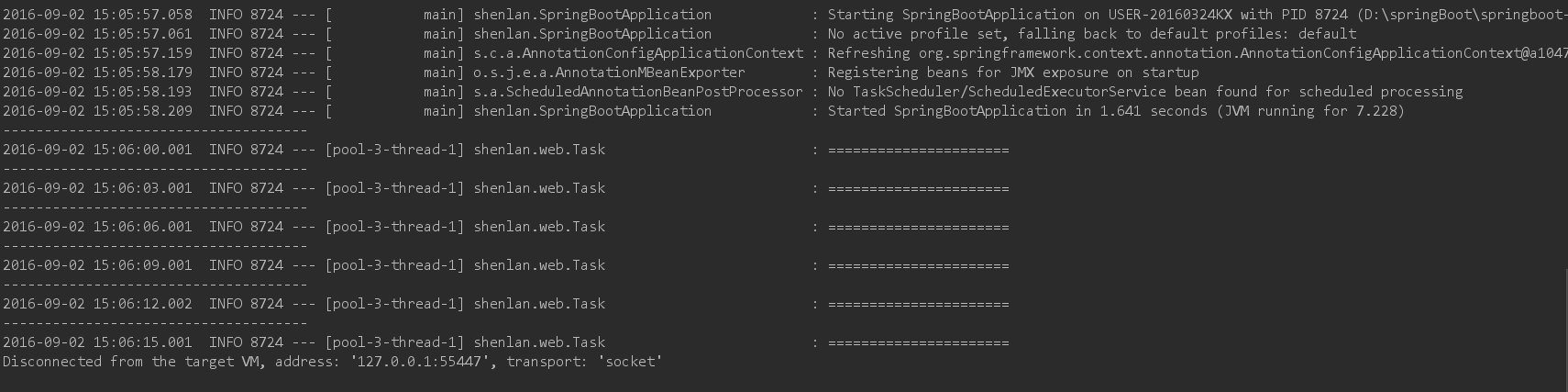
本博客的完整代码:https://github.com/shenlanzhizunjustwangwei/springBoot/tree/master/springboot-schedule
schedule,你值得拥有!
如果你觉得本博客对你有帮助,别忘了请我喝茶哦!


SpringBoot专题2----springboot与schedule的激情相拥的更多相关文章
- SpringBoot学习(八)-->SpringBoot之过滤器、监听器
本文将直接使用@WebFilter和@WebListener的方式,完成一个Filter 和一个 Listener. 过滤器(Filter)和 监听器(Listener)的注册方法和 Servlet ...
- SpringBoot基础系列-SpringBoot配置
原创作品,可以转载,但是请标注出处地址:https://www.cnblogs.com/V1haoge/p/9990680.html SpringBoot基础系列-SpringBoot配置 概述 属性 ...
- SpringBoot:4.SpringBoot整合Mybatis实现数据库访问
在公司项目开发中,使用Mybatis居多.在 SpringBoot:3.SpringBoot使用Spring-data-jpa实现数据库访问 中,这种jpa风格的把sql语句和java代码放到一起,总 ...
- springboot(一).初识springboot以及基本项目搭建
初识springboot 以及基本项目搭建 由于新的项目需要搭建后台框架,之前的springmvc架构也使用多次,在我印象中springboot的微服务架构更轻量级更容易搭建,所以想去试试spring ...
- SpringBoot(19)---SpringBoot整合Apollo
SpringBoot(19)---SpringBoot整合Apollo 有关Apollo之前已经写了两篇文章: 1.[Apollo](1)--- Apollo入门介绍篇 2.[Apollo](2)-- ...
- SpringBoot | 1.1 SpringBoot简介
前言 本博客仅为记录与总结SpringBoot的学习笔记,资料来源: 书籍<深入浅出SpringBoot>第三版 B站尚硅谷<雷丰阳2021版SpringBoot2零基础入门> ...
- SpringBoot入门教程(九)定时任务Schedule
在日常项目运行中,我们总会有需求在某一时间段周期性的执行某个动作.比如每天在某个时间段导出报表,或者每隔多久统计一次现在在线的用户量.在springboot中可以有很多方案去帮我们完成定时器的工作,有 ...
- springBoot专题3---->springBoot与多数据源的配置
最近有点忙,更新有点慢.今天进来说说一说springBoot中如何配置多数据源. 第一,新建一个名为springBoot-mutidata的maven项目,完整的pom.xml配置如下: <?x ...
- SpringBoot专题1----springboot与mybatis的完美融合
springboot大家都知道了,搭建一个spring框架只需要秒秒钟.下面给大家介绍一下springboot与mybatis的完美融合: 首先:创建一个名为springboot-mybatis的ma ...
随机推荐
- python hello wlord
入门运行第一个python程序 https://www.python.org/ 官网下载最新python3安装到电脑 安装成功 cmd进入到安装目录 1.在cmd中直接进入到python安装目录 编写 ...
- Android新手入门2016(10)--GridView
本文来自肥宝传说之路.引用必须注明出处! GridView跟ListView一样是多控件布局.实现九宫图是最方便的. 还是先看看图,没图说个鸡鸡是不是 如上图.是一种应用方式.在每一个格子里面.放入应 ...
- Mysql主从(主从不同步解决办法,常见问题及解决办法,在线对mysql做主从复制)
一.主从不同步解决办法 先上Master库: mysql>show processlist; 查看下进程是否Sleep太多.发现很正常. show master status; 也正常. mys ...
- linux 安装 登录 centos7
常用资源下载 r.aminglinux.com centos7.aminglinux.com http://www.apelearn.com/study_v2/ 认识linux Debian Slac ...
- ubuntu命令改变文档权限和所有者
chgrp :改变档案所属群组 chown :改变档案拥有者 chmod :改变档案的权限, SUID, SGID, SBIT等等的特性,可读.可写.可执行 1 chgrp 例子 chgrp [-R] ...
- Atitit.执行cmd 命令行 php
Atitit.执行cmd 命令行 php 1. 执行cmd 命令行,调用系统命令的基础 1 1.1. 实际执行模式 1 1.2. 空格的问题 1 1.3. 中文路径的问题,程序文件读取编码设置 1 1 ...
- Decoration1:Spring-boot基础实现
前段时间发布的Traveller项目,花费了不少精力,但是效果并不如意,根源在于瀑布式的开发思想不适合这种独立的学习项目.在项目初始就规划一个全面的web系统,,因为预设了一个前景,在心理上会想尽快看 ...
- 5.3日,7:20开始 阮一峰js的早课学习
Infinity - Infinity // NaN Infinity / Infinity // NaN Infinity + Infinity // Infinity Infinity * Inf ...
- 用mysql写带占位符的select语句
sql.append(" AND t.f_user_name LIKE CONCAT('%',?,'%')");//模糊查询 sql.append(" AND t.f_u ...
- matlab和c++混合编程---matlab和vs的环境配置问题及方法和步骤(转载)
matlab和c++混合编程---方法和步骤 matlab和c++混合编程---matlab和vs的环境配置问题 摘要:Matlab具有很强的数值计算和分析等能力,而C/C++是目前最为流行的高级程序 ...