
spring security结合数据库验证用户-XML配置方式
之前的用户信息我们都是使用的内存用户,测试例子可以,实际中使用肯定不行,需要结合数据库进行验证用户。这就是本节的重点:
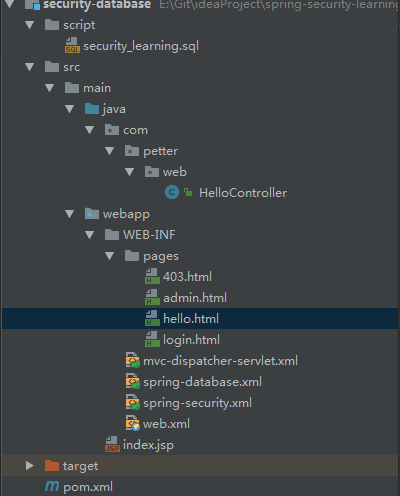
<dependency>

    <groupId>org.springframework</groupId>

    <artifactId>spring-jdbc</artifactId>

    <version>${spring.version}</version>

</dependency>

<!-- 用于thymeleaf中使用security的标签 -->

<dependency>

     <groupId>org.thymeleaf.extras</groupId>

     <artifactId>thymeleaf-extras-springsecurity4</artifactId>

     <version>3.0.2.RELEASE</version>

</dependency>

<!-- mysql -->

 <dependency>

      <groupId>mysql</groupId>

      <artifactId>mysql-connector-java</artifactId>

      <version>${mysql.connector.version}</version>

 </dependency>
spring-jdbc依赖用于数据库查询,thymeleaf-extras-springsecurity4是thymeleaf对security标签的支持
CREATE TABLE users (

  username VARCHAR(45) NOT NULL ,

  password VARCHAR(45) NOT NULL ,

  enabled BOOLEAN DEFAULT TRUE NOT NULL,

  PRIMARY KEY (username)

);

CREATE TABLE user_roles (

  user_role_id int(11) NOT NULL AUTO_INCREMENT,

  username varchar(45) NOT NULL,

  role varchar(45) NOT NULL,

  PRIMARY KEY (user_role_id),

  UNIQUE KEY uni_username_role (role,username),

  KEY fk_username_idx (username),

  CONSTRAINT fk_username FOREIGN KEY (username) REFERENCES users (username)

);

INSERT INTO users(username,password,enabled) VALUES ('hxf','', true);

INSERT INTO users(username,password,enabled) VALUES ('wpp','', true);

INSERT INTO user_roles (username, role) VALUES ('hxf', 'ROLE_USER');

INSERT INTO user_roles (username, role) VALUES ('hxf', 'ROLE_ADMIN');

INSERT INTO user_roles (username, role) VALUES ('wpp', 'ROLE_USER');
这里参考 http://docs.spring.io/spring-security/site/docs/4.2.1.RELEASE/reference/htmlsingle/#user-schema 官网给的配置
<?xml version="1.0" encoding="UTF-8"?>

<beans xmlns="http://www.springframework.org/schema/beans"

       xmlns:xsi="http://www.w3.org/2001/XMLSchema-instance"

       xsi:schemaLocation="http://www.springframework.org/schema/beans http://www.springframework.org/schema/beans/spring-beans.xsd http://www.springframework.org/schema/security http://www.springframework.org/schema/security/spring-security.xsd">

    <bean id="datasource" class="org.springframework.jdbc.datasource.DriverManagerDataSource">

        <property name="driverClassName" value="com.mysql.jdbc.Driver"/>

        <property name="url" value="jdbc:mysql://localhost:3306/security_learning"/>

        <property name="username" value="petter"/>

        <property name="password" value="petter"/>

    </bean>

</beans>
添加完成以后需要在web.xml文件中指定:
<!-- Loads Spring config file -->

    <context-param>

        <param-name>contextConfigLocation</param-name>

        <param-value>

            /WEB-INF/spring-security.xml

            /WEB-INF/spring-database.xml

        </param-value>

    </context-param>
二、修改spring-security.xml配置文件:
<?xml version="1.0" encoding="UTF-8"?>

<beans xmlns="http://www.springframework.org/schema/beans"

       xmlns:xsi="http://www.w3.org/2001/XMLSchema-instance"

       xmlns:security="http://www.springframework.org/schema/security"

       xsi:schemaLocation="http://www.springframework.org/schema/beans http://www.springframework.org/schema/beans/spring-beans.xsd http://www.springframework.org/schema/security http://www.springframework.org/schema/security/spring-security.xsd">

    <!-- use-expressions 允许使用表达式 -->

    <security:http auto-config="true" use-expressions="true">

        <security:intercept-url pattern="/admin**" access="hasRole('ROLE_ADMIN')"/>

        <!-- 拒绝访问页面 -->

        <security:access-denied-handler error-page="/403"/>

        <security:form-login

                login-page="/login"

                default-target-url="/welcome"

                authentication-failure-url="/login?error"

                username-parameter="user-name"

                password-parameter="pwd"/>

        <security:logout

                logout-success-url="/login?logout"/>

        <!-- XML 配置中默认csrf是关闭的,此处设置为打开

            如果这里打开csrf,则在form表单中需要添加

            <input type="hidden" th:name="${_csrf.parameterName}" th:value="${_csrf.token}" />

        -->

        <security:csrf />

    </security:http>

    <security:authentication-manager>

        <security:authentication-provider>

            <security:jdbc-user-service data-source-ref="datasource"

                                        users-by-username-query="select username,password, enabled from users where username = ?"

                                        authorities-by-username-query="select username, role from user_roles where username = ?"/>

        </security:authentication-provider>

    </security:authentication-manager>

</beans>
三、修改登录以后默认进入的页面hello.html
<!DOCTYPE html>

<html xmlns="http://www.w3.org/1999/xhtml"

      xmlns:th="http://www.thymeleaf.org"

      xmlns:sec="http://www.thymeleaf.org/thymeleaf-extras-springsecurity4">

<head>

    <meta charset="UTF-8" />

    <title>hello</title>

</head>

<body>

    <h1 th:text="|标题: ${title}|">Title : XXX</h1>

    <h1 th:text="|信息: ${message}|">Message : XXX</h1>

    <div sec:authentication="name">

        验证用户的名称显示在这里

    </div>

    <div sec:authentication="principal.authorities">

        验证用户的权限显示在这里

    </div>

    <!-- 下面注释掉的两种写法是等价的,但是不起作用,暂时使用第三种方式 -->

    <!--<div sec:authorize="hasRole('ROLE_USER')">-->

    <!--<div sec:authorize="hasAuthority('ROLE_USER')">-->

    <div th:if="${#strings.contains(#authentication.principal.authorities,'ROLE_USER')}">

        <form action="/logout" method="post" id="logoutForm">

            <input type="hidden" th:name="${_csrf.parameterName}" th:value="${_csrf.token}" />

        </form>

        <h2><a href="javascript:formSubmit()">退出</a></h2>

        <script>

            function formSubmit() {

                document.getElementById("logoutForm").submit();

            }

        </script>

    </div>

</body>

</html>
这里需要注意:
<bean id="templateEngine" class="org.thymeleaf.spring4.SpringTemplateEngine">

        <property name="templateResolver" ref="templateResolver"/>

        <property name="additionalDialects">

            <set>

                <!-- Note the package would change to 'springsecurity3' if you are using that version -->

                <bean class="org.thymeleaf.extras.springsecurity4.dialect.SpringSecurityDialect"/>

            </set>

        </property>

    </bean>
3、如上注释所示,两种写法判断只用含有USER角色的用户会显示,不起作用,可能只会会修复。
PS:要想起作用,thymeleaf-spring4 版本必须是 3.0.3.RELEASE以上
记住,role就是一种约定的前面加上ROLE_作为前缀的特殊的authority,所以它们是等价的,具体可以参考http://stackoverflow.com/questions/19525380/difference-between-role-and-grantedauthority-in-spring-security
<!DOCTYPE html>

<html xmlns:th="http://www.thymeleaf.org">

<head>

    <meta charset="UTF-8"/>

    <title>403</title>

</head>

<body>

<h1>HTTP Status 403 - Access is denied</h1>

<div>

    <h2 th:if="username eq null" th:text="您没有权限访问这个页面"></h2>

    <h2 th:if="username ne null" th:text="|用户:${username},您没有权限访问这个页面|"></h2>

</div>

</body>

</html>
并且在HelloController中添加代码:
@RequestMapping(value = "/403", method = RequestMethod.GET)

    public ModelAndView accessDenied() {

        ModelAndView model = new ModelAndView();

        //检查用户是否已经登录

        Authentication auth = SecurityContextHolder.getContext().getAuthentication();

        if (!(auth instanceof AnonymousAuthenticationToken)) {

            UserDetails userDetail = (UserDetails) auth.getPrincipal();

            model.addObject("username", userDetail.getUsername());

        }

        model.setViewName("403");

        return model;

    }
启动程序,访问http://localhost:8080/login http://localhost:8080/admin 登录不同角色的用户进行自行测试
spring security结合数据库验证用户-XML配置方式的更多相关文章
- spring security结合数据库验证用户-注解方式
项目目录结构如下: 首先数据库的建立和数据导入,以及一些类的依赖参考XML配置方式,需要修改一些配置. 一.在AppConfig文件中添加DataSource的配置 @Bean(name = &quo ...
- spring security使用数据库验证的逻辑处理
前面做了多个示例,包括使用jdbc和hibernate两种方式访问数据库获取用户信息和权限信息,其中一些关键步骤如下: 我们在SecurityConfig中配置覆盖configure方法时候,可以 ...
- Spring MVC 的 Java Config ( 非 XML ) 配置方式
索引: 开源Spring解决方案--lm.solution 参看代码 GitHub: solution/pom.xml web/pom.xml web.xml WebInitializer.java ...
- Spring框架(2)---IOC装配Bean(xml配置方式)
IOC装配Bean (1)Spring框架Bean实例化的方式提供了三种方式实例化Bean 构造方法实例化(默认无参数,用的最多) 静态工厂实例化 实例工厂实例化 下面先写这三种方法的applicat ...
- Spring IOC容器装配Bean_基于XML配置方式
开发所需jar包 实例化Bean的四种方式 1.无参数构造器 (最常用) <?xml version="1.0" encoding="UTF-8"?> ...
- spring security关闭http验证 和 springboot 使用h2数据库
spring security关闭http验证 最近在跑demo的过程中,访问swagger页面的时候需要验证登录,记得在之前写的代码中是关闭了security验证,无需登录成功访问,直接在appli ...
- Spring Security 概念基础 验证流程
Spring Security 概念基础 验证流程 认证&授权 认证:确定是否为合法用户 授权:分配角色权限(分配角色,分配资源) 认证管理器(Authentication Manager) ...
- 自定义Spring Security的身份验证失败处理
1.概述 在本快速教程中,我们将演示如何在Spring Boot应用程序中自定义Spring Security的身份验证失败处理.目标是使用表单登录方法对用户进行身份验证. 2.认证和授权(Authe ...
- Spring之AOP原理、代码、使用详解(XML配置方式)
Spring 的两大核心,一是IOC,另一个是AOP,本博客从原理.AOP代码以及AOP使用三个方向来讲AOP.先给出一张AOP相关的结构图,可以放大查看. 一.Spring AOP 接口设计 1.P ...
随机推荐
- 【BZOJ3876】[Ahoi2014]支线剧情 有上下界费用流
[BZOJ3876][Ahoi2014]支线剧情 Description [故事背景] 宅男JYY非常喜欢玩RPG游戏,比如仙剑,轩辕剑等等.不过JYY喜欢的并不是战斗场景,而是类似电视剧一般的充满恩 ...
- java的奇技淫巧--意外行为与特性(译文)
Java是一种非常成熟的编程语言 - 事实上,它已经走过21年了,如果它是一个人,它可以在美国随便混!随着年龄的增长,智慧也在增长,而至少有时候,有些东西会变得很怪异.在本文中,我将介绍Java语言的 ...
- 转!!配置Tomcat时server.xml和content.xml自动还原问题
原博文地址:http://www.cnblogs.com/zuosl/p/4342190.html 当我们在处理中文乱码或是配置数据源时,我们要修改Tomcat下的server.xml和content ...
- javascript教程5:--BOM操作
1.BOM 简介 所谓的 BOM 即浏览器对象模型(Browser Object Model).BOM 赋予了 JS 操作浏览器的能力,即 window 操作.DOM 则用于创建删除节点,操作 HTM ...
- Python知识点复习之__call__
一个对象实例可以有自己的属性和方法,当我们调用实例方法时,我们用instance.method()来调用.能不能直接在实例本身上调用呢?在Python中,答案是肯定的. 任何类,只需要定义一个__ca ...
- Event对象、队列、multiprocessing模块
一.Event对象 线程的一个关键特性是每个线程都是独立运行且状态不可预测.如果程序中的其他线程需要通过判断某个线程的状态来确定自己下一步的操作,这时线程同步问题就 会变得非常棘手.为了解决这些问题, ...
- Appium自动化环境搭建(windows+Android)
开始安装: 1.首先搭建好Android开发环境(eclipse+jdk+android的sdk包+Level17或以上的版本api) 2.设置ANDROID_HOME系统变量为你的Android S ...
- 0504-Hystrix保护应用-Hystrix Dashboard的使用与常见问题总结
一.概述 Hystrix的主要优势之一是它收集的每个HystrixCommand的度量集合. Hystrix仪表板以高效的方式显示每个断路器的运行状况. 以前查看通过http://localhost: ...
- TypeScript学习笔记—函数
函数定义 在 JavaScript 中,有两种常见的定义函数的方式——函数声明(Function Declaration)和函数表达式(Function Expression): // 函数声明(Fu ...
- 用仿ActionScript的语法来编写html5——第六篇,TextField与输入框
一,对比1,html5中首先看看在html5的canvas中的文字显示 var canvas = document.getElementById("myCanvas"); var ...