
3月20日html(二) 图片热点,网页划分,表单
1.图片热点:
规划出图片上的一个区域,可以做出超链接,直接点击图片区域就可以完成跳转的效果。
<img src="../图片/5109de19b9c5b.jpg" width="" height="" usemap="map"  name="map" />

<map name="map">

<area shape="rect" coords="244,234,367,354" href="http://www.baidu.com" />

</map> <br/>
2.网页划区:
在一个网页里,规划出一个区域用来展示另一个网页的内容。
<table>

<tr>

<td>

<iframe  src="http://www.baidu.com"  width="" height=""  frameborder=""></iframe>

</td>

</tr>

</table><br />

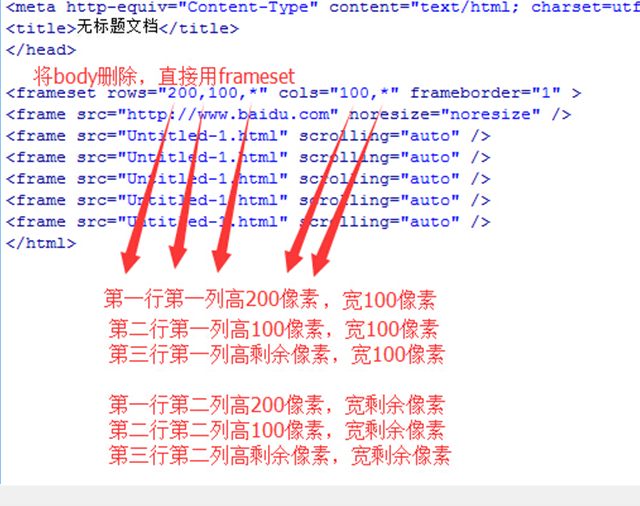
3.网页的拼接:
在一个网络页面内,规划出多个页面窗口,以表格拼接的形式展示出来。
4. 表单:
<form id="" name="" method="post/get" action="负责处理的服务端">
id不可重复,name可重复,get提交有长度限制,并且编码后的内容在地址栏可见,
post提交没有长度限制,且编码后内容不可见。
</form>
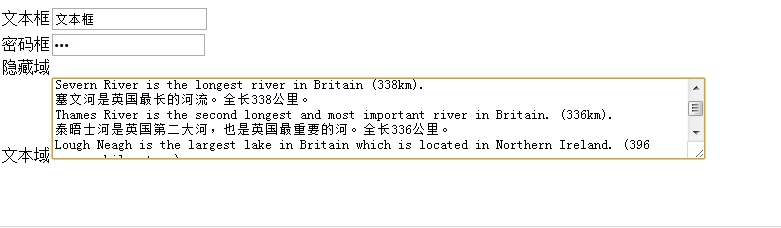
(1)文本输入
文本框<input type="txt" name="" id="" value="" />
密码框<input type="password" name="" id="" value="" />
文本域<textarea name="" id="" cols=""(字符多少) rows=""(几行高)></textarea>
隐藏域<input type="hidden" name="" id="" value="" />
<form>

文本框<input type="txt" value="文本框" /><br />

密码框<input type="password" value="密码框" /><br />

隐藏域<input type="hidden" value="隐藏域" /><br />

文本域<textarea cols="" rows="" name="">
 Ben Nevis is the highest mountain in Britain (,343m).

本尼维斯山为英国最高峰,海拔1,343米。

Severn River is the longest river in Britain (338km).

塞文河是英国最长的河流。全长338公里。

Thames River is the second longest and most important river in Britain. (336km).

泰晤士河是英国第二大河,也是英国最重要的河。全长336公里。

Lough Neagh is the largest lake in Britain which is located in Northern Ireland. ( square kilometres).

讷湖(内伊湖)是英国最大的湖,位于北爱尔兰。面积为396平方公里。

</textarea><br />
(2)按钮
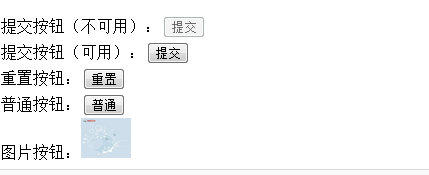
提交按钮<input type="submit" name="" id="" disabled="disabled" value="" />点击后转到form内的提交服务器的地址
重置按钮<input type="reset" name="" id="" disabled="disabled" value="" />
普通按钮<input type="button" name="" id="" disabled="disabled" value="" />
图片按钮<input type="image" name="" id="" disabled="disabled" src="图片地址" />
disabled使按钮失效
enable使按钮可用
提交按钮(不可用):<input type="submit" value="提交" disabled="disabled" /><br />

提交按钮(可用):<input type="submit" value="提交"   /><br />

重置按钮:<input type="reset" value="重置" /><br />

普通按钮:<input type="button" value="普通" /><br />

图片按钮:<input type="image"  src="../图片/u=289739846,1709449352&fm=21&gp=0.jpg" width="" height="" /><br />
(3)选择输入
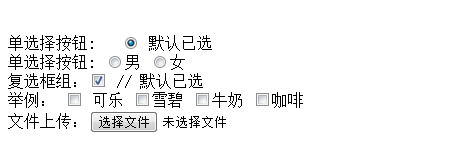
单选按钮组<input type="radio" name="" checked="checked" value="" />
name的值用来分组,value的值看不见,提交给程序用的,checked设置默认选项。
复选框组<input type="checkbox" name="" checked="checked" value="" />
文件上传<input type="file" name="" id="" />
<lable for=""></lable>
(lable标签为input元素定义标注。
lable元素不会向用户呈现任何特殊效果,不过,他为鼠标用户改进了可用性。如果您在lable元素内点击文本,就会触发此控件。
就是说,当用户选择该标签时,浏览器会 将焦点转到和标签相关的表单控件上。
lable标签的for属性应当与相关元素的id属性相同。)
单选择按钮: <input type="radio" checked="checked" /> 默认已选<br />
单选择按钮: <input type="radio" name="a"/>男
<input type="radio" name="a"/>女<br />
复选框组:<input type="checkbox" checked="checked" /> // 默认已选 <br />
举例: <input type="checkbox"/> 可乐
<input type="checkbox" />雪碧
<input type="checkbox" />牛奶
<input type="checkbox" />咖啡
<br/>
文件上传:<input type="file" /> <br />
(4)下拉列表框
<select name="" id="" size="" multiple="multiple">
--size为1时,为菜单;>1时,为列表。multiple为多选。
<option value="值">内容1</option>
<option value="值" selected="selected">内容2</option>
--selected,设为默认
<option value="值">内容3</option>
</select>
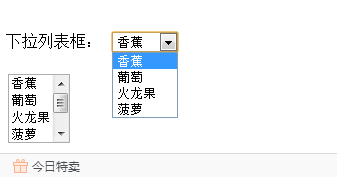
下拉列表框:

<select  size="">

<option>香蕉</option>

<option>葡萄</option>

<option>火龙果</option>

<option>菠萝</option>

</select>

<br/><br />

<select  size=""  multiple="multiple">

<option>香蕉</option>

<option>葡萄</option>

<option>火龙果</option>

<option>菠萝</option>

<option>苹果</option>

<option>橙子</option>

</select>
(5)标签
<label></label>
字段集 (一堆label)
<fieldset></fieldset>
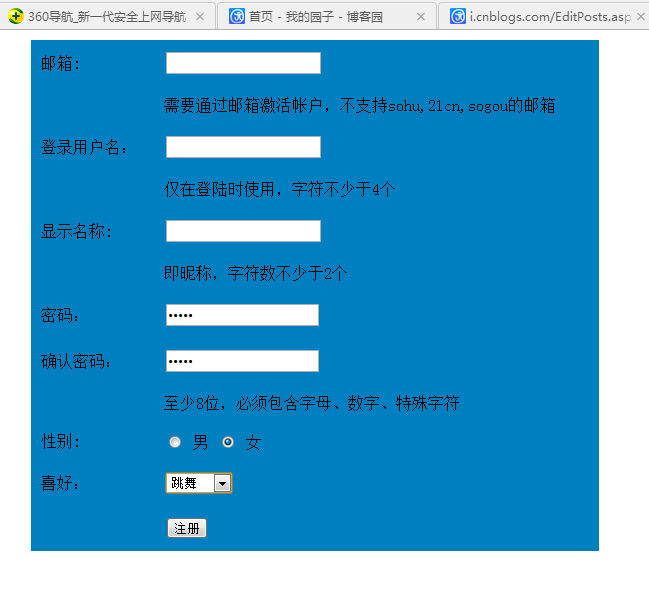
表单练习题:邮箱注册界面(直接贴自己做好的吧。)
<body leftmargin="" rightmargin=""> <table width="" height="" border="" cellpadding="" cellspacing="" bgcolor="#0080C0">
<tr height="">
<td width="">邮箱:</td>
<td width=""> <form> <input type="txt" value="" /></form></td>
</tr> <tr >
<td width="" > </td>
<td width="" ><font>
需要通过邮箱激活帐户,不支持sohu,21cn,sogou的邮箱
</font></td>
</tr> <tr height="">
<td width=""> 登录用户名:</td>
<td> <form> <input type="txt" value="" /></form></td>
</tr> <tr>
<td></td>
<td> 仅在登陆时使用,字符不少于4个</td>
</tr> <tr >
<td width="">显示名称:</td>
<td> <form> <input type="txt" value="" /></form></td>
</tr> <tr>
<td></td>
<td>即昵称,字符数不少于2个</td>
</tr>
<tr>
<td width="">密码:</td>
<td><form> <input type="password" value=""/></form></td>
</tr> <tr>
<td width="">确认密码:</td>
<td><form><input type="password" value=""/></form></td>
</tr> <tr>
<td></td>
<td>至少8位,必须包含字母、数字、特殊字符</td>
</tr> <tr>
<td width="">性别:</td>
<td><form> <input type="radio" name="a" value="" /> 男
<input type="radio" name="a" value="" /> 女</form></td>
</tr> <tr>
<td width="">喜好:</td>
<td><form > <select size="">
<option > 听音乐</option>
<option>看电视</option>
<option>旅游</option>
<option>跳舞</option>
<option>其他</option>
</select></form></td>
</tr> <tr>
<td></td>
<td> <form> <input type="submit" value="注册" /></form> </td>
</tr>
</table>
3月20日html(二) 图片热点,网页划分,表单的更多相关文章
- 厦门Uber优步司机奖励政策(12月14日到12月20日)
滴快车单单2.5倍,注册地址:http://www.udache.com/ 如何注册Uber司机(全国版最新最详细注册流程)/月入2万/不用抢单:http://www.cnblogs.com/mfry ...
- 西安活动 | 4月20日「拥抱开源,又见.NET :云时代 • 新契机」
云计算日渐兴起,成为提升企业效率和生产力的最终解决方案,而云时代也为软件开发模式带来了翻天覆地的变化.可以说 .NET Core就是这个时代催生的产物.自2016年 .NET Core 1.0 发布以 ...
- 北京Uber优步司机奖励政策(1月20日)
滴快车单单2.5倍,注册地址:http://www.udache.com/ 如何注册Uber司机(全国版最新最详细注册流程)/月入2万/不用抢单:http://www.cnblogs.com/mfry ...
- 北京Uber优步司机奖励政策(12月20日)
滴快车单单2.5倍,注册地址:http://www.udache.com/ 如何注册Uber司机(全国版最新最详细注册流程)/月入2万/不用抢单:http://www.cnblogs.com/mfry ...
- 北京Uber优步司机奖励政策(9月14日~9月20日)
滴快车单单2.5倍,注册地址:http://www.udache.com/ 如何注册Uber司机(全国版最新最详细注册流程)/月入2万/不用抢单:http://www.cnblogs.com/mfry ...
- 成都Uber优步司机奖励政策(1月20日)
滴快车单单2.5倍,注册地址:http://www.udache.com/ 如何注册Uber司机(全国版最新最详细注册流程)/月入2万/不用抢单:http://www.cnblogs.com/mfry ...
- 广州Uber优步司机奖励政策(12月14日到12月20日)
滴快车单单2.5倍,注册地址:http://www.udache.com/ 如何注册Uber司机(全国版最新最详细注册流程)/月入2万/不用抢单:http://www.cnblogs.com/mfry ...
- 武汉Uber优步司机奖励政策(12月14日到12月20日)
滴快车单单2.5倍,注册地址:http://www.udache.com/ 如何注册Uber司机(全国版最新最详细注册流程)/月入2万/不用抢单:http://www.cnblogs.com/mfry ...
- 天津Uber优步司机奖励政策(12月14日到12月20日)
滴快车单单2.5倍,注册地址:http://www.udache.com/ 如何注册Uber司机(全国版最新最详细注册流程)/月入2万/不用抢单:http://www.cnblogs.com/mfry ...
随机推荐
- HTTP_X_FORWARDED_FOR 和 REMOTE_ADDR的使用 php
参考来源:http://qq398705749.iteye.com/blog/963818 php中HTTP_X_FORWARDED_FOR 和 REMOTE_ADDR的使用 1.REMOTE_ADD ...
- html文字有光晕
<style> .tb{ font-size:40px; filter:glow(color=pink,direction=); font-family:华文行楷; } </styl ...
- 再次探讨C++的动态绑定和静态绑定
以前在学习C++的时候,对动态绑定和静态绑定的理解是:静态绑定是编译时决定的,非虚函数基本都是静态绑定:而动态绑定用于虚函数,是为了实现多态.这样理解没什么大的问题,但我一直疑惑的是,既然静态绑定可以 ...
- 提取所有mtk机型的线刷包
首先手机root且安装busybox和超级终端软件,这里不提供自己百度一大堆 一.制作scatter 示范 PRELOADER 0x0 { } MBR 0x600000 { } EBR1 0x6800 ...
- ng-options
tr td 地点 td select.form-control(required="true" ng-model="addkc.dd" ng-options=& ...
- 用MySQL创建数据库和数据库表
1.使用SHOW语句找出在服务器上当前存在什么数据库: mysql> SHOW DATABASES; +----------+ | Database | +----------+ | mysql ...
- Building Web Apps with SignalR, Part 1
Building Web Apps with SignalR, Part 1 In the first installment of app-building with SignalR, learn ...
- HttpClient 发送 HTTP、HTTPS 请求的简单封装
import org.apache.commons.io.IOUtils; import org.apache.http.HttpEntity; import org.apache.http.Http ...
- Android 自定义View(button)
很多的Android入门程序猿来说对于Android自定义View,可能都是比较恐惧的,但是这又是高手进阶的必经之路,所有准备在自定义View上面花一些功夫,多写一些文章.先总结下自定义View的步骤 ...
- 【转】Android:ListView常见错位之CheckBox错位
原文网址:http://blog.csdn.net/lemon_tree12138/article/details/39337867 ListView在什么样的情况下会出现错位?错位的原因是什么?怎么 ...