
android 使用Scroller实现缓慢移动
在Launcher中的Workspace中实现了左右屏幕切换效果,里面就用到了Scroller记录滑动轨迹,实现一种缓慢地向左或向右移动的效果,这里我对这种效果进行总结:
我们先看一个例子:点击按钮时红经块会从左边缓慢地移向左右,这个该怎么实现呢

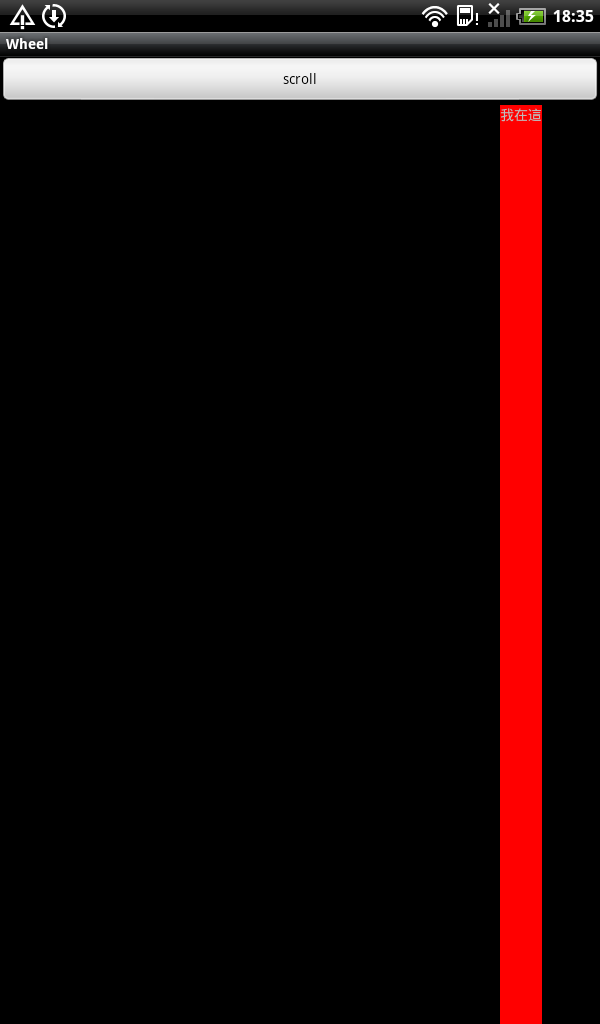
我们先来看一下,Scroller,这个对象里有startScroll方法
void android.widget.Scroller.startScroll(int startX, int startY, int dx, int dy, int duration)
第一个参数是起始移动的x坐标值,第二个是起始移动的y坐标值,第三个第四个参数都是移到某点的坐标值,而duration 当然就是执行移动的时间。这个有什么用呢。要知道有什么用还得再看一个方法
当startScroll执行过程中即在duration时间内,computeScrollOffset 方法会一直返回false,但当动画执行完成后会返回返加true.
有了这两个方法还不够,我们还需要再重写viewGroup的一个方法,
computeScroll 这个方法什么时候会被调用呢
官网上这样说的
public void computeScroll ()
Called by a parent to request that a child update its values for mScrollX and mScrollY if necessary. This will typically be done if the child is animating a scroll using a Scroller object.
当我们执行ontouch或invalidate()或postInvalidate()都会导致这个方法的执行
所以我们像下面这样调用,postInvalidate执行后,会去调computeScroll 方法,而这个方法里再去调postInvalidate,这样就可以不断地去调用scrollTo方法了,直到mScroller动画结束,当然第一次时,我们需要手动去调用一次postInvalidate才会去调用
computeScroll 方法
- @Override
- public void computeScroll() {
- if (mScroller.computeScrollOffset()) {
- scrollTo(mScroller.getCurrX(), 0);
- postInvalidate();
- }
- }
下面附上上面那个例子的源代码
首先是MyViewGroup.java
- package com.wb;
- import android.content.Context;
- import android.util.AttributeSet;
- import android.view.View;
- import android.view.ViewGroup;
- import android.widget.LinearLayout;
- import android.widget.Scroller;
- public class MyViewGroup extends LinearLayout {
- private boolean s1=true;
- Scroller mScroller=null;
- public MyViewGroup(Context context, AttributeSet attrs) {
- super(context, attrs);
- mScroller=new Scroller(context);
- // TODO Auto-generated constructor stub
- }
- @Override
- public void computeScroll() {
- if (mScroller.computeScrollOffset()) {
- scrollTo(mScroller.getCurrX(), 0);
- postInvalidate();
- }
- }
- public void beginScroll(){
- if (!s1) {
- mScroller.startScroll(0, 0, 0, 0, 1000);
- s1 = true;
- } else {
- mScroller.startScroll(0, 0, -500, 0, 1000);
- s1 = false;
- }
- invalidate();
- }
- }
然后是WheelActivity.java
- package com.wb;
- import android.app.Activity;
- import android.graphics.Color;
- import android.os.Bundle;
- import android.view.Gravity;
- import android.view.View;
- import android.view.ViewGroup;
- import android.widget.AbsListView;
- import android.widget.AbsListView.LayoutParams;
- import android.widget.AbsListView.OnScrollListener;
- import android.widget.Adapter;
- import android.widget.BaseAdapter;
- import android.widget.ListView;
- import android.widget.TextView;
- public class WheelActivity extends Activity {
- private ListView listView = null;
- private MyViewGroup myViewGroup;
- @Override
- public void onCreate(Bundle savedInstanceState) {
- super.onCreate(savedInstanceState);
- setContentView(R.layout.main);
- myViewGroup = (MyViewGroup) findViewById(R.id.myviewGroup);
- }
- public void scroll(View view) {
- myViewGroup.beginScroll();
- }
- }
main.xml
- <?xml version="1.0" encoding="utf-8"?>
- <LinearLayout xmlns:android="http://schemas.android.com/apk/res/android"
- android:layout_width="fill_parent"
- android:layout_height="fill_parent"
- android:orientation="vertical" >
- <Button
- android:layout_width="fill_parent"
- android:layout_height="wrap_content"
- android:text="scroll"
- android:onClick="scroll" />
- <com.wb.MyViewGroup
- xmlns:android="http://schemas.android.com/apk/res/android"
- android:layout_width="fill_parent"
- android:layout_height="fill_parent"
- android:orientation="vertical" android:id="@+id/myviewGroup">
- <TextView
- android:layout_width="wrap_content"
- android:layout_height="fill_parent"
- android:background="#ff0000"
- android:text="我在這"/>
- </com.wb.MyViewGroup>
- </LinearLayout>
源代码下载地址:http://download.csdn.net/detail/c_weibin/4208751
android 使用Scroller实现缓慢移动的更多相关文章
- 【转】Android 使用Scroller实现绚丽的ListView左右滑动删除Item效果
原文网址:http://blog.csdn.net/xiaanming/article/details/17539199 转帖请注明本文出自xiaanming的博客(http://blog.csdn. ...
- [转]Android 使用Scroller实现绚丽的ListView左右滑动删除Item效果
转帖请注明本文出自xiaanming的博客(http://blog.csdn.net/xiaanming/article/details/17539199),请尊重他人的辛勤劳动成果,谢谢! 我在上一 ...
- Android 使用Scroller实现绚丽的ListView左右滑动删除Item效果
转帖请注明本文出自xiaanming的博客(http://blog.csdn.net/xiaanming/article/details/17539199),请尊重他人的辛勤劳动成果,谢谢! 我在上一 ...
- [Android Pro] Scroller使用分析
reference to : http://blog.csdn.net/a910626/article/details/51548840 一.Scroller是什么? Android里 Scrolle ...
- Android学习Scroller(五)——具体解释Scroller调用过程以及View的重绘
PS: 该篇博客已经deprecated,不再维护.详情请參见 站在源代码的肩膀上全解Scroller工作机制 http://blog.csdn.net/lfdfhl/article/detail ...
- 【Android】Scroller分析
mScroller.getCurrX() //获取mScroller当前水平滚动的位置 mScroller.getCurrY() //获取mScroller当前竖直滚动的位置 mScroller.ge ...
- Android学习Scroller(三)——控件平移划过屏幕 (Scroller简单使用)
MainActivity例如以下: package cc.cn; import android.os.Bundle; import android.view.View; import android. ...
- Android中Scroller类的分析
今天看了一下项目中用到的ViewFlow控件,想弄明白其工作原理.从头开始分析,卡在"滚动"这儿了. 做android也快两年了,连最基本的滚动都不熟悉,真是惭愧...遂网上找资料 ...
- Android得知Scroller(两)——ViewGroup转让scrollTo()
MainActivity例如下列: package cc.ac; import android.os.Bundle; import android.view.View; import android. ...
随机推荐
- 写一方法来实现两个变量的交换。在主调函数中定义两个整型变量,并初始化,调用交换方法,实现这两个变量的交换。(使用ref参数)
using System; using System.Collections.Generic; using System.Linq; using System.Text; using System.T ...
- 版本管理工具:linux下svn的基本使用
参考: linux下安装SVN http://jingyan.baidu.com/article/3c343ff7039de20d37796306.html svn客户端使用linux篇 ht ...
- ASP.net 学习路线(详细)
.net学习路线 入门篇1. 学习面向对象(OOP)的编程思想 许多高级语言都是面向对象的编程,.NET也不例外.如果您第一次接触面向对象的编程,就必须理解类.对象.字段.属性.方法和 ...
- PLSQL Developer使用技巧整理(转)
一.工具-首选项-用户界面-编辑器-其它-显示行号二.工具-首选项-窗口类型-SQL窗口-显示隔号(行号) 在使用PL/SQL Developer对Procedure进行Debug时,突然发现无法Se ...
- kingso_module - Taocode
kingso_module - Taocode 模块介绍 Merger 功能介绍 Merger的功能: 合并多台Searcher机器的部分查询结果,得到最终的完整查询结果 向Detail集群请求最终展 ...
- linux定时调度器每秒运行一次
linux操作系统最小粒度的定时调度器仅仅能调到分钟的级别,工作中有时需在到秒的调度,所以须要自己编写脚本来实现 #!/bin/bash while [ true ]; do /bin/sleep 1 ...
- js 中 字符串的转换
JS 中将 number 转换为 string 我们比较熟悉,直接用toString() 的方法就可以了:那么将 string 转换成为 number 都有些什么方法呢?如下便简单的列举了一些,以便记 ...
- BZOJ 1305: [CQOI2009]dance跳舞( 最大流 )
云神代码很短...0 ms过的...看了代码 , 大概是贪心... orz 我不会证 数据这么小乱搞就可以了吧... ←_← 这道题网络流还是可以写的... 既然限制了最多只能和 k 个不喜欢的人da ...
- [转]VMware 出现下述错误: Application failure. hr=0x80040101:Failed to initialize virtual machine.
VMware 出现下述错误:Application failure. hr=0x80040101:Failed to initialize virtual machine. 解决方法:1.重新注册这三 ...
- Git命令非主流札记
使用git做开发的版本管理也有一年半之多了,但是始终都是常用的branch commit status diff push等一些再常用不过的命令,最近闲下来,打算学习一下高端用法,所以就静下心来好好读 ...