
The useful App Paths registry key : HKEY_LOCAL_MACHINE\SOFTWARE\Microsoft\Windows\CurrentVersion\App Paths
HKEY_LOCAL_MACHINE\SOFTWARE\Microsoft\Windows\CurrentVersion\App Paths
how to load BPLs without writing them in the system directory or in the application directory.
I suggested to use the "App paths" registry key
[HKEY_LOCAL_MACHINE\SOFTWARE\Microsoft\Windows\CurrentVersion\App Paths],
but while looking for a reference for its proper use I didn't find a complete one, even on MSDN.
It looks to be poorly documented, yet it's a very useful key.
First, you have to create a key under the App Paths key named after you application executable.
Then you have the following options:
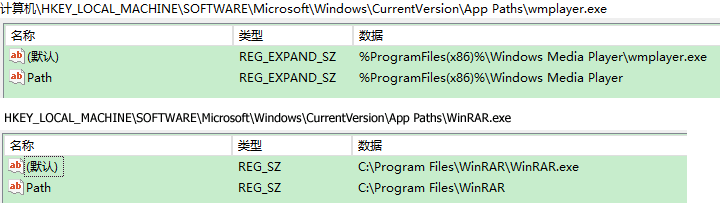
- If you set the "default" value (which can be created passing an empty string as its name) to your application path and filename,
Windows will be able to run it just typing the exe name in the "Run" dialog or "Address" toolbar
(if you use it and ever wondered why it worked for some apps but not others, you know why now). - You can create a value (string type) named "Path",
which should contain a comma delimited list of directories where application DLLs can be found. - You can map an executable to another (look at the pbrush.exe entry, that maps it to mspaint.exe).
Some Microsoft applications (i.e. Office 2007) uses other values,
for example useURL (set to 1), but I have no clue if they are application specific values stored there, or have a broader meaning.
我们知道,在Windows中,单击“开始→运行”命令后,就可以在打开的对话框中输入相应的命令来打开一些系统工具,
如输入“regedit”后回车可以启动注册表编辑器,输入“notepad”后回车会启动记事本程序等等。
不过,在默认情况下,Windows只能支持少数的程序使用这样的便捷功能,
有没有什么办法可以让更多的程序享受这样的便捷启动呢?
当然有:我们只要在注册表中添加一些简单的信息,告诉Windows该怎样做就可以了!
打开注册表编辑器,依次展开
[HKEY_LOCAL_MACHINE\SOFTWARE\Microsoft\Windows\CurrentVersion\App Paths]
分支,在“App Paths”主键下面我们可以看到很多名称为“xxxxx.exe”的次级主键,
点击某个主键可以在右边看见它的字符串,其中“Path”字符串为该程序的路径。
正是因为有了这些主键,我们可以在“运行”对话框中便捷地启动某一程序。
知道了这个原理,我们便可以自由地为其他程序添加便捷启动方式。
以QQ为例:我们要为QQ添加一个便捷启动方式,其安装路径为
D:\Program Files\Tencent\QQ.exe。
在“App Paths”下新建一个名为“QQ.exe”的子键(不能和已有名称重复),
然后在右侧窗口中将“Path”字符串设置为“D:\Program Files\Tencent\QQ.exe”即可。
退出注册表编辑器,在“运行”对话框直接输入“QQ”并回车,就可以启动QQ了!
提示:其实,我们还可以为任意文件添加快捷方式,Windows会自动调用相应的程序来打开这个文件。
添加的方法和上述一样,在“Path”字符串中输入程序的启动路径即可。
需要注意的是,新添加的次级主键名称必须要有扩展名,如EXE、TXT等。
若您使用EXE扩展名,在“运行”对话框中只需要输入名称就可以了;
若使用其他扩展名,必须输入名称+扩展名才可以启动。
比如使用了“CCE.exe”的名称,在“运行”对话框只需输入“CCE”便可启动;
若使用“CCE.txt”则需要输入“CCE.txt”才可启动相应文件。
THE WINDOWS “APP PATHS” REGISTRY KEY
This was news to me. Basically, not every app has to be on your PATH to be launched via executable name only (from anywhere).
For example, on my x64 Windows 7 machine, WordPad is located at:
<C:\Program Files\Windows NT\Accessories\wordpad.exe>
This is *not* set in my PATH environment variable. But I can go to Start > Run, and type wordpad, and it launches.
Why does this work? Because of “App Paths”.
<HKEY_LOCAL_MACHINE\SOFTWARE\Microsoft\Windows\CurrentVersion\App Paths>

How the App Paths Registry Key Makes Windows Both Faster and Safer
Why can you start Mozilla Firefox by typing “firefox” in the Run dialog and press enter?
Firefox.exe is not located in any directory in the path.
The same with Outlook (type “outlook”), PowerShell (“powershell”), VMware Workstation (“vmware”) or Adobe Reader (“acrord32″).
This “magic application starting thingy” works because of a little-known Windows feature based on the “App Paths” registry key.
App Paths – Dissection
In your forays through the Windows registry you may have noticed a peculiar key,
HKEY_LOCAL_MACHINE\SOFTWARE\Microsoft\Windows\CurrentVersion\App Paths,
that has subkeys named like executables. Here is what it looks like on my machine:
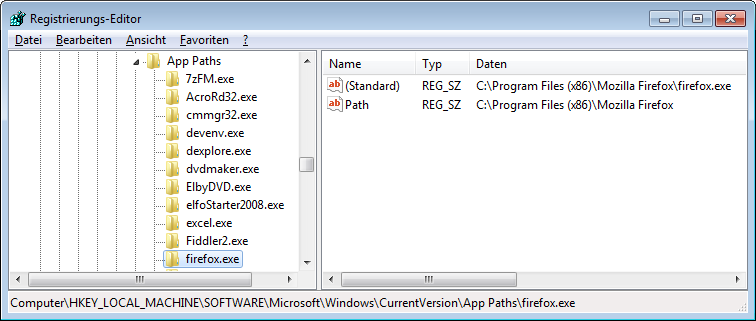
Notice that the HKLM App Paths key and its counterpart in HKCU are basically mapping tables
between executable names and their full paths.
The direct subkeys of App Paths store the executable names,
while each subkey’s default value stores the full path to that executable.
Notice also, that the key “firefox.exe” has a named value “Path” that stores the path to the program’s installation directory.
So what is this all about?
App Paths – Explanation
The App Paths key provides a mechanism that allows programmers to make their application startable
by name only without having to modify the system-wide path.
Why would they do that?
Vanity and overestimation of the importance of one’s own application.
But, hey, it sometimes does come in handy to be able to start programs without having to type the full path,
just hit Win+R instead and type the executable name.
Getting more technical, modifying the system path is not exactly best practice since it may slow down the system,
break other applications and even create security holes.
To provide an alternative, Microsoft added the App Paths functionality in XP.
Whenever a new process is to be started with the API functions ShellExecute or ShellExecuteEx,
and only a file name without a path is specified, Windows looks in the following places for the executable:
- The current working directory.
- The Windows directory.
- The Windows\System32 directory.
- The directories listed in the PATH environment variable.
- If there is a App Paths subkey with the name of the executable, the key’s default value is used as the program’s full path.
If the subkey also has a value named Path, the string stored in Path is added to the PATH environment variable, but only for the process to be started.
As mentioned, the App Paths key has a second use, namely proving per-process PATH configurations,
reducing the need of application developers to modify the global system PATH.
The useful App Paths registry key : HKEY_LOCAL_MACHINE\SOFTWARE\Microsoft\Windows\CurrentVersion\App Paths的更多相关文章
- C++ 无法将值写入注册表 HKEY_LOCAL_MACHINE\Sofeware\Microsoft\Windows\CurrentVersion\Run,以实现开机自启动应用程序。
C++ 无法将值写入注册表 HKEY_LOCAL_MACHINE\Sofeware\Microsoft\Windows\CurrentVersion\Run,以实现开机自启动应用程序.但可以写入到H ...
- 64位系统访问注册表SOFTWARE\Microsoft\Windows\CurrentVersion\Uninstall
public int ChecNonkWoW64() { try { ; string subKey = @"SOFTWARE\Microsoft\Windows\CurrentVersio ...
- Cannot evaluate the property expression "$([MSBuild]::ValueOrDefault('$(VCTargetsPath)','$(MSBuildExtensionsPath32)\Microsoft.Cpp\v4.0\V140\'))" found at "HKEY_LOCAL_MACHINE\SOFTWARE\Microsoft\MSBuil
Cannot evaluate the property expression "$([MSBuild]::ValueOrDefault('$(VCTargetsPath)','$(MSBu ...
- To enable assembly bind failure logging, set the registry value [HKLM\Software\Microsoft\Fusion!EnableLog]
Could not load file or assembly 'System.Web.Mvc, Version=3.0.0.0, Culture=neutral, PublicKeyToken=31 ...
- VS2010 无法计算HKEY_LOCAL_MACHINE\SOFTWARE\Microsoft\MSBuild\ToolsVersions\14.0@VCTargetPath处的属性表达式
VS2010打开.csproj工程文件报错,不能加载,错误信息如下: 无法计算HKEY_LOCAL_MACHINE\SOFTWARE\Microsoft\MSBuild\ToolsVersions\1 ...
- Please set registry key HKLM\Microsoft\.NET Framework\InstallRoot to point to the .NET Framework
安装.NET程序时会提示“Please set registry key HKLM\Microsoft\.NET Framework\InstallRoot to point to the .NET ...
- How Do I Deploy a Windows 8 App to Another Device for Testing?
If your developing a new Windows 8 app and you want to test it on another device (e.g. Surface), you ...
- java command line error opening registry key 'Software\JavaSoft\Java Runtime Environment' java.dll
C:\Users\huxxxxchan>javaError: opening registry key 'Software\JavaSoft\Java Runtime Environment'E ...
- 安装jdk出现问题:Error opening registry key'software\Javasoft\Java Runti...
重装系统后发现jdk没有了,重新安装了,装一个其实挺容易的,但是“java -version”回车的时候,“啪”,error: Error opening registry key'software\ ...
随机推荐
- Tomcat: Connector中HTTP与AJP差别与整合
apache tomcat 整合(ajp proxy, http proxy) 1.软件: apache: httpd-2.2.17-win32-x86-openssl-0.9.8o.msi tomc ...
- Nginx-1.6.3源码安装、虚拟主机
源码安装nginx cat /etc/redhat-release uname -rm yum install pcre-devel openssl-devel -y rpm -qa pcre pcr ...
- Struts2使用
Struts2是一个基于MVC设计模式的Web应用框架.在MVC设计模式中,Struts2作为控制器(Controller)来建立模型与视图的数据交互.Struts 2是Struts的下一代产品,是在 ...
- RSA加密登录
1.首先下载前端JS加密框架:jsencrypt 2.后台添加解密帮助类:RSACrypto(参考文章最后) 3.在登录页面先引入jquery.min.js,在引入jsencrypt.min.js 4 ...
- Reflow(回流)和Repaint(重绘) (转)
原文地址:http://blog.csdn.net/qq_18826911/article/details/68924255 首先我们要明白的是,页面的显示过程分为以下几个阶段: 1.生成DOM树(包 ...
- 配置OpenCV+VS2013环境
配置OpenCV+VS2013环境 准备工作 win7系统 下载opencv的windows编译版 安装vs2013 express 设定环境变量 按windows窗键输入path,选择第二个结果编辑 ...
- MySql学习笔记——触发器
今天又学习了一下mysql触发器的相关知识,对此做了一些笔记和总结. 定义及作用 触发器是一个被指定关联到一个表的数据对象,触发器不需要调用,当对一个表的特别事件出现时,它就会被激活.触发器的代码也是 ...
- 洛谷 P2639 [USACO09OCT]Bessie的体重问题Bessie's We… 题解
题目传送门 这也是个01背包,只是装的很... #include<bits/stdc++.h> #define MAXN 45010 using namespace std; int f[ ...
- poj1562 Oil Deposits(DFS)
题目链接 http://poj.org/problem?id=1562 题意 输入一个m行n列的棋盘,棋盘上每个位置为'*'或者'@',求'@'的连通块有几个(连通为8连通,即上下左右,两条对角线). ...
- ssh自动登录(免密)
创建公钥 1 ssh-keygen -t rsa 无视它出来的任何提示,欢快的一路回车到底吧~ 把公钥复制到远程主机 把公钥id_rsa.pub复制到远程机器的 /home/username/.ssh ...