
.NET:CLR via C# The CLR’s Execution Model
The CLR’s Execution Model
The core features of the CLR
- memory management.
- assembly loading.
- security.
- exception handling.
- thread synchronization.
Managed Module
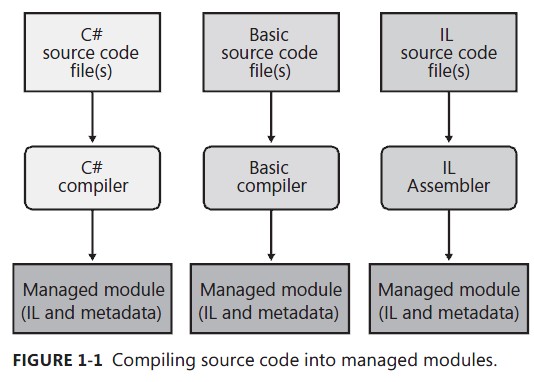
Parts of a Managed Module:
- PE32 or PE32+ header:The standard Windows PE file header, which is similar to the Common Object File Format (COFF) header. If the header uses the PE32 format, the file can run on a 32-bit or 64-bit version of Windows. If the header uses the PE32+ format, the file requires a 64-bit version of Windows to run. This header also indicates the type of file: GUI, CUI, or DLL, and contains a time stamp indicating when the file was built. For modules that contain only IL code, the bulk of the information in the PE32(+) header is ignored. For modules that contain native CPU code, this header contains information about the native CPU code.
- CLR header:Contains the information (interpreted by the CLR and utilities) that makes this a managed module. The header includes the version of the CLR required, some flags, the MethodDef metadata token of the managed module’s entry point method (Main method), and the location/size of the module’s metadata, resources, strong name, some flags, and other less interesting stuff.
- Metadata:Every managed module contains metadata tables. There are two main types of tables: tables that describe the types and members defined in your source code and tables that describe the types and members referenced by your source code.
- IL code:Code the compiler produced as it compiled the source code. At run time, the CLR compiles the IL into native CPU instructions.
In addition to emitting IL, every compiler targeting the CLR is required to emit full metadata into every managed module. In brief, metadata is a set of data tables that describe what is defined in the module, such as types and their members. In addition, metadata also has tables indicating what the managed module references, such as imported types and their members.
Metadata has many uses. Here are some of them:
- Metadata removes the need for native C/C++ header and library files when compiling because all the information about the referenced types/members is contained in the file that has the IL that implements the type/members. Compilers can read metadata directly from managed modules.
- Microsoft Visual Studio uses metadata to help you write code. Its IntelliSense feature parses metadata to tell you what methods, properties, events, and fields a type offers, and in the case of a method, what parameters the method expects.
- The CLR’s code verification process uses metadata to ensure that your code performs only “type-safe” operations. (I’ll discuss verification shortly.)
- Metadata allows an object’s fields to be serialized into a memory block, sent to another machine, and then deserialized, re-creating the object’s state on the remote machine.
- Metadata allows the garbage collector to track the lifetime of objects. For any object, the garbage collector can determine the type of the object and, from the metadata, know which fields within that object refer to other objects.
Combining Managed Modules into Assemblies
First, an assembly is a logical grouping of one or more modules or resource files. Second, an assembly is the smallest unit of reuse, security, and versioning. Depending on the choices you make with your compilers or tools, you can produce a single-file or a multifile assembly. In the CLR world, an assembly is what we would call a component.
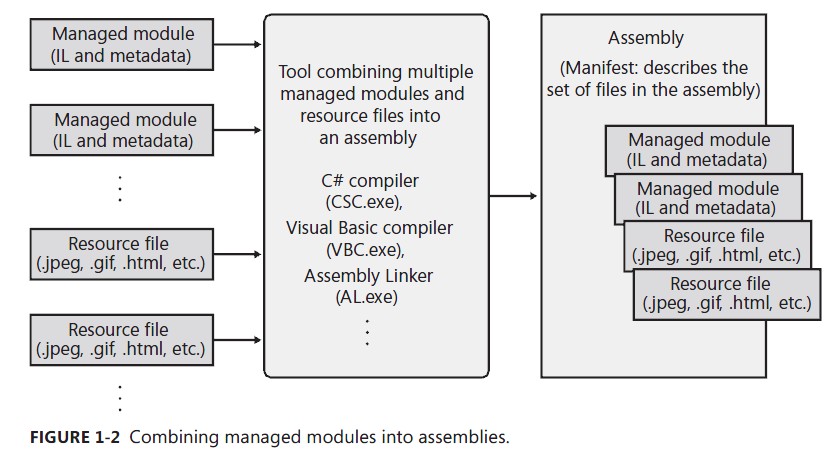
The manifest is simply another set of metadata tables. These tables describe the files that make up the assembly, the publicly exported types implemented by the files in the assembly, and the resource or data files that are associated with the assembly.
An assembly allows you to decouple the logical and physical notions of a reusable, securable, versionable component. How you partition your code and resources into different files is completely up to you. For example, you could put rarely used types or resources in separate files that are part of an assembly. The separate files could be downloaded on demand from the web as they are needed at run time. If the files are never needed, they’re never downloaded, saving disk space and reducing installation time. Assemblies allow you to break up the deployment of the files while still treating all of the files as a single collection.
An assembly’s modules also include information about referenced assemblies (including their version numbers). This information makes an assembly self-describing.
Loading the Common Language Runtime
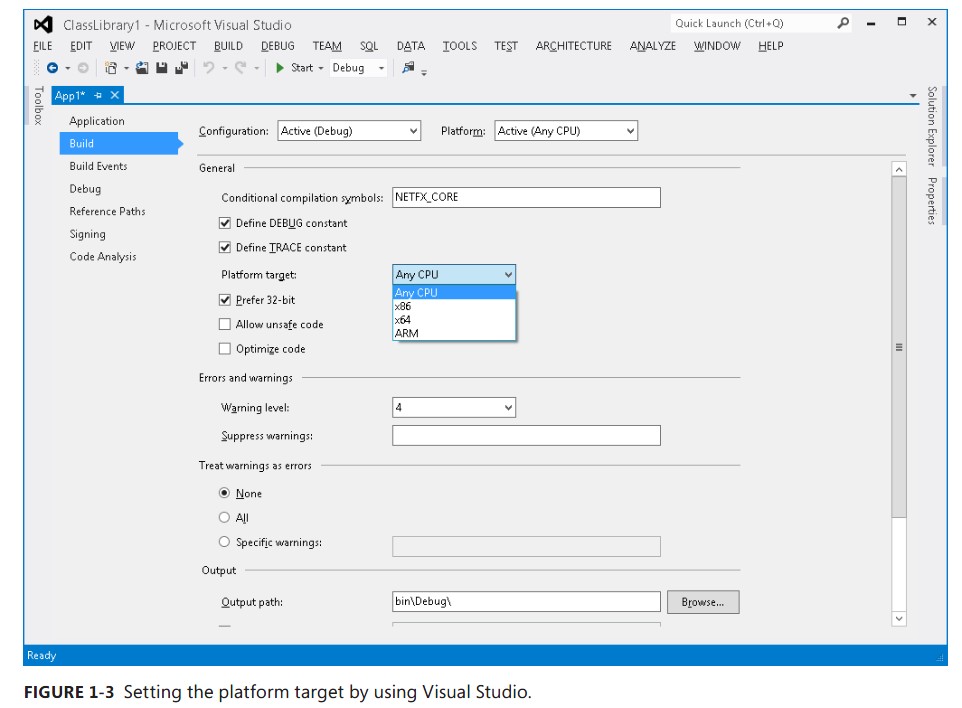
When running an executable file, Windows examines this EXE file’s header to determine whether the application requires a 32-bit or 64-bit address space. A file with a PE32 header can run with a 32- bit or 64-bit address space, and a file with a PE32+ header requires a 64-bit address space. Windows also checks the CPU architecture information embedded inside the header to ensure that it matches the CPU type in the computer. Lastly, 64-bit versions of Windows offer a technology that allows 32-bit Windows applications to run. This technology is called WoW64 (for Windows on Windows 64).
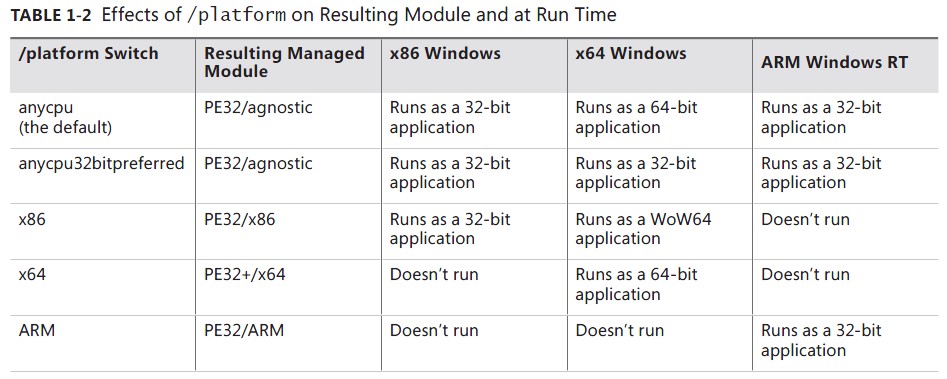
After Windows has examined the EXE file’s header to determine whether to create a 32-bit or 64- bit process, Windows loads the x86, x64, or ARM version of MSCorEE.dll into the process’s address space. On an x86 or ARM version of Windows, the 32-bit version of MSCorEE.dll can be found in the %SystemRoot%\System32 directory. On an x64 version of Windows, the x86 version of MSCorEE.dll can be found in the %SystemRoot%\SysWow64 directory, whereas the 64-bit version can be found in the %SystemRoot%\System32 directory (for backward compatibility reasons). Then, the process’s primary thread calls a method defined inside MSCorEE.dll. This method initializes the CLR, loads the EXE assembly, and then calls its entry point method (Main). At this point, the managed application is up and running.
Executing Your Assembly’s Code
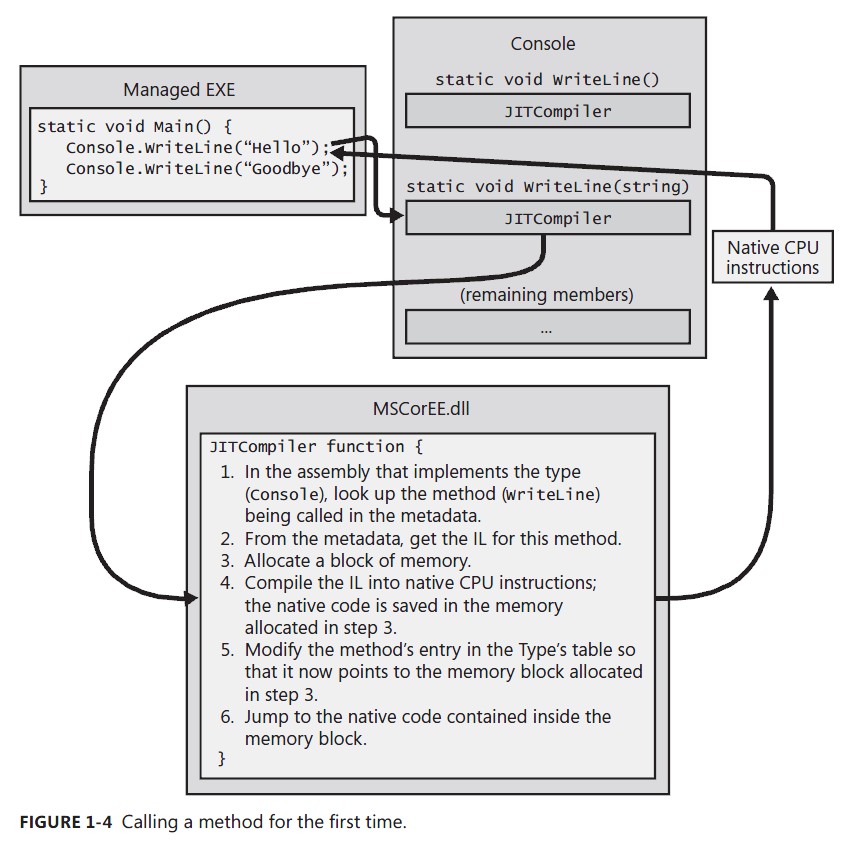
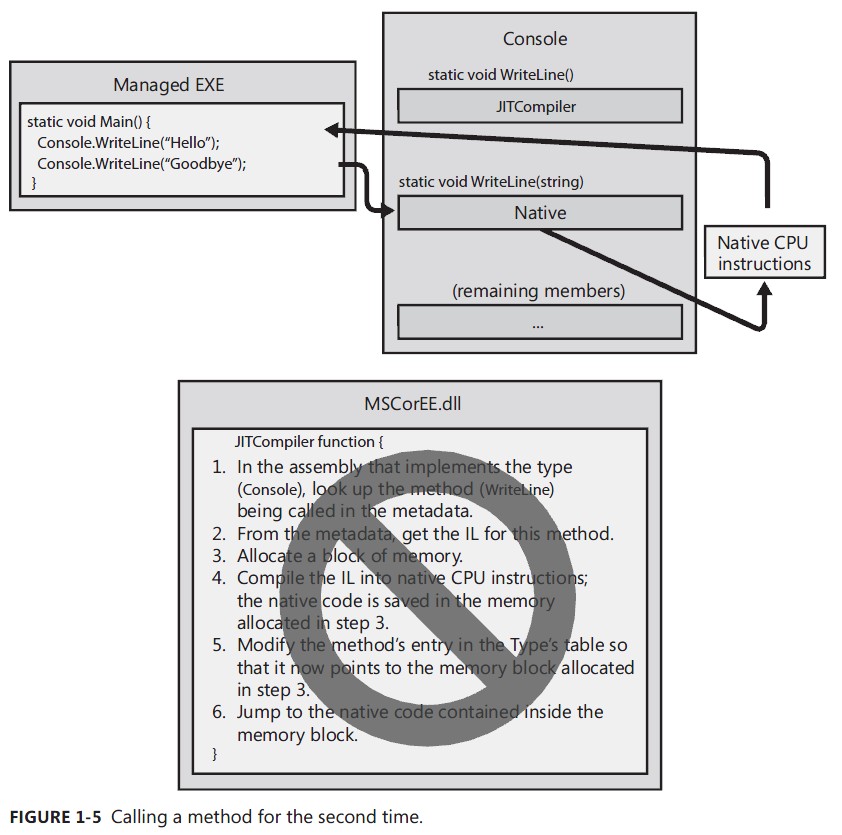
.NET:CLR via C# The CLR’s Execution Model的更多相关文章
- CLR学习之初识CLR
一.什么是CLR? CLR即公共语言运行时(Common Language Runtime,简称CRL),就是微软为.net产品构建的运行环境,与java的JVM类似,通俗的讲就是.net虚拟机.CL ...
- 【读书笔记】【CLR via C#】【第一章】The CLR’s Execution Model
内容提要 本章的目的是对.Net 框架的设计做一个总体的介绍,包括介绍框架中使用的一些技术.定义一些术语.同时会展示从源代码生成应用程序(或者一些包含了一些自定义类型的可以发布的组件),并且会解释程序 ...
- 01.由浅入深学习.NET CLR 基础系列之CLR 的执行模型
.Net 从代码生成到执行,这中间的一些列过程是一个有别于其他的新技术新概念,那么这是一个什么样的过程呢,有什么样的机制呢,清楚了这些基本的东西我们做.Net的东西方可心中有数.那么,CLR的执行模型 ...
- CLR基础之一---认识CLR [《CLR via C#》读书笔记]
<CLR via C#>读书笔记 什么是CLR CLR的基本概念 通用语言运行平台(Common Language Runtime,简称CLR)是微软为他们的.Net虚拟机所选用的名称.这 ...
- 【CLR】详解CLR中的程序集
目录结构: contents structure [+] 程序集的简介 为程序集分配强名称 如何指定程序集的版本资源信息 如何对程序集签名 全局程序集缓存 如何查看程序集的信息 强命名程序集防串改 1 ...
- 重温CLR(一)CLR基础
如果一个C#developer,对CLR没有了解,那就只能是入门级别.未来.NET CORE是趋势,但是.NET CORE 也是基于CoreCLR的,而CLR和CoreCLR其实差别不大,从runti ...
- C++手动加载CLR运行托管程序(CLR Hosting)
转载自:http://www.linuxidc.com/Linux/2012-10/72293.htm 机制介绍 有些时候主程序是通过C/C++实现的,但是我们希望通过托管代码来扩展非托管程序,从而也 ...
- CLR via C# 3rd - 01 - The CLR's Execution Model
1. Assemly A managed module is a standard 32-bit Microsoft Windoes portable executable (PE32) ...
- The CLR's Execution Model
the native code generator tool:NGen.exe optimization tool:MPGO.exe 所有类型最终都继承自System.Object.则所有类型都有如下 ...
随机推荐
- 1.第一个hello word
1.生产者 #!/usr/bin/env python import pika connection = pika.BlockingConnection(pika.ConnectionParamete ...
- HDU 2181 哈密顿绕行世界问题 (DFS)
题目链接:https://vjudge.net/contest/185350#problem/C 题目大意:一个规则的实心十二面体,它的 20个顶点标出世界著名的20个城市,你从一个城市出发经过每个城 ...
- Python股票信息抓取(二)
在一的基础上,想着把所有的折线图放在一个图中,然后图的结果如图所示: 不是略丑,是很丑~ 依然的单进程,只是将图标结果放在了一张图里 代码如下: #-*-coding:utf-8 -*- import ...
- gentoo emerge unable to sync
gentoo emerge unable to sync Author: Tubo After setting SYNC to customized URL: SYNC="rsync://m ...
- 在go中连接mysql
5.访问数据库 5.1 database/sql接口 5.2 使用MySQL数据库 5.3 使用SQLite数据库 5.4 使用PostgreSQL数据库 5.5 使用Beego orm库进行ORM开 ...
- 取消cp确认
使用cp -r -f 强制覆盖拷贝命令时,每一个文件都需要认为的键入“Y”进行确认 可以通过取消同名cp的定义,命令如下unalias cp
- Linux的权限对于文件与目录的意义
权限对文件: r:可读取此文件的实际内容. w:可以编辑.新增或者是修改该文件的内容(但不含删除该文件),如果没有r权限,无法w. x :该文件具有被系统执行的权限.可以删除. 权限对目录: r:re ...
- Adsafe 导致win10 中窗口错位
域账号使用,出现上述情况,干掉后一切恢复正常... 还好家里的本地管理员账号使用一切正常,不然又被广告占领了
- postman自动生成签名
查看详细图文教程↓ 一.全局变量方式 1. 在全局变量添加key:value分别是autoSign和var sign={toUnicode:function(s){return s.replace(/ ...
- XV6操作系统代码阅读心得(一):启动加载、中断与系统调用
XV6操作系统是MIT 6.828课程中使用的教学操作系统,是在现代硬件上对Unix V6系统的重写.XV6总共只有一万多行,非常适合初学者用于学习和实践操作系统相关知识. MIT 6.828的课程网 ...