
Observable 示例之 Windows Phone 列表内项目逐个加载
在写 Windows phone应用性能优化(一)的时候,在 ListBox 的项加载的时候,添加了一些简单的动画。
其实在 Windows Phone 的应用中使用 Blend 设计动画是很容易的,并且在程序的交互中,增加一些动画
效果,用户会感觉用户体验非常的好,从而提升了用户对应用的印象评分。
本文的 demo 演示如何逐项的加载列表中的每一项。对于延时迭代加载列表中的项,通常会考虑使用 DispatherTimer,
但是如果设计的逻辑较多,需要的代码量会比较多,并且不好维护。这里使用 Rx(Reactive Extensions) 中的
Observable 类进行对 IObservable<T> 的创建。在 Rx 中 IObservable<T> (可观察序列)和 IObserver<T> (观察者)
是两个核心的元素,我研究了一段时间,感觉它在 .NET 平台是可以大有作为的,它的使用并不难,很多操作使用是以 LINQ
的扩展方法而使用的,重点是理解 (IObservable)的 “推”数据 和 (IEnumerable)的 “拉”数据的 数据源数据流向的不同。
以后还会继续研究的。之前翻译的有关 Rx 一篇文章
这个示例在页面中使用一个 Pivot 控件,两个 PivotItem 项都是使用 ListBox 作为模版,区别是:
1)第一个 PivotItem 项中的 ItemsPanel 模版使用默认的,在第二个 PivotItem 中
的 ListBox 中, 把 ItemsPanel 设置为了 WrapPanel,从而使 Item 可以流动布局:
 <ListBox ItemsSource="{Binding}" >

     <ListBox.ItemsPanel>

         <ItemsPanelTemplate>

             <Controls:WrapPanel />

         </ItemsPanelTemplate>

     </ListBox.ItemsPanel>
2)两个 ListBox 中的 ItemTemplate 中的 StackPanel 在触发 Loaded 事件时,开始的动画不同。
MainPage 页面中 Pivot 控件的全部代码:
<phone:Pivot SelectionChanged="Pivot_SelectionChanged">
<phone:PivotItem Header="Stack">
<ListBox ItemsSource="{Binding}" >
<ListBox.ItemTemplate>
<DataTemplate>
<StackPanel x:Name="stack" Orientation="Horizontal" Margin="10,30,0,0">
<StackPanel.Triggers>
<EventTrigger RoutedEvent="StackPanel.Loaded">
<BeginStoryboard>
<Storyboard x:Name="Storyboard1">
<DoubleAnimationUsingKeyFrames Storyboard.TargetProperty="(UIElement.Projection).(PlaneProjection.RotationX)" Storyboard.TargetName="stack">
<EasingDoubleKeyFrame KeyTime="0" Value="-180"/>
<EasingDoubleKeyFrame KeyTime="0:0:3" Value="0">
<EasingDoubleKeyFrame.EasingFunction>
<QuinticEase EasingMode="EaseOut"/>
</EasingDoubleKeyFrame.EasingFunction>
</EasingDoubleKeyFrame>
</DoubleAnimationUsingKeyFrames>
<DoubleAnimationUsingKeyFrames Storyboard.TargetProperty="(UIElement.Projection).(PlaneProjection.RotationY)" Storyboard.TargetName="stack">
<EasingDoubleKeyFrame KeyTime="0" Value="106"/>
<EasingDoubleKeyFrame KeyTime="0:0:3" Value="0">
<EasingDoubleKeyFrame.EasingFunction>
<QuinticEase EasingMode="EaseOut"/>
</EasingDoubleKeyFrame.EasingFunction>
</EasingDoubleKeyFrame>
</DoubleAnimationUsingKeyFrames>
<DoubleAnimationUsingKeyFrames Storyboard.TargetProperty="(UIElement.Projection).(PlaneProjection.RotationZ)" Storyboard.TargetName="stack">
<EasingDoubleKeyFrame KeyTime="0" Value="0"/>
<EasingDoubleKeyFrame KeyTime="0:0:3" Value="0">
<EasingDoubleKeyFrame.EasingFunction>
<QuinticEase EasingMode="EaseOut"/>
</EasingDoubleKeyFrame.EasingFunction>
</EasingDoubleKeyFrame>
</DoubleAnimationUsingKeyFrames>
<DoubleAnimationUsingKeyFrames Storyboard.TargetProperty="(UIElement.RenderTransform).(CompositeTransform.TranslateX)" Storyboard.TargetName="stack">
<EasingDoubleKeyFrame KeyTime="0" Value="246"/>
<EasingDoubleKeyFrame KeyTime="0:0:3" Value="0">
<EasingDoubleKeyFrame.EasingFunction>
<QuinticEase EasingMode="EaseOut"/>
</EasingDoubleKeyFrame.EasingFunction>
</EasingDoubleKeyFrame>
</DoubleAnimationUsingKeyFrames>
<DoubleAnimationUsingKeyFrames Storyboard.TargetProperty="(UIElement.RenderTransform).(CompositeTransform.ScaleX)" Storyboard.TargetName="stack">
<EasingDoubleKeyFrame KeyTime="0" Value="0.4"/>
<EasingDoubleKeyFrame KeyTime="0:0:3" Value="1">
<EasingDoubleKeyFrame.EasingFunction>
<QuinticEase EasingMode="EaseOut"/>
</EasingDoubleKeyFrame.EasingFunction>
</EasingDoubleKeyFrame>
</DoubleAnimationUsingKeyFrames>
<DoubleAnimationUsingKeyFrames Storyboard.TargetProperty="(UIElement.RenderTransform).(CompositeTransform.ScaleY)" Storyboard.TargetName="stack">
<EasingDoubleKeyFrame KeyTime="0" Value="0.4"/>
<EasingDoubleKeyFrame KeyTime="0:0:3" Value="1">
<EasingDoubleKeyFrame.EasingFunction>
<QuinticEase EasingMode="EaseOut"/>
</EasingDoubleKeyFrame.EasingFunction>
</EasingDoubleKeyFrame>
</DoubleAnimationUsingKeyFrames>
</Storyboard>
</BeginStoryboard>
</EventTrigger>
</StackPanel.Triggers>
<StackPanel.RenderTransform>
<CompositeTransform/>
</StackPanel.RenderTransform>
<StackPanel.Projection>
<PlaneProjection/>
</StackPanel.Projection>
<Image VerticalAlignment="Top" Source="{Binding Photo}" Width="150"/>
<TextBlock Text="{Binding Title}" Width="250" Foreground="Wheat" FontSize="25" Margin="10,0,0,0" TextWrapping="Wrap"/>
</StackPanel>
</DataTemplate>
</ListBox.ItemTemplate>
</ListBox>
</phone:PivotItem>
<phone:PivotItem Header="Wrap">
<ListBox ItemsSource="{Binding}" >
<ListBox.ItemsPanel>
<ItemsPanelTemplate>
<Controls:WrapPanel />
</ItemsPanelTemplate>
</ListBox.ItemsPanel>
<ListBox.ItemTemplate>
<DataTemplate>
<StackPanel x:Name="stack" Orientation="Horizontal" Margin="10,30,0,0">
<StackPanel.Triggers>
<EventTrigger RoutedEvent="StackPanel.Loaded">
<BeginStoryboard>
<Storyboard x:Name="Storyboard1">
<DoubleAnimationUsingKeyFrames Storyboard.TargetProperty="(UIElement.Projection).(PlaneProjection.CenterOfRotationX)" Storyboard.TargetName="stack">
<EasingDoubleKeyFrame KeyTime="0" Value="1"/>
<EasingDoubleKeyFrame KeyTime="0:0:2" Value="1">
<EasingDoubleKeyFrame.EasingFunction>
<QuarticEase EasingMode="EaseOut"/>
</EasingDoubleKeyFrame.EasingFunction>
</EasingDoubleKeyFrame>
</DoubleAnimationUsingKeyFrames>
<DoubleAnimationUsingKeyFrames Storyboard.TargetProperty="(UIElement.Projection).(PlaneProjection.RotationY)" Storyboard.TargetName="stack">
<EasingDoubleKeyFrame KeyTime="0" Value="96"/>
<EasingDoubleKeyFrame KeyTime="0:0:2" Value="0">
<EasingDoubleKeyFrame.EasingFunction>
<QuarticEase EasingMode="EaseOut"/>
</EasingDoubleKeyFrame.EasingFunction>
</EasingDoubleKeyFrame>
</DoubleAnimationUsingKeyFrames>
</Storyboard>
</BeginStoryboard>
</EventTrigger>
</StackPanel.Triggers>
<StackPanel.Projection>
<PlaneProjection/>
</StackPanel.Projection>
<Image VerticalAlignment="Top" Source="{Binding Photo}" Width="200"/>
</StackPanel>
</DataTemplate>
</ListBox.ItemTemplate>
</ListBox>
</phone:PivotItem>
</phone:Pivot>
程序的运行效果:
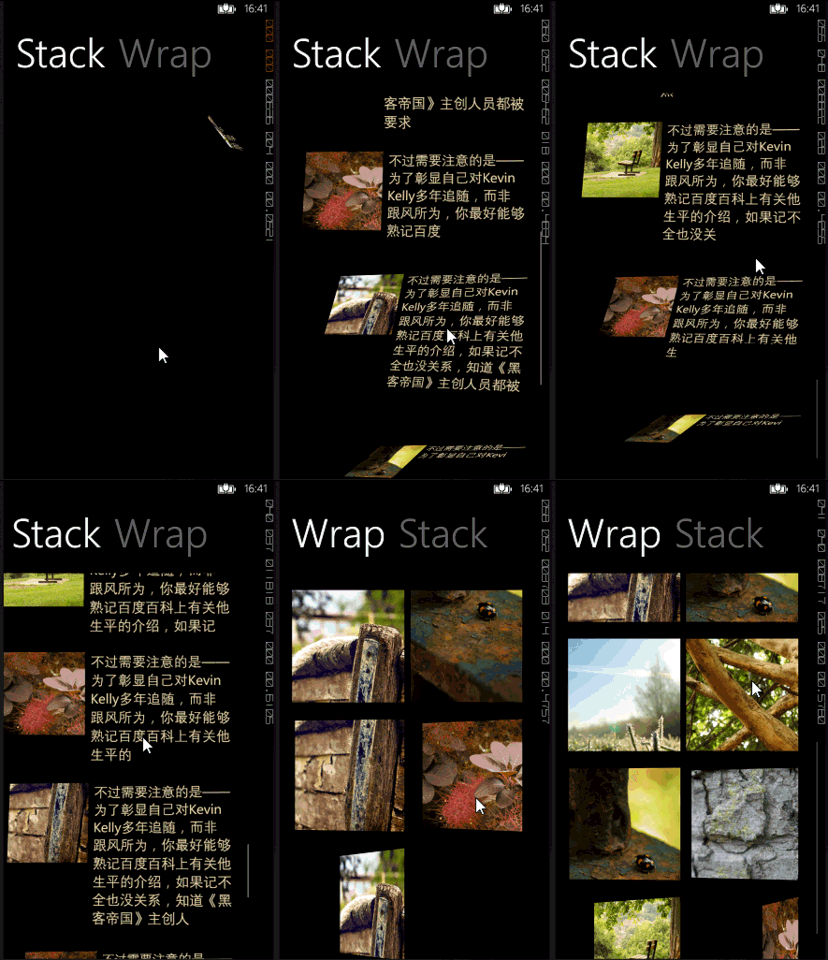
在 MainPage 的 C# 页面的主要代码就不贴出来了,和 Windows phone应用性能优化(一) 中的代码基本相同。
重点的代码,是当 Pivot 触发 Pivot_SelectionChanged 事件的时候,逐项加载 ObservableCollection 集合:
  private void Pivot_SelectionChanged(object sender, SelectionChangedEventArgs e)

  {

      ObservableCollection<News> NewsList2 = new ObservableCollection<News>();

      this.DataContext = NewsList2;

      #region 实现 1

      //IObservable<long> obser = Observable.Interval(TimeSpan.FromSeconds(0.3)).ObserveOnDispatcher();

      //obser.Subscribe((i) =>

      //{

      //    NewsList2.Add(NewsList[(int)i]);

      //});

      #endregion

      #region 实现 2

      // 方法含义:

      // GenerateWithTime(初始值, 循环条件, 传递给 Observer‘观察者’的值, 延迟时间, 迭代)

      //

      // 类似于 for循环:for(初始值;循环条件;迭代)

      IObservable<int> source = Observable.GenerateWithTime(,

          i => i < NewsList.Count,

          i => i,

          i => TimeSpan.FromSeconds(.),

          i => i + );

      // 在 Dispather 线程,每次接受 source 传递来的 i 值,即下面的 x

      source.ObserveOnDispatcher().Subscribe(x =>

      {

          NewsList2.Add(NewsList[x]);

          Debug.WriteLine(x);

      });

      #endregion

  }
把上面的 Observable.GenerateWithTime(...); 方法可以理解成:
  for (int i = ; i < count; i++)

  {

      // 当然,Observable 的时间延迟是在异步线程中完成的

      Thread.Sleep(TimeSpan.FromSeconds(.));

      // 逻辑

  }
Observable 示例之 Windows Phone 列表内项目逐个加载的更多相关文章
- 背水一战 Windows 10 (11) - 资源: CustomResource, ResourceDictionary, 加载外部的 ResourceDictionary 文件
[源码下载] 背水一战 Windows 10 (11) - 资源: CustomResource, ResourceDictionary, 加载外部的 ResourceDictionary 文件 作者 ...
- wepy小程序实现列表分页上拉加载(2)
第一篇:wepy小程序实现列表分页上拉加载(1) 本文接着上一篇内容: 4.优化-添加加载动画 (1)首先写加载动画的结构和样式 打开list.wpy文件 template结构代码: <temp ...
- wepy小程序实现列表分页上拉加载(1)
使用wepy开发微信小程序商城第一篇:项目初始化 使用wepy开发微信小程序商城第二篇:路由配置和页面结构 列表页效果图: 1.新建列表页 (1)在pages里面新建一个list.wpy文件 初始代码 ...
- quartz.net 项目无法加载的问题
最近尝试试用一下quartz.net 做任务调度用. 下载了源代码后打开解决方案发现项目无法加载.错误如下 未找到导入的项目“C:\Users\****\Desktop\Quartz.NET-2.1. ...
- 微信小程序开发——列表分页上拉加载封装实现(订单列表为例,订单状态改变后刷新列表滚动位置不变)
业务需求: 业务需求是给订单列表添加分页功能,也就是上拉加载这种每次只请求加载固定数量的数据. 需求分析: 对业务来说就是简单的分页上拉加载,但是对于技术实现来说,除了要处理分页数据的累加加载,还要处 ...
- 模块 DLL C:\WINDOWS\system32\inetsrv\aspnetcore.dll 未能加载。返回的数据为错误信息。
更新了win10的版本后,就启动原来的iis发布的程序 程序池就自动关闭.后来 启动网站 iis程序池自动关闭. 在为应用程序池“.NET v4.5”提供服务的工作进程“21908”中,协议“http ...
- 在iframe内页面完全加载完后,关闭父页面生成的div遮罩层
遮罩层div为iframe父页面生成,需在iframe内页面完全加载完后,关闭遮罩层 alertMsgClose() :函数为关闭遮罩层函数 此段代码在iframe页面内: <script> ...
- Springboot项目自动加载设置
SpringBoot是允许项目自动加载的,但是需要在pom文件映入依赖库 1.导入依赖库 <dependency> <groupId>org.springframework.b ...
- Windows Phone 7 ListBox 列表项渐显加载动画学习笔记
在wp7程序中,当程序功能越来越复杂时,性能问题是我们不得不考虑的一个问题.在聊天列表中,如果聊天项过多,而且项目UI组件足够复杂时, 我们不得不想尽办法让UI尽快加载.所以有一种可行的方案,就是像Q ...
随机推荐
- Istio在Openshift 3.11的安装
详细安装步骤及解释参考 https://docs.openshift.com/container-platform/3.11/servicemesh-install/servicemesh-insta ...
- jquery获取第一层li
<ul id="aaa"> <li>aaa</li> <li>aaa <ul> <li>bbb</li ...
- 【云计算】Docker容器不能修改hosts文件怎么解决?
参考资料: http://bbs.csdn.net/topics/390871429 http://tieba.baidu.com/p/4295556808 http://stackoverflow. ...
- function/bind
1.函数指针指向一类函数,这类函数的类型一样,也就是函数的返回类型和形参表一样. 2.不同的函数类型要使用不同的函数指针,才能指向它,有没有好的办法呢? 类比思考下,交换方法,对不同的类型要写不同的s ...
- netlink error: too many arguments to function 'netlink_kernel_create'
2.6版本的 netlink_kernel_create(&init_net, NETLINK_TEST, 0, NULL, kernel_receive ,THIS_MODULE); 3 ...
- iOS核心动画 - CALayer
大家知道,在iOS中所有的视图都继承自UIView. UIView处理所有的触摸事件和画图. 事实上,UIView所有的渲染和动画是托管给另一个类来负责的,它就是CALayer. 但是,需要记住的是, ...
- Drawing points
A point is the most simple graphics object that can be drawn. It is a small spot on the window. #!/u ...
- java的21个技术点归纳学习
- unix 网络编程 第五章
个人对unix 网络编程中的代码进行了精简,保留了主要和关键部分. 1 tcpserve01 程序见 https://github.com/juniperdiego/Unix-network-prog ...
- CentOS7——gitlab本地git仓库搭建 以及web hook配置
整个搭建用的都是各种默认设置,所以没有用到高深的的东西,比较简单,比较傻瓜式,这篇也仅仅是一个入门. 另外本文具有时效性,浏览本文请注意发表时间,为防止过时产生误导,本文尽量把 “如何得知应该这样做” ...