
System.Drawing.Text.TextRenderingHint 的几种效果
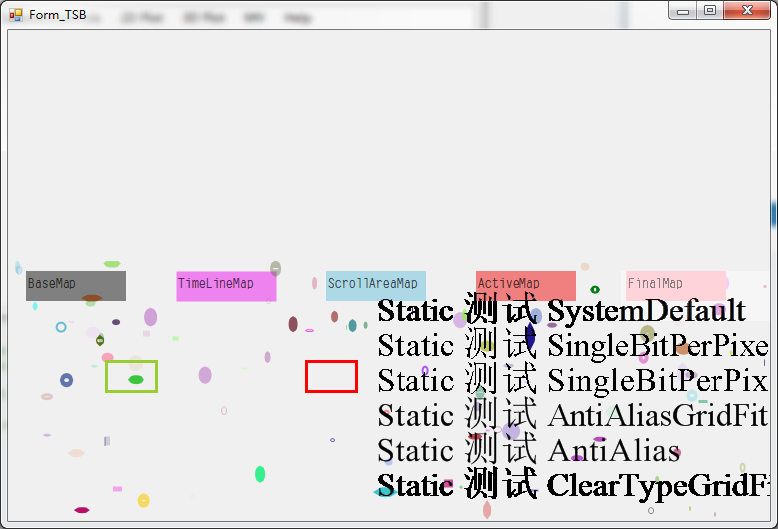
            for (int i = ; i < ; i++)

            {

                g5.TextRenderingHint = (System.Drawing.Text.TextRenderingHint)i;

                string txt;

                int font_sz = ;

                txt = "Static 测试 ";

                switch ((System.Drawing.Text.TextRenderingHint)i)

                {

                    case System.Drawing.Text.TextRenderingHint.SystemDefault:

                        txt += "SystemDefault";

                        g5.DrawString(txt, new Font("Times New Roman", font_sz), new SolidBrush(Color.Black),

                            new PointF(this._parentControl.Width - ,  +  * i));

                        break;

                    case System.Drawing.Text.TextRenderingHint.AntiAlias:

                        txt += "AntiAlias";

                        g5.DrawString(txt, new Font("Times New Roman", font_sz), new SolidBrush(Color.Black),

                            new PointF(this._parentControl.Width - ,  +  * i));

                        break;

                    case System.Drawing.Text.TextRenderingHint.AntiAliasGridFit:

                        txt += "AntiAliasGridFit";

                        g5.DrawString(txt, new Font("Times New Roman", font_sz), new SolidBrush(Color.Black),

                            new PointF(this._parentControl.Width - ,  +  * i));

                        break;

                    case System.Drawing.Text.TextRenderingHint.ClearTypeGridFit:

                        txt += "ClearTypeGridFit";

                        g5.DrawString(txt, new Font("Times New Roman", font_sz), new SolidBrush(Color.Black),

                            new PointF(this._parentControl.Width - ,  +  * i));

                        break;

                    case System.Drawing.Text.TextRenderingHint.SingleBitPerPixel:

                        txt += "SingleBitPerPixel";

                        g5.DrawString(txt, new Font("Times New Roman", font_sz), new SolidBrush(Color.Black),

                            new PointF(this._parentControl.Width - ,  +  * i));

                        break;

                    case System.Drawing.Text.TextRenderingHint.SingleBitPerPixelGridFit:

                        txt += "SingleBitPerPixelGridFit";

                        g5.DrawString(txt, new Font("Times New Roman", font_sz), new SolidBrush(Color.Black),

                            new PointF(this._parentControl.Width - ,  +  * i));

                        break;

                    default:

                        break;

                }

            }
System.Drawing.Text.TextRenderingHint 的几种效果的更多相关文章
- 类库探源——System.Drawing
一.System.Drawing 命名空间简述 System.Drawing 命名空间提供访问 GDI+ 的基本功能,更高级的功能在 System.Drawing.Drawing2D,System.D ...
- System.Drawing.Graphics.cs
ylbtech-System.Drawing.Graphics.cs 1.程序集 System.Drawing, Version=4.0.0.0, Culture=neutral, PublicKey ...
- mono+jexus 验证码不显示:System.Drawing
System.ArgumentException The requested FontFamily could not be found [GDI+ status: FontFamilyNotFoun ...
- System.Drawing.Color的几种使用方法
System.Drawing.Color cl = Color.Red; System.Drawing.Color cl = Color.FromArgb(255,0,0); ...
- 类库探源——System.Drawing.Bitmap
一.System.Drawing.Bitmap Bitmap 类: 封装GDI+ 位图,此位图由图形图像及其属性的像素数据组成.Bitmap 是用于处理由像素定义的图像的对象 命名空间: System ...
- fakeLoader页面加载前loading演示8种效果
提高用户体验的插件fakeLoader页面加载前loading演示8种效果 在线预览 下载地址 示例代码 <div id="main"> <div class=& ...
- jQuery Wheel 环形菜单插件5种效果演示
很酷的菜单-jQuery Wheel 环形菜单插件5种效果演示在线预览 下载地址 实例代码 <div class="container"> <!-- Top Na ...
- jQuery超酷下拉插件6种效果演示
原始的下拉框很丑啦, 给大家一款jQuery超酷下拉插件6种效果 效果预览 下载地址 实例代码 <div class="container"> <section ...
- jQuery自定义漂亮的下拉框插件8种效果演示
原始的下拉框不好看这里推荐一个jQuery自定义漂亮的下拉框插件8种效果演示 在线预览 下载地址 实例代码 <!DOCTYPE html> <html lang="en&q ...
随机推荐
- 【示例代码】 Tuple<T> Func<T>
using System; using System.Math; namespace PiWithMonteCarlo { /// <summary> /// Trivial, synch ...
- Error measure
Noise 在x和y都可能有noise 对于没有noise的情况,x~P(x), f(x)=h(x),但是如果现在有noise,x~P(x), y~P(y|x)(y是真正的label,只是一定概率上会 ...
- BZOJ1597土地购买 【斜率优化DP】
BZOJ1597土地购买 [斜率优化DP] Description 农夫John准备扩大他的农场,他正在考虑N (1 <= N <= 50,000) 块长方形的土地. 每块土地的长宽满足( ...
- python发送邮件的实例代码(支持html、图片、附件)
转自http://www.jb51.net/article/34498.htm 第一段代码 #!/usr/bin/python# -*- coding: utf-8 -*- import emaili ...
- 使用不安全代码将 Bitmap 位图转为 WPF 的 ImageSource 以获得高性能和持续小的内存占用
在 WPF 中将一个现成的 Bitmap 位图转换成 ImageSource 用于显示一个麻烦的事儿,因为 WPF 并没有提供多少可以转过来的方法.不过产生 Bitmap 来源却非常多,比如屏幕截图. ...
- hadoop入门手册4:Hadoop【2.7.1】初级入门之命令:文件系统shell1
问题导读1.Hadoop文件系统shell与Linux shell有哪些相似之处?2.如何改变文件所属组?3.如何改变hdfs的文件权限?4.如何查找hdfs文件,并且不区分大小写? 概述文件系统 ( ...
- php中strstr、strchr、strrchr、substr、stristr
一.strstr 和 strcchr的区别 strstr 显示第一次找到,要查找的字符串,以及后面的字符串. strrchr 显示最后一次找到,要查找的字符串,以及后面的字符串. 二.strstr ...
- drone 学习一 几个核心组件
1. clone 这个是内置的,实际上就行进行代码clone的 参考配置,同时我们可以使用自定义的插件 clone: + git: + image: plugins/git pipeline: bui ...
- sqlopsstudio 微软开源跨平台sql server 连接工具
sqlopsstudio 微软开源的sql server 连接工具,跨平台,基于vscode 分之代码. 项目地址: https://github.com/Microsoft/sqlopsstudi ...
- 随着tomcat一起启动一个线程
package test; import javax.servlet.*; public class MyCode implements ServletContextListener { //当Tom ...