
QtGui.QCalendarWidget
A QtGui.QCalendarWidget provides a monthly based calendar widget. It allows a user to select a date in a simple and intuitive way.
#!/usr/bin/python

# -*- coding: utf-8 -*-

"""

ZetCode PyQt4 tutorial

This example shows a QtGui.QCalendarWidget widget.

author: Jan Bodnar

website: zetcode.com

last edited: September 2011

"""

import sys

from PyQt4 import QtGui, QtCore

class Example(QtGui.QWidget):

    def __init__(self):

        super(Example, self).__init__()

        self.initUI()

    def initUI(self):

        cal = QtGui.QCalendarWidget(self)

        cal.setGridVisible(True)

        cal.move(20, 20)

        cal.clicked[QtCore.QDate].connect(self.showDate)

        self.lbl = QtGui.QLabel(self)

        date = cal.selectedDate()

        self.lbl.setText(date.toString())

        self.lbl.move(130, 260)

        self.setGeometry(300, 300, 350, 300)

        self.setWindowTitle('Calendar')

        self.show()

    def showDate(self, date):

        self.lbl.setText(date.toString())

def main():

    app = QtGui.QApplication(sys.argv)

    ex = Example()

    sys.exit(app.exec_())

if __name__ == '__main__':

    main()
The example has a calendar widget and a label widget. The currently selected date is displayed in the label widget.
cal = QtGui.QCalendarWidget(self)
We construct a calendar widget.
cal.clicked[QtCore.QDate].connect(self.showDate)
If we select a date from the widget, a clicked[QtCore.QDate] signal is emitted. We connect this signal to the user defined showDate() method.
def showDate(self, date):

    self.lbl.setText(date.toString())
We retrieve the selected date by calling the selectedDate() method. Then we transform the date object into string and set it to the label widget.
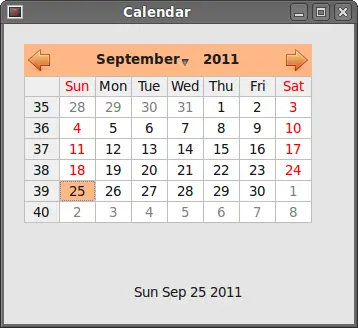 Figure: QtGui.QCalendarWidget
QtGui.QCalendarWidget的更多相关文章
- Qt4升级Qt5注意问题
Qt4升级Qt5注意问题 Qt4过渡到Qt5的项目一开始就受阻,记录一下遇到的下面的问题 --->编译遇到类似错误: error: QCalendarWidget: No such file o ...
- PyQt4日历部件QXalendarWidget
QCalendarWidget类提供了以月为单位地日历部件.该部件允许用户以一种简单而直接的方式选择日期. #!/usr/bin/python # -*- coding: utf-8 -*- impo ...
- ZetCode PyQt4 tutorial widgets I
#!/usr/bin/python # -*- coding: utf-8 -*- """ ZetCode PyQt4 tutorial In this example, ...
- PyQt4 进度条和日历 代码
# -*- coding: utf-8 -*- """ ------------------------------------------------- File Na ...
- 读Pyqt4教程,带你入门Pyqt4 _008
QCalendarWidget QCalendarWidget 提供基于月份的日历窗口组件,它允许用户简单并且直观的选择日期. #!/usr/bin/python # -*- coding: utf- ...
- GUI学习之三十—QCalendarWidget学习总结
今天学习的是最后一个展示控件——QCalendarWidget 一.描述 QCalendarWidget提供了一个基于每月的日历控件,允许用户选择一个日期,还可以看一下里面的图示: QCalendar ...
- PySide中QtGui.QFrame的用法
最近一位同事的出现让我重新正视PySide中designer这个工具的强大之处,通过QtGui.QObject.setGeometry(QtCore.QRect())这个最简单直接的方法可以完成很多复 ...
- 【PyQt5-Qt Designer】日历(QCalendarWidget)
日历(QCalendarWidget)+爬虫API调用+自定义发送信号(传入2个参数) 总体介绍 QCalendarWidget类提供了一个基日历小部件,允许用户选择一个日期. 该小部件使用当前的月份 ...
- QT5中无法包含Qtgui头文件的问题。
今天新学QT是,从一个ppt中边看边抄边学.前几页还能理解,但到了用纯源码写空白QT工程时,便遇到了一个问题.头文件里包含 #include <QtGui> 但是编译时总是出现下面图一中 ...
随机推荐
- 禁用substr、substring、mid函数的sql注入脚本
#encodeing=utf-8 import requests import sys reload(sys) sys.setdefaultencoding('utf-8') payloads = l ...
- bzoj 2770 堆的中序遍历性质
我们知道二叉搜索树的中序遍历是一个已经排好序的序列,知道序列我们无法确定树的形态(因为有多种). 但是,Treap如果告诉我们它的关键字以及权值,那么就可以唯一确定树的形态(Treap的O(logn) ...
- 模拟算法+栈 HDU 1022
Train Problem I Time Limit: 2000/1000 MS (Java/Others) Memory Limit: 65536/32768 K (Java/Others)T ...
- [转]Android之Activity的几种跳转方式
1.显示调用方法 Intent intent=new Intent(this,OtherActivity.class); //方法1 Intent intent2=new Intent(); in ...
- Codeforces Beta Round #8 C. Looking for Order 状压
C. Looking for Order 题目连接: http://www.codeforces.com/contest/8/problem/C Description Girl Lena likes ...
- URL资源跨域访问 跨域使用session信息
SilverLight 出于对安全性的考虑默认情况下对URL的访问进行了严格的限制,只允许访问同一子域下的URL资源. 下表列出了Silverlight 2.0 中 URL 访问规则: WebCl ...
- Django 中文显示
Django中文显示: 1.如要在.py文件中显示中文,在文件首行加上:# -*- coding: utf-8 -*- 2.如要在html文件中显示中文,要将文件保存为UTF-8格式 3.在setti ...
- 我的jlink破解失败经历
http://fallenwind.spaces.eepw.com.cn/articles/article/item/59116 标题:我的jlink破解失败经历2009-07-12 01:16:56 ...
- Druid 常见问题
https://github.com/alibaba/druid/wiki/%E5%B8%B8%E8%A7%81%E9%97%AE%E9%A2%98
- .Net 加密 哈希
一.DES加解密 DES一共就有4个参数参与运作:明文.密文.密钥.向量.其中这4者的关系可以理解为: 密文=明文+密钥+向量: 明文=密文-密钥-向量: 为什么要向量这个参数呢?因为如果有一篇文章, ...