
Netty学习摘记 —— 简单WEB聊天室开发
本文参考
本篇文章是对《Netty In Action》一书第十二章"WebSocket"的学习摘记,主要内容为开发一个基于广播的WEB聊天室
聊天室工作过程
请求的 URL 以/ws 结尾时,通过升级握手的机制把该协议升级为 WebSocket,之后客户端发送一个消息,这个消息会被广播到所有其它连接的客户端
当有新的客户端连入时,其它客户端也能得到通知
处理HTTP请求
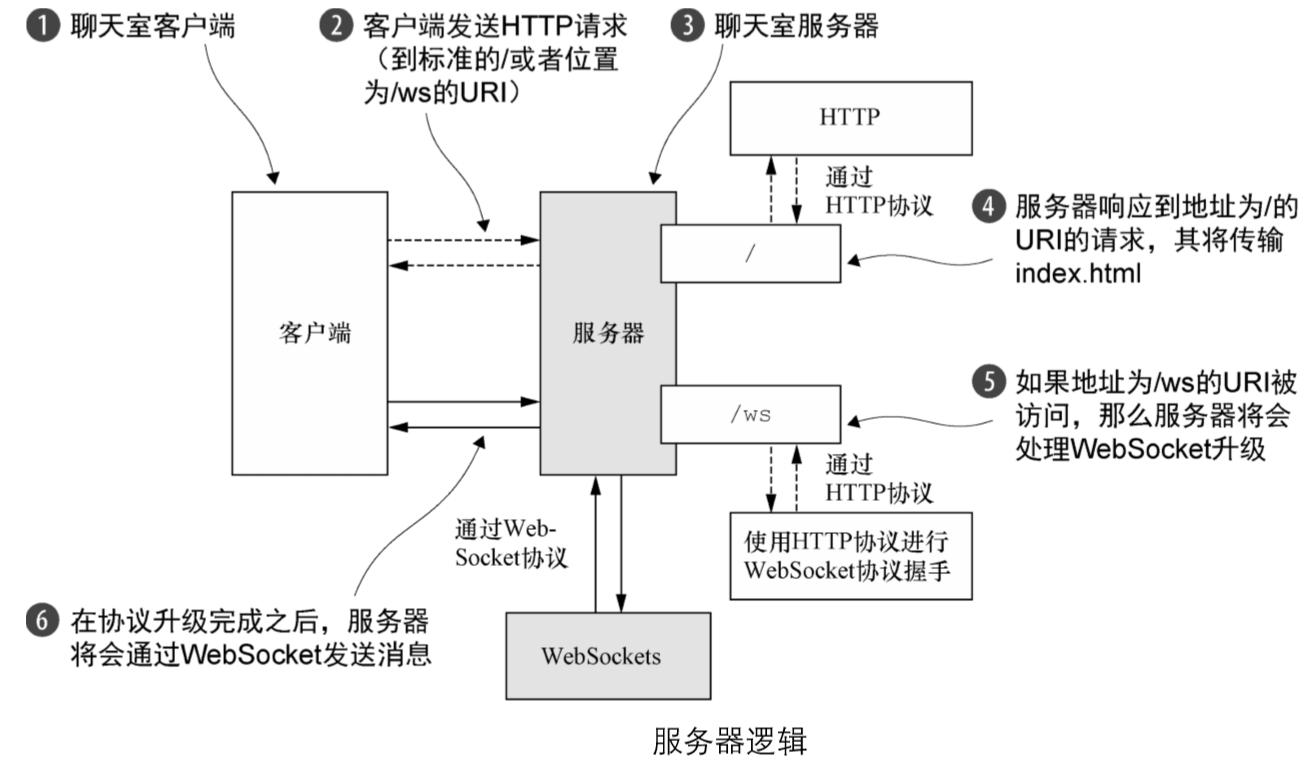
首先实现该处理 HTTP 请求的组件,当请求的url没有指定的WebSocket连接的后缀时(如后缀/ws),这个组件将提供聊天室网页页面的http response响应
public class HttpRequestHandler extends SimpleChannelInboundHandler<FullHttpRequest> {
private final String wsUri;
private static final File INDEX;
static {
URL location = HttpRequestHandler.class
.getProtectionDomain()
.getCodeSource().getLocation();
try {
String path = location.toURI() + "index.html";
path = !path.contains("file:") ? path : path.substring(6);
INDEX = new File(path);
} catch (URISyntaxException e) {
throw new IllegalStateException("Unable to locate index.html", e);
}
}
public HttpRequestHandler(String wsUri) {
this.wsUri = wsUri;
}
@Override
public void channelRead0(ChannelHandlerContext ctx, FullHttpRequest request)
throws Exception {
//(1) 如果请求了 WebSocket 协议升级,则增加引用计数(调用 retain()方法)
// 并将它传递给下一个 ChannelInboundHandler
if (wsUri.equalsIgnoreCase(request.uri())) {
ctx.fireChannelRead(request.retain());
} else {
//(2) 处理 100 Continue 请求以符合 HTTP 1.1 规范
if (HttpUtil.is100ContinueExpected(request)) {
send100Continue(ctx);
}
//读取 index.html
RandomAccessFile file = new RandomAccessFile(INDEX, "r");
HttpResponse response = new DefaultHttpResponse(
request.protocolVersion(), HttpResponseStatus.OK);
response.headers().set(
HttpHeaderNames.CONTENT_TYPE,"text/html; charset=UTF-8");
boolean keepAlive = HttpUtil.isKeepAlive(request);
//如果请求了keep-alive,则添加所需要的 HTTP 头信息
if (keepAlive) {
response.headers().set(
HttpHeaderNames.CONTENT_LENGTH,
file.length());
response.headers().set(
HttpHeaderNames.CONNECTION,
HttpHeaderValues.KEEP_ALIVE);
}
//(3) 将 HttpResponse 写到客户端
// 只是设置了响应的头信息,因此没有进行flush冲刷
ctx.write(response);
//(4) 将 index.html 写到客户端,也不进行flush冲刷
if (ctx.pipeline().get(SslHandler.class) == null) {
// 如果不需要进行加密,则利用零拷贝特性达到最佳效率
ctx.write(new DefaultFileRegion(
file.getChannel(), 0, file.length()));
} else {
ctx.write(new ChunkedNioFile(
file.getChannel()));
}
//(5) 写 LastHttpContent 标记响应的结束并冲刷至客户端
ChannelFuture future = ctx.writeAndFlush(
LastHttpContent.EMPTY_LAST_CONTENT);
//(6)如果没有请求keep-alive,则在写操作完成后关闭 Channel
if (!keepAlive) {
future.addListener(ChannelFutureListener.CLOSE);
}
}
}
private static void send100Continue(ChannelHandlerContext ctx) {
FullHttpResponse response = new DefaultFullHttpResponse(
HttpVersion.HTTP_1_1, HttpResponseStatus.CONTINUE);
ctx.writeAndFlush(response);
}
@Override
public void exceptionCaught(ChannelHandlerContext ctx, Throwable cause)
throws Exception {
cause.printStackTrace();
ctx.close();
}
}
- 如果该 HTTP 请求指向了地址为/ws的URI,那么HttpRequestHandler将调用FullHttpRequest对象上的retain()方法,并通过调用fireChannelRead(msg)方法将它转发给下一 个ChannelInboundHandler。对于retain()方法的调用是必需的,因为当channelRead0()方法返回时, FullHttpRequest的引用计数将会被减少。由于所有的操作都是异步的,因此,fireChannelRead ()方法可能会在channelRead0()方法返回之后完成
- 如果客户端发送了 HTTP 1.1 的 HTTP 头信息 Expect: 100-continue,那么 HttpRequestHandler将会发送一个100 Continue 响应
- 在该HTTP头信息被设置之后,HttpRequestHandler 将会写回一个 HttpResponse 给客户端,因为这不是一个 FullHttpResponse,只是响应的第一个部分,所以不调用 writeAndFlush()方法,在response响应设置完成后才会调用
- 通过检查是否有SslHandler存在于在ChannelPipeline中,判断是否有加密传输,如果不需要加密和压缩,那么可以通过零拷贝特性将 index.html 的内容存储到 DefaultFileRegion中来达到最佳效率,否则,使用ChunkedNioFile
- HttpRequestHandler 将写一个 LastHttpContent 来标记响应的结束,因此可以调用writeAndFlush()方法
- 如果没有请求 keep-alive,那么 HttpRequestHandler 将会添加一个 ChannelFutureListener 到最后一次写出动作的ChannelFuture,并关闭该连接
处理 WebSocket 帧
由 IETF 发布的 WebSocket RFC,定义了 6 种帧,Netty 为它们每种都提供了一个 POJO 实现

TextWebSocketFrame 是我们唯一真正需要处理的帧类型,下面展示了处理代码
public class TextWebSocketFrameHandler
extends SimpleChannelInboundHandler<TextWebSocketFrame> {
private final ChannelGroup group;
public TextWebSocketFrameHandler(ChannelGroup group) {
this.group = group;
}
//重写 userEventTriggered()方法以处理自定义事件
@Override
public void userEventTriggered(ChannelHandlerContext ctx, Object evt)
throws Exception {
//如果该事件表示握手成功,则从该 ChannelPipeline 中移除HttpRequest-Handler
//因为将不会接收到任何HTTP消息了
if (evt instanceof WebSocketServerProtocolHandler.HandshakeComplete) {
ctx.pipeline().remove(HttpRequestHandler.class);
//(1) 通知所有已经连接的WebSocket 客户端新的客户端已经连接上了
group.writeAndFlush(new TextWebSocketFrame("Client " + ctx.channel() + " joined"));
//(2) 将新的 WebSocket Channel 添加到 ChannelGroup 中,以便它可以接收到所有的消息
group.add(ctx.channel());
System.out.println("a new channel added to group");
} else {
super.userEventTriggered(ctx, evt);
}
}
@Override
public void channelRead0(ChannelHandlerContext ctx, final TextWebSocketFrame msg)
throws Exception {
//(3) 增加消息的引用计数,并将它写到 ChannelGroup中所有已经连接的客户端
group.writeAndFlush(msg.retain());
}
}
- 当和新客户端的WebSocket 握手成功完成之后,会触发一个WebSocketServerProtocolHandler.HandshakeComplete事件,可以通过instanceof运算符进行判断
To know once a handshake was done you can intercept the ChannelInboundHandler.userEventTriggered(ChannelHandlerContext, Object) and check if the event was instance of WebSocketServerProtocolHandler.HandshakeComplete, the event will contain extra information about the handshake such as the request and selected subprotocol.
- 握手成功事件触发后,会把通知消息写到 ChannelGroup 中的所有 Channel 来通知所有已经连接的客户端,然后它将把这个新Channel加入到该ChannelGroup中
- ChannelGroup可以根据我们的具体需求添加相应的Channel,一个Channel可以添加到多个ChannelGroup,当Channel关闭时,会自动从ChannelGroup移除
A thread-safe Set that contains open Channels and provides various bulk operations on them. Using ChannelGroup, you can categorize Channels into a meaningful group (e.g. on a per-service or per-state basis.) A closed Channel is automatically removed from the collection, so that you don't need to worry about the life cycle of the added Channel. A Channel can belong to more than one ChannelGroup.
- 如果接收到了 TextWebSocketFrame 消息 ,TextWebSocketFrameHandler 将调用 TextWebSocketFrame 消息上的 retain()方法,并使用 writeAndFlush()方法来将它传输给ChannelGroup,以便所有已经连接的 WebSocket Channel都将接收到它,由此实现消息的广播
初始化ChannelPipline
将所有需要的ChannelHandler添加到ChannelPipeline
public class ChatServerInitializer extends ChannelInitializer<Channel> {
private final ChannelGroup group;
public ChatServerInitializer(ChannelGroup group) {
this.group = group;
}
@Override
//将所有需要的ChannelHandler 添加到 ChannelPipeline 中
protected void initChannel(Channel ch) throws Exception {
ChannelPipeline pipeline = ch.pipeline();
pipeline.addLast(new HttpServerCodec());
pipeline.addLast(new ChunkedWriteHandler());
pipeline.addLast(new HttpObjectAggregator(64 * 1024));
pipeline.addLast(new HttpRequestHandler("/ws"));
pipeline.addLast(new WebSocketServerProtocolHandler("/ws"));
pipeline.addLast(new TextWebSocketFrameHandler(group));
}
}
各个ChannelHandler的作用如下
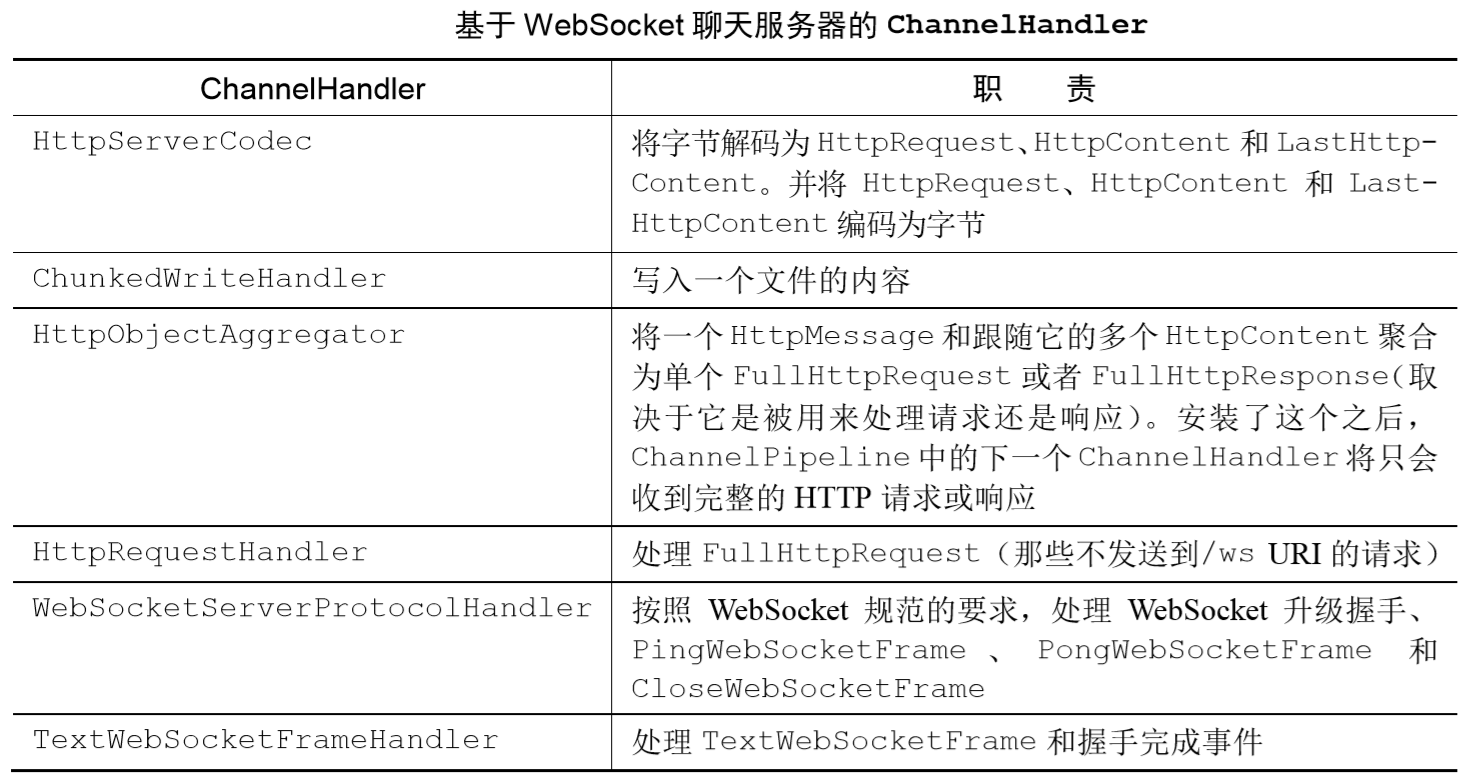
这里有一个我们从未接触过的ChannelHandler —— WebSocketServerProtocolHandler,它能够帮我们处理如"升级握手",以及Close、Ping、Pong三种控制帧等繁重的工作,Text和Binary两种数据帧会被发送到下一个ChannelHandler,能够方便我们将工作重点落在实际的数据处理上
This handler does all the heavy lifting for you to run a websocket server. It takes care of websocket handshaking as well as processing of control frames (Close, Ping, Pong). Text and Binary data frames are passed to the next handler in the pipeline (implemented by you) for processing.
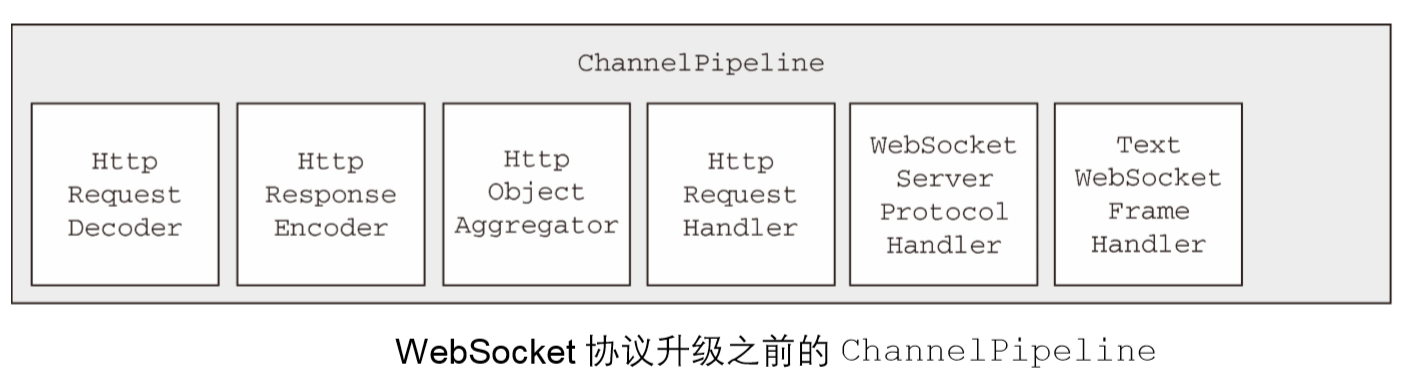
WebSocket 协议升级之前的 ChannelPipeline 的状态如图所示。这代表了刚刚被 ChatServerInitializer初始化之后的ChannelPipeline
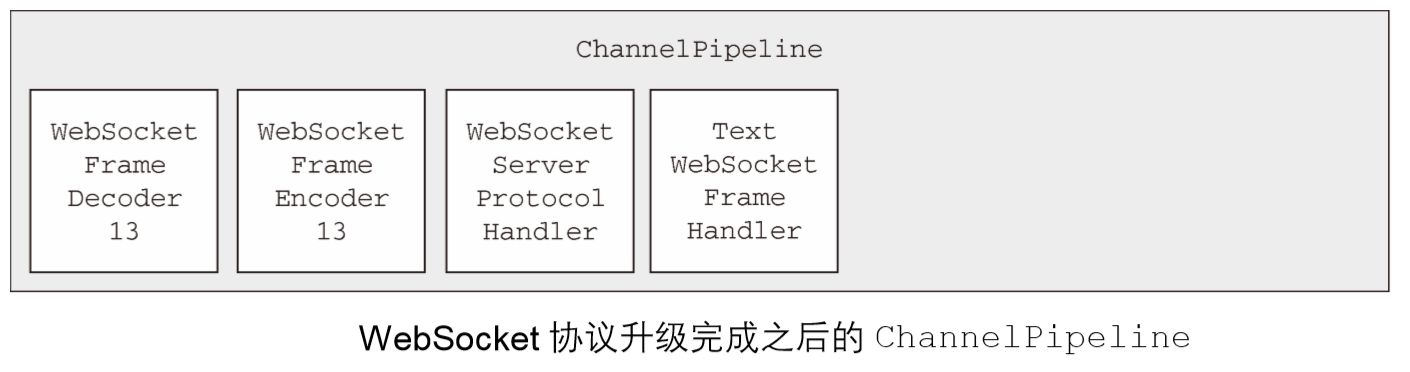
当 WebSocket 协议升级完成之后,WebSocketServerProtocolHandler 将会把 Http- RequestDecoder 替换为 WebSocketFrameDecoder,把 HttpResponseEncoder 替换为 WebSocketFrameEncoder。为了性能最大化,我们移除了不再被 WebSocket 连接所需要的 HttpRequestHandler
引导
将各组件组合到一起
public class ChatServer {
//创建 DefaultChannelGroup,其将保存所有已经连接的 WebSocket Channel
private final ChannelGroup channelGroup =
new DefaultChannelGroup(ImmediateEventExecutor.INSTANCE);
private final EventLoopGroup bossGroup = new NioEventLoopGroup();
private final EventLoopGroup workGroup = new NioEventLoopGroup();
private Channel channel;
public ChannelFuture start(InetSocketAddress address) {
//引导服务器
ServerBootstrap bootstrap = new ServerBootstrap();
bootstrap.group(bossGroup, workGroup)
.channel(NioServerSocketChannel.class)
.childHandler(createInitializer(channelGroup));
ChannelFuture future = bootstrap.bind(address);
future.syncUninterruptibly();
channel = future.channel();
return future;
}
//创建 ChatServerInitializer
protected ChannelInitializer<Channel> createInitializer(ChannelGroup group) {
return new ChatServerInitializer(group);
}
//处理服务器关闭,并释放所有的资源
public void destroy() {
if (channel != null) {
channel.close();
}
channelGroup.close();
bossGroup.shutdownGracefully();
}
public static void main(String[] args) throws Exception {
if (args.length != 1) {
System.err.println("Please give port as argument");
System.exit(1);
}
int port = Integer.parseInt(args[0]);
final ChatServer endpoint = new ChatServer();
ChannelFuture future = endpoint.start(new InetSocketAddress(port));
Runtime.getRuntime().addShutdownHook(new Thread() {
@Override
public void run() {
endpoint.destroy();
}
});
future.channel().closeFuture().syncUninterruptibly();
}
}
运行结果
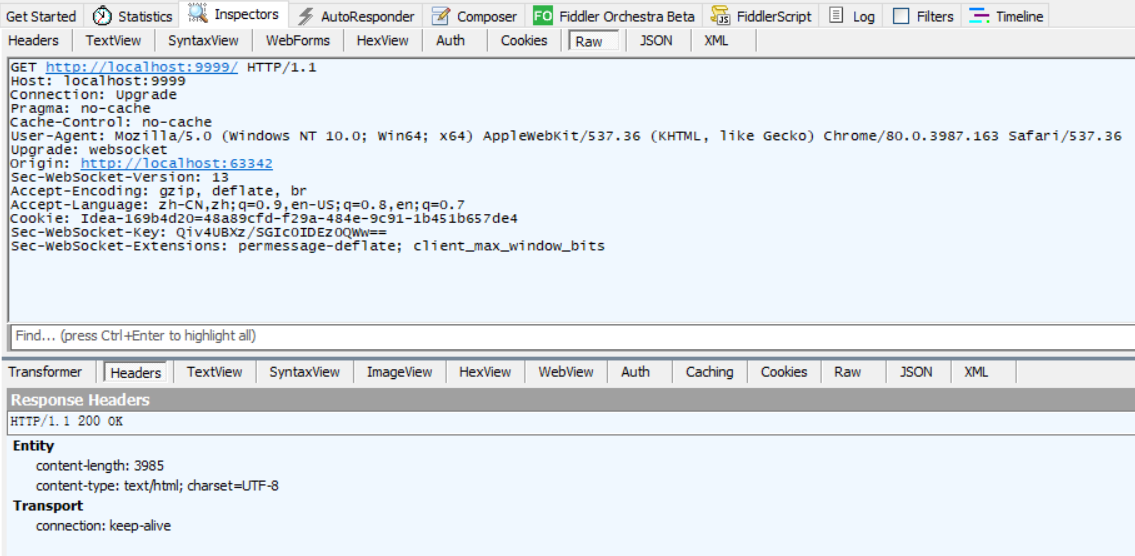
当请求的URI不是以/ws结尾时,返回index.html页面内容,可见页面内容的长度为3985字节
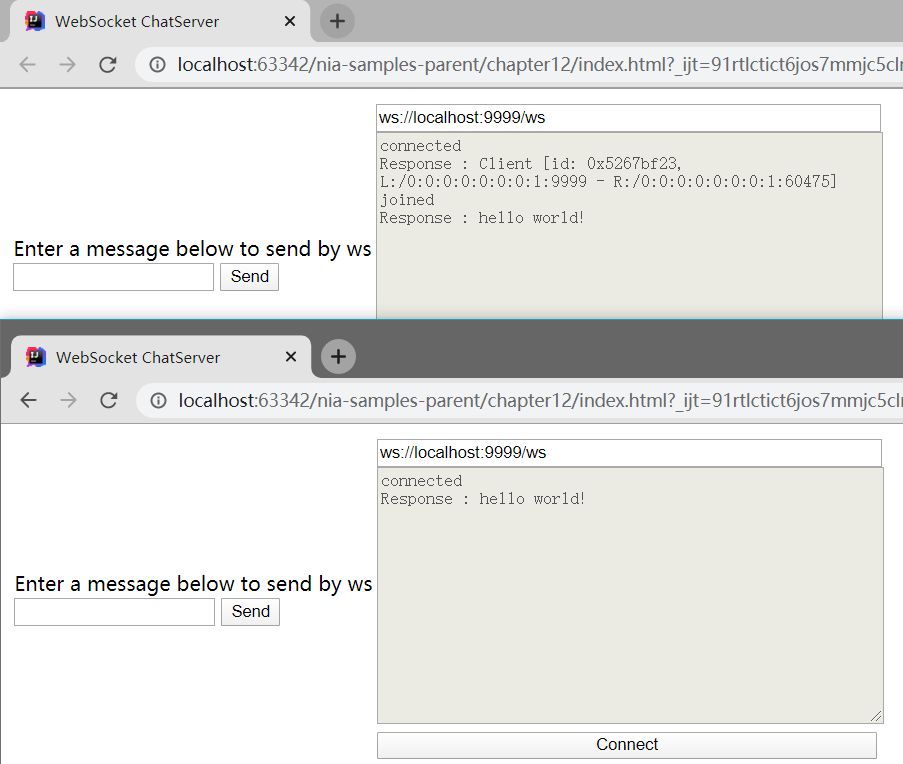
下面是聊天功能的展示
WebSocket的加密
我们需要将SslHandler添加到ChannelPipeline的首部
public class SecureChatServerInitializer extends ChatServerInitializer {
private final SslContext context;
public SecureChatServerInitializer(ChannelGroup group, SslContext context) {
super(group);
this.context = context;
}
@Override
protected void initChannel(Channel ch) throws Exception {
//调用父类的 initChannel() 方法
super.initChannel(ch);
SSLEngine engine = context.newEngine(ch.alloc());
engine.setUseClientMode(false);
//将 SslHandler 添加到 ChannelPipeline 中
ch.pipeline().addFirst(new SslHandler(engine));
}
}
"引导"处的代码也要做相应调整
public class SecureChatServer extends ChatServer {
private final SslContext context;
public SecureChatServer(SslContext context) {
this.context = context;
}
@Override
protected ChannelInitializer<Channel> createInitializer(ChannelGroup group) {
//返回之前创建的 SecureChatServerInitializer 以启用加密
return new SecureChatServerInitializer(group, context);
}
public static void main(String[] args) throws Exception {
if (args.length != 1) {
System.err.println("Please give port as argument");
System.exit(1);
}
int port = Integer.parseInt(args[0]);
SelfSignedCertificate cert = new SelfSignedCertificate();
SslContext context = SslContextBuilder.forServer(
cert.certificate(), cert.privateKey()).build();
final SecureChatServer endpoint = new SecureChatServer(context);
ChannelFuture future = endpoint.start(new InetSocketAddress(port));
Runtime.getRuntime().addShutdownHook(new Thread() {
@Override
public void run() {
endpoint.destroy();
}
});
future.channel().closeFuture().syncUninterruptibly();
}
}
注意要用HTTPS连接进行测试
Netty学习摘记 —— 简单WEB聊天室开发的更多相关文章
- Android简单的聊天室开发(client与server沟通)
请尊重他人的劳动成果.转载请注明出处:Android开发之简单的聊天室(client与server进行通信) 1. 预备知识:Tcp/IP协议与Socket TCP/IP 是Transmission ...
- Netty学习笔记(四) 简单的聊天室功能之服务端开发
前面三个章节,我们使用了Netty实现了DISCARD丢弃服务和回复以及自定义编码解码,这篇博客,我们要用Netty实现简单的聊天室功能. Ps: 突然想起来大学里面有个课程实训,给予UDP还是TCP ...
- 使用Servlet和JSP实现一个简单的Web聊天室系统
1 问题描述 利用Java EE相关技术实现一个简单的Web聊天室系统,具体要求如下. (1)编写一个登录 ...
- Python开发一个WEB聊天室
项目实战:开发一个WEB聊天室 功能需求: 用户可以与好友一对一聊天 可以搜索.添加某人为好友 用户可以搜索和添加群 每个群有管理员可以审批用户的加群请求,群管理员可以用多个,群管理员可以删除.添加. ...
- 利用html 5 websocket做个山寨版web聊天室(手写C#服务器)
在之前的博客中提到过看到html5 的websocket后很感兴趣,终于可以摆脱长轮询(websocket之前的实现方式可以看看Developer Works上的一篇文章,有简单提到,同时也说了web ...
- ASP.NET Signalr 2.0 实现一个简单的聊天室
学习了一下SignalR 2.0,http://www.asp.net/signalr 文章写的很详细,如果头疼英文,还可以机翻成中文,虽然不是很准确,大概还是容易看明白. 理论要结合实践,自己动手做 ...
- ASP.NET SignalR 与 LayIM2.0 配合轻松实现Web聊天室(零) 前言
前端时间听一个技术朋友说 LayIM 2.0 发布了,听到这个消息抓紧去官网看了一下.(http://layim.layui.com/)哎呀呀,还要购买授权[大家支持一下哦],果断买了企业版,喜欢钻研 ...
- ASP.NET SignalR 与 LayIM2.0 配合轻松实现Web聊天室(一) 之 基层数据搭建,让数据活起来(数据获取)
大家好,本篇是接上一篇 ASP.NET SignalR 与 LayIM2.0 配合轻松实现Web聊天室(零) 前言 ASP.NET SignalR WebIM系列第二篇.本篇会带领大家将 LayIM ...
- ASP.NET SignalR 与 LayIM2.0 配合轻松实现Web聊天室(七) 之 历史记录查询(时间,关键字,图片,文件),关键字高亮显示。
前言 上一篇讲解了如何自定义右键菜单,都是前端的内容,本篇内容就一个:查询.聊天历史纪录查询,在之前介绍查找好友的那篇博客里已经提到过 Elasticsearch,今天它又要上场了.对于Elastic ...
随机推荐
- C语言字符串输入输出函数(gets()函数、puts()函数、fgets()函数、fputs()函数)
scanf("%s", str) 不能读取空白字符,遇到第一个空白字符就停止读取. gets(str) 读取整行输入,直至遇到换行符,丢弃换行符储存其余字符,并在末尾添加 \0.与 ...
- 【C#基础概念】程序集清单
.NET Core 程序集(模块)还包含描述程序集本身的元数据,我们称之为清单.清单记录了当前程序集正常运行所需的所有外部程序集.程序集的版本号.版权信息.模块 .资源(图片 xml等)等.与类型元数 ...
- weblogic threadpool has stuck threads引发内存溢出
转至:https://blog.csdn.net/wyx713510713/article/details/12705221?utm_source=copy 最近项目老是出问题,weblogic的no ...
- c语言 排序(转)
https://blog.csdn.net/Galaxy_n/article/details/116742537
- MongoDB数据库的下载安装及配置方法
MongoDB安装与配置步骤 MongoDB数据库之安装篇 # 1 下载MongoDB数据库 1.打开浏览器,登录"https://www.mongodb.com/try/download/ ...
- js实现密码输入框对开启键盘大写锁定的提示(IE浏览器下有自动识别提示则不执行(用IE自带效果即可))
代码如下: <!DOCTYPE html> <html> <head> <meta charset="utf-8"> <tit ...
- python 编辑器提示 do not use bare except
在捕获异常时,应该尽可能指定特定的异常,而不是只使用 except 语句. 比如说,except 语句会捕获 KeyboardInterrupt 和 SystemExit 异常,但 KeyboardI ...
- JZ-015-反转链表
反转链表 题目描述 输入一个链表,反转链表后,输出新链表的表头. 题目链接: 反转链表 代码 /** * 标题:反转链表 * 题目描述 * 输入一个链表,反转链表后,输出新链表的表头. * 题目链接: ...
- 【阅读SpringMVC源码】手把手带你debug验证SpringMVC执行流程
✿ 阅读源码思路: 先跳过非重点,深入每个方法,进入的时候可以把整个可以理一下方法的执行步骤理一下,也可以,理到某一步,继续深入,回来后,接着理清除下面的步骤. ✿ 阅读本文的准备工作,预习一下Spr ...
- think php 软删除
<a href="/admin/exam/delete/id/{$v.id}" onclick="if(confirm('确认删除?')) location.hre ...