
MyBatis Generator使用方法
第一步:在resources文件夹下创建一个目录mybatis-generator,在目录mybatis-generator下创建文件generatorConfig.xml(此处的目录名可任意取)
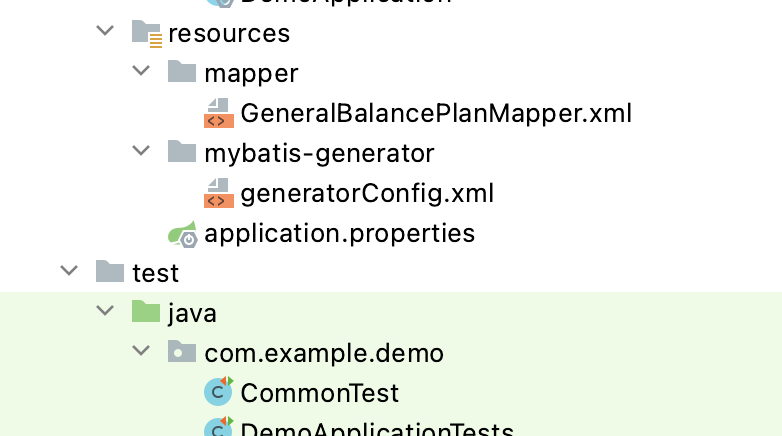
第二步:在pom文件标签<plugins>处引入依赖
<plugin>

    <groupId>org.mybatis.generator</groupId>

    <artifactId>mybatis-generator-maven-plugin</artifactId>

    <version>1.3.5</version>

    <configuration>

        <configurationFile>${basedir}/src/main/resources/mybatis-generator/generatorConfig.xml

        </configurationFile>

        <overwrite>true</overwrite>

        <verbose>true</verbose>

    </configuration>

</plugin>
第三步:配置generatorConfig.xml
注:①标红处即为需要修改处
②"http://mybatis.org/dtd/mybatis-generator-config_1_0.dtd" 在xml中会报错,可忽略
<?xml version="1.0" encoding="UTF-8"?>
<!DOCTYPE generatorConfiguration
PUBLIC "-//mybatis.org//DTD MyBatis Generator Configuration 1.0//EN"
"http://mybatis.org/dtd/mybatis-generator-config_1_0.dtd"> <generatorConfiguration>
<!-- 连接数据库jar包的路径-->
<classPathEntry location="/Users/dxm1/.m2/repository/mysql/mysql-connector-java/5.1.48/mysql-connector-java-5.1.48.jar"/>
<context id="DB2Tables" targetRuntime="MyBatis3">
<commentGenerator>
<property name="suppressDate" value="true"/>
<!-- 是否去除自动生成的注释 true:是 : false:否 -->
<property name="suppressAllComments" value="true"/>
</commentGenerator> <!--数据库连接参数 -->
<jdbcConnection
driverClass="com.mysql.jdbc.Driver"
connectionURL="jdbc:mysql://localhost:3306/test_db?serverTimezone=UTC&useSSL=false"
userId="root"
password="zu273334ly">
</jdbcConnection> <javaTypeResolver>
<property name="forceBigDecimals" value="false"/>
</javaTypeResolver> <!-- 实体类的包名和存放路径 -->
<javaModelGenerator targetPackage="com.example.demo.model" targetProject="src/main/java">
<property name="enableSubPackages" value="true"/>
<property name="trimStrings" value="true"/>
</javaModelGenerator> <!-- 生成映射文件*.xml的位置-->
<sqlMapGenerator targetPackage="mapper" targetProject="src/main/resources">
<property name="enableSubPackages" value="true"/>
</sqlMapGenerator> <!-- 生成DAO的包名和位置 -->
<javaClientGenerator type="XMLMAPPER" targetPackage="com.example.demo.dao" targetProject="src/main/java">
<property name="enableSubPackages" value="true"/>
</javaClientGenerator> <!-- tableName:数据库中的表名或视图名;domainObjectName:生成的实体类的类名-->
<table tableName="GENERAL_BALANCE_PLAN" domainObjectName="GeneralBalancePlan"
enableCountByExample="false"
enableUpdateByExample="false"
enableDeleteByExample="false"
enableSelectByExample="false"
selectByExampleQueryId="false"/>
<!--
<table tableName="xxx" domainObjectName="xxx"
enableCountByExample="false"
enableUpdateByExample="false"
enableDeleteByExample="false"
enableSelectByExample="false"
selectByExampleQueryId="false"/>
...
<table tableName="xxx" domainObjectName="xxx"
enableCountByExample="false"
enableUpdateByExample="false"
enableDeleteByExample="false"
enableSelectByExample="false"
selectByExampleQueryId="false"/>
-->
</context>
</generatorConfiguration>
如何找连接数据库jar包的路径,可参考 https://blog.csdn.net/weixin_43228497/article/details/83114594
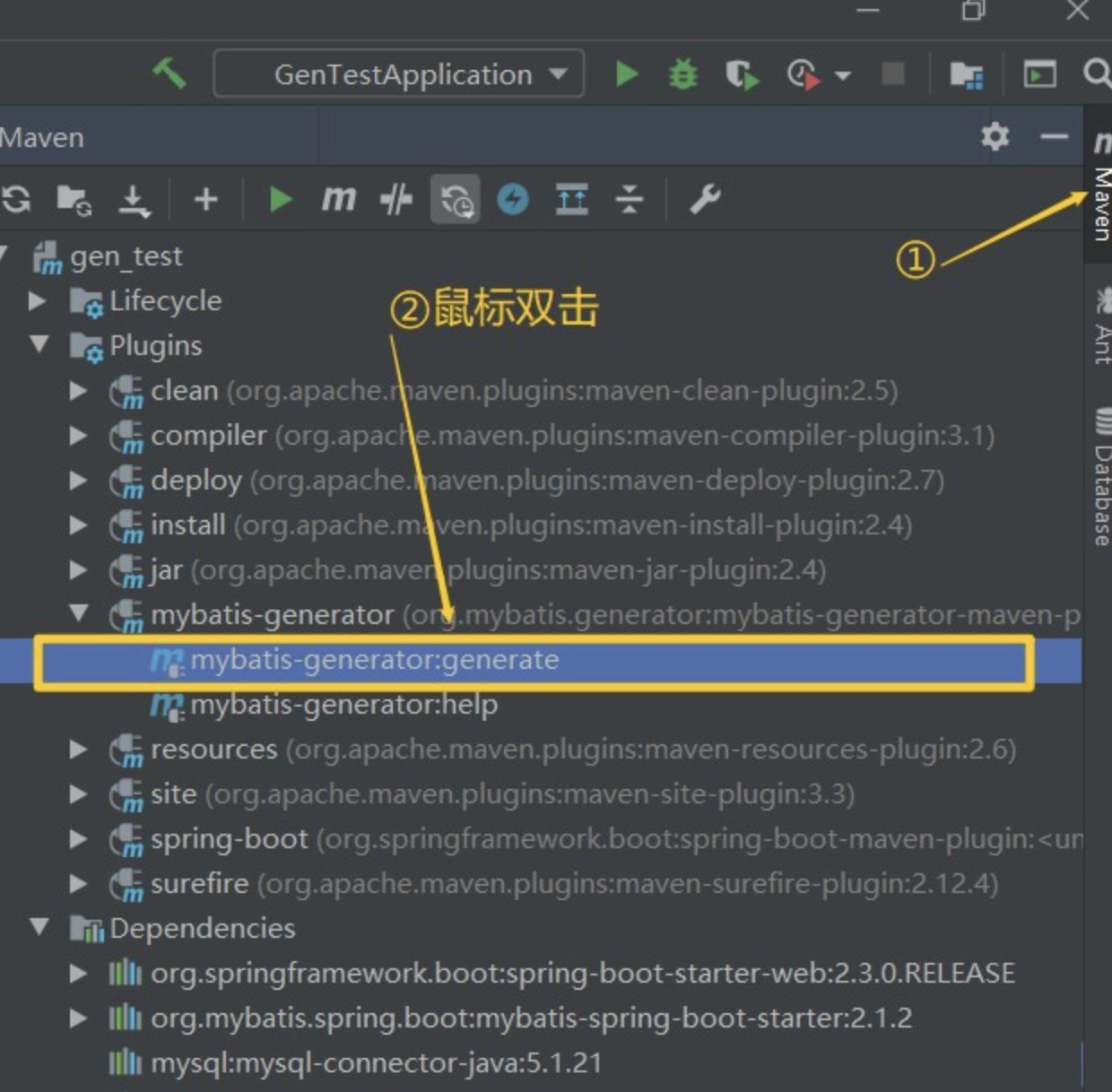
第四步:启动
参考资料: https://blog.csdn.net/weixin_42250302/article/details/106986707
MyBatis Generator使用方法的更多相关文章
- mybatis generator 使用方法
环境: ubuntu eclipse maven 一. 简介 mybatis-geneator是一款mybatis自动代码生成工具,可以通过配置,快速生成mapper和xml文件以及pojo 二. ...
- Mybatis Generator自动生成的mapper只有insert方法
– Mybatis Generator 生成的mapper只有insert方法 – 首先检查generatorConfig.xml中table项中的属性 enableSelectByPrimaryKe ...
- Mybatis Generator的model生成中文注释,支持oracle和mysql(通过实现CommentGenerator接口的方法来实现)
自己手动实现的前提,对maven项目有基本的了解,在本地成功搭建了maven环境,可以参考我之前的文章:maven环境搭建 项目里新建表时model,mapper以及mapper.xml基本都是用My ...
- mybatis generator自动生成sqlmap代码的不完善之处以及解决方法
a) 建表时,字段名称建议用"_"分隔多个单词,比如:AWB_NO.REC_ID...,这样生成的entity,属性名称就会变成漂亮的驼峰命名,即:awbNo.recId b)or ...
- Mybatis—三剑客之generator使用方法
三剑客之generator主要用于自动生成POJO实体类 准备素材: mybatis-generator-core-1.3.2.jar mysql-connector-java-5.1.2 ...
- mybatis Generator生成代码及使用方式
本文原创,转载请注明:http://www.cnblogs.com/fengzheng/p/5889312.html 为什么要有mybatis mybatis 是一个 Java 的 ORM 框架,OR ...
- mybatis generator 自动生成dao层映射代码
资源: doc url :http://www.mybatis.org/generator/ download:https://github.com/mybatis/generator/release ...
- MyBatis Generator作为maven插件自动生成增删改查代码及配置文件例子
什么是MyBatis Generator MyBatis Generator (MBG) 是一个Mybatis的代码生成器,可以自动生成一些简单的CRUD(插入,查询,更新,删除)操作代码,model ...
- Mybatis Generator生成工具配置文件详解
<?xml version="1.0" encoding="UTF-8"?> <!DOCTYPE generatorConfiguration ...
- MyBatis Generator 详解
MyBatis Generator中文文档 MyBatis Generator中文文档地址:http://mbg.cndocs.tk/ 该中文文档由于尽可能和原文内容一致,所以有些地方如果不熟悉,看中 ...
随机推荐
- 内存模型--共享、JMM
Balking 指令重排
- 日常遇到bug小记
archery查询后显示缺少空格: https://github.com/hhyo/Archery/pull/1449 archery-mongo数据库查询skip不生效: https://githu ...
- OKHttp 之--------http/https协议处理方法 (Finn_ZengYuan博客)
如果遇到okttp需要使用https协议,那么就需要在支持ssl,不说了,撸码搞起: 加入下面代码即可搞定:主要就是设置 builder.sslSocketFactory(sslParams.sSLS ...
- drop table后,约束会被删除吗?
create table test1(id number); insert into test1 values(11);insert into test1 values(22);insert into ...
- WebSocket服务
package com.sxsoft.admin.Component; import com.alibaba.fastjson.JSON; import io.netty.handler.codec. ...
- celery学习
1.清空队列:celery -A 项目名称 purge 2.原理参考 https://www.cnblogs.com/sui776265233/p/10004679.html 消息中间件(messa ...
- vue使用websoket
参考链接:https://www.cnblogs.com/qisi007/p/10213886.html export default { name: "realdetail", ...
- 【Selenium IDE】下载安装Chrome和Firefox插件IDE ide了解就行 不是重点 重点是写脚本
下载安装Chrome和Firefox插件IDE 1.Chrome的IDE安装(1)由于chrome的限制所以提供了一个小方法:链接: https://www.crx4chrome.com/crx/77 ...
- 编译内核出现错误cc1: error: code model kernel does not support PIC mode
删除该模块目录下的 .cache.mk 文件就好了,重新 make 即可
- LOOP GROUP BY 分组循环的使用方法小栗子
原文链接:https://blog.csdn.net/lmf496891416/article/details/111317377 1.格式: LOOP AT 内表 INTO DATA(工作区) GR ...