
[Linux]RabbitMQ - 解决Error: unable to connect to node rabbit@localhost: nodedown
1 问题
环境: CentOS7.8.2003 (x86 / 64bit)
版本: RabbitMQ 3.6.15 (Erlang 19.3)
安装方式: 二进制源码压缩安装
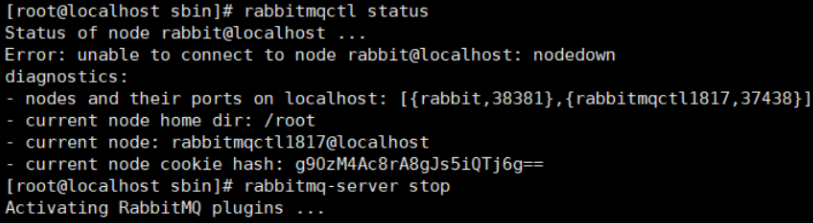
2 解决思路
2.1 思路1 关闭进程,并重启
step1 查询mq的进程
ps -ef | grep rabbitmq
step2 杀掉mq进程
ps -ef | grep rabbitmq | grep -v grep | awk '{print $2}' | xargs kill -9
step3 启动mq
rabbitmq-server -detached

Warning: PID file not written; -detached was passed.
step4 在查询mq的状态
rabbitmqctl status

2.2 思路2 erlang安装版本与rabbitmq版本不兼容
查询erlang与rabbitmq的版本兼容性地址: https://www.rabbitmq.com/which-erlang.html
2.3 思路3 RabbitMQ的依赖件: erlang的cookie
1 安装方式:
Linux中,rabbitmq安装方式主要有两种:RPM安装 和 二进制安装(编译安装/压缩包安装)
2 .erlang.cookie是什么?
.erlang.cookie是erlang实现分布式的必要文件;
erlang分布式的每一个节点上要保持相同的.erlang.cookie文件,同时该文件的权限至少应为400。
3 .erlang.cookie文件路径?
- Linux
- $HOME/.erlang.cookie 【二进制安装(编译安装/压缩包安装)】
- 若用root角色安装,则 /root/.erlang.cookie;其他用户为/home/用户名/.erlang.cookie
- ~/.erlang.cookie
- /var/lib/rabbitmq/.erlang.cookie 【RPM安装】
- $HOME/.erlang.cookie 【二进制安装(编译安装/压缩包安装)】
- Windows
- C:\Users${username}.erlang
- 用上面这个文件覆盖下面目录的文件
- C:\Windows.erlang.cookie
- C:\Windows\System64\config\systemprofile
- C:\Windows\System32\config\systemprofile
4 可通过rabbitmq的启动日志,查看rabbitmq的home目录以及.erlang.cookie文件的位置等信息。
=INFO REPORT==== 20-Jul-2018::13:34:56 ===

node           : rabbit@he10

home dir       : /root (我是用root用户启动的)

config file(s) : /home/rabbitmq_server-3.6.1/etc/rabbitmq/rabbitmq.config (not found)

cookie hash    : 063Gh+RyPjHRzyuSPf9wWA==

...

rabbit@localhost:

  * connected to epmd (port 4369) on localhost

  * epmd reports: node 'rabbit' not running at all

                  other nodes on localhost: ['rabbitmq-cli-17']

  * suggestion: start the node

current node details:

- node name: 'rabbitmq-cli-17@Hydrant'

- home dir: /root

- cookie hash: 063Gh+RyPjHRzyuSPf9wWA==
2.4 思路4 重新安装RabbitMQ的服务
代价最高
3 补充
RabbitMQ相关的命令
[rabbitmq-server]

[service] rabbitmq-server stop #[service] : 表示中括号内的service命令可加可不加,下同

[service] rabbitmq-server start #前台启动rabbitmq服务

[service] rabbitmq-server restart

[service] rabbitmq-service remove

[service] rabbitmq-server -detached #后台启动rabbitmq服务

[rabbitmqctl]

rabbitmqctl status

rabbitmqctl stop

    Stops the Erlang node on which RabbitMQ is running. To restart the node follow the instructions for Running the Server in the installation guide[1].

rabbitmqctl start_app

rabbitmqctl stop_app

rabbitmqctl shutdown

    Shuts down the Erlang process on which RabbitMQ is running. The command is blocking and will return after the Erlang process exits. If RabbitMQ fails to stop, it will return a non-zero exit code.

rabbitmqctl change_password {username} {password}

rabbitmqctl list_users #查看监听用户

rabbitmqctl add_user {username} {password}

rabbitmqctl set_user_tags {username} {tag ...}

    rabbitmqctl set_user_tags admin administrator

rabbitmqctl set_permissions [-p vhost] {user} {conf} {write} {read}

    rabbitmqctl set_permissions -p "/" admin ".*" ".*" ".*"

rabbitmqctl delete_user {username}

[rabbitmq-plugins]

rabbitmq-plugins enable/disable rabbitmq_management #开启/禁用 rabbitmq的web管理插件

rabbitmq-plugins enable/disable rabbitmq_web_stomp

rabbitmq-plugins enable/disable rabbitmq_tracing #开启/禁用 rabbitmq_tracing能跟踪RabbitMQ中消息的流入流出情况
4 参考文献
- 解决RabbitMQ保错 Error: unable to connect to node rabbit@localhost: nodedown - CSDN
- rabbitmq .erlang.cookie文件疑惑 - 博客园
- RabbitMQ,erlang:如何“确保erlang cookie是一样的”
[Linux]RabbitMQ - 解决Error: unable to connect to node rabbit@localhost: nodedown的更多相关文章
- rabbitmqctl: Error unable to connect to node 'rabbit@xxxxx' nodedown
RabbitMQ使用rabbitmqctl add_user的时候报以下错误: Creating user "xxxx" ... Error: unable to connect ...
- [RabbitMQ]Error: unable to connect to node rabbit@compute1: nodedown(CentOS7.0)
今天在搭建OpenStack的时候需要安装RabbitMQ,可是使用yum install rabbitmq-server安装之后,按照OpenStack官方提供的文档修改guest用户密码的时候却出 ...
- Error: unable to connect to node rabbit@mail: nodedown
某天,开启一个应用时,发现连接rabbitmq失败,本来想用rabbitmqctl来查看队列,结果提示“Error: unable to connect to node rabbit@mail: no ...
- Error: unable to connect to node rabbit@10: nodedown 修改hostname后异常
https://blog.csdn.net/witsmakemen/article/details/22651365 [root@d bin]# rabbitmqctl start_appStarti ...
- Rabbitmq安装报错 Windows下安装RabbitMQ报错Error: unable to connect to node rabbit@xxx: nodedown
1..erlang.cookie文件不一致 如果是Windows 64位系统两个文件都要修改,另外当C:\Users\用户\.erlang.cookie没有修改权限的时候 用上面这个文件覆盖下面两个目 ...
- RabbitMq安装成功后执行命令报错(Error: unable to connect to node 'rabbit@DESKTOP-LPKSION': nodedown)
我们直接来看解决方案吧.首先打开服务,找到RabbitMq服务. 双击打开后选择登陆选项卡: 点选此账户,输入你计算机的登录名称.点击浏览: 在这里输入你的用户名,点检索: 这里的密码输入你电脑开机登 ...
- RabbitMQ安装后不能运行 Error: unable to connect to node nodedown
本地安装RabbitMQ后总是不能正常的使用.. 命令行输入 rabbitMQctl Status 报下边的错 Error: unable to connect to node 'rabbit@YO ...
- dblogin userid ogg ERROR: Unable to connect to database using user ogg
测试环境,初步配置ogg,添加ogg用户连接数据库,提示无权限报错. 1.0 报错信息 GGSCI (enmo) > dblogin userid ogg,password ogg ERROR: ...
- Unable to process request: General SSLEngine problem.Unable to connect to neo4j at `localhost:7687`, because the certificate the server uses has changed.
Exception in thread "main" org.neo4j.driver.v1.exceptions.ClientException: Unable to proce ...
- error rabbitMQ:Error: unable to perform an operation on node 'rabbit@xxxx'.
C:\Program Files\RabbitMQ Server\rabbitmq_server-3.7.4\sbin>rabbitmqctl list_queues Error: unable ...
随机推荐
- PTA最大子列和问题
给定K个整数组成的序列{ N1, N2, ..., NK },"连续子列"被定义为{ Ni, Ni+1, ..., Nj },其中 1≤i≤j≤K."最大子列 ...
- Day3 准备步入入门.ok
安装开发环境(6.21周一) 卸载JDK 删除Java的安装目录 打开我的电脑-->属性-->高级系统设置-->环境变量 删除JAVA_HOME 删除path下添加的JAVA目录 安 ...
- python-文件和文件夹操作
1.os模块 import os 方法 功能说明 access(path,mode) 测试是否可以按照mode指定的权限访问文件 chdir(path) 把path设为当前工作目录 chmod(pat ...
- 项目:在wiki标记中添加无序列表(split、join巩固)
# coding: utf-8 import pyperclip text = pyperclip.paste() lines = text.split("\n") for i i ...
- Hbase操作与编程使用
1.任务: 列出HBase所有的表的相关信息,例如表名: 3. 编程完成以下指定功能(教材P92下): (1)createTable(String tableName, String[] fields ...
- C# 锁汇总
一.前言 本文章汇总c#中常见的锁,基本都列出了该锁在微软官网的文章,一些不常用的锁也可以参考微软文章左侧的列表,方便温习回顾. 二.锁的分类 2.1.用户模式锁 1.volatile 关键字 vol ...
- 我做的mysql 一些题 里面大部分都是mysql的方法
基础题:-- 1. 查询Student表中的所有记录的Sname.Ssex和Class列.1 select sname,ssex,class from student;-- 2. 查询教师所有的单位即 ...
- liunx 目录详解
/etc/sysconfig/network-scripts/ifcfg-eth0 第一块网卡的配置文件 /etc/sysconfig/network 主机名配置文件 /etc/profile ...
- Windows右键新建菜单中添加md文件
1.win+r------->regedit 2.找到.md文件夹,双击该文件夹后修改数据的值为".md" 3.在.md文件夹右键新建"项"------& ...
- c/c++指针从浅入深介绍——基于数据内存分配的理解(上)
c/c++指针从浅入深介绍--基于数据内存分配的理解(上) 本文是对自我学习的一个总结以及回顾,文章内容主要是针对代码中的数据在内存中的存储情况以及存储中数值的变化来对指针进行介绍,是对指针以及数据在 ...