
我的Vue之旅 11 Vuex 实现购物车
Vue
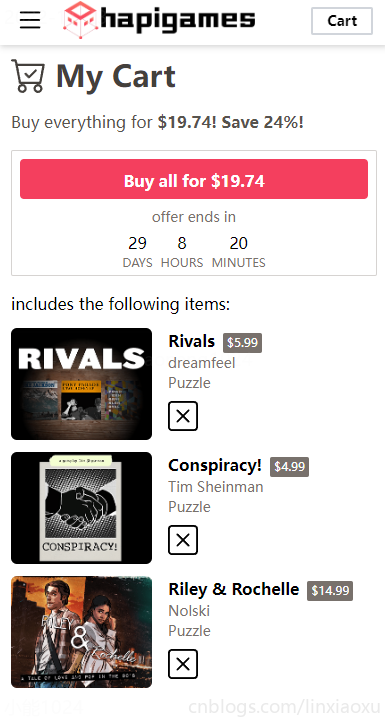
CartView.vue script
- 数组的filter函数需要return显式返回布尔值,该方法得到一个新数组。
- 使用Vuex store的modules方式,注意读取状态的方式
this.$store.state.cart.items - 刷新页面后state状态还原,需要用session保存状态(TODO)
- axios 发出 get 请求,第二个参数对象的 params 字段值显式使用 JSON.stringify 进行转化,如果不使用会表示成
xxx?items=xxx&items=xxx&items=xxx
<script lang="ts">

import { defineComponent } from "vue";

export default defineComponent({

  name: "CartView",

  components: {},

  methods: {

    deleteItem(id: number) {

      this.$store.dispatch("del", id);

      console.log(this.$store.state.cart.items);

      this.items = this.items.filter((item) => {

        return item.id != id; // @ return

      });

    },

  },

  data() {

    return {

      days: 29,

      hours: 8,

      minutes: 20,

      discount: 24,

      items: [

        {

          id: 201,

          img: "https://xiaonenglife.oss-cn-hangzhou.aliyuncs.com/static/pic/2022/11/20221123235723_201.png",

          name: "Family",

          price: 2.99,

          author: "Tim Sheinman",

          category: "Puzzle",

        }

      ],

    };

  },

  computed: {

    cost() {

      let total = 0;

      this.items.forEach((item) => {

        total += item.price;

      });

      total *= (100 - this.discount) / 100;

      const res = total.toFixed(2);

      return res;

    },

  },

  created() {

    this.axios

      .get("/game/query", {

        params: {

          items: JSON.stringify(this.$store.state.cart.items),

        },

      })

      .then((response) => {

        if (!response.data) {

          console.log("无数据");

          return;

        }

        this.items = [];

        response.data.forEach((item: any) => {

          this.items.push({

            id: item.id,

            img: item.img,

            name: item.title,

            price: item.price,

            author: item.author,

            category: item.category,

          });

        });

      })

      .catch((err) => {

        console.log(err);

      });

  },

});

</script>
CartView.vue template
<template>

  <div class="m-3">

    <div class="text-3xl font-bold text-stone-700">

      <b-icon-cart-check

        class="text-4xl inline-block align-text-top mr-2"

      ></b-icon-cart-check

      >My Cart

    </div>

    <div class="text-stone-600 mt-4">

      Buy everything for

      <span class="font-bold">${{ cost }}! </span>

      <span class="font-bold">Save {{ discount }}%!</span>

    </div>

    <div class="mt-4 border border-stone-300 rounded-sm">

      <div

        class="

          mx-2

          h-10

          text-center

          pt-2.5

          m-auto

          mt-2

          bg-rose-500

          font-bold

          text-white

          rounded

        "

      >

        Buy all for ${{ cost }}

      </div>

      <div class="mt-2 text-center text-stone-500 text-sm">offer ends in</div>

      <div class="text-center">

        <div class="inline-block m-1">

          <div>{{ days }}</div>

          <div class="text-xs text-stone-500">DAYS</div>

        </div>

        <div class="inline-block m-1">

          <div>{{ hours }}</div>

          <div class="text-xs text-stone-500">HOURS</div>

        </div>

        <div class="inline-block m-1">

          <div>{{ minutes }}</div>

          <div class="text-xs text-stone-500">MINUTES</div>

        </div>

      </div>

    </div>

    <div class="mt-4">

      <div>includes the following items:</div>

      <template v-for="(value, index) in items" :key="index">

        <div class="mt-3">

          <img class="inline-block h-28 rounded-md" :src="value.img" />

          <div class="inline-block ml-4">

            <div class="">

              <span class="font-bold">{{ value.name }}</span>

              <div

                class="

                  ml-2

                  inline-block

                  text-xs

                  bg-stone-500

                  rounded-sm

                  px-1

                  py-0.5

                  mt-1

                  text-center text-white

                "

              >

                ${{ value.price }}

              </div>

            </div>

            <div class="text-stone-500 text-sm">

              {{ value.author }}

            </div>

            <div class="text-stone-500 text-sm">

              {{ value.category }}

            </div>

            <b-icon-x-square

              @click="deleteItem(value.id)"

              class="text-3xl mt-2"

            ></b-icon-x-square>

          </div>

        </div>

      </template>

    </div>

  </div>

</template>
store/cart.ts
VUE里面的export default 是什么_啊了个呜的博客-CSDN博客
const state = {

  items: [

    // 201, 202, 203, 204

  ]

}

const mutations = {

  add(state: any, param: number) {

    if (!state.items.includes(param)) {

      state.items.push(param)

    }

  },

  del(state: any, param: number) {

    if (state.items.indexOf(param) != -1) {

      state.items.splice(state.items.indexOf(param), 1)

    }

  }

}

const actions = {

  add(context: any, param: number) {  // 可以 {commit} 解构简化

    context.commit('add', param)

  },

  del(context: any, param: number) {

    context.commit('del', param)

  }

}

const cart = {

  state,

  mutations,

  actions

}

export default cart
store/index.ts
import { createStore } from 'vuex'

import cart from './cart'

export default createStore({

  modules: {

    cart: cart

  }

})
Property ‘$store‘ does not exist on type ‘CreateComponentPublicInstance
在src文件夹下新建文件夹vue.d.ts
// vuex.d.ts

import { ComponentCustomProperties } from '@/vue'

import { Store } from 'vuex'

declare module '@vue/runtime-core' {

  // declare your own store states

  interface State {

    cart

  }

  // provide typings for `this.$store`

  interface ComponentCustomProperties {

    $store: Store<State>

  }

}
三种方法实现Vue路由跳转时自动定位在页面顶部
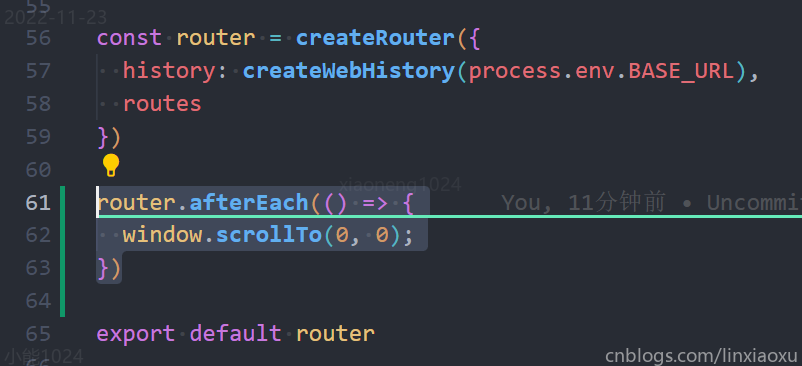
// 跳转后自动返回页面顶部

router.afterEach(() => {window.scrollTo(0,0);

})
const router = new VueRouter({routes:[...],scrollBehavior () {// return返回期望滚动到的位置的坐标return { x: 0, y: 0 }}

})
router.beforeEach((to, from, next) => {    // chrome兼容document.body.scrollTop = 0// firefox兼容document.documentElement.scrollTop = 0// safari兼容window.pageYOffset = 0next()

})
Golang Gin
structs/game.go
package structs

type Game struct {

	ID       int64   `db:"id" json:"id"`

	Title    string  `db:"title" json:"title"`

	Text     string  `db:"text" json:"text"`

	Img      string  `db:"img" json:"img"`

	Author   string  `db:"author" json:"author"`

	Category string  `db:"category" json:"category"`

	Price    float64 `db:"price" json:"price"`

}
controller/game.go
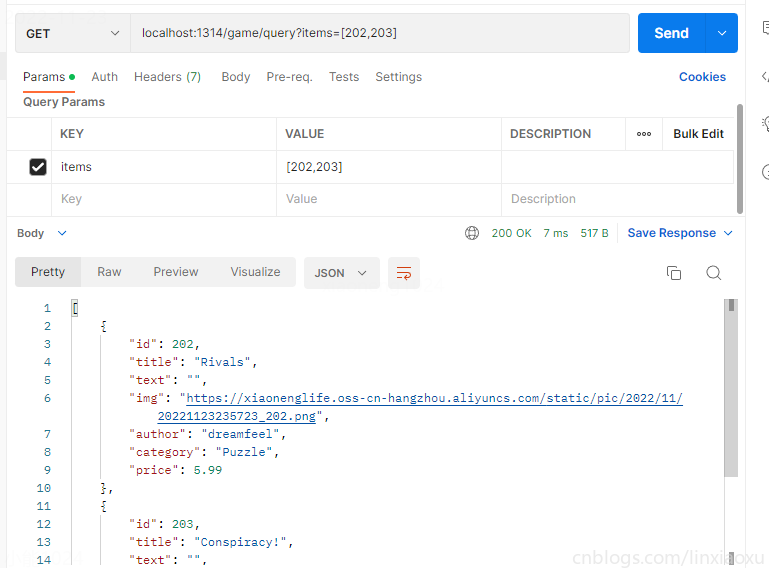
package controller

import (

	"encoding/json"

	"fmt"

	"github.com/gin-gonic/gin"

	"wolflong.com/vue_gin/structs"

	"wolflong.com/vue_gin/variable"

)

func QueryGame(c *gin.Context) {

	db := variable.DB

	items_ := c.Query("items")

	var items []int64

	err := json.Unmarshal([]byte(items_), &items)

	if err != nil || len(items) == 0 {

		c.JSON(501, gin.H{

			"message": "failure items",

		})

		c.Abort()

		return

	}

	// fmt.Println(items)

	stmt := `select id,title,author,category,img,price from game where id in (`

	for i, v := range items {

		stmt += fmt.Sprintf("%d", v)

		if i != len(items)-1 {

			stmt += ","

		}

	}

	stmt += ")"

	rows, err := db.Query(stmt)

	checkError(err)

	defer rows.Close()

	var res []structs.Game

	for rows.Next() {

		var c structs.Game

		err = rows.Scan(&c.ID, &c.Title, &c.Author, &c.Category, &c.Img, &c.Price)

		checkError(err)

		res = append(res, c)

	}

	c.JSON(200, res)

}
router/router.go
新增路由
game := r.Group("/game")

{

    game.GET("/query", controller.QueryGame)

}
Mysql 建表
DROP DATABASE VUE;

create database if not exists vue;

use vue;

CREATE TABLE gameblog (

  id INT PRIMARY KEY AUTO_INCREMENT,

  title VARCHAR(255),

  text VARCHAR(255),

  img VARCHAR(255)

);

insert into gameblog(title,text,img) values

("Games of the Month: surrealist solitaire puzzles","What’s that? You need more games? I hear you, anonymous hapi fan.We’ve reached the part of the year when games start coming out fast","https://xiaonenglife.oss-cn-hangzhou.aliyuncs.com/static/pic/2022/11/20221102184434_1.jpg"),

("Games of the Month: Puzzles!","Sometimes you need a good puzzle game, just something to throw all of your attention at and ignore anything else going on. Well if that sometime for you is right now, then you’re in luck because in this Games of the Month","https://xiaonenglife.oss-cn-hangzhou.aliyuncs.com/static/pic/2022/11/20221102184434_2.jpg"),

("The next hapi Creator Day is July 29th!","I don’t think I’m allowed to make the entire body of this post “Thenext itch.io Creator Day is taking place on Friday July 29th.” I mean it’s true, we are hosting the next itch.io Creator Day on Friday July 29th but I should probably write more here.","https://xiaonenglife.oss-cn-hangzhou.aliyuncs.com/static/pic/2022/11/20221102184434_3.jpg");

select * from gameblog;

drop table if exists game;

CREATE TABLE game (

  id INT PRIMARY KEY AUTO_INCREMENT,

  title VARCHAR(255),

  text VARCHAR(255),

  img VARCHAR(255),

  author VARCHAR(255) default "", # TODO ID

  category VARCHAR(255) default "", # TODO ID

  price decimal(6,2) default 0,

  web boolean default 0

  # TODO 发布时间

  # TODO 浏览量

  # TODO 评论量

  # TODO 热度综合指标

);

CREATE TABLE tag (

  id INT PRIMARY KEY AUTO_INCREMENT,

  title VARCHAR(255)

);

CREATE TABLE gametag (

  gameid INT,

  tagid INT

);

# TODO 外键

insert into game(id,title,author,category,text,img,price,web) values

(1,"Late Night Mop","","","A haunted house cleaning simulator.","https://xiaonenglife.oss-cn-hangzhou.aliyuncs.com/static/pic/2022/11/20221102193135_1.png",0,0),

(2,"an average day at the cat cafe","A haunted house cleaning simulator.","","","https://xiaonenglife.oss-cn-hangzhou.aliyuncs.com/static/pic/2022/11/20221102193135_2.png",0,1),

(3,"Corebreaker","A fast-paced action-platform shooter game with roguelike elements.","","","https://xiaonenglife.oss-cn-hangzhou.aliyuncs.com/static/pic/2022/11/20221102193135_3.png",19.99,0),

(4,"Atuel","Traverse a surrealist landscape inspired by the Atuel River in Argentina.","","","https://xiaonenglife.oss-cn-hangzhou.aliyuncs.com/static/pic/2022/11/20221102193135_5.png",0,0),

(201,"Family","Tim Sheinman","Puzzle","TEST","https://xiaonenglife.oss-cn-hangzhou.aliyuncs.com/static/pic/2022/11/20221123235723_201.png",2.99,0),

(202,"Rivals","dreamfeel","Puzzle","TEST","https://xiaonenglife.oss-cn-hangzhou.aliyuncs.com/static/pic/2022/11/20221123235723_202.png",5.99,0),

(203,"Conspiracy!","Tim Sheinman","Puzzle","TEST","https://xiaonenglife.oss-cn-hangzhou.aliyuncs.com/static/pic/2022/11/20221123235723_203.png",4.99,0),

(204,"Riley & Rochelle","Nolski","Puzzle","TEST","https://xiaonenglife.oss-cn-hangzhou.aliyuncs.com/static/pic/2022/11/20221123235723_204.png",14.99,0)

;

select * from game;

insert into tag values

(1,"Difficult"),

(2,"Fast-Paced");

insert into gametag values

(3,1),

(3,2),

(4,1);

DELIMITER $$

CREATE PROCEDURE gamelist()

BEGIN

	# TODO

END $$

DELIMITER ;

select a.title,a.text,img,price,web,if(group_concat(c.title separator "#") is null ,"", group_concat(c.title separator "#")) as tag from game a left join gametag b on a.id = b.gameid left join tag c on b.tagid = c.id group by a.id;

drop table if exists users;

drop table if exists comments;

create table users(

id int primary key auto_increment,

uid varchar(255),

name varchar(255),

password varchar(255)

);

create table comments(

id int primary key auto_increment,

uid int,

text mediumtext,

pid int,

date long

);

insert into users(uid,name,password) values

("1001","admin","123456"),

("1002","玉米炖萝卜","123456"),

("1003","西红柿炒番茄","123456");

INSERT INTO comments(id, uid, text, pid, date) VALUES (1, 1003, 'asdmoapsdasopdnopasdopasopdas localstorage', 100, 1666107328334);

INSERT INTO comments(id, uid, text, pid, date) VALUES (2, 1003, 'asdmoapsdasopdnopasdopasopdas localstorage', 100, 1666107328836);

INSERT INTO comments(id, uid, text, pid, date)  VALUES (3, 1003, 'asdmoapsdasopdnopasdopasopdas localstorage', 100, 1666107329459);

INSERT INTO comments(id, uid, text, pid, date)  VALUES (4, 1001, 'asdmoapsdasopdnopasdopasopdas localstorage', 100, 1666107331864);

INSERT INTO comments(id, uid, text, pid, date)  VALUES (5, 1001, 'asdmoapsdasopdnopasdopasopdas localstorage', 100, 1666107332720);

INSERT INTO comments(id, uid, text, pid, date)  VALUES (6, 1002, '你好', 100, 1666107337646);

select * from users;

select * from comments;

select * from game;

drop table if exists posts;

create table posts(

id int primary key auto_increment,

bgcolor varchar(7),

textcolor varchar(7),

headimg varchar(255),

videosrc varchar(255),

imgs mediumtext,

html mediumtext

);

insert into posts(id,bgcolor,textcolor,headimg,videosrc,imgs,html) values

(

100,

"#E8E1BC",

"#2f5b71",

"https://xiaonenglife.oss-cn-hangzhou.aliyuncs.com/static/pic/2022/11/20221109232741_head.png",

"https://www.youtube.com/embed/zGGTLStyKX0",

'["https://xiaonenglife.oss-cn-hangzhou.aliyuncs.com/static/pic/2022/11/20221109233251_1.png",

"https://xiaonenglife.oss-cn-hangzhou.aliyuncs.com/static/pic/2022/11/20221109233256_4.png",

"https://xiaonenglife.oss-cn-hangzhou.aliyuncs.com/static/pic/2022/11/20221109233253_2.png",

"https://xiaonenglife.oss-cn-hangzhou.aliyuncs.com/static/pic/2022/11/20221109233255_3.png",

"https://xiaonenglife.oss-cn-hangzhou.aliyuncs.com/static/pic/2022/11/20221109233258_5.png"]

',

'<div class="m-4 text-xl font-bold">

      A sound reverberated from beyond the ocean.

    </div>

    <div class="ml-4 mt-6">

      At the edge of a desolate island, pick up what the waves wash ashore to

      make instruments. Use those instruments to answer the echoes heard from

      beyond the ocean. In this hand-drawn world, enjoy a soothing soundscape

      formed by waves, footsteps and the sounds made from things washed up.

    </div>

    <img

      src="https://xiaonenglife.oss-cn-hangzhou.aliyuncs.com/static/pic/2022/11/20221109231919_play.gif"

      class="w-full mt-6 px-4"

    />

    <div class="ml-4 mt-6">

      Resonance of the Ocean is a short adventure game you can play in 10 ~

      30min. This game was made in the 22nd unity1week, a Japanese game jam

      event. This version is updated with an English localization and with small

      changes. In unity1week, this game placed 4th in the overall ranking, and

      1st for art and sound.

    </div>

    <div class="m-4 mt-6 text-xl font-bold">Controls</div>

    <div class="ml-4 mt-6">

      This game only supports keyboard controls.

      <ul class="list-disc ml-6 mt-2">

        <li>Arrow Keys: Move</li>

        <li>Space Key(Or ZXC): Confirm</li>

        <li>ZXC Keys: pick up, replace, throw, search</li>

      </ul>

    </div>

    <div class="m-4 mt-6 text-xl font-bold">Save Function</div>

    <div class="ml-4 mt-6">

      There is no save function available as the time required to complete the

      game is short (10 ~ 30 min). Thank you for your understanding.

    </div>'

),

(

101,

"#FFFFFF",

"#000000",

"https://xiaonenglife.oss-cn-hangzhou.aliyuncs.com/static/pic/2022/11/20221110004301_head2.png",

"https://www.youtube.com/embed/vddlEmrbNRw",

'["https://xiaonenglife.oss-cn-hangzhou.aliyuncs.com/static/pic/2022/11/20221110004259_7.png",

"https://xiaonenglife.oss-cn-hangzhou.aliyuncs.com/static/pic/2022/11/20221110004259_8.png",

"https://xiaonenglife.oss-cn-hangzhou.aliyuncs.com/static/pic/2022/11/20221110004259_9.png",

"https://xiaonenglife.oss-cn-hangzhou.aliyuncs.com/static/pic/2022/11/20221110004259_10.png"]

',

'

<div class="ml-4 mt-6">

      The past and future cannot be explored alone! Team up with a friend and

      piece together the mysteries surrounding Albert Vanderboom. Communicate

      what you see around you to help one another solve various puzzles and

      explore the worlds from different perspectives!

    </div>

    <div class="ml-4 mt-6">

      The Past Within is the first <a class="underline">co-op</a> only

      point-and-click adventure set in the mysterious world of Rusty Lake.

    </div>

    <div class="m-4 mt-6 text-xl font-bold">Features</div>

    <div class="ml-4 mt-6">

      <ul class="list-disc ml-6 mt-2">

        <li class="font-bold">A co-op experience</li>

        Play together with a friend, one in The Past, the other in The Future.

        Work together to solve the puzzles and help Rose set her father’s plan

        in motion!

        <li class="font-bold">Two worlds - Two perspectives</li>

        Both players will experience their environments in two different

        dimensions: 2D as well as in 3D - a first-time experience in the Rusty

        Lake universe!

        <li class="font-bold">Cross-platform play</li>

        As long as you can communicate with each other, you and your partner of

        choice can each play The Past Within on your preferred platform: PC,

        Mac, iOS, Android and (very soon) Nintendo Switch!

        <li class="font-bold">Playtime & Replayability</li>

        The game contains 2 chapters and has an average play-time of 2 hours.

        For the full experience, we recommend replaying the game from the other

        perspective. Plus you can use our replayability feature for a fresh

        start with new solutions to all puzzles.

      </ul>

    </div>

    '

),

(

201,

"#FFFFFF",

"#000000",

"https://xiaonenglife.oss-cn-hangzhou.aliyuncs.com/static/pic/2022/11/20221123235723_201.png",

"https://www.youtube.com/embed/vddlEmrbNRw",

'["https://xiaonenglife.oss-cn-hangzhou.aliyuncs.com/static/pic/2022/11/20221110004259_7.png",

"https://xiaonenglife.oss-cn-hangzhou.aliyuncs.com/static/pic/2022/11/20221110004259_8.png",

"https://xiaonenglife.oss-cn-hangzhou.aliyuncs.com/static/pic/2022/11/20221110004259_9.png",

"https://xiaonenglife.oss-cn-hangzhou.aliyuncs.com/static/pic/2022/11/20221110004259_10.png"]

',

'

<div class="ml-4 mt-6">

	测试测试测试

    </div>

    '

),

(

202,

"#FFFFFF",

"#000000",

"https://xiaonenglife.oss-cn-hangzhou.aliyuncs.com/static/pic/2022/11/20221123235723_202.png",

"https://www.youtube.com/embed/vddlEmrbNRw",

'["https://xiaonenglife.oss-cn-hangzhou.aliyuncs.com/static/pic/2022/11/20221110004259_7.png",

"https://xiaonenglife.oss-cn-hangzhou.aliyuncs.com/static/pic/2022/11/20221110004259_8.png",

"https://xiaonenglife.oss-cn-hangzhou.aliyuncs.com/static/pic/2022/11/20221110004259_9.png",

"https://xiaonenglife.oss-cn-hangzhou.aliyuncs.com/static/pic/2022/11/20221110004259_10.png"]

',

'

<div class="ml-4 mt-6">

	测试测试测试

    </div>

    '

),

(

203,

"#FFFFFF",

"#000000",

"https://xiaonenglife.oss-cn-hangzhou.aliyuncs.com/static/pic/2022/11/20221123235723_203.png",

"https://www.youtube.com/embed/vddlEmrbNRw",

'["https://xiaonenglife.oss-cn-hangzhou.aliyuncs.com/static/pic/2022/11/20221110004259_7.png",

"https://xiaonenglife.oss-cn-hangzhou.aliyuncs.com/static/pic/2022/11/20221110004259_8.png",

"https://xiaonenglife.oss-cn-hangzhou.aliyuncs.com/static/pic/2022/11/20221110004259_9.png",

"https://xiaonenglife.oss-cn-hangzhou.aliyuncs.com/static/pic/2022/11/20221110004259_10.png"]

',

'

<div class="ml-4 mt-6">

	测试测试测试

    </div>

    '

),

(

204,

"#FFFFFF",

"#000000",

"https://xiaonenglife.oss-cn-hangzhou.aliyuncs.com/static/pic/2022/11/20221123235723_204.png",

"https://www.youtube.com/embed/vddlEmrbNRw",

'["https://xiaonenglife.oss-cn-hangzhou.aliyuncs.com/static/pic/2022/11/20221110004259_7.png",

"https://xiaonenglife.oss-cn-hangzhou.aliyuncs.com/static/pic/2022/11/20221110004259_8.png",

"https://xiaonenglife.oss-cn-hangzhou.aliyuncs.com/static/pic/2022/11/20221110004259_9.png",

"https://xiaonenglife.oss-cn-hangzhou.aliyuncs.com/static/pic/2022/11/20221110004259_10.png"]

',

'

<div class="ml-4 mt-6">

	测试测试测试

    </div>

    '

)

;

select * from posts;

drop table if exists sellopts;

create table sellopts(

	id int primary key auto_increment,

	days int,

    hours int,

    minutes int,

    discount int

);

insert into sellopts(id,days,hours,minutes,discount) values

(1,29,8,20,24);

select id,bgcolor,textcolor,headimg,videosrc,imgs,html from posts where id = 100
JS 数组方法
JavaScript Array 对象 | 菜鸟教程 (runoob.com)
Gin Query
Gin之获取querystring参数_GoGo在努力的博客-CSDN博客
Gin Session
gin-contrib/sessions: Gin middleware for session management (github.com)
gin-contrib/sessions 筆記 | PJCHENder 未整理筆記
我的Vue之旅 11 Vuex 实现购物车的更多相关文章
- vue创建状态管理(vuex的store机制)
1:为什么说要是永远状态管理 在使用 Vue 框架做单页面应用时,我们时常会遇到传值,组件公用状态的问题.(子父间传值文章传送门) ,如果是简单的应用,兄弟组件之间通信还能使用 eventBus 来作 ...
- Vue之状态管理(vuex)与接口调用
Vue之状态管理(vuex)与接口调用 一,介绍与需求 1.1,介绍 1,状态管理(vuex) Vuex 是一个专为 Vue.js 应用程序开发的状态管理模式.它采用集中式存储管理应用的所有组件的状态 ...
- vue组件通信传值——Vuex
一.Vuex介绍 Vuex 是一个专为 Vue.js 应用程序开发的状态管理模式.它采用集中式存储管理应用的所有组件的状态,并以相应的规则保证状态以一种可预测的方式发生变化. Vuex 也集成到 Vu ...
- 在vue组件中使用vuex的state状态对象的5种方式
下面是store文件夹下的state.js和index.js内容 //state.js const state = { headerBgOpacity:0, loginStatus:0, count: ...
- vue(22)Vuex的安装与使用
前言 每一个 Vuex 应用的核心就是 store(仓库).store基本上就是一个容器,它包含着你的应用中大部分的状态 (state).Vuex 和单纯的全局对象有以下两点不同: Vuex 的状态存 ...
- Vue总结第六天:Vuex (全局变量管理~多个页面共享数据)
Vue总结第六天:Vuex (全局变量管理~多个页面共享数据) 目录 一.Vuex (全局变量管理~~多个页面共享数据) ✿ 更详细的可以看官网:开始 | Vuex 1.什么是Vuex? 2.核心概念 ...
- 我的Vue之旅、04 CSS媒体查询完全指南(Media Quires)
什么是SCSS Sass: Sass Basics (sass-lang.com) SCSS 是 CSS 的预处理器,它比常规 CSS 更强大. 可以嵌套选择器,更好维护.管理代码. 可以将各种值存储 ...
- 我的Vue之旅 06 超详细、仿 itch.io 主页设计(Mobile)
第二期 · 使用 Vue 3.1 + TypeScript + Router + Tailwind.css 仿 itch.io 平台主页. 我的主题 HapiGames 是仿 itch.io 的 in ...
- vue学习六之vuex
由于状态零散地分布在许多组件和组件之间的交互中,大型应用复杂度也经常逐渐增长.为了解决这个问题,Vue 提供 vuex. 什么是Vuex Vuex 是一个专为 Vue.js 应用程序开发的状态管理模式 ...
- Vue 状态管理之vuex && {mapState,mapGetters}
1 # 一.理解vuex 2 1.概念:专门在Vue中实现集中式状态(数据)管理的一个Vue插件,对vue应用中多个组件的共享状态进行集中式的管理(读写),也是一种组件间通信的方式,且适用于任意组件间 ...
随机推荐
- 如何结合整洁架构和MVP模式提升前端开发体验(二) - 代码实现篇
上一篇文章介绍了整体架构,接下来说说怎么按照上图的分层结构实现下面的增删改查的功能. 代码结构 vue userManage └── List ├── api.ts ├── EditModal │ ├ ...
- centos7换清华源
一 删除其他源 cd /etc/yum.repos.d/ 二 创建源 vim CentOS-Base.repo # CentOS-Base.repo # # The mirror system use ...
- 使用Pipeline抽象业务生命周期流程
上篇关于流程引擎的文章还是快两年以前的<微服务业务生命周期流程管控引擎>,这中间各种低代码平台层出不穷,虽然有些仅仅是OA+表单的再度包装,但有些的确是在逻辑和操作单元层面进行了真正的高度 ...
- [Python]-sklearn模块-机器学习Python入门《Python机器学习手册》-02-加载数据:加载数据集
<Python机器学习手册--从数据预处理到深度学习> 这本书类似于工具书或者字典,对于python具体代码的调用和使用场景写的很清楚,感觉虽然是工具书,但是对照着做一遍应该可以对机器学习 ...
- 关于指针初始化为NULL的一些问题
关于指针初始化问题,先看以下代码: #include <stdio.h>typedef struct{ char data[128]; int top;} Stack;voi ...
- ProxySQL 使用情况报错问题汇总及解决办法
1.ProxySQL Error: connection is locked to hostgroup 2 but trying to reach hostgroup 1 解决方案:登上proxysq ...
- Kubernetes 版本升级之路
把一个集群从1.22版升级到1.23版. 前提条件 确保备份所有重要组件,例如存储在数据库中的应用状态.Kubernetes 升级不涉及正常的工作负载,只涉及与 Kubernetes 相关的组件,但备 ...
- 使用MinIO中暂未解决的问题
时间显示问题 web页面上创建桶的时间跟使用SDK获取的时间不一样,相差8个小时,但是mc命令行客户端获取的时间跟web上的一样
- 图解 Kubernetes Ingress
文章转载自:https://www.qikqiak.com/post/visually-explained-k8s-ingress/ 原文链接: https://codeburst.io/kubern ...
- 天翼云上新增IP备案具体操作步骤
0.点击右上角的备案,进入到备案中心 1.已备案信息管理 点击左侧的已备案信息管理,右侧出现的页面中找到已备案网站信息,网站负责人后面的操作里有5个图标,点击第三个(变更接入),提交订单,进入到下一步 ...