
根据官方文档使用Visual Studio Code创建代码组件的一些总结
1、安装组件Visual Studio Code
Download Visual Studio Code - Mac, Linux, Windows
2、安装Node.js
Download | Node.js (nodejs.org)
3、安装Microsoft Power Platform CLI可以在Visual Studio Code的扩展安装
Microsoft Power Platform CLI - Power Apps | Microsoft Docs
下载后会提示是否打开Visual Studio Code
在cmd中运行
创建名为“LinearInput”文件夹
mkdir LinearInput
在 Visual Studio Code 中打开文件夹。最快的启动方法是在项目目录中使用命令提示符,然后从命令提示符运行。此命令将在 Visual Studio Code 中打开组件项目。LinearInputcd LinearInputcode 注:这段没看懂
所以直接在Visual Studio Code中
文件-->打开文件夹
也是一样
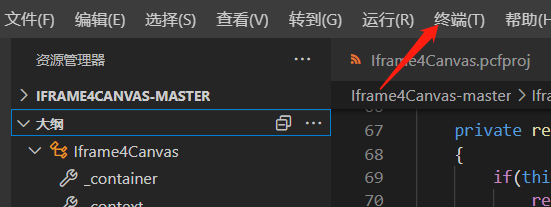
终端Running 'npm install' for you...需要先选择目录后再打开,确保是对一个目录的命令
在终端提示符下,通过使用该命令传递基本参数来创建新的组件项目。

pac pcf init --namespace SampleNamespace --name LinearInputControl --template field
会提示Running 'npm install' for you...
如果运行npm install报错或不成功可能因为没有安装Node.js
清单定义组件
namespace:代码组件的命名空间。

Constructor:代码组件的构造函数。

Version:组件的版本。每当更新组件时,都需要更新版本以查看运行时中的最新更改。

display-name-key:UI 上显示的代码组件的名称。

description-name-key:UI 上显示的代码组件的说明。

control-type:代码组件类型。仅支持标准类型的代码组件
<?xml version="1.0" encoding="utf-8" ?>

<manifest>

<control namespace="SampleNamespace" constructor="LinearInputControl" version="1.1.0" display-name-key="LinearInputControl_Display_Key" description-key="LinearInputControl_Desc_Key" control-type="standard">
属性节点
name:属性的名称。

display-name-key:UI 上显示的属性的显示名称。

description-name-key:UI 上显示的属性的说明。

of-type-group:当您希望具有两个以上的数据类型列时,将使用 of-type-group。将 of-group 元素作为同级元素添加到清单中的元素。指定组件值,可以包含整数值、货币值、浮点值或十进制值。propertyof-type-group

usage:具有两个属性:绑定和输入。绑定属性仅绑定到列的值。输入属性要么绑定到列,要么允许静态值。

required:定义属性是否为必需属性。
<property name="controlValue" display-name-key="controlValue_Display_Key" description-key="controlValue_Desc_Key" of-type-group="numbers" usage="bound" required="true" />
代码:指所有资源文件所在的路径。
<resources>

   <code path="index.ts" order="1" />

   <css path="css/LinearInputControl.css" order="1" />

</resources>
如果写官方的示例的话可以直接直接将此ControlManifest.Input.xml文件写
<?xml version="1.0" encoding="utf-8" ?>

<manifest>

  <control namespace="SampleNamespace" constructor="LinearInputControl" version="1.1.0" display-name-key="LinearInputControl_Display_Key" description-key="LinearInputControl_Desc_Key" control-type="standard">

       <type-group name="numbers">

           <type>Whole.None</type>

           <type>Currency</type>

           <type>FP</type>

           <type>Decimal</type>

       </type-group>

       <property name="controlValue" display-name-key="controlValue_Display_Key" description-key="controlValue_Desc_Key" of-type-group="numbers" usage="bound" required="true" />

    <resources>

      <code path="index.ts" order="1" />

      <css path="css/LinearInputControl.css" order="1" />

    </resources>

  </control>

</manifest>
修改index.ts文件会报一些错误但是可以忽略,可以继续执行,执行正常的话错误没有影响
import { IInputs, IOutputs } from "./generated/ManifestTypes";

export class LinearInputControl implements ComponentFramework.StandardControl<IInputs, IOutputs> {

    private _value: number;

    private _notifyOutputChanged: () => void;

    private labelElement: HTMLLabelElement;

    private inputElement: HTMLInputElement;

    private _container: HTMLDivElement;

    private _context: ComponentFramework.Context<IInputs>;

    private _refreshData: EventListenerOrEventListenerObject;

    public init(context: ComponentFramework.Context<IInputs>, notifyOutputChanged: () => void, state: ComponentFramework.Dictionary, container: HTMLDivElement): void {

        this._context = context;

        this._container = document.createElement("div");

        this._notifyOutputChanged = notifyOutputChanged;

        this._refreshData = this.refreshData.bind(this);

        // creating HTML elements for the input type range and binding it to the function which refreshes the control data

        this.inputElement = document.createElement("input");

        this.inputElement.setAttribute("type", "range");

        this.inputElement.addEventListener("input", this._refreshData);

        //setting the max and min values for the control.

        this.inputElement.setAttribute("min", "1");

        this.inputElement.setAttribute("max", "1000");

        this.inputElement.setAttribute("class", "linearslider");

        this.inputElement.setAttribute("id", "linearrangeinput");

        // creating a HTML label element that shows the value that is set on the linear range control

        this.labelElement = document.createElement("label");

        this.labelElement.setAttribute("class", "LinearRangeLabel");

        this.labelElement.setAttribute("id", "lrclabel");

        // retrieving the latest value from the control and setting it to the HTMl elements.

        this._value = context.parameters.controlValue.raw!;

        this.inputElement.setAttribute("value", context.parameters.controlValue.formatted ? context.parameters.controlValue.formatted : "0");

        this.labelElement.innerHTML = context.parameters.controlValue.formatted ? context.parameters.controlValue.formatted : "0";

        // appending the HTML elements to the control's HTML container element.

        this._container.appendChild(this.inputElement);

        this._container.appendChild(this.labelElement);

        container.appendChild(this._container);

    }

    public refreshData(evt: Event): void {

        this._value = (this.inputElement.value as any) as number;

        this.labelElement.innerHTML = this.inputElement.value;

        this._notifyOutputChanged();

    }

    public updateView(context: ComponentFramework.Context<IInputs>): void {

        // storing the latest context from the control.

        this._value = context.parameters.controlValue.raw!;

        this._context = context;

        this.inputElement.setAttribute("value", context.parameters.controlValue.formatted ? context.parameters.controlValue.formatted : "");

        this.labelElement.innerHTML = context.parameters.controlValue.formatted ? context.parameters.controlValue.formatted : "";

    }

    public getOutputs(): IOutputs {

        return {

            controlValue: this._value

        };

    }

    public destroy(): void {

        this.inputElement.removeEventListener("input", this._refreshData);

    }

}
官方的
样式:
需要在根目录下创建一个css文件夹然后添加LinearInputControl.css
.SampleNamespace\.LinearInputControl input[type=range].linearslider {

    margin: 1px 0;

    background:transparent;

    -webkit-appearance:none;

    width:100%;padding:0;

    height:24px;

    -webkit-tap-highlight-color:transparent

}

.SampleNamespace\.LinearInputControl input[type=range].linearslider:focus {

    outline: none;

}

.SampleNamespace\.LinearInputControl input[type=range].linearslider::-webkit-slider-runnable-track {

    background: #666;

    height:2px;

    cursor:pointer

}

.SampleNamespace\.LinearInputControl input[type=range].linearslider::-webkit-slider-thumb {

    background: #666;

    border:0 solid #f00;

    height:24px;

    width:10px;

    border-radius:48px;

    cursor:pointer;

    opacity:1;

    -webkit-appearance:none;

    margin-top:-12px

}

.SampleNamespace\.LinearInputControl input[type=range].linearslider::-moz-range-track {

    background: #666;

    height:2px;

    cursor:pointer

}

.SampleNamespace\.LinearInputControl input[type=range].linearslider::-moz-range-thumb {

    background: #666;

    border:0 solid #f00;

    height:24px;

    width:10px;

    border-radius:48px;

    cursor:pointer;

    opacity:1;

    -webkit-appearance:none;

    margin-top:-12px

}

.SampleNamespace\.LinearInputControl input[type=range].linearslider::-ms-track {

    background: #666;

    height:2px;

    cursor:pointer

}

.SampleNamespace\.LinearInputControl input[type=range].linearslider::-ms-thumb {

    background: #666;

    border:0 solid #f00;

    height:24px;

    width:10px;

    border-radius:48px;

    cursor:pointer;

    opacity:1;

    -webkit-appearance:none;

}
这个名字和xml里的相对应
<resources>

  <code path="index.ts" order="1"/>

  <css path="css/LinearInputControl.css" order="1"/>

</resources>
生成代码组件
npm run build
调试代码组件
npm start watch
打包:创建解决方案文件后生成压缩文件
在根目录下创建文件夹:Solutions
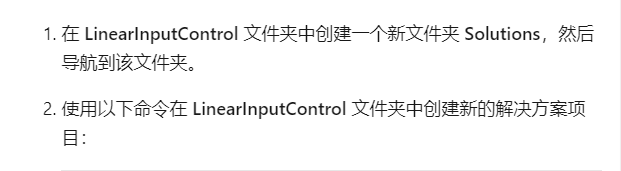
pac solution init --publisher-name Samples --publisher-prefix samples
此命令会在文件夹中创建解决方案的必要文件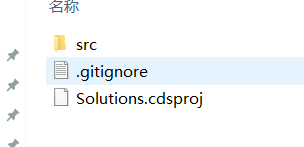
创建完成后执行此命令 path..\:为根目录需要指向cdsproj文件目录
pac solution add-reference --path ..\
注:指向Solutions文件夹的话会显示找不到cdsproj的datavarse文件
可以在根目录中执行创建解决方案的命令
然后指向根目录
生成zip文件命令有两个
msbuild /t:restore
dotnet build
如果有.NET 5 SDK的话可以使用第二个
第一个我没有使用成功过
最后执行
msbuild
压缩包在bin--Debug下
然后在powerapp中导入解决方案,指向生成的压缩包就可以了
根据官方文档使用Visual Studio Code创建代码组件的一些总结的更多相关文章
- Visual Studio Code创建C#项目
Visual Studio Code是一个支持跨平台的文本编辑器,同其他文本文本编辑器一样,不但占用磁盘空间小,性能也比较快:近几年由于不断的升级和许多开发者提供大量的插件,它已经成为了一个非常强大的 ...
- 使用Visual Studio Code创建第一个ASP.NET Core应用程序
全文翻译自:Your First ASP.NET Core Application on a Mac Using Visual Studio Code 这篇文章将向你展示如何在Mac上写出你的第一个A ...
- visual studio code开发代码片段扩展插件
背景 visual studio code编辑器强大在于可以自己扩展插件,不仅可以去插件市场下载,也可以按照官方的API很方便的制作适合自己的插件: 自己最近在开发一个手机端网站项目,基于vant项目 ...
- 总结在Visual Studio Code创建Node.js+Express+handlebars项目
一.安装node.js环境. Node.js安装包及源码下载地址为:https://nodejs.org/en/download/ 32 位安装包下载地址 : https://nodejs.org/d ...
- 【原创+译文】官方文档中声明的如何创建抽屉导航栏(Navigation Drawer)
如需转载请注明出处:http://www.cnblogs.com/ghylzwsb/p/5831759.html 创建一个抽屉导航栏 抽屉式导航栏是显示在屏幕的左边缘,它是应用程序的主导航选项面板.它 ...
- Visual Studio Code create the aps.net core project(Visual Studio Code 创建asp.net core项目)
Install the C# plug-in as shown below: Perfom the dotnet new --help command as shown below: Enter a ...
- Visual Studio Code python 代码快速自动提示
1.file --> setting->设置 搜索 python 或者auto_complete setting.json { "explorer.confirmDelete&q ...
- Visual Studio Code - 同步代码时使用 rebase
打开设置 设置"git.rebaseWhenSync": true
- Visual Studio Code 折叠代码快捷键
为了快速阅读不熟悉的代码, 最好可以打开一个文件能先将具体实现折叠起来的,进行一个大概的认识,vscode中有这些折叠快捷键: ctrl+shift+[是折叠 ctrl+k ctrl+0 是折叠全部 ...
随机推荐
- QQ聊天记录快速迁移
QQ聊天记录快速迁移 在工作中大家经常会用到QQ来沟通,但是很多时候在其它设备上登录QQ就无法查看到之前的聊天记录和图片,这是因为电脑上的QQ聊天记录一般都是保存在电脑本地硬盘里,所以我们在换设备登录 ...
- CF1453D题解
VP 的时候发现的一道数学题( 在思考这个问题之前,先让我们思考一件事:走到距离上一个存档点 \(n\) 的位置的期望是多少?(假设这个值为 \(f[n]\)) 先思考 \(f[1]\) 是多少,很明 ...
- LGP6156题解
真·简单题 题目大意 给定 \(n\) 和 \(k\),求出这个柿子的值: \[\sum_{i=1}^n\sum_{j=1}^n(i+j)^k\mu^2(\gcd(i,j)gcd(i,j) \] 按照 ...
- 【基础】tail命令查看日志
一.tail 命令介绍 tail 命令可以将文件指定位置到文件结束的内容写到标准输出. 如果你不知道tail命令怎样使用,可以在命令行执行命令tail --help就能看到tail命令介绍和详细的参数 ...
- Android 12(S) 图形显示系统 - BufferQueue的工作流程(九)
题外话 Covid-19疫情的强烈反弹,小区里检测出了无症状感染者.小区封闭管理,我也不得不居家办公了.既然这么大把的时间可以光明正大的宅家里,自然要好好利用,八个字 == 努力工作,好好学习 一.前 ...
- 敏捷开发之Scrum方法运用
目前软件开发除了强调产品质量,同时对产品能够快速发布并且迅速适应市场变化的要求也日益强烈.为适应这种开发环境和市场需求,传统的软件开发模式已被敏捷开发模式所替代.本文介绍敏捷软件开发中的Scrum方法 ...
- PLSQL导出Oracle表结构
tools->export tables 是导出表结构还有数据 tools->export user objects是导出表结构 可以用tools->export tables ...
- chili
靶机准备 首先将靶机ova文件导入 网络模式改为NAT 扫描ip netdiscover -r 192.168.164.0/24 kali:192.168.164.137 渗透测试 扫描端口 nmap ...
- STM32控制永磁同步电机 | FOC电机控制算法概述
1. FOC基本概念 参考:https://www.sohu.com/a/432103720_120929980 FOC(field-oriented control)为磁场导向控制,又称为矢量控制( ...
- CF1500D Tiles for Bathroom (递推+大讨论)
题目大意:给你一个n*n的矩阵,现在问对于每个k\le n,求出所有k*k的子矩阵中,元素种类数不超过q的矩阵个数,n\le 1500, q\le 10 先考虑最暴力的做法: 对于每个格子,求出以它为 ...