
Django + mysql 快速搭建简单web投票系统
了解学习pyhton web的简单demo
1. 安装Django, 安装pyhton 自行百度
2. 执行命令创建project django-admin.py startproject mysite
3. 执行命令创建app python manage.py startapp polls
目录结构: polls/templates/polls 目录 和 polls/admin.py 都是自己手动创建的。
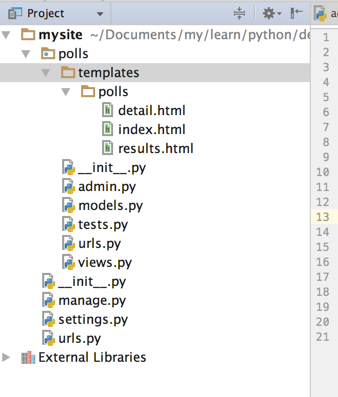
4. 编辑setting.py 添加app polls 同时打开admin
INSTALLED_APPS = (

    'django.contrib.auth',

    'django.contrib.contenttypes',

    'django.contrib.sessions',

    'django.contrib.sites',

    'django.contrib.messages',

    'django.contrib.staticfiles',

    'polls',

    # Uncomment the next line to enable the admin:

    'django.contrib.admin',

    # Uncomment the next line to enable admin documentation:

    # 'django.contrib.admindocs',

)
5. 编辑setting.py 添加数据库连接信息
DATABASES = {

    'default': {

        'ENGINE': 'django.db.backends.mysql', # Add 'postgresql_psycopg2', 'postgresql', 'mysql', 'sqlite3' or 'oracle'.

        'NAME': 'polls',                      # Or path to database file if using sqlite3.

        'USER': 'root',                      # Not used with sqlite3.

        'PASSWORD': '123',                  # Not used with sqlite3.

        'HOST': '',                      # Set to empty string for localhost. Not used with sqlite3.

        'PORT': '',                      # Set to empty string for default. Not used with sqlite3.

    }

}
6. 创建Modle模型 :
# coding=utf-8

from django.db import models

# Create your models here.

class Question(models.Model):

    question_text = models.CharField(max_length=200)

    pub_date = models.DateTimeField('date published')

    def __unicode__(self):

        return self.question_text

class Choice(models.Model):

    question = models.ForeignKey(Question)

    choice_text = models.CharField(max_length=200)

    votes = models.IntegerField(default=0)

    def __unicode__(self):

        return self.choice_text
7. 执行数据库同步 (ORM)自动根据model定义创建表接口 (我这里使用的mysql)
首先创建数据库
create database polls;
然后执行命令:
python manage.py syncdb
8. 检查数据库中表的创建:
use polls
show tables
9. 创建admin.py
# coding=utf-8

from django.contrib import admin

from .models import Question, Choice

# Register your models here.

class ChoiceInline(admin.TabularInline):

    model = Choice

    extra = 3

class QuestionAdmin(admin.ModelAdmin):

    fieldsets = [

        (None,               {'fields': ['question_text']}),

        ('Date information', {'fields': ['pub_date'], 'classes': ['collapse']}),

    ]

    inlines = [ChoiceInline]

    list_display = ('question_text', 'pub_date')

admin.site.register(Choice)

admin.site.register(Question, QuestionAdmin)
10. 启动应用
python manage.py runserver
登录后台:http://127.0.0.1:8000/admin 通过Django自动的后台进行问题添加
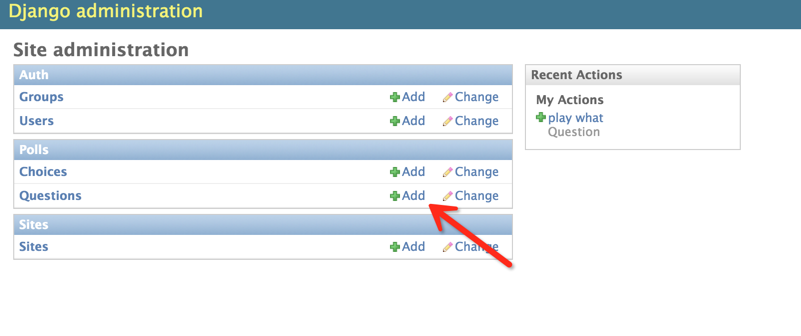
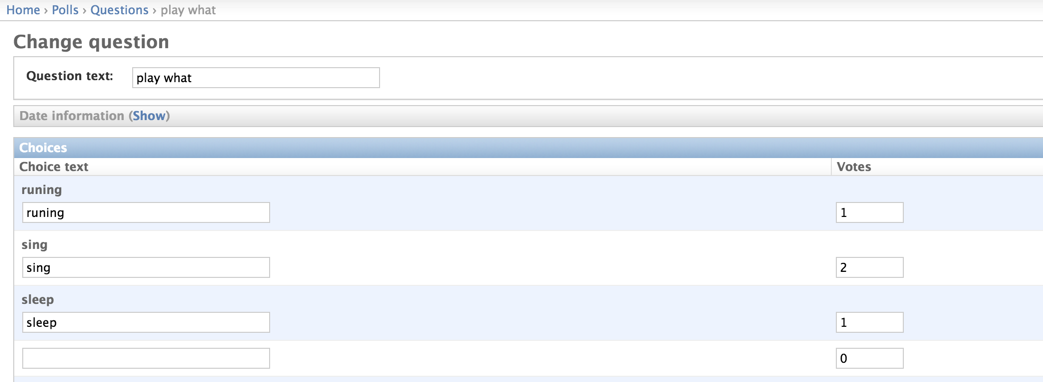
11. 编写视图控制层
视图起着承前启后的作用,前是指前端页面,后是指后台数据库。将数据库表中的内容查询出来显示到页面上。
编写polls/views.py文件:
# coding=utf-8

from django.shortcuts import render, get_object_or_404

from django.http import HttpResponseRedirect, HttpResponse

from django.core.urlresolvers import reverse

from .models import Question, Choice

# Create your views here.

# 首页展示所有问题

def index(request):

    # latest_question_list2 = Question.objects.order_by('-pub_data')[:2]

    latest_question_list = Question.objects.all()

    context = {'latest_question_list': latest_question_list}

    return render(request, 'polls/index.html', context)

# 查看所有问题

def detail(request, question_id):

    question = get_object_or_404(Question, pk=question_id)

    return render(request, 'polls/detail.html', {'question': question})

# 查看投票结果

def results(request, question_id):

    question = get_object_or_404(Question, pk=question_id)

    return render(request, 'polls/results.html', {'question': question})

# 选择投票

def vote(request, question_id):

    p = get_object_or_404(Question, pk=question_id)

    try:

        selected_choice = p.choice_set.get(pk=request.POST['choice'])

    except (KeyError, Choice.DoesNotExist):

        # Redisplay the question voting form.

        return render(request, 'polls/detail.html', {

            'question': p,

            'error_message': "You didn't select a choice.",

        })

    else:

        selected_choice.votes += 1

        selected_choice.save()

        # Always return an HttpResponseRedirect after successfully dealing

        # with POST data. This prevents data from being posted twice if a

        # user hits the Back button.

        return HttpResponseRedirect(reverse('polls:results', args=(p.id,)))
12. 配置视图展示层与逻辑控制层url映射
url是一个请求配置文件,页面中的请求转交给由哪个函数处理,由该文件决定。
首先配置polls/urls.py(该文件需要创建)
from django.conf.urls import url

from . import views

urlpatterns = [

    # ex : /polls/

    url(r'^$', views.index, name='index'),

    # ex : /polls/5/

    url(r'^(?P<question_id>[0-9]+)/$', views.detail, name='detail'),

    # ex : /polls/5/results/

    url(r'^(?P<question_id>[0-9]+)/results/$', views.results, name='results'),

    # ex : /polls/5/vote

    url(r'^(?P<question_id>[0-9]+)/vote/$', views.vote, name='vote'),

]
接着,编辑mysite/urls.py文件。
from django.conf.urls import include, url

from django.contrib import admin

urlpatterns = [

    url(r'^polls/', include('polls.urls', namespace="polls")),

    url(r'^admin/', include(admin.site.urls)),

]
13. 创建视图模板
模板就是前端页面,用来将数据显示到web页面上。
首先创建polls/templates/polls/目录,分别在该目录下创建index.html、detail.html和results.html文件。
index.html
{% if latest_question_list %}

    <ul>

    {% for question in latest_question_list %}

        <li><a href="{% url polls:detail question.id %}">{{ question.question_text }}</a></li>

    {% endfor %}

    </ul>

{% else %}

    <p>No polls are available.</p>

{% endif %}
detail.html
<h1>{{ question.question_text }}</h1>

{% if error_message %}<p><strong>{{ error_message }}</strong></p>{% endif %}

<form action="{% url polls:vote question.id %}" method="post">

{% csrf_token %}

{% for choice in question.choice_set.all %}

    <input type="radio" name="choice" id="choice{{ forloop.counter }}" value="{{ choice.id }}" />

    <label for="choice{{ forloop.counter }}">{{ choice.choice_text }}</label><br />

{% endfor %}

<input type="submit" value="Vote" />

</form>
results.html
<h1>{{ question.question_text }}</h1>

<ul>

{% for choice in question.choice_set.all %}

    <li>{{ choice.choice_text }} -- {{ choice.votes }} vote{{ choice.votes|pluralize }}</li>

{% endfor %}

</ul>

<a href="{% url polls:detail question.id %}">Vote again?</a>
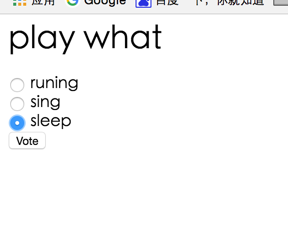
14. 启动web容器,访问:http://127.0.0.1:8000/polls/


Django + mysql 快速搭建简单web投票系统的更多相关文章
- 使用Django快速搭建简单的数据管理后台
使用Django快速搭建简单的数据管理后台 概述 需求描述: 数据表已建好,能可视化操作增删改查,避免直接操作数据库 简版的管理系统 环境 Windows 10 x64 Python 3.6.3 (A ...
- 快速搭建应用服务日志收集系统(Filebeat + ElasticSearch + kibana)
快速搭建应用服务日志收集系统(Filebeat + ElasticSearch + kibana) 概要说明 需求场景,系统环境是CentOS,多个应用部署在多台服务器上,平时查看应用日志及排查问题十 ...
- koa2+koa-generator+mysql快速搭建nodejs服务器
koa2+koa-generator+mysql快速搭建nodejs服务器 用koa的脚手架koa-generator可以快速生成项目骨架,可以用于发开或者测试接口 https://github.co ...
- 拿nodejs快速搭建简单Oauth认证和restful API server攻略
拿nodejs快速搭建简单Oauth认证和restful API server攻略:http://blog.csdn.net/zhaoweitco/article/details/21708955 最 ...
- 使用docker快速搭建Permeate渗透测试系统实践
一.背景 笔者最近在做一场Web安全培训,其中需要搭建一套安全测试环境:在挑选渗透测试系统的时候发现permeate渗透测试系统比较满足需求,便选择了此系统:为了简化这个步骤,笔者将系统直接封装到了d ...
- 巨杉Tech | 十分钟快速搭建 Wordpress 博客系统
介绍 很多互联网应用程序开发人员第一个接触到的网站项目就是博客系统.而全球使用最广的Wordpress常常被用户用来快速搭建个人博客网站.默认情况下,Wordpress一般在后台使用MySQL关系型数 ...
- 用python3.x与mysql数据库构建简单的爬虫系统(转)
这是在博客园的第一篇文章,由于本人还是一个编程菜鸟,也写不出那些高大上的牛逼文章,这篇文章就是对自己这段时间学习python的一个总结吧. 众所周知python是一门对初学编程的人相当友好的编程语言, ...
- 使用Node.js快速搭建简单的静态文件服务器
做前端有时会采用一些复杂框架,在文件系统中直接打开页面(用file:///方式打开),往往会报跨域的错,类似于“XMLHttpRequest cannot load ...(文件名). Cross o ...
- mysql快速搭建从库
基于mysqldump快速搭建从库 https://blog.csdn.net/leshami/article/details/44994329 使用xtrbackup克隆从库 https://blo ...
随机推荐
- leetcode 28
题目描述: Implement strStr(). Returns the index of the first occurrence of needle in haystack, or -1 if ...
- MonkeyTest简单实用介绍
什么是Monkeytest? monkey测试是Android平台自动化测试的一种手段,通过Monkey程序模拟用户触摸屏幕.滑动Trackball.按键灯操作来对设备上的程序进行压力测试,检测程序发 ...
- git基本配置
用户信息 你个人的用户名称和电子邮件地址,用户名可随意修改,git 用于记录是谁提交了更新,以及更新人的联系方式. $ git config --global user.name "Donl ...
- Mac终端用Sublime打开指定文件或文件夹
首先你先把的sublime放到Application中,再确认您的Sublime的路径是否正确 1 创建别名: sudo ln -s "/Applications/Sublime\ Text ...
- php 截取代码方法(140个字后的。)
//截取摘要public static function mbsubstr($str){ $strleng = mb_strlen($str,"utf8"); $mbs ...
- Samba文件服务器详细配置步骤
准备安装 环境:CentOS 6.3_x64bit 安装:Minimal(最小) 1.配置IP地址 2.挂载:[root@localhost ~]# mount -t iso9660 /dev/cdr ...
- 验证控件,解决用于ajax提交前的验证,不是submit提交的验证
//解决ajax提交前的验证问题,主要用于onclick事件时对某一区域中(可以是form,div,table中的等)控件的验证.(function ($) { var v; //Create a n ...
- webstorm修改文件,webpack-dev-server不会自动编译刷新
重装了 webstorm ,从10升级到了2016 一升不要紧,打开老项目,开启webpakc-dev-server,然后改代码,发现浏览器不会自动刷新了!!! 这可急死我了,各种卸载webpack. ...
- 【Ngui 学习系列之一:简单组件的操作】
一.Buttonunity edit: Sprite作为父对象和背景 -- Collider -- Button script Label 作为子对象和显示文字代码: private UIButton ...
- 微信聊天记录查看器(程序+源码) - iOS版
本文版权归cxun所有,如有转载请注明出处与本文链接,谢谢!原文地址:http://www.cnblogs.com/cxun/p/4338643.html Updates [2016.10.14]感谢 ...