
C#并行编程-并发集合
菜鸟学习并行编程,参考《C#并行编程高级教程.PDF》,如有错误,欢迎指正。
目录
背景
基于任务的程序设计、命令式数据并行和任务并行都要求能够支持并发更新的数组、列表和集合。
在.NET Framework 4 以前,为了让共享的数组、列表和集合能够被多个线程更新,需要添加复杂的代码来同步这些更新操作。
如您需要编写一个并行循环,这个循环以无序的方式向一个共享集合中添加元素,那么必须加入一个同步机制来保证这是一个线程安全的集合。
System.Collenctions和System.Collenctions.Generic 名称空间中所提供的经典列表、集合和数组的线程都不是安全的,不能接受并发请求,因此需要对相应的操作方法执行串行化。
下面看代码,代码中并没有实现线程安全和串行化:
    class Program

    {

        private static object o = new object();

        private static List<Product> _Products { get; set; }

        /*  coder:释迦苦僧

         *  代码中 创建三个并发线程 来操作_Products 集合

         *  System.Collections.Generic.List 这个列表在多个线程访问下,不能保证是安全的线程,所以不能接受并发的请求,我们必须对ADD方法的执行进行串行化

         */

        static void Main(string[] args)

        {

            _Products = new List<Product>();

            /*创建任务 t1  t1 执行 数据集合添加操作*/

            Task t1 = Task.Factory.StartNew(() =>

            {

                AddProducts();

            });

            /*创建任务 t2  t2 执行 数据集合添加操作*/

            Task t2 = Task.Factory.StartNew(() =>

            {

                AddProducts();

            });

            /*创建任务 t3  t3 执行 数据集合添加操作*/

            Task t3 = Task.Factory.StartNew(() =>

            {

                AddProducts();

            });

            Task.WaitAll(t1, t2, t3);

            Console.WriteLine(_Products.Count);

            Console.ReadLine();

        }

        /*执行集合数据添加操作*/

        static void AddProducts()

        {

            Parallel.For(, , (i) =>

            {

                Product product = new Product();

                product.Name = "name" + i;

                product.Category = "Category" + i;

                product.SellPrice = i;

                _Products.Add(product);

            });

        }

    }

    class Product

    {

        public string Name { get; set; }

        public string Category { get; set; }

        public int SellPrice { get; set; }

    }
代码中开启了三个并发操作,每个操作都向集合中添加1000条数据,在没有保障线程安全和串行化的运行下,实际得到的数据并没有3000条,结果如下: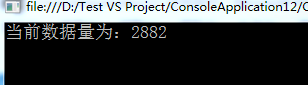
为此我们需要采用Lock关键字,来确保每次只有一个线程来访问 _Products.Add(product); 这个方法,代码如下:
    class Program

    {

        private static object o = new object();

        private static List<Product> _Products { get; set; }

        /*  coder:释迦苦僧

         *  代码中 创建三个并发线程 来操作_Products 集合

         *  System.Collections.Generic.List 这个列表在多个线程访问下,不能保证是安全的线程,所以不能接受并发的请求,我们必须对ADD方法的执行进行串行化

         */

        static void Main(string[] args)

        {

            _Products = new List<Product>();

            /*创建任务 t1  t1 执行 数据集合添加操作*/

            Task t1 = Task.Factory.StartNew(() =>

            {

                AddProducts();

            });

            /*创建任务 t2  t2 执行 数据集合添加操作*/

            Task t2 = Task.Factory.StartNew(() =>

            {

                AddProducts();

            });

            /*创建任务 t3  t3 执行 数据集合添加操作*/

            Task t3 = Task.Factory.StartNew(() =>

            {

                AddProducts();

            });

            Task.WaitAll(t1, t2, t3);

            Console.WriteLine("当前数据量为:" + _Products.Count);

            Console.ReadLine();

        }

        /*执行集合数据添加操作*/

        static void AddProducts()

        {

            Parallel.For(, , (i) =>

            {

                Product product = new Product();

                product.Name = "name" + i;

                product.Category = "Category" + i;

                product.SellPrice = i;

                lock (o)

                {

                    _Products.Add(product);

                }

            });

        }

    }

    class Product

    {

        public string Name { get; set; }

        public string Category { get; set; }

        public int SellPrice { get; set; }

    }
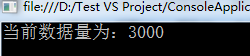
但是锁的引入,带来了一定的开销和性能的损耗,并降低了程序的扩展性,在并发编程中显然不适用。
System.Collections.Concurrent
.NET Framework 4提供了新的线程安全和扩展的并发集合,它们能够解决潜在的死锁问题和竞争条件问题,因此在很多复杂的情形下它们能够使得并行代码更容易编写,这些集合尽可能减少需要使用锁的次数,从而使得在大部分情形下能够优化为最佳性能,不会产生不必要的同步开销。
需要注意的是:
线程安全并不是没有代价的,比起System.Collenctions和System.Collenctions.Generic命名空间中的列表、集合和数组来说,并发集合会有更大的开销。因此,应该只在需要从多个任务中并发访问集合的时候才使用并发几个,在串行代码中使用并发集合是没有意义的,因为它们会增加无谓的开销。
为此,在.NET Framework中提供了System.Collections.Concurrent新的命名空间可以访问用于解决线程安全问题,通过这个命名空间能访问以下为并发做好了准备的集合。
1.BlockingCollection 与经典的阻塞队列数据结构类似,能够适用于多个任务添加和删除数据,提供阻塞和限界能力。
2.ConcurrentBag 提供对象的线程安全的无序集合
3.ConcurrentDictionary 提供可有多个线程同时访问的键值对的线程安全集合
4.ConcurrentQueue 提供线程安全的先进先出集合
5.ConcurrentStack 提供线程安全的后进先出集合
这些集合通过使用比较并交换和内存屏障等技术,避免使用典型的互斥重量级的锁,从而保证线程安全和性能。
ConcurrentQueue
ConcurrentQueue 是完全无锁的,能够支持并发的添加元素,先进先出。下面贴代码,详解见注释:
    class Program

    {

        private static object o = new object();

        /*定义 Queue*/

        private static Queue<Product> _Products { get; set; }

        private static ConcurrentQueue<Product> _ConcurrenProducts { get; set; }

        /*  coder:释迦苦僧

         *  代码中 创建三个并发线程 来操作_Products 和 _ConcurrenProducts 集合,每次添加 10000 条数据 查看 一般队列Queue 和 多线程安全下的队列ConcurrentQueue 执行情况

         */

        static void Main(string[] args)

        {

            Thread.Sleep();

            _Products = new Queue<Product>();

            Stopwatch swTask = new Stopwatch();

            swTask.Start();

            /*创建任务 t1  t1 执行 数据集合添加操作*/

            Task t1 = Task.Factory.StartNew(() =>

            {

                AddProducts();

            });

            /*创建任务 t2  t2 执行 数据集合添加操作*/

            Task t2 = Task.Factory.StartNew(() =>

            {

                AddProducts();

            });

            /*创建任务 t3  t3 执行 数据集合添加操作*/

            Task t3 = Task.Factory.StartNew(() =>

            {

                AddProducts();

            });

            Task.WaitAll(t1, t2, t3);

            swTask.Stop();

            Console.WriteLine("List<Product> 当前数据量为:" + _Products.Count);

            Console.WriteLine("List<Product> 执行时间为:" + swTask.ElapsedMilliseconds);

            Thread.Sleep();

            _ConcurrenProducts = new ConcurrentQueue<Product>();

            Stopwatch swTask1 = new Stopwatch();

            swTask1.Start();

            /*创建任务 tk1  tk1 执行 数据集合添加操作*/

            Task tk1 = Task.Factory.StartNew(() =>

            {

                AddConcurrenProducts();

            });

            /*创建任务 tk2  tk2 执行 数据集合添加操作*/

            Task tk2 = Task.Factory.StartNew(() =>

            {

                AddConcurrenProducts();

            });

            /*创建任务 tk3  tk3 执行 数据集合添加操作*/

            Task tk3 = Task.Factory.StartNew(() =>

            {

                AddConcurrenProducts();

            });

            Task.WaitAll(tk1, tk2, tk3);

            swTask1.Stop();

            Console.WriteLine("ConcurrentQueue<Product> 当前数据量为:" + _ConcurrenProducts.Count);

            Console.WriteLine("ConcurrentQueue<Product> 执行时间为:" + swTask1.ElapsedMilliseconds);

            Console.ReadLine();

        }

        /*执行集合数据添加操作*/

        static void AddProducts()

        {

            Parallel.For(, , (i) =>

            {

                Product product = new Product();

                product.Name = "name" + i;

                product.Category = "Category" + i;

                product.SellPrice = i;

                lock (o)

                {

                    _Products.Enqueue(product);

                }

            });

        }

        /*执行集合数据添加操作*/

        static void AddConcurrenProducts()

        {

            Parallel.For(, , (i) =>

            {

                Product product = new Product();

                product.Name = "name" + i;

                product.Category = "Category" + i;

                product.SellPrice = i;

                _ConcurrenProducts.Enqueue(product);

            });

        }

    }

    class Product

    {

        public string Name { get; set; }

        public string Category { get; set; }

        public int SellPrice { get; set; }

    }
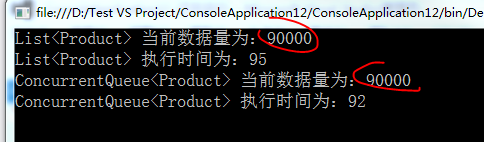
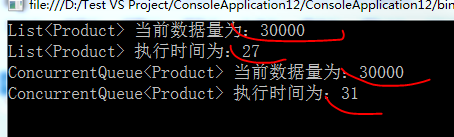
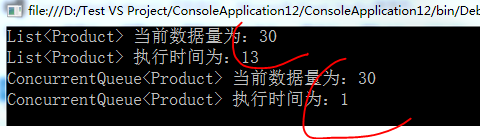
需要注意的是,代码中的输出时间并不能够完全正确的展示出并发代码下的ConcurrentQueue性能,采用ConcurrentQueue在一定程度上也带来了损耗,如下图所示:
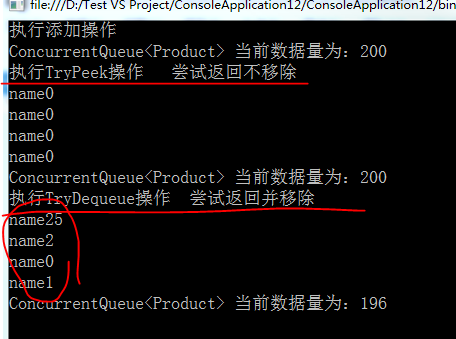
ConcurrentQueue 还有另外两种方法:TryDequeue 尝试移除并返回 和 TryPeek 尝试返回但不移除,下面贴代码:
    class Program

    {

        private static object o = new object();

        private static ConcurrentQueue<Product> _ConcurrenProducts { get; set; }

        /*  coder:释迦苦僧

         *  ConcurrentQueue  下的 TryPeek 和 TryDequeue

         */

        static void Main(string[] args)

        {

            _ConcurrenProducts = new ConcurrentQueue<Product>();

            /*执行添加操作*/

            Console.WriteLine("执行添加操作");

            Parallel.Invoke(AddConcurrenProducts, AddConcurrenProducts);

            Console.WriteLine("ConcurrentQueue<Product> 当前数据量为:" + _ConcurrenProducts.Count);

            /*执行TryPeek操作   尝试返回不移除*/

            Console.WriteLine("执行TryPeek操作   尝试返回不移除");

            Parallel.Invoke(PeekConcurrenProducts, PeekConcurrenProducts);

            Console.WriteLine("ConcurrentQueue<Product> 当前数据量为:" + _ConcurrenProducts.Count);

            /*执行TryDequeue操作  尝试返回并移除*/

            Console.WriteLine("执行TryDequeue操作  尝试返回并移除");

            Parallel.Invoke(DequeueConcurrenProducts, DequeueConcurrenProducts);

            Console.WriteLine("ConcurrentQueue<Product> 当前数据量为:" + _ConcurrenProducts.Count);

            Console.ReadLine();

        }

        /*执行集合数据添加操作*/

        static void AddConcurrenProducts()

        {

            Parallel.For(, , (i) =>

            {

                Product product = new Product();

                product.Name = "name" + i;

                product.Category = "Category" + i;

                product.SellPrice = i;

                _ConcurrenProducts.Enqueue(product);

            });

        }

        /*尝试返回 但不移除*/

        static void PeekConcurrenProducts()

        {

            Parallel.For(, , (i) =>

            {

                Product product = null;

                bool excute = _ConcurrenProducts.TryPeek(out product);

                Console.WriteLine(product.Name);

            });

        }

        /*尝试返回 并 移除*/

        static void DequeueConcurrenProducts()

        {

            Parallel.For(, , (i) =>

            {

                Product product = null;

                bool excute = _ConcurrenProducts.TryDequeue(out product);

                Console.WriteLine(product.Name);

            });

        }

    }

    class Product

    {

        public string Name { get; set; }

        public string Category { get; set; }

        public int SellPrice { get; set; }

    }
需要注意 TryDequeue 和 TryPeek 的无序性,在多线程下
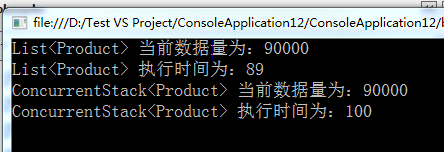
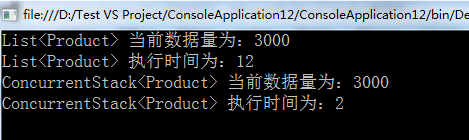
ConcurrentStack 是完全无锁的,能够支持并发的添加元素,后进先出。下面贴代码,详解见注释:
        private static object o = new object();

        /*定义 Stack*/

        private static Stack<Product> _Products { get; set; }

        private static ConcurrentStack<Product> _ConcurrenProducts { get; set; }

        /*  coder:释迦苦僧

         *  代码中 创建三个并发线程 来操作_Products 和 _ConcurrenProducts 集合,每次添加 30000 条数据 查看 一般Stack 和 多线程安全下的 ConcurrentStack 执行情况

         */

        static void Main(string[] args)

        {

            Thread.Sleep();

            _Products = new Stack<Product>();

            Stopwatch swTask = new Stopwatch();

            swTask.Start();

            /*创建任务 t1  t1 执行 数据集合添加操作*/

            Task t1 = Task.Factory.StartNew(() =>

            {

                AddProducts();

            });

            /*创建任务 t2  t2 执行 数据集合添加操作*/

            Task t2 = Task.Factory.StartNew(() =>

            {

                AddProducts();

            });

            /*创建任务 t3  t3 执行 数据集合添加操作*/

            Task t3 = Task.Factory.StartNew(() =>

            {

                AddProducts();

            });

            Task.WaitAll(t1, t2, t3);

            swTask.Stop();

            Console.WriteLine("List<Product> 当前数据量为:" + _Products.Count);

            Console.WriteLine("List<Product> 执行时间为:" + swTask.ElapsedMilliseconds);

            Thread.Sleep();

            _ConcurrenProducts = new ConcurrentStack<Product>();

            Stopwatch swTask1 = new Stopwatch();

            swTask1.Start();

            /*创建任务 tk1  tk1 执行 数据集合添加操作*/

            Task tk1 = Task.Factory.StartNew(() =>

            {

                AddConcurrenProducts();

            });

            /*创建任务 tk2  tk2 执行 数据集合添加操作*/

            Task tk2 = Task.Factory.StartNew(() =>

            {

                AddConcurrenProducts();

            });

            /*创建任务 tk3  tk3 执行 数据集合添加操作*/

            Task tk3 = Task.Factory.StartNew(() =>

            {

                AddConcurrenProducts();

            });

            Task.WaitAll(tk1, tk2, tk3);

            swTask1.Stop();

            Console.WriteLine("ConcurrentStack<Product> 当前数据量为:" + _ConcurrenProducts.Count);

            Console.WriteLine("ConcurrentStack<Product> 执行时间为:" + swTask1.ElapsedMilliseconds);

            Console.ReadLine();

        }

        /*执行集合数据添加操作*/

        static void AddProducts()

        {

            Parallel.For(, , (i) =>

            {

                Product product = new Product();

                product.Name = "name" + i;

                product.Category = "Category" + i;

                product.SellPrice = i;

                lock (o)

                {

                    _Products.Push(product);

                }

            });

        }

        /*执行集合数据添加操作*/

        static void AddConcurrenProducts()

        {

            Parallel.For(, , (i) =>

            {

                Product product = new Product();

                product.Name = "name" + i;

                product.Category = "Category" + i;

                product.SellPrice = i;

                _ConcurrenProducts.Push(product);

            });

        }

    }

    class Product

    {

        public string Name { get; set; }

        public string Category { get; set; }

        public int SellPrice { get; set; }

    }
ConcurrentStack 还有另外两种方法:TryPop 尝试移除并返回 和 TryPeek 尝试返回但不移除,下面贴代码:
    class Program

    {

        private static object o = new object();

        private static ConcurrentStack<Product> _ConcurrenProducts { get; set; }

        /*  coder:释迦苦僧

         *  ConcurrentQueue  下的 TryPeek 和 TryPop

         */

        static void Main(string[] args)

        {

            _ConcurrenProducts = new ConcurrentStack<Product>();

            /*执行添加操作*/

            Console.WriteLine("执行添加操作");

            Parallel.Invoke(AddConcurrenProducts, AddConcurrenProducts);

            Console.WriteLine("ConcurrentStack<Product> 当前数据量为:" + _ConcurrenProducts.Count);

            /*执行TryPeek操作   尝试返回不移除*/

            Console.WriteLine("执行TryPeek操作   尝试返回不移除");

            Parallel.Invoke(PeekConcurrenProducts, PeekConcurrenProducts);

            Console.WriteLine("ConcurrentStack<Product> 当前数据量为:" + _ConcurrenProducts.Count);

            /*执行TryDequeue操作  尝试返回并移除*/

            Console.WriteLine("执行TryPop操作  尝试返回并移除");

            Parallel.Invoke(PopConcurrenProducts, PopConcurrenProducts);

            Console.WriteLine("ConcurrentStack<Product> 当前数据量为:" + _ConcurrenProducts.Count);

            Console.ReadLine();

        }

        /*执行集合数据添加操作*/

        static void AddConcurrenProducts()

        {

            Parallel.For(, , (i) =>

            {

                Product product = new Product();

                product.Name = "name" + i;

                product.Category = "Category" + i;

                product.SellPrice = i;

                _ConcurrenProducts.Push(product);

            });

        }

        /*尝试返回 但不移除*/

        static void PeekConcurrenProducts()

        {

            Parallel.For(, , (i) =>

            {

                Product product = null;

                bool excute = _ConcurrenProducts.TryPeek(out product);

                Console.WriteLine(product.Name);

            });

        }

        /*尝试返回 并 移除*/

        static void PopConcurrenProducts()

        {

            Parallel.For(, , (i) =>

            {

                Product product = null;

                bool excute = _ConcurrenProducts.TryPop(out product);

                Console.WriteLine(product.Name);

            });

        }

    }

    class Product

    {

        public string Name { get; set; }

        public string Category { get; set; }

        public int SellPrice { get; set; }

    }
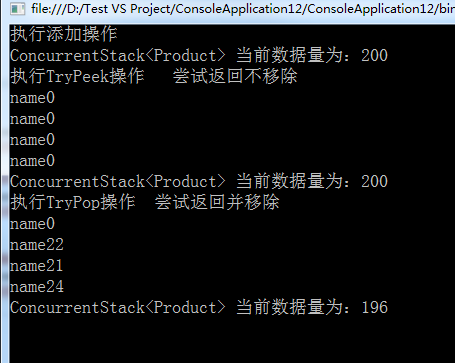
对于并发下的其他集合,我这边就不做代码案列了,大家可以通过下面的链接查看,如有问题,欢迎指正
http://msdn.microsoft.com/zh-cn/library/system.collections.concurrent(v=vs.110).aspx
作者:释迦苦僧 出处:http://www.cnblogs.com/woxpp/p/3935557.html
本文版权归作者和博客园共有,欢迎转载,但未经作者同意必须保留此段声明,且在文章页面明显位置给出原文连接。
C#并行编程-并发集合的更多相关文章
- 转载 .Net多线程编程—并发集合 https://www.cnblogs.com/hdwgxz/p/6258014.html
集合 1 为什么使用并发集合? 原因主要有以下几点: System.Collections和System.Collections.Generic名称空间中所提供的经典列表.集合和数组都不是线程安全的, ...
- .Net多线程编程—并发集合
并发集合 1 为什么使用并发集合? 原因主要有以下几点: System.Collections和System.Collections.Generic名称空间中所提供的经典列表.集合和数组都不是线程安全 ...
- C#并行编程系列-文章导航
菜鸟初步学习,不对的地方请大神指教,参考<C#并行编程高级教程.pdf> 目录 C#并行编程-相关概念 C#并行编程-Parallel C#并行编程-Task C#并行编程-并发集合 C# ...
- C#并行编程-相关概念
菜鸟初步学习,不对的地方请大神指教,参考<C#并行编程高级教程.pdf> 目录 C#并行编程-相关概念 C#并行编程-Parallel C#并行编程-Task C#并行编程-并发集合 C# ...
- C#并行编程-Parallel
菜鸟学习并行编程,参考<C#并行编程高级教程.PDF>,如有错误,欢迎指正. 目录 C#并行编程-相关概念 C#并行编程-Parallel C#并行编程-Task C#并行编程-并发集合 ...
- C#并行编程-Task
菜鸟学习并行编程,参考<C#并行编程高级教程.PDF>,如有错误,欢迎指正. 目录 C#并行编程-相关概念 C#并行编程-Parallel C#并行编程-Task C#并行编程-并发集合 ...
- C#并行编程-线程同步原语
菜鸟学习并行编程,参考<C#并行编程高级教程.PDF>,如有错误,欢迎指正. 目录 C#并行编程-相关概念 C#并行编程-Parallel C#并行编程-Task C#并行编程-并发集合 ...
- C#并行编程-PLINQ:声明式数据并行
目录 C#并行编程-相关概念 C#并行编程-Parallel C#并行编程-Task C#并行编程-并发集合 C#并行编程-线程同步原语 C#并行编程-PLINQ:声明式数据并行 背景 通过LINQ可 ...
- C#并行编程-PLINQ:声明式数据并行-转载
C#并行编程-PLINQ:声明式数据并行 目录 C#并行编程-相关概念 C#并行编程-Parallel C#并行编程-Task C#并行编程-并发集合 C#并行编程-线程同步原语 C#并行编程-P ...
随机推荐
- 轮播神器swiper插件
Swiper中文网:http://www.swiper.com.cn/ Swiper- 是免费的,最现代化的移动触摸滑块硬件加速的转换和惊人的天然行为.它的目的是在移动网站,移动网络应用和移动本地/混 ...
- 【洛谷P2737】Beef McNuggets
首先有这样一个结论:若p,q为自然数,且gcd(p,q)=1,那么px+qy不能表示的最大数为pq-p-q 那么本题中p,q均取决于最大的两个数,不妨取256,那么上界为256^2-256*2 之后就 ...
- [转]MySQL批量更新死锁案例分析
文章出处:http://blog.csdn.net/aesop_wubo/article/details/8286215 问题描述 在做项目的过程中,由于写SQL太过随意,一不小心就抛了一个死锁异常, ...
- 用SYS_CONNECT_BY_PATH进行层级查询时的排序问题
用SYS_CONNECT_BY_PATH进行层级查询时, 对同一级别的节点进行排序,可以加order SIBLINGS by 子句实现 WITH N2 AS( SELECT n.ID, org.&qu ...
- BruteXSS:XSS暴力破解神器
×01 BruteXSS BruteXSS是一个非常强大和快速的跨站点脚本暴力注入.它用于暴力注入一个参数.该BruteXSS从指定的词库加载多种有效载荷进行注入并且使用指定的载荷和扫描检查这些参数很 ...
- ASP.NET使用ConfigurationSection在Web.Config创建自定义配置节
主要代码,一定要继续System.Configuration.ConfigurationSection,具体的节点名称可以自行修改 using System; using System.Data; u ...
- android技巧总结
技巧1. 在写布局文件时,有时不需要给控件指定text值,但是又想知道他的位置是否是自己想要他在的位置.这种情况只有在运行时给他指定text值才能确切地知道它显示的位置. 现在有一种方法可以实现,即利 ...
- Ubuntu 16.04 下使用Xampp
Ubuntu 16.04 下使用Xampp 什么是Xampp? XAMPP(Apache+MySQL+PHP+PERL) 是一个功能强大的建站集成软件包.这个软件包原来的名字是 LAMPP,但是为了避 ...
- 将excel数据导入到mysql的方法
文本框被键盘遮挡到了,不会再获取焦点的时候被顶到键盘顶部.解决方案:设置A的Position为绝对定位absolute即可,其他几种定位方式未测试,但是不能是fixed ,正是因为这种定位方式,导致它 ...
- 为什么一个类的全局变量默认以m开头?
某天闲着无聊,突然想起来为什么大家都习惯将全局变量使用m开头,于是追根求源,查了一些资料,虽然并不是我想要的,但是也总结一下. 在stackoverflow上就有人问: Why do most var ...