
WPF 使用字体引发的 CLR20r3 问题排查
开发机器上运行完好,拷贝置目标机器上出现此问题

问题排查:
计算机-->管理-->事件查看器--->windows日志-->应用程序
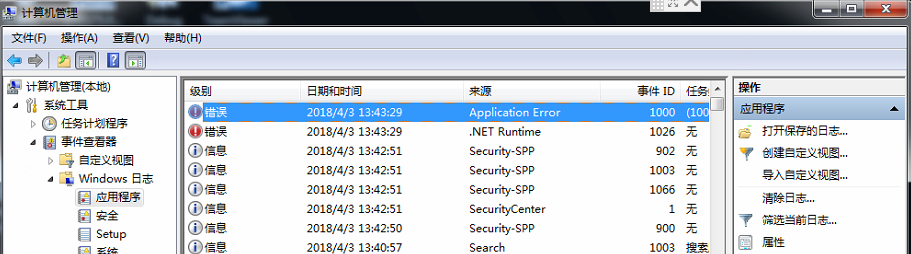
Application Error 看不懂没啥用
打开.NET Runtime 查看程序异常信息
日志名称: Application
来源: .NET Runtime
日期: 2018/4/3 13:43:29
描述:
Application: WPFTestPage.exe
Framework Version: v4.0.30319
Description: The process was terminated due to an unhandled exception.
Exception Info: System.IO.FileFormatException
Stack:
at MS.Internal.Text.TextInterface.Native.Util.ConvertHresultToException(Int32)
at MS.Internal.Text.TextInterface.Font.CreateFontFace()
at MS.Internal.Text.TextInterface.Font.AddFontFaceToCache()
at MS.Internal.Text.TextInterface.Font.GetFontFace()
at System.Windows.Media.GlyphTypeface..ctor(MS.Internal.Text.TextInterface.Font)
at MS.Internal.FontFace.PhysicalFontFamily.GetGlyphTypeface(System.Windows.FontStyle, System.Windows.FontWeight, System.Windows.FontStretch)
at MS.Internal.FontFace.PhysicalFontFamily.MS.Internal.FontFace.IFontFamily.GetTypefaceMetrics(System.Windows.FontStyle, System.Windows.FontWeight, System.Windows.FontStretch)
at System.Windows.Media.Typeface.ConstructCachedTypeface()
at System.Windows.Media.Typeface.get_CachedTypeface()
at System.Windows.Media.Typeface.CheckFastPathNominalGlyphs(System.Windows.Media.TextFormatting.CharacterBufferRange, Double, Double, Double, Boolean, Boolean, System.Globalization.CultureInfo, System.Windows.Media.TextFormattingMode, Boolean, Boolean, Int32 ByRef)
at MS.Internal.TextFormatting.SimpleRun.CreateSimpleTextRun(System.Windows.Media.TextFormatting.CharacterBufferRange, System.Windows.Media.TextFormatting.TextRun, MS.Internal.TextFormatting.TextFormatterImp, Int32, Boolean, Boolean)
at MS.Internal.TextFormatting.SimpleRun.Create(MS.Internal.TextFormatting.FormatSettings, System.Windows.Media.TextFormatting.CharacterBufferRange, System.Windows.Media.TextFormatting.TextRun, Int32, Int32, Int32, Int32, Int32)
at MS.Internal.TextFormatting.SimpleTextLine.Create(MS.Internal.TextFormatting.FormatSettings, Int32, Int32)
at MS.Internal.TextFormatting.TextFormatterImp.FormatLineInternal(System.Windows.Media.TextFormatting.TextSource, Int32, Int32, Double, System.Windows.Media.TextFormatting.TextParagraphProperties, System.Windows.Media.TextFormatting.TextLineBreak, System.Windows.Media.TextFormatting.TextRunCache)
at MS.Internal.TextFormatting.TextFormatterImp.FormatLine(System.Windows.Media.TextFormatting.TextSource, Int32, Double, System.Windows.Media.TextFormatting.TextParagraphProperties, System.Windows.Media.TextFormatting.TextLineBreak, System.Windows.Media.TextFormatting.TextRunCache)
at MS.Internal.Text.Line.Format(Int32, Double, System.Windows.Media.TextFormatting.TextParagraphProperties, System.Windows.Media.TextFormatting.TextLineBreak, System.Windows.Media.TextFormatting.TextRunCache, Boolean)
at System.Windows.Controls.TextBlock.MeasureOverride(System.Windows.Size)
at System.Windows.FrameworkElement.MeasureCore(System.Windows.Size)
at System.Windows.UIElement.Measure(System.Windows.Size)
at MS.Internal.Helper.MeasureElementWithSingleChild(System.Windows.UIElement, System.Windows.Size)
at System.Windows.Controls.ContentPresenter.MeasureOverride(System.Windows.Size)
at System.Windows.FrameworkElement.MeasureCore(System.Windows.Size)
at System.Windows.UIElement.Measure(System.Windows.Size)
at System.Windows.Controls.Border.MeasureOverride(System.Windows.Size)
at System.Windows.FrameworkElement.MeasureCore(System.Windows.Size)
at System.Windows.UIElement.Measure(System.Windows.Size)
at System.Windows.Controls.Control.MeasureOverride(System.Windows.Size)
at System.Windows.FrameworkElement.MeasureCore(System.Windows.Size)
at System.Windows.UIElement.Measure(System.Windows.Size)
at System.Windows.Controls.Grid.MeasureOverride(System.Windows.Size)
at System.Windows.FrameworkElement.MeasureCore(System.Windows.Size)
at System.Windows.UIElement.Measure(System.Windows.Size)
at System.Windows.Controls.Grid.MeasureCell(Int32, Boolean)
at System.Windows.Controls.Grid.MeasureCellsGroup(Int32, System.Windows.Size, Boolean, Boolean, Boolean ByRef)
at System.Windows.Controls.Grid.MeasureOverride(System.Windows.Size)
at System.Windows.FrameworkElement.MeasureCore(System.Windows.Size)
at System.Windows.UIElement.Measure(System.Windows.Size)
at MS.Internal.Helper.MeasureElementWithSingleChild(System.Windows.UIElement, System.Windows.Size)
at System.Windows.Controls.ContentPresenter.MeasureOverride(System.Windows.Size)
at System.Windows.FrameworkElement.MeasureCore(System.Windows.Size)
at System.Windows.UIElement.Measure(System.Windows.Size)
at System.Windows.Documents.AdornerDecorator.MeasureOverride(System.Windows.Size)
at System.Windows.FrameworkElement.MeasureCore(System.Windows.Size)
at System.Windows.UIElement.Measure(System.Windows.Size)
at System.Windows.Controls.Border.MeasureOverride(System.Windows.Size)
at System.Windows.FrameworkElement.MeasureCore(System.Windows.Size)
at System.Windows.UIElement.Measure(System.Windows.Size)
at System.Windows.Window.MeasureOverrideHelper(System.Windows.Size)
at System.Windows.Window.MeasureOverride(System.Windows.Size)
at System.Windows.FrameworkElement.MeasureCore(System.Windows.Size)
at System.Windows.UIElement.Measure(System.Windows.Size)
at System.Windows.Interop.HwndSource.SetLayoutSize()
at System.Windows.Interop.HwndSource.set_RootVisualInternal(System.Windows.Media.Visual)
at System.Windows.Interop.HwndSource.set_RootVisual(System.Windows.Media.Visual)
at System.Windows.Window.SetRootVisual()
at System.Windows.Window.SetRootVisualAndUpdateSTC()
at System.Windows.Window.SetupInitialState(Double, Double, Double, Double)
at System.Windows.Window.CreateSourceWindow(Boolean)
at System.Windows.Window.CreateSourceWindowDuringShow()
at System.Windows.Window.SafeCreateWindowDuringShow()
at System.Windows.Window.ShowHelper(System.Object)
at System.Windows.Threading.ExceptionWrapper.InternalRealCall(System.Delegate, System.Object, Int32)
at MS.Internal.Threading.ExceptionFilterHelper.TryCatchWhen(System.Object, System.Delegate, System.Object, Int32, System.Delegate)
at System.Windows.Threading.DispatcherOperation.InvokeImpl()
at System.Windows.Threading.DispatcherOperation.InvokeInSecurityContext(System.Object)
at System.Threading.ExecutionContext.RunInternal(System.Threading.ExecutionContext, System.Threading.ContextCallback, System.Object, Boolean)
at System.Threading.ExecutionContext.Run(System.Threading.ExecutionContext, System.Threading.ContextCallback, System.Object, Boolean)
at System.Threading.ExecutionContext.Run(System.Threading.ExecutionContext, System.Threading.ContextCallback, System.Object)
at System.Windows.Threading.DispatcherOperation.Invoke()
at System.Windows.Threading.Dispatcher.ProcessQueue()
at System.Windows.Threading.Dispatcher.WndProcHook(IntPtr, Int32, IntPtr, IntPtr, Boolean ByRef)
at MS.Win32.HwndWrapper.WndProc(IntPtr, Int32, IntPtr, IntPtr, Boolean ByRef)
at MS.Win32.HwndSubclass.DispatcherCallbackOperation(System.Object)
at System.Windows.Threading.ExceptionWrapper.InternalRealCall(System.Delegate, System.Object, Int32)
at MS.Internal.Threading.ExceptionFilterHelper.TryCatchWhen(System.Object, System.Delegate, System.Object, Int32, System.Delegate)
at System.Windows.Threading.Dispatcher.LegacyInvokeImpl(System.Windows.Threading.DispatcherPriority, System.TimeSpan, System.Delegate, System.Object, Int32)
at MS.Win32.HwndSubclass.SubclassWndProc(IntPtr, Int32, IntPtr, IntPtr)
at MS.Win32.UnsafeNativeMethods.DispatchMessage(System.Windows.Interop.MSG ByRef)
at System.Windows.Threading.Dispatcher.PushFrameImpl(System.Windows.Threading.DispatcherFrame)
at System.Windows.Threading.Dispatcher.PushFrame(System.Windows.Threading.DispatcherFrame)
at System.Windows.Threading.Dispatcher.Run()
at System.Windows.Application.RunDispatcher(System.Object)
at System.Windows.Application.RunInternal(System.Windows.Window)
at System.Windows.Application.Run(System.Windows.Window)
at System.Windows.Application.Run()
at SLCashierDesk.App.Main()
事件 Xml:
<Event xmlns="http://schemas.microsoft.com/win/2004/08/events/event">
<System>
<Provider Name=".NET Runtime" />
<EventID Qualifiers="0">1026</EventID>
<Level>2</Level>
<Task>0</Task>
<Keywords>0x80000000000000</Keywords>
<TimeCreated SystemTime="2018-04-03T05:43:29.000000000Z" />
<EventRecordID>2627</EventRecordID>
<Channel>Application</Channel>
<Computer>Z-PC</Computer>
<Security />
</System>
<EventData>
<Data>Application: WPFTestPage.exe
Framework Version: v4.0.30319
Description: The process was terminated due to an unhandled exception.
Exception Info: System.IO.FileFormatException
Stack:
at MS.Internal.Text.TextInterface.Native.Util.ConvertHresultToException(Int32)
at MS.Internal.Text.TextInterface.Font.CreateFontFace()
at MS.Internal.Text.TextInterface.Font.AddFontFaceToCache()
at MS.Internal.Text.TextInterface.Font.GetFontFace()
at System.Windows.Media.GlyphTypeface..ctor(MS.Internal.Text.TextInterface.Font)
at MS.Internal.FontFace.PhysicalFontFamily.GetGlyphTypeface(System.Windows.FontStyle, System.Windows.FontWeight, System.Windows.FontStretch)
at MS.Internal.FontFace.PhysicalFontFamily.MS.Internal.FontFace.IFontFamily.GetTypefaceMetrics(System.Windows.FontStyle, System.Windows.FontWeight, System.Windows.FontStretch)
at System.Windows.Media.Typeface.ConstructCachedTypeface()
at System.Windows.Media.Typeface.get_CachedTypeface()
at System.Windows.Media.Typeface.CheckFastPathNominalGlyphs(System.Windows.Media.TextFormatting.CharacterBufferRange, Double, Double, Double, Boolean, Boolean, System.Globalization.CultureInfo, System.Windows.Media.TextFormattingMode, Boolean, Boolean, Int32 ByRef)
at MS.Internal.TextFormatting.SimpleRun.CreateSimpleTextRun(System.Windows.Media.TextFormatting.CharacterBufferRange, System.Windows.Media.TextFormatting.TextRun, MS.Internal.TextFormatting.TextFormatterImp, Int32, Boolean, Boolean)
at MS.Internal.TextFormatting.SimpleRun.Create(MS.Internal.TextFormatting.FormatSettings, System.Windows.Media.TextFormatting.CharacterBufferRange, System.Windows.Media.TextFormatting.TextRun, Int32, Int32, Int32, Int32, Int32)
at MS.Internal.TextFormatting.SimpleTextLine.Create(MS.Internal.TextFormatting.FormatSettings, Int32, Int32)
at MS.Internal.TextFormatting.TextFormatterImp.FormatLineInternal(System.Windows.Media.TextFormatting.TextSource, Int32, Int32, Double, System.Windows.Media.TextFormatting.TextParagraphProperties, System.Windows.Media.TextFormatting.TextLineBreak, System.Windows.Media.TextFormatting.TextRunCache)
at MS.Internal.TextFormatting.TextFormatterImp.FormatLine(System.Windows.Media.TextFormatting.TextSource, Int32, Double, System.Windows.Media.TextFormatting.TextParagraphProperties, System.Windows.Media.TextFormatting.TextLineBreak, System.Windows.Media.TextFormatting.TextRunCache)
at MS.Internal.Text.Line.Format(Int32, Double, System.Windows.Media.TextFormatting.TextParagraphProperties, System.Windows.Media.TextFormatting.TextLineBreak, System.Windows.Media.TextFormatting.TextRunCache, Boolean)
at System.Windows.Controls.TextBlock.MeasureOverride(System.Windows.Size)
at System.Windows.FrameworkElement.MeasureCore(System.Windows.Size)
at System.Windows.UIElement.Measure(System.Windows.Size)
at MS.Internal.Helper.MeasureElementWithSingleChild(System.Windows.UIElement, System.Windows.Size)
at System.Windows.Controls.ContentPresenter.MeasureOverride(System.Windows.Size)
at System.Windows.FrameworkElement.MeasureCore(System.Windows.Size)
at System.Windows.UIElement.Measure(System.Windows.Size)
at System.Windows.Controls.Border.MeasureOverride(System.Windows.Size)
at System.Windows.FrameworkElement.MeasureCore(System.Windows.Size)
at System.Windows.UIElement.Measure(System.Windows.Size)
at System.Windows.Controls.Control.MeasureOverride(System.Windows.Size)
at System.Windows.FrameworkElement.MeasureCore(System.Windows.Size)
at System.Windows.UIElement.Measure(System.Windows.Size)
at System.Windows.Controls.Grid.MeasureOverride(System.Windows.Size)
at System.Windows.FrameworkElement.MeasureCore(System.Windows.Size)
at System.Windows.UIElement.Measure(System.Windows.Size)
at System.Windows.Controls.Grid.MeasureCell(Int32, Boolean)
at System.Windows.Controls.Grid.MeasureCellsGroup(Int32, System.Windows.Size, Boolean, Boolean, Boolean ByRef)
at System.Windows.Controls.Grid.MeasureOverride(System.Windows.Size)
at System.Windows.FrameworkElement.MeasureCore(System.Windows.Size)
at System.Windows.UIElement.Measure(System.Windows.Size)
at MS.Internal.Helper.MeasureElementWithSingleChild(System.Windows.UIElement, System.Windows.Size)
at System.Windows.Controls.ContentPresenter.MeasureOverride(System.Windows.Size)
at System.Windows.FrameworkElement.MeasureCore(System.Windows.Size)
at System.Windows.UIElement.Measure(System.Windows.Size)
at System.Windows.Documents.AdornerDecorator.MeasureOverride(System.Windows.Size)
at System.Windows.FrameworkElement.MeasureCore(System.Windows.Size)
at System.Windows.UIElement.Measure(System.Windows.Size)
at System.Windows.Controls.Border.MeasureOverride(System.Windows.Size)
at System.Windows.FrameworkElement.MeasureCore(System.Windows.Size)
at System.Windows.UIElement.Measure(System.Windows.Size)
at System.Windows.Window.MeasureOverrideHelper(System.Windows.Size)
at System.Windows.Window.MeasureOverride(System.Windows.Size)
at System.Windows.FrameworkElement.MeasureCore(System.Windows.Size)
at System.Windows.UIElement.Measure(System.Windows.Size)
at System.Windows.Interop.HwndSource.SetLayoutSize()
at System.Windows.Interop.HwndSource.set_RootVisualInternal(System.Windows.Media.Visual)
at System.Windows.Interop.HwndSource.set_RootVisual(System.Windows.Media.Visual)
at System.Windows.Window.SetRootVisual()
at System.Windows.Window.SetRootVisualAndUpdateSTC()
at System.Windows.Window.SetupInitialState(Double, Double, Double, Double)
at System.Windows.Window.CreateSourceWindow(Boolean)
at System.Windows.Window.CreateSourceWindowDuringShow()
at System.Windows.Window.SafeCreateWindowDuringShow()
at System.Windows.Window.ShowHelper(System.Object)
at System.Windows.Threading.ExceptionWrapper.InternalRealCall(System.Delegate, System.Object, Int32)
at MS.Internal.Threading.ExceptionFilterHelper.TryCatchWhen(System.Object, System.Delegate, System.Object, Int32, System.Delegate)
at System.Windows.Threading.DispatcherOperation.InvokeImpl()
at System.Windows.Threading.DispatcherOperation.InvokeInSecurityContext(System.Object)
at System.Threading.ExecutionContext.RunInternal(System.Threading.ExecutionContext, System.Threading.ContextCallback, System.Object, Boolean)
at System.Threading.ExecutionContext.Run(System.Threading.ExecutionContext, System.Threading.ContextCallback, System.Object, Boolean)
at System.Threading.ExecutionContext.Run(System.Threading.ExecutionContext, System.Threading.ContextCallback, System.Object)
at System.Windows.Threading.DispatcherOperation.Invoke()
at System.Windows.Threading.Dispatcher.ProcessQueue()
at System.Windows.Threading.Dispatcher.WndProcHook(IntPtr, Int32, IntPtr, IntPtr, Boolean ByRef)
at MS.Win32.HwndWrapper.WndProc(IntPtr, Int32, IntPtr, IntPtr, Boolean ByRef)
at MS.Win32.HwndSubclass.DispatcherCallbackOperation(System.Object)
at System.Windows.Threading.ExceptionWrapper.InternalRealCall(System.Delegate, System.Object, Int32)
at MS.Internal.Threading.ExceptionFilterHelper.TryCatchWhen(System.Object, System.Delegate, System.Object, Int32, System.Delegate)
at System.Windows.Threading.Dispatcher.LegacyInvokeImpl(System.Windows.Threading.DispatcherPriority, System.TimeSpan, System.Delegate, System.Object, Int32)
at MS.Win32.HwndSubclass.SubclassWndProc(IntPtr, Int32, IntPtr, IntPtr)
at MS.Win32.UnsafeNativeMethods.DispatchMessage(System.Windows.Interop.MSG ByRef)
at System.Windows.Threading.Dispatcher.PushFrameImpl(System.Windows.Threading.DispatcherFrame)
at System.Windows.Threading.Dispatcher.PushFrame(System.Windows.Threading.DispatcherFrame)
at System.Windows.Threading.Dispatcher.Run()
at System.Windows.Application.RunDispatcher(System.Object)
at System.Windows.Application.RunInternal(System.Windows.Window)
at System.Windows.Application.Run(System.Windows.Window)
at System.Windows.Application.Run()
at SLCashierDesk.App.Main()
</Data>
</EventData>
</Event>
出现
Description: The process was terminated due to an unhandled exception.
Exception Info: System.IO.FileFormatException IO异常
说明使用了不存在的文件
继续查看异常信息
at MS.Internal.Text.TextInterface.Native.Util.ConvertHresultToException(Int32)
at MS.Internal.Text.TextInterface.Font.CreateFontFace()
at MS.Internal.Text.TextInterface.Font.AddFontFaceToCache()
at MS.Internal.Text.TextInterface.Font.GetFontFace()
font 跟字体有关 ,经过排查 发现 开发机器上安装并且使用的字体,而目标机器上未安装字体文件 于是产生此错误!
WPF 使用字体引发的 CLR20r3 问题排查的更多相关文章
- Win10 中修改cmd字体引发的问题
Win10 中修改cmd字体引发的问题 学习了:https://www.cnblogs.com/Diryboy/archive/2015/12/05/Use-Consolas-MSYaHei-in-C ...
- WPF下字体模糊的问题
原文:WPF下字体模糊的问题 一直以来,发现WPF中的小字体下的文字变得比较模糊,比如: WPF与Winform字体显示比较: 为了看到更清楚,我们放大点显示: 放得更大些: 中文.日文等亚洲文字的 ...
- WPF矢量字体图标(iconfont)
原文:WPF矢量字体图标(iconfont) 转载:点击打开链接 步骤: 一.下载添加iconfont文件 二.添加到资源文件夹,并设置不复制,且为资源文件 三.增加FIcon.xaml文件 < ...
- WPF 嵌入字体文件
官方说明文档:将字体与应用程序一起打包 https://docs.microsoft.com/zh-cn/dotnet/framework/wpf/advanced/packaging-fonts-w ...
- 聊聊WPF中字体的设置
1. 今天帮同事调试一个字体的bug:TextBox中的中文显示大小不一致, 比如包含"杰","热". 原因是WPF针对点阵字体需要指定特定字体才能正确渲染, ...
- 一个字体引发的bug
delphi 7 中默认字体样式为‘MS Sans Serif’,一般情况下子级控件会继承父级一些属性,其中包括字体(包括字体大小,字体样式,颜色等)属性.如果动态创建控件且需要修改字体颜色或者大小时 ...
- wpf设置字体颜色渐变和字体阴影
<StackPanel Orientation="Horizontal" Grid.Column="1" HorizontalAlignment=&quo ...
- WPF 将字体文件 添加到 资源文件,并在后台代码使用
先看结果 1.将字体文件,导入到资源文件,如: 添加后,自动生成 2.在窗体xaml中添加如: 3.在xaml窗体对应的cs文件中,为TextBlock指定字段 创建一个字段对象,并指定字体文件的所在 ...
- WPF使用字体图标
首先我们要有字体文件,可以去阿里巴巴矢量图标库下载,下载解压后可以看到如下文件: 其中,iconfont.ttf就是字体文件,我们将该文件引入到自己的项目中,将iconfont.ttf文件的属性中&q ...
随机推荐
- sequence配置
在实现分库分表的情况下,数据库自增主键已经无法保证在集群中是全局唯一的主键了,因此mycat提供了全局的sequence,并且提供了本地配置.数据库配置等多种实现方式. 本地文件方式 采用该方式,my ...
- 无法为数据库中的对象分配空间,因为'PRIMARY'文件组已满
用SQL Server2012,做数据保存时出错,错误信息:无法为数据库'***'中的对象'***'分配空间,因为'PRIMARY'文件组已满.请删除不需要的文件.删除文件组中的对象.将其他文件添加到 ...
- bash keys
stty-a CTRL-S and CTRL-Q are called flow-control characters. Bash readline 使用技巧_Linux编程_操作系统_希赛网 htt ...
- 【74.89%】【codeforces 551A】GukiZ and Contest
time limit per test2 seconds memory limit per test256 megabytes inputstandard input outputstandard o ...
- 【33.33%】【codeforces 552B】Vanya and Books
time limit per test1 second memory limit per test256 megabytes inputstandard input outputstandard ou ...
- 【47.95%】【codeforces 554C】Kyoya and Colored Balls
time limit per test2 seconds memory limit per test256 megabytes inputstandard input outputstandard o ...
- arcengine 开发经典帖 【强烈推荐仔细研读】
转自原文 arcengine 开发经典帖 使用ArcGIS Engine 开发自定义GIS应用: 第一部分:使用ArcGIS Engine 发布自定义GIS应用软件-全面了解ArcGIS Engine ...
- .net core——Docker化开发和部署
原文:.net core--Docker化开发和部署 本篇文章是使用Vs2017生成的Dockerfile进行部署的. 目录 VS2017生成Docker部署项目 Dockerfile内容 在开发服务 ...
- PHP/HTML混写的四种方式总结
PHP/HTML混写的四种方式总结 一.总结 一句话总结: 注意点: 1.双引号里面解析变量:echo "$Content" 2.HEREDOC和NOWDOC的关系:类似于双引号包 ...
- 小强的HTML5移动开发之路(39)——jqMobi插件json格式ActionSheet
在上一篇中我们学会了ActionSheet的使用,细心的朋友可能会发现其中创建列表的格式是HTML的,代码如下: function showCustomHtmlSheet() { $("#a ...