
WPF MvvmLight简单实例(1) 页面导航
实现了那些功能,先看看截图:
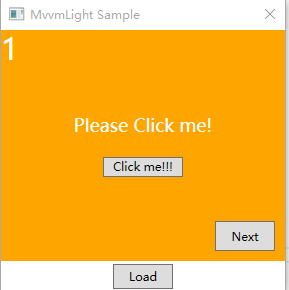
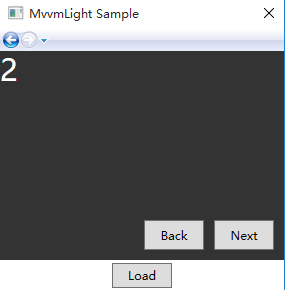
操作描述:
在程序运行后,点击“Load”按钮,页面会加载PageOne,点击PageOne页面中的“Next”按钮即可进入PageTwo页面,
点击PageTwo页面中的“Next”即可进入PageThree页面,点击Back可返回Page1页面
第一步:新建工程并使用NuGet安装MvvmLight
第二步:添加Views文件夹并添加相应的ViewModel
本文主要描述如何使用MvvmLight实现简单的导航效果,所以页面基本上都是大同小异比较简单ViewModel也比较简单,所以这里只PageOne.xaml以及PageOneViewModel.cs
PageOne.xaml代码:
<Page x:Class="MvvmLightSample.Views.PageOne"

      xmlns="http://schemas.microsoft.com/winfx/2006/xaml/presentation"

      xmlns:x="http://schemas.microsoft.com/winfx/2006/xaml"

      xmlns:mc="http://schemas.openxmlformats.org/markup-compatibility/2006"

      xmlns:d="http://schemas.microsoft.com/expression/blend/2008"

      xmlns:local="clr-namespace:MvvmLightSample.Views"

      mc:Ignorable="d"

      Title="PageOne">

    <Page.DataContext>

        <Binding Path="PageOne" Source="{StaticResource Locator}"></Binding>

    </Page.DataContext>

    <Grid Background="Orange">

        <TextBlock Text="" Foreground="White" FontSize=""></TextBlock>

        <StackPanel Orientation="Vertical" HorizontalAlignment="Center" VerticalAlignment="Center">

            <TextBlock Text="{Binding Title}" FontSize="" Foreground="White"></TextBlock>

            <Button Width="" Height="" Content="Click me!!!" Margin="0,20,0,0" Command="{Binding ChangeCommand}"></Button>

        </StackPanel>

        <Button Command="{Binding GoToNextCommand}"  Content="Next" Width="" Height="" VerticalAlignment="Bottom" HorizontalAlignment="Right" Margin="0,0,10,10"></Button>

    </Grid>

</Page>
PageOneViewModel.cs代码:
  public class PageOneViewModel : ViewModelBase

    {

        private INavigationService _navigationService;

        public ICommand GoBackCommand { get; set; }

        public ICommand GoToNextCommand { get; set; }

        public ICommand ChangeCommand { get; set;}

        private string _title;

        public string Title

        {

            get { return _title; }

            set

            {

                Set(()=>Title,ref _title,value);

            }

        }

        public PageOneViewModel(INavigationService navigationService)

        {

            _navigationService = navigationService;

            Title = "Please Click me!";

            GoBackCommand = new RelayCommand(GoBack);

            GoToNextCommand = new RelayCommand(GotoNext);

            ChangeCommand = new RelayCommand(ChangeTitle);

        }

        private void ChangeTitle()

        {

            Title = "Hello MvvmLight!!!";

        }

        private void GoBack()

        {

            _navigationService.GoBack();

        }

        private void GotoNext()

        {

            var navigationService = ServiceLocator.Current.GetInstance<INavigationService>();

            navigationService.NavigateTo("PageTwo2");

        }

    }
第三步:修改ViewModelLocator.cs
 public class ViewModelLocator

    {

        /// <summary>

        /// Initializes a new instance of the ViewModelLocator class.

        /// </summary>

        public ViewModelLocator()

        {

            ServiceLocator.SetLocatorProvider(() => SimpleIoc.Default);

            SimpleIoc.Default.Register<MainViewModel>();

            SimpleIoc.Default.Register<PageOneViewModel>();

            SimpleIoc.Default.Register<PageTwoViewModel>();

            SimpleIoc.Default.Register<PageThreeViewModel>();

            SimpleIoc.Default.Register<PageFourViewModel>();

            var navigationService = this.CreateNavigationService();

            SimpleIoc.Default.Register<INavigationService>(() => navigationService);

        }

        private INavigationService CreateNavigationService()

        {

            var nav = new NavigationService();

            var navigationService = new NavigationService();

            navigationService.Configure("PageTwo1", new Uri("/MvvmLightSample;component/Views/PageOne.xaml", UriKind.Relative));

            navigationService.Configure("PageTwo2", new Uri("/MvvmLightSample;component/Views/PageTwo.xaml", UriKind.Relative));

            navigationService.Configure("PageTwo3", new Uri("/MvvmLightSample;component/Views/PageThree.xaml", UriKind.Relative));

            navigationService.Configure("PageTwo4", new Uri("/MvvmLightSample;component/Views/PageFour.xaml", UriKind.Relative));

            return navigationService;

        }

        public MainViewModel Main

        {

            get

            {

                return ServiceLocator.Current.GetInstance<MainViewModel>();

            }

        }

        public PageOneViewModel PageOne

        {

            get

            {

                return ServiceLocator.Current.GetInstance<PageOneViewModel>();

            }

        }

        public PageTwoViewModel PageTwo

        {

            get

            {

                return ServiceLocator.Current.GetInstance<PageTwoViewModel>();

            }

        }

        public PageThreeViewModel PageThree

        {

            get

            {

                return ServiceLocator.Current.GetInstance<PageThreeViewModel>();

            }

        }

        public PageFourViewModel PageFour

        {

            get

            {

                return ServiceLocator.Current.GetInstance<PageFourViewModel>();

            }

        }

        public static void Cleanup()

        {

        }

    }
NavigationService.cs代码:
 public class NavigationService : ViewModelBase,INavigationService

    {

        private readonly Dictionary<string, Uri> _pagesByKey;

        private readonly List<string> _historic;

        private string _currentPageKey;

        #region Properties

        public string CurrentPageKey

        {

            get

            {

                return _currentPageKey;

            }

            private set

            {

               Set(()=>CurrentPageKey,ref _currentPageKey,value);

            }

        }

        public object Parameter { get; private set; }

        #endregion

        #region Ctors and Methods

        public NavigationService()

        {

            _pagesByKey = new Dictionary<string, Uri>();

            _historic = new List<string>();

        }

        public void GoBack()

        {

            if (_historic.Count > )

            {

                _historic.RemoveAt(_historic.Count - );

                NavigateTo(_historic.Last(), "Back");

            }

        }

        public void NavigateTo(string pageKey)

        {

            NavigateTo(pageKey, "Next");

        }

        public virtual void NavigateTo(string pageKey, object parameter)

        {

            lock (_pagesByKey)

            {

                if (!_pagesByKey.ContainsKey(pageKey))

                {

                    throw new ArgumentException(string.Format("No such page: {0} ", pageKey), "pageKey");

                }

                var frame = GetDescendantFromName(Application.Current.MainWindow, "MainFrame") as Frame;

                if (frame != null)

                {

                    frame.Source = _pagesByKey[pageKey];

                }

                Parameter = parameter;

                if (parameter.ToString().Equals("Next"))

                {

                    _historic.Add(pageKey);

                }

                CurrentPageKey = pageKey;

            }

        }

        public void Configure(string key, Uri pageType)

        {

            lock (_pagesByKey)

            {

                if (_pagesByKey.ContainsKey(key))

                {

                    _pagesByKey[key] = pageType;

                }

                else

                {

                    _pagesByKey.Add(key, pageType);

                }

            }

        }

        private static FrameworkElement GetDescendantFromName(DependencyObject parent, string name)

        {

            var count = VisualTreeHelper.GetChildrenCount(parent);

            if (count < )

            {

                return null;

            }

            for (var i = ; i < count; i++)

            {

                var frameworkElement = VisualTreeHelper.GetChild(parent, i) as FrameworkElement;

                if (frameworkElement != null)

                {

                    if (frameworkElement.Name == name)

                    {

                        return frameworkElement;

                    }

                    frameworkElement = GetDescendantFromName(frameworkElement, name);

                    if (frameworkElement != null)

                    {

                        return frameworkElement;

                    }

                }

            }

            return null;

        }

        #endregion

    }
源码下载地址:http://download.csdn.net/detail/qindongshou1/9481969
此文仅作学习中的记录,希望对看到此文的同学有一点点的帮助。
文中如果有不正确的地方欢迎指正。
WPF MvvmLight简单实例(1) 页面导航的更多相关文章
- 【转】【WPF】WPF MVVM 简单实例
1 新建WPF 应用程序WPFMVVMExample 程序结构如下图所示. 2 Model实现 在Model文件夹下新建业务类StudentModel(类文件StudentModel.cs),类的详细 ...
- 梦琪小生 【转】【WPF】WPF MVVM 简单实例
1 新建WPF 应用程序WPFMVVMExample 程序结构如下图所示. 2 Model实现 在Model文件夹下新建业务类StudentModel(类文件StudentModel.cs),类的详细 ...
- Wpf(Storyboard)动画简单实例
原文:Wpf(Storyboard)动画简单实例 动画的三种变换方式 RotateTransform:旋转变换变化值:CenterX围绕转的圆心横坐标 CenterY纵坐标 Angle旋转角度(角度正 ...
- WPF的页面导航
工作中之前接触过的WPF程序一直是使用TabControl作不同页面间的切换,每个Tab负责独立的功能,清晰简捷,所以一直就没有动力研究WPF自带的页面导航.(虽然接触过使用页面导航的WPF项目,也并 ...
- TERSUS无代码开发(笔记06)-简单实例手机端页面设计
手机端的设计 1.页面说明 2.默认页面===>提交请假单(上面页面双击进入,页面主要编辑区) 2.1默认页面===>提交请假单===>头部区(页面部份主要编辑区01) 2.1.1默 ...
- TERSUS无代码开发(笔记05)-简单实例电脑端页面设计
案例笔记电脑端页面设计 1.新建项目(请假管理qjgl) 2.开发软件界面介绍(常用的功能按键) 3.目录中显示元件对象 4.对元件对象的操作主要方式是双击(双击哪个元件, ...
- WinPhone学习笔记(一)——页面导航与页面相关
最近学一下Windows Phone(接下来简称“WinPhone”)的开发,在很久很久前稍探究一下WinPhone中对一些传感器的开发,那么现在就从头来学学WinPhone的开发.先从WinPhon ...
- 【Win10】页面导航的实现
注:本文基于 Windows 10 10240 及其 SDK 编写,若以后有变化,请以新版本为准. 页面导航我们是再熟悉不过了,浏览器.手机 App 大多都使用这种方式来展示内容.在 Windows ...
- 简单实例一步一步帮你搞清楚MVC3中的路由以及区域
我们都知道MVC 3 程序的所有请求都是先经过路由解析然后分配到特定的Controller 以及 Action 中的,为什么这些知识讲完了Controller Action Model 后再讲呢?这个 ...
随机推荐
- 基于 Android NDK 的学习之旅-----数据传输(引用数据类型)
接着上篇文章继续讲.主要关于引用类型的数据传输,本文将介绍字符串传输和自定义对象的传输. 1.主要流程 1. String 字符串传输 a) 上层定义一个native的方法,需要一个 ...
- 原生js如何实现图片翻转旋转效果?
原生js如何实现图片翻转旋转效果? 一.总结 1.通过给元素设置style中的transition来实现的. 2.我昨天纠结的效果全部可以通过精读这个代码后实现. 二.原生js如何实现图片翻转旋转效果 ...
- 【u026】房间最短路问题
描述 在一个长宽均为10,入口出口分别为(0,5).(10,5)的房间里,有几堵墙,每堵墙上有两个缺口,求入口到出口的最短路经. 格式 输入格式 第一排为n(n<=20),墙的数目. 接下来n排 ...
- 跟上 Java 8 – 了解 lambda
原文出处: 王爵nice 从java8出现以来lambda是最重要的特性之一,它可以让我们用简洁流畅的代码完成一个功能. 很长一段时间java被吐槽是冗余和缺乏函数式编程能力的语言,随着函数式编程的流 ...
- 使用JSONlib简单的转换json操作
在使用jsonlib操作之前 需要引入json及5个依赖包,依赖包版本不能最新,lang与collections有不兼容现象. 官方地址:http://json-lib.sourceforge.net ...
- (ubuntu 下)tensorflow 的安装及版本升级
对于 CPU 版本 pip3 install –upgrade tensorflow 对于 GPU 版本: pip3 install –upgrade tensorflow-gpu [TensorFl ...
- 探险 - 树型dp(背包)/多叉树转二叉树
题目大意: 国家探险队长 Jack 意外弄到了一份秦始皇的藏宝图,于是,探险队一行人便踏上寻宝之旅,去寻找传说中的宝藏. 藏宝点分布在森林的各处,每个点有一个值,表示藏宝的价值.它们之间由一些小路相连 ...
- HDU 3605Escape(缩点+网络流之最大流)
题目地址:http://acm.hdu.edu.cn/showproblem.php?pid=3605 本来打算昨天写两道题的,结果这个题卡住了,最后才发现是最后的推断条件出错了,推断满流的条件应该是 ...
- C# powshell 调用
原文:C# powshell 调用 本文告诉大家如何在 ps 脚本使用 C# 代码. 首先创建一个 C# 的控制台项目,注意修改输出为类库. 现在的 Powershell 还不支持 dotnet co ...
- unity3d 学习笔记(三)
工作现场查看: 飞行模式: 按住鼠标右键 w s a d 围绕浏览当前视图, q e 上下浏览. 交模式下无效 需透视图 移动吸附:移动状态(w) ctrl+shif 移动吸附在其它物体上移动 顶点 ...