
Servlet学习(三)——实例:用户登录并记录登陆次数
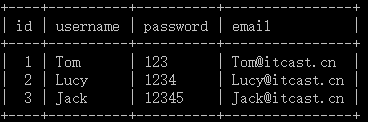
1、前提:在Mysql数据库下建立数据库web13,在web13下创建一张表user,插入几条数据如下:
2、创建HTML文件,命名为login,作为登录界面(以post方式提交)
 <!DOCTYPE html>

 <html>

 <head>

 <meta charset="UTF-8">

 <title>Insert title here</title>

 </head>

 <body>

     <form action="/WEB13_sevrlet/login" method="post">

         用户名:<input type="text" name="username"><br/>

         密码:<input type="password" name="password"><br/>

         <input type="submit" value="登录"><br/>

     </form>

 </body>

 </html>
3、创建连接池
c3p0-config.xml文件如下:
 <?xml version="1.0" encoding="UTF-8"?>

 <c3p0-config>

   <default-config>

     <property name="driverClass">com.mysql.jdbc.Driver</property>

     <property name="jdbcUrl">jdbc:mysql:///web13</property>

     <property name="user">root</property>

     <property name="password">12345</property>

   </default-config>

 </c3p0-config>
DataSourceUtils.java文件如下:(可作为套用模板)
 package com.itheima.utils;

 import java.sql.Connection;

 import java.sql.ResultSet;

 import java.sql.SQLException;

 import java.sql.Statement;

 import javax.sql.DataSource;

 import com.mchange.v2.c3p0.ComboPooledDataSource;

 public class DataSourceUtils {

     private static DataSource dataSource = new ComboPooledDataSource();

     private static ThreadLocal<Connection> tl = new ThreadLocal<Connection>();

     // 直接可以获取一个连接池

     public static DataSource getDataSource() {

         return dataSource;

     }

     // 获取连接对象

     public static Connection getConnection() throws SQLException {

         Connection con = tl.get();

         if (con == null) {

             con = dataSource.getConnection();

             tl.set(con);

         }

         return con;

     }

     // 开启事务

     public static void startTransaction() throws SQLException {

         Connection con = getConnection();

         if (con != null) {

             con.setAutoCommit(false);

         }

     }

     // 事务回滚

     public static void rollback() throws SQLException {

         Connection con = getConnection();

         if (con != null) {

             con.rollback();

         }

     }

     // 提交并且 关闭资源及从ThreadLocall中释放

     public static void commitAndRelease() throws SQLException {

         Connection con = getConnection();

         if (con != null) {

             con.commit(); // 事务提交

             con.close();// 关闭资源

             tl.remove();// 从线程绑定中移除

         }

     }

     // 关闭资源方法

     public static void closeConnection() throws SQLException {

         Connection con = getConnection();

         if (con != null) {

             con.close();

         }

     }

     public static void closeStatement(Statement st) throws SQLException {

         if (st != null) {

             st.close();

         }

     }

     public static void closeResultSet(ResultSet rs) throws SQLException {

         if (rs != null) {

             rs.close();

         }

     }

 }
4、编写Servlet实现类
User类代码如下:
 package com.itheima.domain;

 public class User {

     private int id;

     private String name;

     private String password;

     public User(){

     }

     public int getId() {

         return id;

     }

     public void setId(int id) {

         this.id = id;

     }

     public String getName() {

         return name;

     }

     public void setName(String name) {

         this.name = name;

     }

     public String getPassword() {

         return password;

     }

     public void setPassword(String password) {

         this.password = password;

     }

 }
LoginServlet.java代码如下:
 package com.itheima.login;

 import java.io.IOException;

 import java.sql.SQLException;

 import javax.servlet.ServletContext;

 import javax.servlet.ServletException;

 import javax.servlet.http.HttpServlet;

 import javax.servlet.http.HttpServletRequest;

 import javax.servlet.http.HttpServletResponse;

 import org.apache.commons.dbutils.QueryRunner;

 import org.apache.commons.dbutils.handlers.BeanHandler;

 import com.itheima.domain.User;

 import com.itheima.utils.DataSourceUtils;

 public class LoginServlet extends HttpServlet {

     @Override

     public void init() throws ServletException{

          //在Servletcontext域中存一个数据count

         int count=0;

         this.getServletContext().setAttribute("count", count);

     }

     public void doGet(HttpServletRequest request, HttpServletResponse response)

             throws ServletException, IOException {

         //1.获得用户名和密码

         String username=request.getParameter("username");

         String password=request.getParameter("password");

         //2.从数据库中验证该用户名和密码是否正确

         QueryRunner runner=new QueryRunner(DataSourceUtils.getDataSource());

         String sql="select * from user where username=? and password=?";

         User user=null;

         try {

             user=runner.query(sql, new BeanHandler<User>(User.class),username,password);

         } catch (SQLException e) {

             e.printStackTrace();

         }

         //3.根据返回的结果给用户不同显示信息

         if(user!=null){

             //从Servletcontext中取出count进行++运算

             ServletContext context=this.getServletContext();

             Integer count=(Integer)context.getAttribute("count");

             count++;

             //用户登录成功

             response.getWriter().write(user.toString()+"--you are success login person"+count);

             context.setAttribute("count", count);

         }else{

             //用户登录失败

             response.getWriter().write("Sorry,your username or password is wrong!");

         }

     }

     public void doPost(HttpServletRequest request, HttpServletResponse response)

             throws ServletException, IOException {

         doGet(request, response);

     }

 }
5、编写Servlet配置文件,代码如下:
 <?xml version="1.0" encoding="UTF-8"?>

 <web-app xmlns:xsi="http://www.w3.org/2001/XMLSchema-instance" xmlns="http://java.sun.com/xml/ns/javaee" xsi:schemaLocation="http://java.sun.com/xml/ns/javaee http://java.sun.com/xml/ns/javaee/web-app_2_5.xsd" id="WebApp_ID" version="2.5">

   <display-name>WEB13_sevrlet</display-name>

   <context-param>

     <param-name>driver</param-name>

     <param-value>com.mysql.jdbc.Driver</param-value>

   </context-param>

   <welcome-file-list>

     <welcome-file>index.html</welcome-file>

     <welcome-file>index.htm</welcome-file>

     <welcome-file>index.jsp</welcome-file>

     <welcome-file>default.html</welcome-file>

     <welcome-file>default.htm</welcome-file>

     <welcome-file>default.jsp</welcome-file>

   </welcome-file-list>

   <servlet>

     <description></description>

     <display-name>LoginServlet</display-name>

     <servlet-name>LoginServlet</servlet-name>

     <servlet-class>com.itheima.login.LoginServlet</servlet-class>

   </servlet>

   <servlet-mapping>

     <servlet-name>LoginServlet</servlet-name>

     <url-pattern>/login</url-pattern>

   </servlet-mapping>

   <servlet>

     <description></description>

     <display-name>ContextServlet</display-name>

     <servlet-name>ContextServlet</servlet-name>

     <servlet-class>com.itheima.context.ContextServlet</servlet-class>

   </servlet>

   <servlet-mapping>

     <servlet-name>ContextServlet</servlet-name>

     <url-pattern>/context</url-pattern>

   </servlet-mapping>

 </web-app>
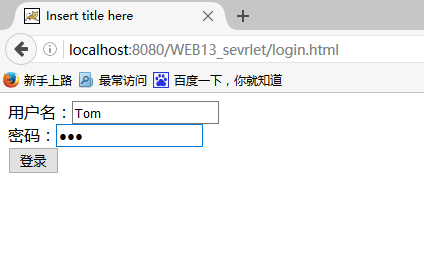
6、测试,访问“http://localhost:8080/WEB13_sevrlet/login.html”
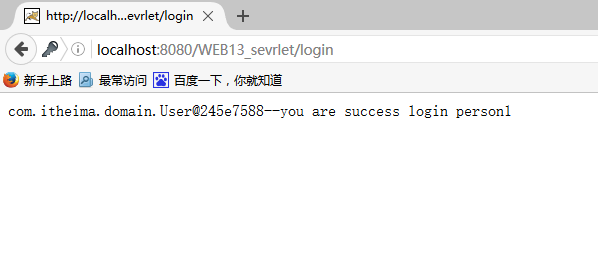
分别输入“Tom”,“123”,登录结果如下:
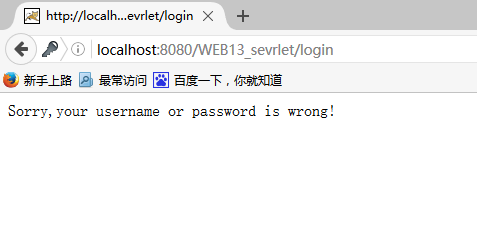
分别输入“Lucy”,“1234”,登录结果如下:
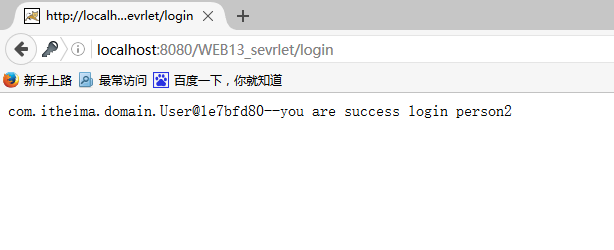
分别输入“Jack”,“123”,登录结果如下:
Servlet学习(三)——实例:用户登录并记录登陆次数的更多相关文章
- 云服务器 ECS Linux 保存用户登录操作命令记录
转载自 : https://help.aliyun.com/knowledge_detail/41210.html 云服务器 ECS Linux 如果要保存用户登录操作记录,则可以通过在 /etc/p ...
- 基于Servlet的MVC模式用户登录实例
关于MVC模式的简单解释 M Model,模型层,例如登录实例中,用于处理登录操作的类: V View,视图层,用于展示以及与用户交互.使用html.js.css.jsp.jQuery等前端技术实现: ...
- Cookie的应用——Servlet实现三天免登录
1.工程结构: 2.Servlet的运用: (1)登录界面: protected void doGet(HttpServletRequest request, HttpServletResponse ...
- mybatis 和servlet使用MVC实现用户登录,注册,退出
普通实现: USerMapper.java: package com.bjsxt.mapper; import org.apache.ibatis.annotations.Param; import ...
- DBCP(MySql)+Servlet+BootStrap+Ajax实现用户登录与简单用户管理系统
目 录 简介 本次项目通过Maven编写 本文最后会附上代码 界面截图 登录界面 注册界面 登录成功进入主页 增加用户操作 删除用户操作 修改用户操作 主要代码 Dao层代码 DBCP代码 Se ...
- Servlet课程0426(十二)Servlet MV模式下用户登录及查看用户表中所有用户
Welcome.java //登录界面 package com.tsinghua; import javax.servlet.http.*; import java.io.*; import java ...
- linux学习(三)-----linux用户管理、实用指令
用户管理 基本介绍 说明: 1.Linux 系统是一个多用户多任务的操作系统,任何一个要使用系统资源的用户,都必须首先向 系统管理员申请一个账号,然后以这个账号的身份进入系统. 2.Linux 的用户 ...
- Servlet学习三——传输文件
最先在考虑传输文件时,想通过java写一个文件上传案例,传给Servlet,Servlet再保存至数据库中,但苦于一直没找到实例,听说Flex有实际的例子,就直接用Flex例子来测试了.本文的顺序为: ...
- XMPP学习——2、用户登录
最近在学习XMPP的使用,打算完成一个完整较为完整地Demo示例,通过这个示例掌握xmpp的使用与开发.同时打算在这个示例中学习使用一下其他的开源类库,在此作为记录学习. 包括服务器端--Openfi ...
随机推荐
- Android 多个APK共享数据
Android给每个APK进程分配一个单独的用户空间,其manifest中的userid就是对应一个Linux用户(Android 系统是基于Linux)的.所以不同APK(用户)间互相访问数据默认是 ...
- java8 Lambad表达式自己的例子
service层方法 public <E> E outer(Function<Session, E> function) { return dao.outer(function ...
- BZOJ4545: DQS的trie 广义后缀自动机_LCT
特别鸣神犇 fcwww 替我调出了无数个错误(没他的话我都快自闭了),祝大佬省选rp++ 板子题,给我写了一天QAQ...... 用 LCT 维护后缀树,暴力更新用 LCT 区间更新链即可 其实,在计 ...
- node——进阶版服务器根据不同请求作出不同响应+响应html文件等文件
文件目录结构如下 resource文件里面放了css文件和图片等,view文件里面是html文件 <!DOCTYPE html> <html lang="en"& ...
- Vue系列(一):简介、起步、常用指令、事件和属性、模板、过滤器
一. Vue.js简介 1. Vue.js是什么 Vue.js也称为Vue,读音/vju:/,类似view,错误读音v-u-e 是一个轻量级MVVM(Model-View-ViewModel)框架,和 ...
- Python学习笔记(一):基本数据类型
在Python3种,有六种标准数据类型: 数字(Number) 字符串(String) 列表(List) 元组(Tuple) 集合(Set) 字典(Dictionary) 这六种数据类型中,数字类型和 ...
- NOIP2018提高组金牌训练营——数论专题
地址 https://www.51nod.com/live/liveDescription.html#!liveId=23 1187 寻找分数 给出 a,b,c,d, 找一个分数p/q,使得a/b & ...
- javascript深度克隆函数deepClone
javascript深度克隆函数deepClone function deepClone(obj) { var _toString = Object.prototype.toString; // nu ...
- Oracle expdp导出多表或表中的部分数据
http://blog.itpub.net/16582684/viewspace-755072/
- [Tools] Create your own mobile emulator device by using Chrome dev tool
Using the New Device Emulation Interface The Device Emulation interface changed a bit with the newer ...