
2.SpringBoot的properties的属性配置详解
    SpringBoot是为了简化Spring应用的创建、运行、调试、部署等一系列问题而诞生的产物,自动装配的特性让我们可以更好的关注业务本身而不是外部的XML配置,
我们只需遵循规范,引入相关的依赖就可以轻易的搭建出一个 WEB 工程
   SpringBoot虽然干掉了 XML 但未做到零配置,它体现出了一种约定优于配置,也称作按约定编程,是一种软件设计范式,旨在减少软件开发人员需做决定的数量,
获得简单的好处,而又不失灵活性。一般情况下默认的配置足够满足日常开发所需,但在特殊的情况下,我们往往需要用到自定义属性配置、自定义文件配置、多环境配置、
外部命令引导等一系列功能。不用担心,这些SpringBoot都替我们考虑好了,我们只需要遵循它的规则配置即可.
一.准备前提
为了让SpringBoot更好的生成数据,我们需要添加如下依赖(该依赖可以不添加,但是在 IDEA 和 STS 中不会有属性提示,没有提示的配置就跟你用记事本写代码一样苦逼,出个问题弄哭你去),该依赖只会在编译时调用,所以不用担心会对生产造成影响…
 <dependency>

     <groupId>org.springframework.boot</groupId>

     <artifactId>spring-boot-configuration-processor</artifactId>

     <optional>true</optional>

 </dependency>
二.使用系统的application.properties属性文件进行相关配置和值的注入
在application.properties写入如下配置内容
 stu1.age=25

 stu1.name=Luis
其次定义StudentProperties.java文件,用来映射我们在application.properties中的内容,这样一来我们就可以通过操作对象的方式来获得配置文件的内容了
1.创建StudentProperties.java
 package cn.kgc.properties;

 import org.springframework.boot.context.properties.ConfigurationProperties;

 import org.springframework.stereotype.Component;

 /**

  * 注解Component: 标注传递数据的实体类

  * 注解ConfigurationProperties:标注属性文件的,

  * prefix前缀则是属性文件中属性的前缀,

  * 因为一个属性文件中可能配置很多,可以通过前缀区分

  */

 @Component

 @ConfigurationProperties(prefix = "stu")

 public class StudentProperties {

     private int age;

     private String name;

     public int getAge() {

         return age;

     }

     public void setAge(int age) {

         this.age = age;

     }

     public String getName() {

         return name;

     }

     public void setName(String name) {

         this.name = name;

     }

     @Override

     public String toString() {

         return "StudentProperties{" +

                 "age=" + age +

                 ", name='" + name + '\'' +

                 '}';

     }

 }
2.定义controller类来给StudentProperties类注入值
定义我们的PropertiesController用来注入StudentProperties测试我们编写的代码,值得注意的是Spring4.x以后,推荐使用构造函数的形式注入属性…
 package cn.kgc.controller;

 import cn.kgc.properties.StudentProperties;

 import org.slf4j.Logger;

 import org.slf4j.LoggerFactory;

 import org.springframework.beans.factory.annotation.Autowired;

 import org.springframework.web.bind.annotation.GetMapping;

 import org.springframework.web.bind.annotation.RequestMapping;

 import org.springframework.web.bind.annotation.RestController;

 /**

  * Created by Administrator on 2018/10/16.

  */

 @RequestMapping("/properties")

 @RestController

 public class PropertiesController {

     //对本类做日志记录

     private static final Logger log = LoggerFactory.getLogger(PropertiesController.class);

     //创建接受属性文件的值的实体类

     private final StudentProperties studentProperties;

     @Autowired

     public PropertiesController(StudentProperties studentProperties) {

         this.studentProperties = studentProperties;

     }

     @GetMapping("/stuProperties")

     public StudentProperties studentProperties() {

         log.info("=================================================================================================");

         log.info(studentProperties.toString());

         log.info("=================================================================================================");

         return studentProperties;

     }

 }
3.运行开启springBoot,在浏览器输入:http://localhost:9090/springboot1/properties/stuProperties ,可以在控制台和浏览器看到我们的数据
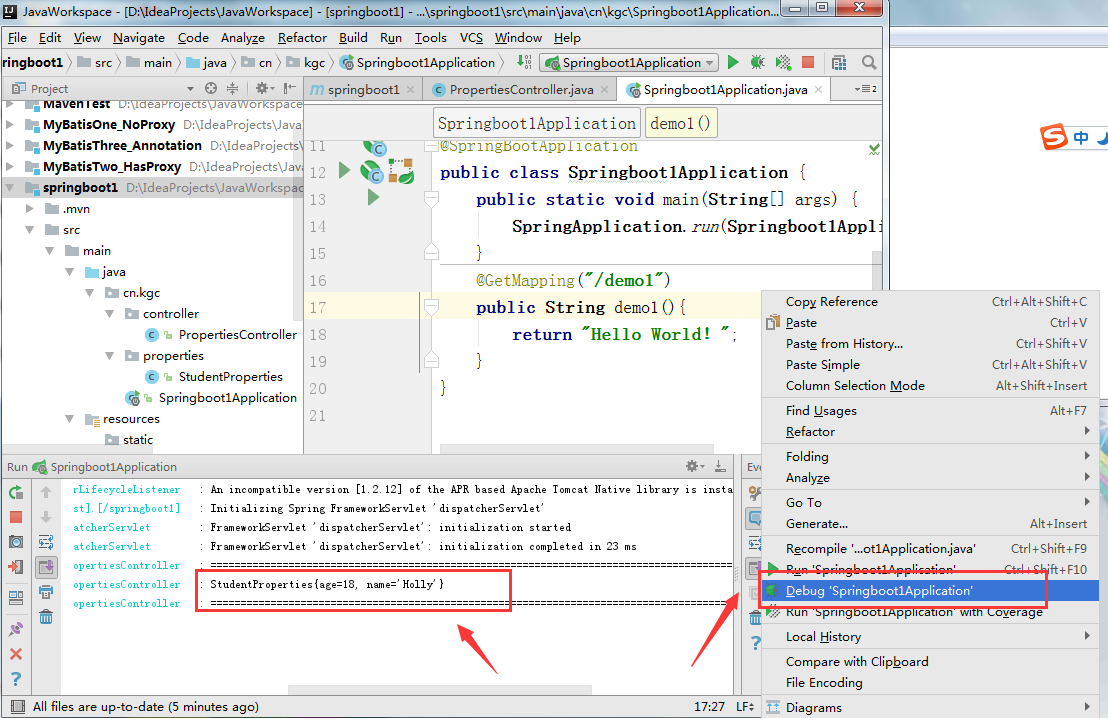
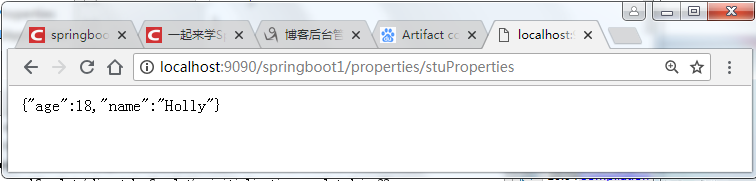
三、使用自定义的属性配置文件,进行值的相关注入
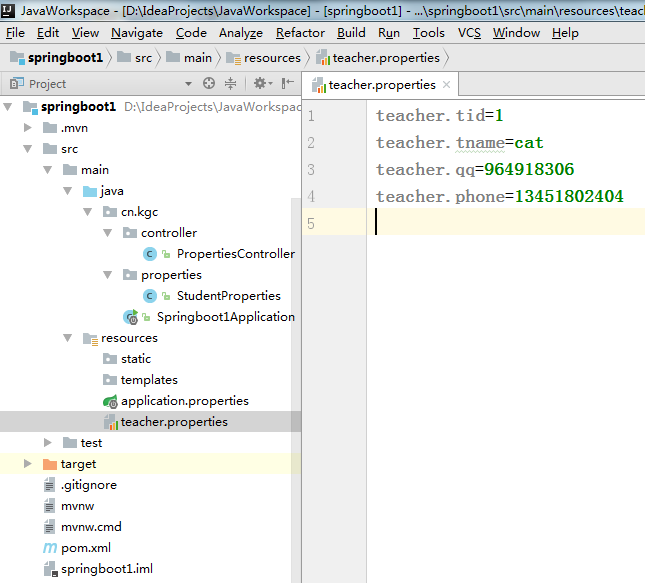
1. 定义一个名为teacher.properties的资源文件,自定义配置文件的命名不强制application开头
2.定义实体类用来接受springboot将将属性文件注入值
其次定义TeacherProperties.java文件,用来映射我们在teacher.properties中的内容。
 package cn.kgc.properties;

 import org.springframework.boot.context.properties.ConfigurationProperties;

 import org.springframework.context.annotation.PropertySource;

 import org.springframework.stereotype.Component;

 /**

  * Created by Administrator on 2018/10/16.

  */

 @Component

 @PropertySource("classpath:teacher.properties")

 @ConfigurationProperties(prefix = "teacher")

 public class TeacherProperties {

     private int tid;

     private String tname;

     private String qq;

     private String phone;

     public TeacherProperties() {

     }

     public TeacherProperties(int tid, String tname, String qq, String phone) {

         this.tid = tid;

         this.tname = tname;

         this.qq = qq;

         this.phone = phone;

     }

     public int getTid() {

         return tid;

     }

     public void setTid(int tid) {

         this.tid = tid;

     }

     public String getTname() {

         return tname;

     }

     public void setTname(String tname) {

         this.tname = tname;

     }

     public String getQq() {

         return qq;

     }

     public void setQq(String qq) {

         this.qq = qq;

     }

     public String getPhone() {

         return phone;

     }

     public void setPhone(String phone) {

         this.phone = phone;

     }

     @Override

     public String toString() {

         return "TeacherProperties{" +

                 "tid=" + tid +

                 ", tname='" + tname + '\'' +

                 ", qq='" + qq + '\'' +

                 ", phone='" + phone + '\'' +

                 '}';

     }

 }
3.在PropertiesController用来注入TeacherProperties测试我们编写的代码
 package cn.kgc.controller;

 import cn.kgc.properties.StudentProperties;

 import cn.kgc.properties.TeacherProperties;

 import org.slf4j.Logger;

 import org.slf4j.LoggerFactory;

 import org.springframework.beans.factory.annotation.Autowired;

 import org.springframework.web.bind.annotation.GetMapping;

 import org.springframework.web.bind.annotation.RequestMapping;

 import org.springframework.web.bind.annotation.RestController;

 /**

  * Created by Administrator on 2018/10/16.

  */

 @RequestMapping("/properties")

 @RestController

 public class PropertiesController {

     //对本类做日志记录

     private static final Logger log = LoggerFactory.getLogger(PropertiesController.class);

     //创建接受属性文件的值的实体类

     private final StudentProperties studentProperties;

     //创建接受属性文件的值的实体类

     private final TeacherProperties teacherProperties;


     @Autowired

     public PropertiesController(TeacherProperties teacherProperties, StudentProperties studentProperties) {

         this.studentProperties = studentProperties;

         this.teacherProperties = teacherProperties;

     }

     @GetMapping("/tecProperties")

     public TeacherProperties teacherProperties() {

         log.info("=================================================================================================");

         log.info(teacherProperties.toString());

         log.info("=================================================================================================");

         return teacherProperties;

     }

     //---

     @GetMapping("/stuProperties")

     public StudentProperties studentProperties() {

         log.info("=================================================================================================");

         log.info(studentProperties.toString());

         log.info("=================================================================================================");

         return studentProperties;

     }

     //

 }
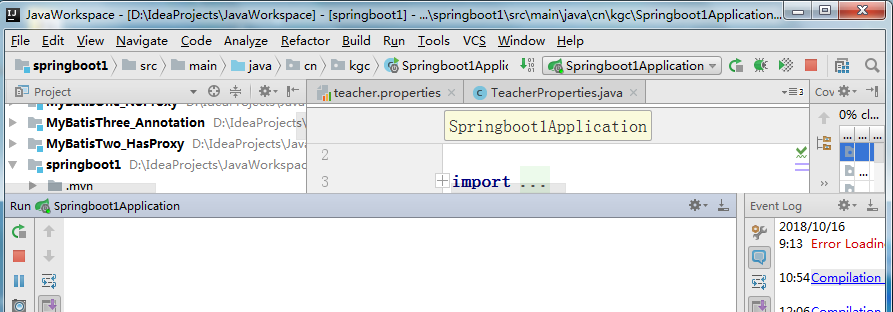
4.先启动springBoot
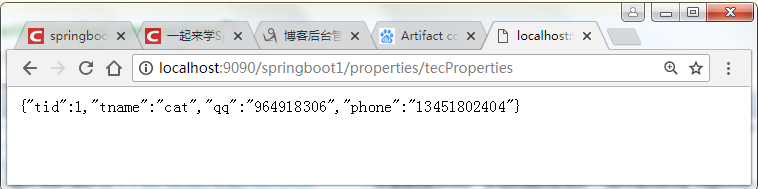
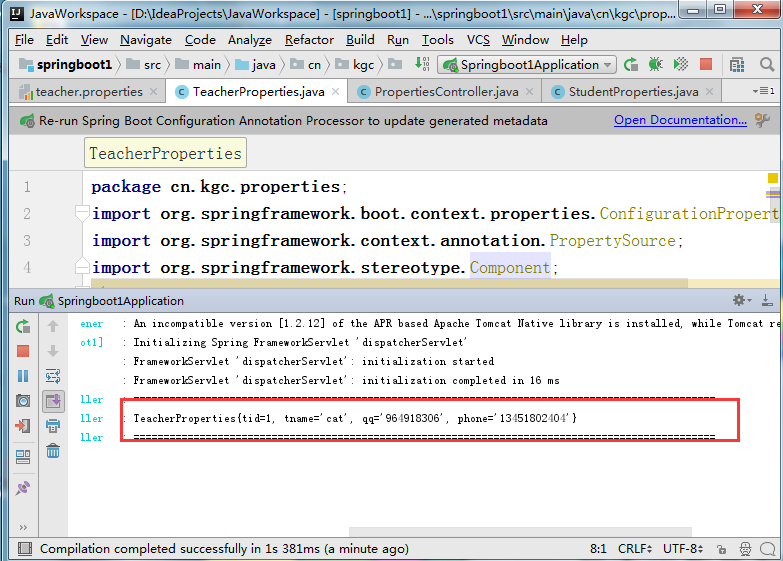
5.在地址栏输入地址:http://localhost:9090/springboot1/properties/tecProperties查看结果
2.SpringBoot的properties的属性配置详解的更多相关文章
- SpringBoot系列(十二)过滤器配置详解
SpringBoot(十二)过滤器详解 往期精彩推荐 SpringBoot系列(一)idea新建Springboot项目 SpringBoot系列(二)入门知识 springBoot系列(三)配置文件 ...
- spring sessionFactory 属性配置详解,applicationContext中各种属性详解
1.Bean的id为sessionFactory,对应的类为AnnotationSessionFactory,即采用注解的形式实现hibernate. 2.hibernateProperties,配置 ...
- Spring容器的属性配置详解的六个专题
在spring IOC容器的配置文件applicationContext.xml里,有一些配置细节值得一提.我们将一些问题归结为以下几个专题. 专题一:字面值问题 配置的bean节点中的值,我们提 ...
- 从Spring到SpringBoot构建WEB MVC核心配置详解
目录 理解Spring WEB MVC架构的演变 认识Spring WEB MVC 传统时代的Spring WEB MVC 新时代Spring WEB MVC SpringBoot简化WEB MVC开 ...
- log4j.properties错误及配置详解
当在Eclipse上运行MapReduce程序遇到以上问题时,请检查项目中是否有log4j.properties配置文件,或者配置文件是否正确. 刚接触Hadoop的时候不太了解log4j.prope ...
- vSphere vSwitch网络属性配置详解
1.安全 混杂模式:把vSwitch当成是一个hub,同一台交换机上面所有的虚拟机都能接受到二层数据包. MAC地址更改:当vSwitch上面连接的某一个虚拟机MAC地址发生更改时,vSwitch是否 ...
- springboot配置详解
springboot配置详解 Author:SimpleWu properteis文件属性参考大全 springboot默认加载配置 SpringBoot使用两种全局的配置文件,全局配置文件可以对一些 ...
- SpringBoot—整合log4j2入门和log4j2.xml配置详解
关注微信公众号:CodingTechWork,一起学习进步. 引言 对于一个线上程序或者服务而言,重要的是要有日志输出,这样才能方便运维.而日志的输出需要有一定的规划,如日志命名.日志大小,日志分 ...
- log4j.properties配置详解
1.Loggers Loggers组件在此系统中被分为五个级别:DEBUG.INFO.WARN.ERROR和FATAL.这五个级别是有顺序的,DEBUG < INFO < WARN < ...
随机推荐
- Hadoop Web项目--Mahout0.10 MR算法集锦
1. 涉及技术及下载 项目开发使用到的软件有:Myeclipse2014,JDK1.8.Hadoop2.6,MySQL5.6.EasyUI1.3.6,jQuery2.0,Spring4.1.3,Hib ...
- 未能加载文件或程序集“System.Web.Helpers, Version=2.0.0.0
在本地终于用上了ASP.NET MVC4自带的认证功能,但放到生产服务器上就出问题了:打开注册页面没问题,但一点下注册按钮就报错了: 未能加载文件或程序集"System.Web.Helper ...
- hdoj-看病要排队
看病要排队 Problem Description 看病要排队这个是地球人都知道的常识. 不过经过细心的0068的观察,他发现了医院里排队还是有讲究的.0068所去的医院有三个医生(汗,这么少)同时看 ...
- javascript 将变量值作为对象属性 获取对象对应的值
例子 var var="name"; var objname="obj"; objname=objname+"."+var; alert(e ...
- Django day15 (二) csrf的 跨站请求伪造 与 局部禁用 , 局部使用
一: csrf 的跨站请求伪造 二: csrf 的局部禁用 , 局部使用
- C99新增内容之变长数组(VLA)
我们在使用多维数组是有一点,任何情况下只能省略第一维的长度.比如在函数中要传一个数组时,数组的行可以在函数调用时传递,当属数组的列却只能在能被预置在函数内部.看下面一个例子: #define COLS ...
- ACM_城市交通线(简单并查集)
城市交通线 Time Limit: 2000/1000ms (Java/Others) Problem Description: A国有n座城市,编号为1~n,这n个城市之间没有任何交通线路,所以不同 ...
- 5.29 @Value{name}无效时怎么办Could not resolve placeholder ‘name22’ in value “${name22}” 错误解决
springboot Caused by: java.lang.IllegalArgumentException: Could not resolve placeholder ‘name22’ in ...
- 5.13Mysql数据库Database
数据库的基本概念 1.什么是数据库: 用于存储和管理数据的仓库. 2.数据库的特点: 1.持久化存储数据的.其实数据库就是一个文件系统. 2.方便存储和管理数据 3.使用了统一的方式操作数据库---s ...
- CSS元素水平垂直居中的方法
1. 元素水平居中 1.1 设置父元素的属性 text-align: center; 说明:此属性只针对父元素的子元素为内联元素时有效,比如:img,input,select,button等(行内 ...