
自定义SearchView实现即时查询
1.效果图,输入关键字时会根据关键字改变而更新数据。
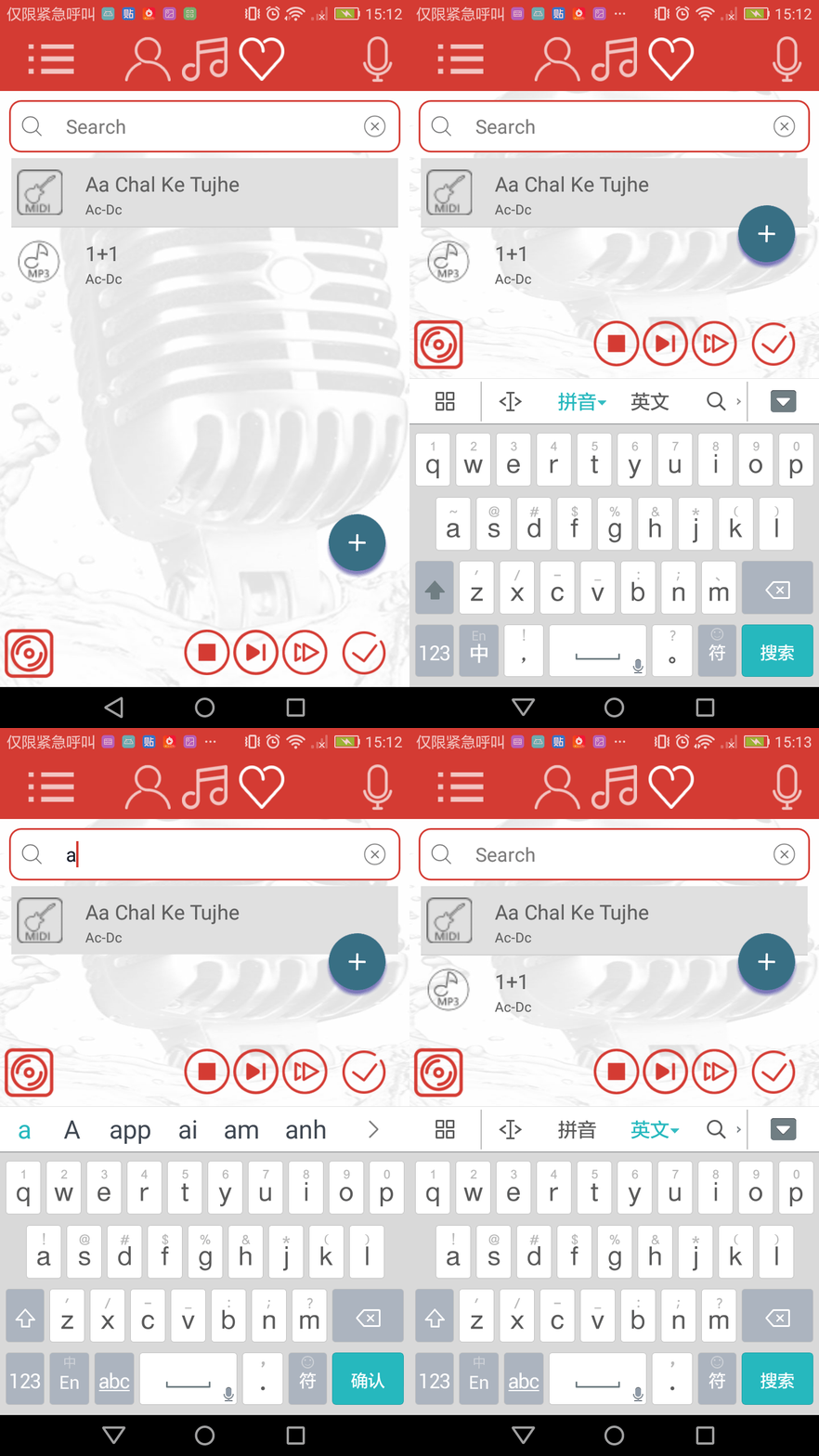
2.其布局文件和2个小图标del.png和searchview.png,布局文件如下:高度已固定为46dp。


<?xml version="1.0" encoding="utf-8"?>

<LinearLayout xmlns:android="http://schemas.android.com/apk/res/android"

    android:orientation="vertical"

    android:layout_width="match_parent"

    android:layout_height="46dp">

    <LinearLayout

        android:layout_width="match_parent"

        android:layout_height="46dp"

        android:orientation="horizontal">


      <Button

            android:id="@+id/btn_search"

            android:layout_width="20dp"

            android:layout_height="20dp"

            android:layout_gravity="right|center_vertical"

            android:layout_margin="10dp"

            android:background="@mipmap/search"/>

      <EditText

            android:id="@+id/et_search"

            android:layout_width="0dp"

            android:layout_height="fill_parent"

            android:layout_marginLeft="10dp"

            android:layout_weight="4"

            android:background="@null"

            android:gravity="center_vertical"

            android:hint="@string/searchViewHint"

            android:imeOptions="actionSearch"

            android:singleLine="true"

            android:textColor="@color/colorHomeBar"

            android:textColorHint="@color/colorSingerName"

            android:textSize="17sp"/>

      <Button

            android:id="@+id/bt_clear"

            android:layout_width="25dp"

            android:layout_height="25dp"

            android:layout_gravity="right|center_vertical"

            android:layout_margin="10dp"

            android:background="@mipmap/del"/>

     </LinearLayout>

</LinearLayout>
3.SearchView的样式:圆角+描边
<?xml version="1.0" encoding="utf-8"?>

<shape xmlns:android="http://schemas.android.com/apk/res/android" >

    <!-- 角度 -->

    <corners android:radius="10dp"/>

    <!-- 填充色 -->

    <solid android:color="#ffffff"/>

    <!-- 描边 设置线宽及颜色 -->

    <stroke android:color="@color/colorAccent"

        android:width="2dp"/>

</shape>
4.代码
import android.content.Context;
import android.text.Editable;
import android.text.TextWatcher;
import android.util.AttributeSet;
import android.util.Log;
import android.view.KeyEvent;
import android.view.LayoutInflater;
import android.view.View;
import android.widget.Button;
import android.widget.EditText;
import android.widget.LinearLayout;
import android.widget.TextView; import java.util.Timer;
import java.util.TimerTask; /**
* Created by guoxw on 2017/6/26.
*/ public class MySearchView extends LinearLayout implements TextWatcher, View.OnClickListener{ /**
* 两个变量,用来判断输入间隔时间,大于1000ms,则提交数据,自动搜索条件
* times1 获取文本变化的时间
* times2 不断获取当前时间
*/
long times1;
long times2;
private static final String TAG = "MySearchView1";
private EditText editText;
private Button button_clear;
String str;
public MyOnQueryTextListener onQueryTextListener;
public void setSearchViewListener(MyOnQueryTextListener onQueryTextListener){
this.onQueryTextListener=onQueryTextListener;
} public MySearchView(Context context, AttributeSet attrs) {
super(context,attrs);
LayoutInflater.from(context).inflate(R.layout.mysearchview,this,true);
timer.schedule(timerTask,0,100);
editText=(EditText) findViewById(R.id.et_search);
button_clear=(Button)findViewById(R.id.bt_clear);
button_clear.setVisibility(GONE);
editText.addTextChangedListener(this);
/*** del图片,清空输入内容*/
button_clear.setOnClickListener(new OnClickListener() {
@Override
public void onClick(View v) {
editText.getText().clear();
}
});
editText.setOnEditorActionListener(new TextView.OnEditorActionListener() {
@Override
public boolean onEditorAction(TextView textView, int i, KeyEvent keyEvent) {
// i== EditorInfo.IME_ACTION_SEND||(keyEvent!=null&&keyEvent.getKeyCode()== KeyEvent.KEYCODE_ENTER)
/*** 监听的是出现搜索键,在up后进行提交事件**/
if((keyEvent!=null&&keyEvent.getKeyCode()== KeyEvent.KEYCODE_ENTER)){
switch(keyEvent.getAction()){
case KeyEvent.ACTION_UP:
onQueryTextListener.MyonQueryTextSubmit(textView.getText().toString());
return true;
default:
return true;
}
} return false; }
});
} @Override
public void beforeTextChanged(CharSequence charSequence, int i, int i1, int i2) { } /*** 监听内容变化,为空时不显示del图片*/
@Override
public void onTextChanged(CharSequence charSequence, int i, int i1, int i2) { if(charSequence!=null){
button_clear.setVisibility(View.VISIBLE);
}
else if(charSequence==null){
button_clear.setVisibility(View.GONE);
} } @Override
public void afterTextChanged(Editable editable) { str=editable.toString();
times1= System.currentTimeMillis(); } @Override
public void onClick(View view) { } /**
* 实现MySearcgView 的监听事件
*/
public interface MyOnQueryTextListener{
void MyonQueryTextChange(String value);
void MyonQueryTextSubmit(String value);
} Timer timer=new Timer(); TimerTask timerTask=new TimerTask() {
@Override
public void run() {
times2= System.currentTimeMillis();
/**
* 超过800ms没有文字变化,则认为输入完成,开始自动搜索。
*/
if(times2-times1>800&×1!=0){
Log.d(TAG, "run: "+"监听超时");
times1=0;
onQueryTextListener.MyonQueryTextChange(""+str);
}
}
}; }
5.使用
  <com.multak.cookaraclient.view.MySearchView

            android:id="@+id/searchView_Favo"

            android:layout_width="match_parent"

            android:layout_height="46dp"

            android:layout_marginLeft="8dp"

            android:layout_marginRight="8dp"

            android:layout_marginTop="8dp"

            android:background="@drawable/searviewtest" />
searchView_record = (MySearchView) view.findViewById(R.id.searchView_record);

        searchView_record.clearFocus();

        searchView_record.setSearchViewListener(new MySearchView.MyOnQueryTextListener() {

            @Override

            public void MyonQueryTextChange(String value) {
        /** 自动搜索的处理**/

            }

            @Override

            public void MyonQueryTextSubmit(String value) {
        /*** 点击提交时的处理**/

            }

        });
6.Code .mywiodows.zip
链接: https://pan.baidu.com/s/1kVyzNYR 密码: qrnm
自定义SearchView实现即时查询的更多相关文章
- typeahead + JDK 8 并行流 + redis 高速即时查询.
感谢JDK8,让我们JAVA 程序员暂时不用担心失业. 有些情况,需要根据用户输入值,即时查询数据库,MYSQL显然不再适合这种业务. mongoDB看似最适合,但是为了这么一个破功能,也不值得特意去 ...
- 解决在TP5中无法使用快递鸟的即时查询API
快递鸟的接口对接其实很简单,先去官网注册账号,登陆把基本信息填好,然后在产品管理中订购一下“物流查询”,免费,不过其他产品是收费,免费的有对接口调用频率限制,结合自己的应用流量够用就可以. 使用前复制 ...
- 调用第三方物流公司API即时查询物流信息
主要是利用快递鸟提供的物流服务,通过对接快递鸟的API,调用即时查询接口,获取物流信息. 这里采用java语言,调用快递鸟的接口为例.步骤如下: 1.首先,得去快递鸟的官方网站注册一个账号并进行实名认 ...
- 自定义 Azure Table storage 查询过滤条件
本文是在Azure Table storage 基本用法一文的基础上,介绍如何自定义 Azure Table storage 的查询过滤条件.如果您还不太清楚 Azure Table storage ...
- Lambda表达式树解析(下)包含自定义的provider和查询
概述 前面章节,总结了Lambda树的构建,那么怎么解析Lambda表达式树那?Lambda表达式是一种委托构造而成,如果能够清晰的解析Lambda表达式树,那么就能够理解Lambda表达式要传递的正 ...
- C# 自定义文件格式并即时刷新注册表 非关闭explorer
转自:http://blog.csdn.net/zhangtirui/article/details/4309492 最近公司在做一个项目 用到关于自定义格式的文件,但在注册表图标更改后 文件图标 ...
- Solr 使用自定义 Query Parser(短语查询,精准查询)
原文出处:http://blog.chenlb.com/2010/08/solr-use-custom-query-parser.html 由于 Solr 默认的 Query Parser 生成的 Q ...
- RookeyFrame 自定义数据源 返回统计查询后的视图
核心:对返回的数据进行重写 功能是这样的:上传淘宝后台的订单文件,将订单文件里面的数据导入到系统,对导入后的订单数据进行统计后再显示. Order_File:用来存上传的订单文件,格式是****.cs ...
- 自定义searchview的编辑框,搜索按钮,删除按钮,光标等
//指定某个私有属性 Field mSearchHintIconField = argClass.getDeclaredField("mSearchHintIcon"); mSea ...
随机推荐
- GFS分布式文件系统理论个人总结
GlusterFS 两种模式 可以通过TCP/IP和RDMA高速网络互连,客户端可通过原生Gluster协议访问数据 没有GlusterFS客户端的可以通过NFS/CIFS标准协议通过存储网关访问数据 ...
- Day 2 语言元素
1.变量和类型 在程序设计中,变量是一种存储数据的载体.计算机中的变量是实际存在的数据或者说是存储器中存储数据的一块内存空间,变量的值可以被读取和修改,这是所有计算和控制的基础.计算机能处理的数据有很 ...
- 理解Linux CPU负载和 CPU使用率
CPU负载和 CPU使用率 这两个从一定程度上都可以反映一台机器的繁忙程度. cpu使用率反映的是当前cpu的繁忙程度,忽高忽低的原因在于占用cpu处理时间的进程可能处于io等待状态但却还未释放进入w ...
- 关于 docsify ssr 的研究
关于 docsify ssr 的研究 docsify 虽然不错, 但是不支持 seo .官网虽然提供 seo 的一个简单示例, 但总总问题在 issues 中无人解答. 今天再次尝试, 解决了 ind ...
- CentOS7.2安装nginx失败
错误提示: Loaded plugins: fastestmirror Loading mirror speeds from cached hostfile * base: mirrors.aliyu ...
- form提交表单中包含time类型数据
当数据库和实体类中含有date类型的数据时 ,form提交的时间数据只是string类型的,所以不能直接写入到java实体类和数据库,经过百度找到了解决方法 ,特地挪过来: 在controller中增 ...
- Java 代理学习笔记
http://blog.csdn.net/mr_seaturtle_/article/details/52686516
- Foundation框架和文件操作
NSString --实例化方法-------------- NSString *str = [[NSString alloc] init]; NSString *str = [[[NSString ...
- 【cl】本地安装maven的jar包报错Artifact is already in the local repository
原因是我直接把jar包放在了仓库里面 解决办法:将jar办放在不是仓库路径位置,在进行install就okle
- phonegap(cordova) 自己定义插件代码篇(四)----读取本地图片
有时候确实知道本地图片地址,要获取到base64 /** * 获取本地图片,包括路径和压缩后的 base64 */ (function (cordova) { var define = cordov ...